What is a Vendor Management System (VMS)? 2026 Guide
- October 03
- 12 min

Definition: VMS SAP integration is the process of connecting your Vendor Management System (VMS) to your SAP ERP system to enable automatic data sharing. Think of it like building a bridge between two allied kingdoms. One kingdom (your VMS) manages all relations with external suppliers, while the other (your SAP ERP) manages all internal resources and finances.
Without a bridge, messengers run back and forth with scrolls, often getting lost, delayed, or delivering outdated news. This creates chaos, with mismatched records, slow approvals, and compliance risks. A solid integration ensures information flows freely and accurately between them.
This article provides a guide to building that bridge correctly. We will explore the business benefits of a connected system, the key data you need to sync, and the architectural patterns that prevent your integration from collapsing under pressure. You will learn about reliable connectivity options, smart data modeling, and best practices for security, monitoring, and testing.
The key is to use a decoupled architecture with an anti-corruption layer. This approach helps keep your VMS agile while ensuring it syncs reliably with SAP or other ERPs.
Connecting your VMS and SAP systems does more than just automate a few tasks; it fundamentally changes how your business operates. It’s the difference between a well-organized library, where every book is in its place, and a room piled high with books, where finding anything is a matter of luck.
When systems communicate, information becomes organized, reliable, and instantly accessible. This creates a ripple effect of positive outcomes across your procurement and supply chain operations.
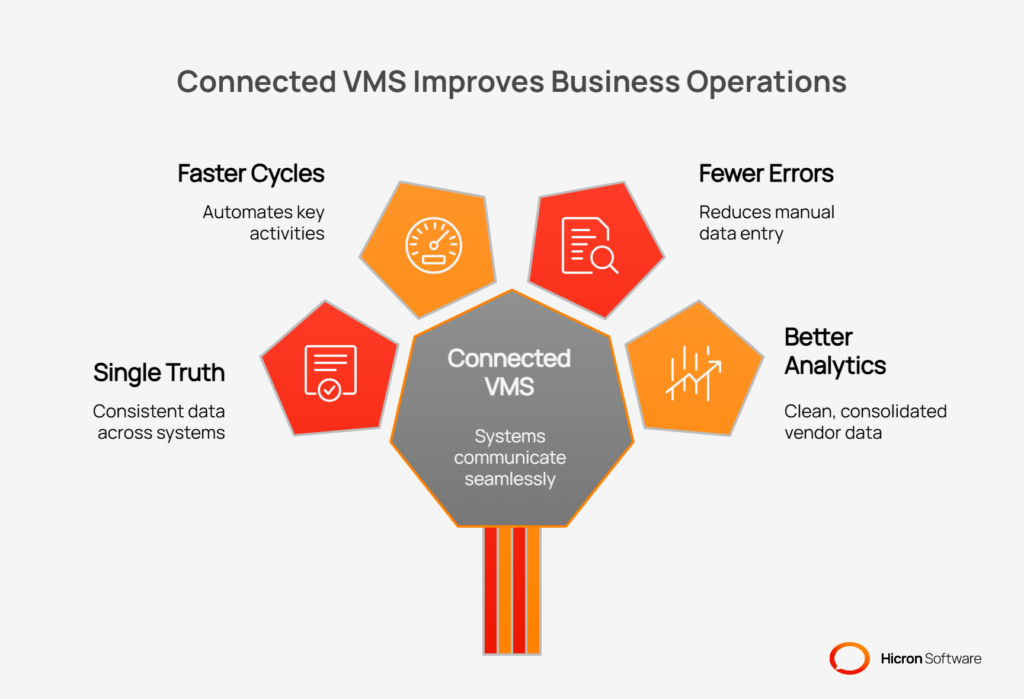
Here are the core benefits you can expect:
A successful VMS SAP integration depends on knowing exactly what information needs to travel between the two systems. Deciding which data to sync is like packing for a trip; you need to bring the essentials but avoid overpacking.
Syncing too little creates information gaps, while syncing too much adds unnecessary complexity. The goal is to establish clear, automated communication channels for the data that keep your supply chain moving.
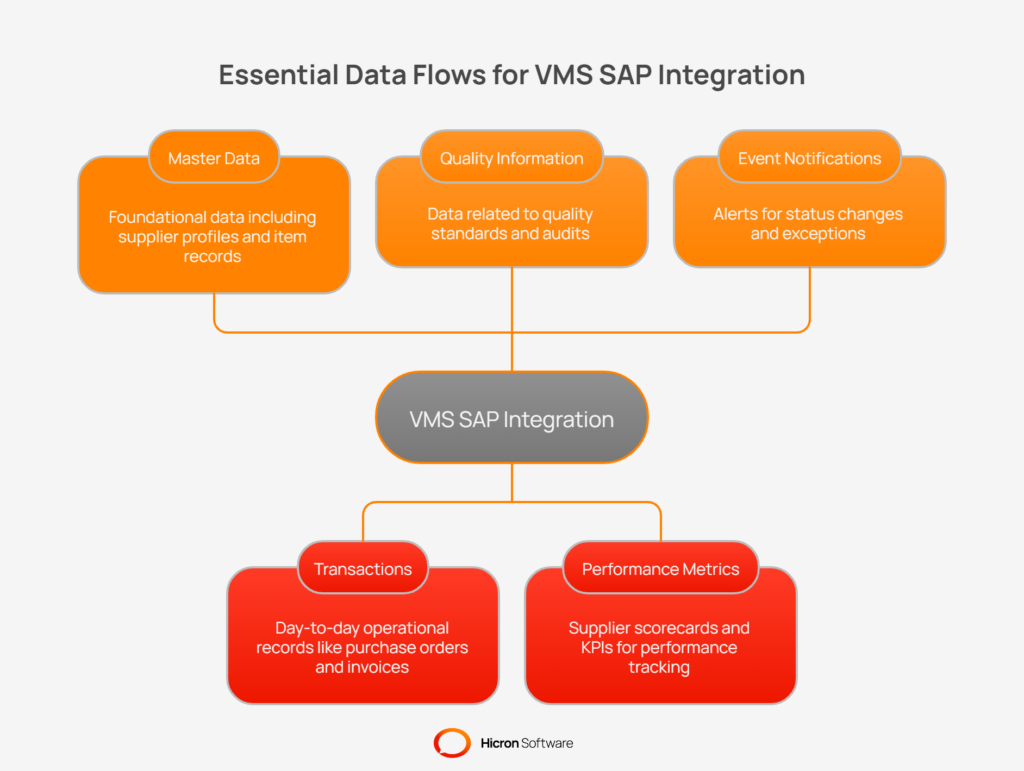
Here are the common data objects and flows to prioritize for your Vendor Management System SAP connection:
Choosing the right architecture for your VMS SAP integration is like deciding on the blueprints for a house. A solid plan ensures everything holds together, even during a storm, while a weak one leads to constant, costly repairs. You want an integration that is resilient, scalable, and easy to maintain.
These design patterns provide the technical foundation for connecting your vendor management system to SAP and other enterprise platforms.
Think of an Anti-Corruption Layer as a universal translator and bodyguard standing between your VMS and SAP. SAP often has its own complex language and rigid structures.
The ACL’s job is to protect your modern, flexible VMS from that complexity. It translates data from one system’s format to the other, ensuring that changes or quirks in SAP don’t break your VMS. This is a core concept in modern ERP integration best practices.
This layer acts as a buffer, performing critical tasks at the boundary between the two systems.
| ACL function | Description |
| Decoupling | Keeps the VMS and SAP models separate, allowing each to evolve independently. |
| Translation | Maps fields and values between systems (e.g., VMS “Supplier ID” to SAP “LIFNR”). |
| Validation | Enforces business rules and ensures data is complete before passing it to SAP. |
| Versioning | Manages different versions of APIs or data models to prevent update conflicts. |
Instead of having systems call each other directly and wait for a response, an event-driven approach uses a message queue or “mailbox.” When your VMS creates a new purchase order, it doesn’t call SAP directly. Instead, it drops a “New PO” message into a queue.
SAP’s integration endpoint picks up this message when it’s ready, processes it, and places a confirmation message in another queue for the VMS to retrieve.
This asynchronous messaging pattern makes your integration far more resilient. If SAP is down for maintenance, the messages simply wait safely in the queue until it’s back online. This prevents data loss and system failures caused by temporary slowdowns or outages. It’s a key strategy to integrate VMS with ERP systems that handle high transaction volumes.
An API Gateway is the single, secure front door for all incoming integration traffic. It handles the critical tasks of authenticating requests, managing traffic, and routing calls to the correct internal service. No request gets into your system without passing through this checkpoint. This is crucial for securing your VMS and ERP data.
| Gateway feature | Benefit |
| Security | Centralizes authentication (like OAuth2) and authorization. |
| Rate limiting | Prevents any single system from overwhelming your integration with too many requests. |
| Idempotency | Ensures that sending the same request multiple times has the same effect as sending it once, preventing duplicate records. |
| Pagination | Breaks large data sets into smaller, manageable chunks for easier processing. |
Even with the best automation, you need a way to verify that everything is working correctly. Staging tables provide a temporary holding area where incoming data can be validated before it’s committed to the final destination. Think of it as a quality control checkpoint on an assembly line.
Reconciliation is the process of double-checking that the data in your VMS and SAP match. This can be done by comparing record counts or using hash-based comparisons to spot discrepancies. Regular reconciliation reports give you confidence that your data is accurate and complete, catching small errors before they become major headaches.
You need a path that is secure, efficient, and lets you track your goods from start to finish. For your VMS SAP integration, selecting the right connectivity method is crucial for building a pipeline that doesn’t leak data or break down when you need it most. Your choice will depend on your specific SAP environment, transaction volume, and your team’s technical expertise.
Let’s look at the primary options for establishing this connection.
For organizations running on older SAP ECC systems, SAP IDocs and BAPIs/RFCs are the traditional workhorses.
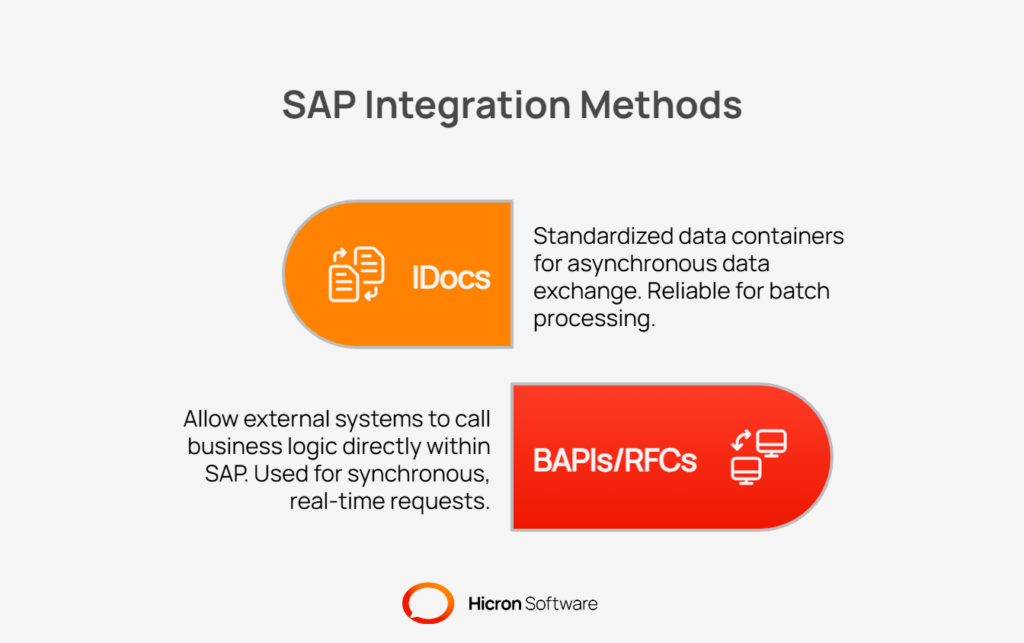
These methods can be complex and require deep SAP knowledge to implement correctly.
If you are on SAP S/4HANA, the game changes. S/4HANA exposes business objects through modern OData/REST APIs. These are web-based, easier to work with, and follow standards that most developers are familiar with. This approach simplifies the development of a VMS SAP integration, as connecting to an OData service is much like connecting to any other modern web API.
Instead of connecting your VMS directly to SAP, you can use a middleman: an integration Platform as a Service (iPaaS). Solutions like SAP Integration Suite (formerly PI/PO), MuleSoft, or Boomi act as a central hub.
This hub manages all the routing, mapping, and monitoring of data flows between your systems. An iPaaS can connect to SAP using IDocs, BAPIs, or OData APIs and present a simplified, unified interface to your VMS. This is a common strategy in modern ERP integration best practices.
The decision to connect directly or use middleware involves balancing speed, control, and long-term maintenance. A direct connection might seem faster for a single, simple integration, but middleware often provides better governance and scalability as your needs grow.
| Aspect | Direct integration | Middleware/iPaaS integration |
| Speed | Faster to set up for a single, simple point-to-point connection. | Slower initial setup, but much faster to add new systems or flows. |
| Governance | Decentralized; logic and rules are spread across systems. | Centralized; provides a single place to manage, secure, and monitor all integrations. |
| Complexity | The VMS must understand SAP’s specific protocols and formats. | The middleware handles SAP complexity, presenting a simpler API to the VMS. |
| Observability | Difficult to get a complete view of the end-to-end data flow. | Offers built-in dashboards, logging, and alerting for clear visibility. |
| Maintenance | Each integration is a custom build that must be maintained separately. | Reusable components and connectors simplify updates and reduce long-term costs. |
When you integrate VMS with ERP systems, there is a strong temptation to make your Vendor Management System’s data model a perfect mirror of SAP’s. It seems logical, but it’s a trap. Forcing your VMS to think and act exactly like SAP is like insisting a modern smartphone operate like a 1990s desktop computer.
It restricts the VMS’s native strengths and makes future updates a nightmare. A successful VMS SAP integration depends on letting each system be what it is, using a smart translation layer to bridge the gap.
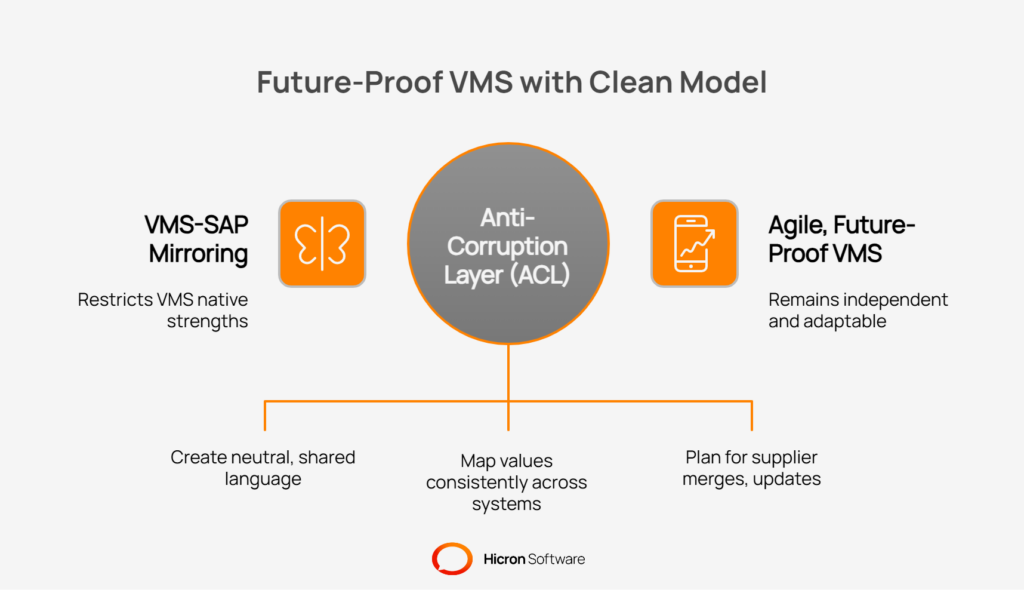
The best practice is to maintain a clean, VMS-native domain model and use the Anti-Corruption Layer (ACL) to handle translations. This approach has several advantages:
By keeping your VMS model independent, you ensure it remains agile and future-proof, a core principle of effective ERP integration best practices.
In any integration, especially a high-stakes VMS SAP integration, data must be reliable. Imagine a supplier invoice being sent twice and paid twice, or a purchase order update getting lost in transmission. These scenarios create chaos, from financial discrepancies to stock shortages.
To build a trustworthy integration, you need specific technical strategies that prevent duplicates, ensure messages are processed in the right order, and guarantee consistency even when network issues occur.
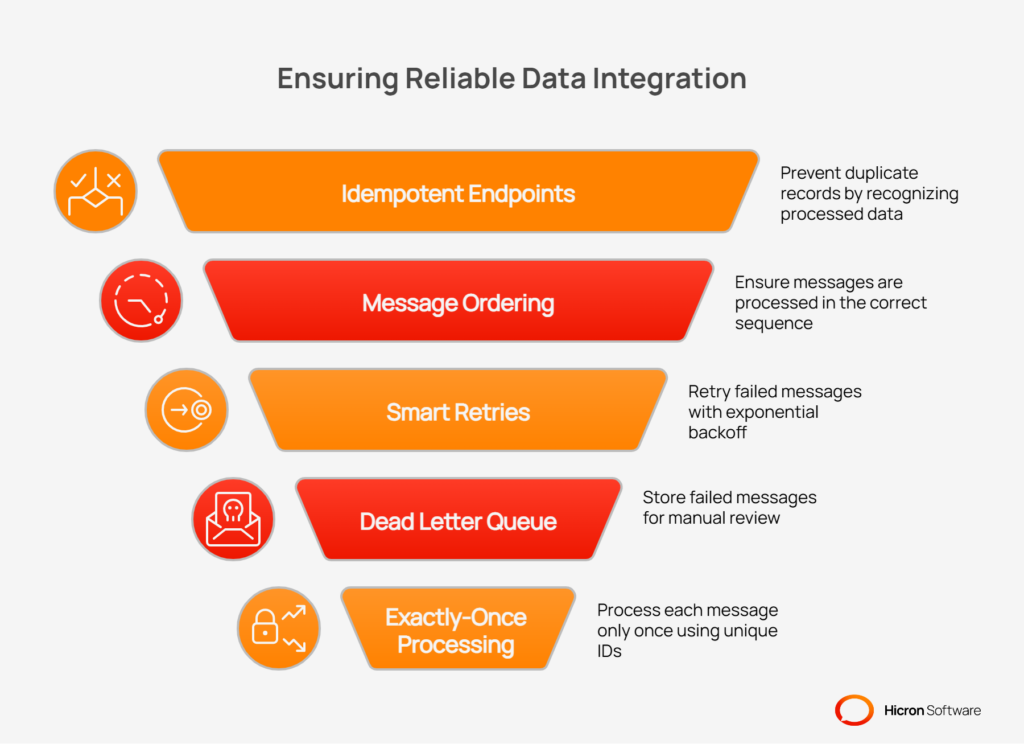
Here are the essential techniques to ensure your integration is reliable:
When you build a bridge between your Vendor Management System and SAP, you are creating a direct channel for some of your company’s most sensitive information. Supplier bank details, pricing agreements, and performance data all travel across this link.
A security failure in your VMS SAP integration doesn’t just create a technical problem; it can lead to financial loss, compliance violations, and damage to your reputation. Securing the integration from end to end is not an optional extra, it is a fundamental requirement.
A multi-layered approach to security ensures that every part of the data exchange is protected, from the network level down to individual data fields.
First, you must ensure that only authorized systems and users can access the integration endpoints. This involves verifying identities and enforcing strict permissions.
| Authentication method | Description |
| mTLS/TLS | Mutual Transport Layer Security (mTLS) and TLS encrypt all data in transit, ensuring that communication between the VMS and SAP is private and cannot be intercepted. |
| OAuth2/SAML | These modern authentication protocols allow systems to grant secure, token-based access to each other without sharing passwords. They provide a way to manage service identities. |
| Least-Privilege | Technical user accounts created for the integration should be granted only the minimum permissions necessary to perform their specific tasks, reducing the potential impact of a compromised account. |
Beyond securing the connection, the data itself must be protected, especially personally identifiable information (PII) or other sensitive details.
| Protection technique | Description |
| Field-level encryption | Encrypts specific sensitive fields, such as bank account numbers or tax IDs, in the database. Even if the database is breached, this data remains unreadable. |
| Data masking | Hides original data with modified content (e.g., showing only the last four digits of an account number). This is useful in testing or staging environments to protect real data. |
Visibility and containment are the final pillars of a secure integration. You need to know what’s happening at all times and be able to isolate traffic to prevent unauthorized access.
| Strategy | Description |
| Full audit trails | Log every action: who requested what data, when it was requested, what transformations were applied, and whether it was successful. This traceability is essential for compliance and forensics. |
| Network segmentation | Isolates integration traffic in its own dedicated subnet with strict firewall rules. Using IP allowlists ensures that only pre-approved VMS and SAP servers can communicate with each other. |
By implementing these measures, you create a security posture that protects your data and builds trust in your cendor management system SAP connection.
A successful VMS SAP integration is not a “set it and forget it” project. It’s a living system that requires continuous attention to ensure data flows smoothly and reliably. Without proper visibility, small errors can go unnoticed until they cause significant business disruptions, like delayed payments or incorrect inventory levels. This is where monitoring and observability come in; they give you the tools to see issues as they happen and fix them before they escalate.
To truly understand the health of your integration, you need to consolidate information from every step of the data journey.
Beyond general system health, you must monitor the specific business processes that the integration supports. This means creating targeted alerts and dashboards that tell you if the integration is actually doing its job correctly.
Good monitoring allows you to establish clear operational standards and even automate responses to common problems.
A comprehensive testing strategy is the only way to ensure your integration is reliable and ready for production. It allows you to find and fix issues in a controlled environment, preventing costly data errors, process failures, and business disruptions down the line.
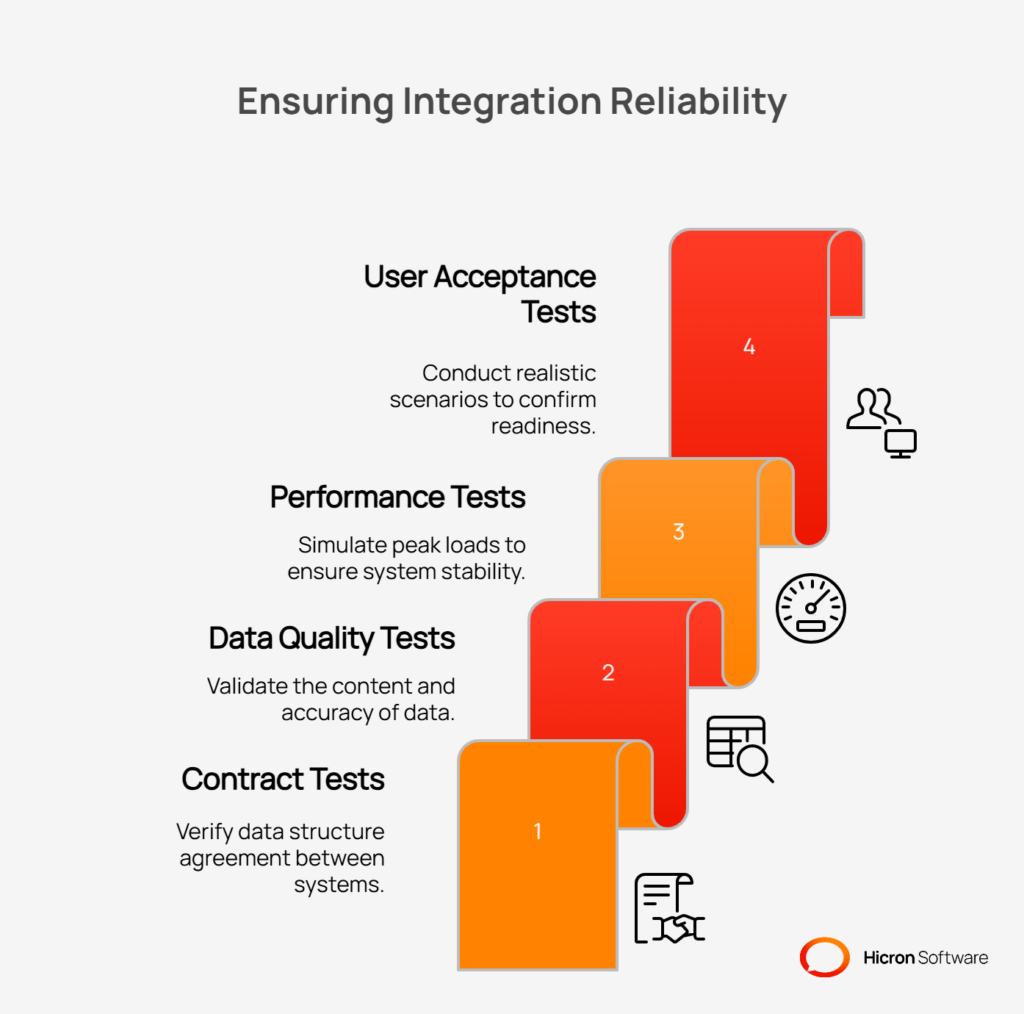
A multi-layered testing approach is essential for validating every aspect of the integration.
Launching a VMS SAP integration requires more than just good code and thorough testing. A structured rollout and a change management plan are essential for a smooth transition and long-term success. A “big bang” go-live can introduce significant risk. A careful, phased approach minimizes disruption and allows your organization to adapt with confidence.
Instead of activating the entire integration at once, deploy it in logical, sequential phases. This strategy de-risks the launch by containing the impact of any unforeseen issues. For example, start with a foundational data flow with lower transaction volume.
A typical sequence begins with synchronizing the supplier master data. Once that process is stable, you can proceed to purchase orders, and then follow with more complex flows like service entry sheets and invoices. This incremental approach allows the team to learn and adapt at each stage.
Modern deployment techniques provide powerful tools for controlling a new release. These methods allow you to introduce changes to a small subset of users or transactions before a full-scale deployment.
Your integration will inevitably need to change as business requirements evolve. Designing for this evolution from day one is critical. This means implementing versioning for your APIs and data mappings.
By maintaining backward compatibility, you can update a component of the integration without breaking other dependent systems. This ensures that you can enhance your VMS SAP integration over time without requiring large, coordinated updates across every connected application.
Clear governance ensures that changes are managed in a controlled and predictable way. It provides a framework for who can request a change, who must approve it, and how it gets implemented.
Key governance practices include formal change request processes, requiring approvals from data stewards or business owners, and maintaining thorough, up-to-date documentation. This discipline prevents unmanaged changes from destabilizing the integration and provides a clear record of its current state and history.
Building an effective VMS SAP integration involves navigating a landscape of potential challenges. While every project has unique aspects, many teams encounter the same common pitfalls. By understanding these issues in advance, you can implement best practices from the start and avoid significant rework, delays, and data integrity issues.
A frequent mistake is designing the Vendor Management System’s data model to be a direct copy of SAP’s complex structures. This tightly couples the two systems, making the VMS rigid and difficult to upgrade or connect to other applications in the future. It forces the VMS to operate in a way it wasn’t designed for, limiting its native capabilities.
How to avoid it: Maintain a clean, VMS-native domain model. Use an anti-corruption layer (ACL) or middleware to translate data between the VMS format and the format SAP requires. This decoupling keeps each system independent and agile.
Some designs rely on frequent, real-time synchronous calls between the VMS and SAP for every small action. This “chatty” communication style can overwhelm systems and lead to failures under high transaction volumes. If one system is temporarily unavailable, the entire process can grind to a halt.
How to avoid it: Favor asynchronous, event-driven patterns. Instead of making direct, blocking calls, publish events (like “Invoice Submitted”) to a message queue. This allows systems to process information at their own pace, improves resilience, and ensures the integration can handle peak loads without failing.
Without a strategy to handle duplicate messages, a simple network hiccup can cause major issues. If an API call to create an invoice is sent but the confirmation is lost, the sending system might retry, creating a second, duplicate invoice in SAP. This leads to payment errors and significant manual cleanup.
How to avoid it: Design all endpoints to be idempotent. This means ensuring that sending the same request multiple times has the same effect as sending it once. Using unique transaction IDs and an “upsert” (update or insert) logic is a common and effective way to achieve this.
When an integration fails without clear logs or monitoring, troubleshooting becomes a time-consuming and challenging task. Teams are left guessing where a transaction failed. Furthermore, without a way to reprocess failed messages, the only solution is often slow, error-prone manual data entry.
How to avoid it: Implement centralized observability from the start. Collect logs, metrics, and traces from every component into a single platform. Also, build in replay tools that allow you to resubmit a failed message after the root cause has been fixed, ensuring data consistency without manual intervention.
To bring these concepts together, it is helpful to visualize a practical reference architecture for a VMS SAP integration. This blueprint provides a clear, high-level map of how data moves between systems, what components are involved, and how they interact. This structure is designed for resilience, scalability, and maintainability.
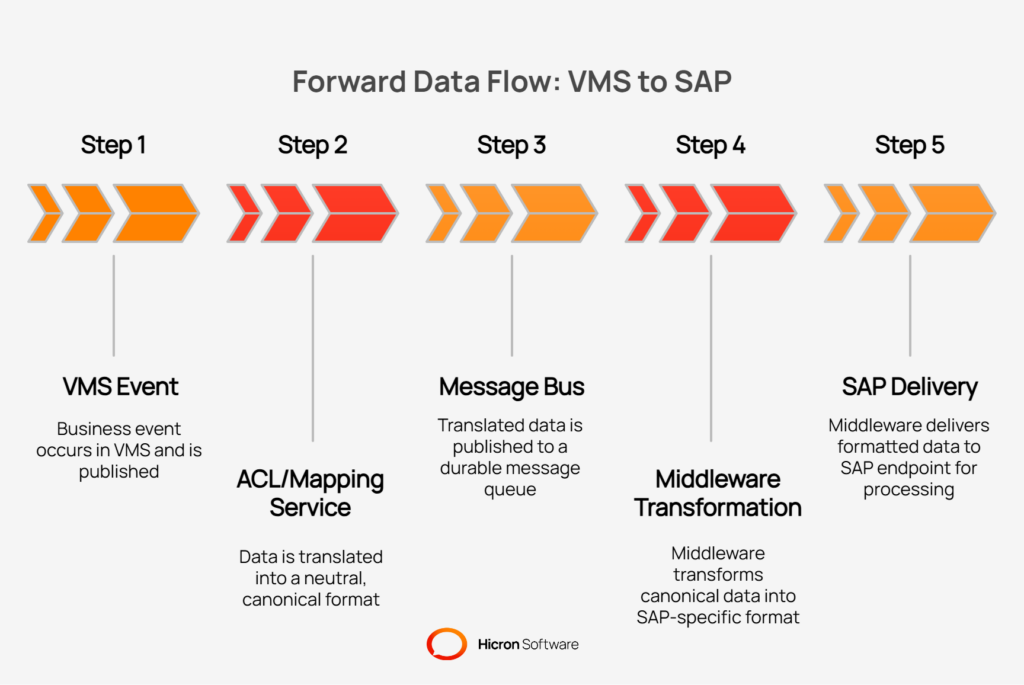
The primary path for data, such as a new purchase order or an approved invoice, follows a distinct sequence of services that decouple the systems and ensure data integrity.
Step 1 – VMS services: The process begins in the Vendor Management System, where a business event occurs (e.g., a candidate is selected). The VMS publishes this event.
Step 2 – Anti-Corruption Layer (ACL)/mapping service: The data first hits a dedicated service. Its job is to translate the VMS data model into a neutral, canonical format. This prevents SAP’s complex structure from influencing the VMS.
Step 3 – Message bus: The translated data is then published to a durable message bus (such as Kafka or RabbitMQ). This decouples the sender from the receiver. If the downstream systems are slow or temporarily offline, the message waits safely in the queue.
Step 4 – Middleware: A middleware component consumes the message from the bus. Its responsibility is to transform the canonical data model into the specific format SAP requires, such as an IDoc or a BAPI call.
Step 5 – SAP: The middleware delivers the final, correctly formatted data to the appropriate SAP endpoint for processing.
A one-way data flow is incomplete. The integration must also handle responses and provide operational visibility.
Connecting your Vendor Management System to SAP is a critical step in streamlining procure-to-pay operations, and lasting results depend on the architectural decisions you make. Focusing on a decoupled approach enables stable integration that can easily adapt as business requirements evolve.
Relying on an Anti-Corruption Layer (ACL) helps protect your VMS from the complexity of SAP, while asynchronous, event-driven communication prevents failures during heavy system loads. Securing your pipelines and making them observable ensures that data is protected and errors can be quickly identified and resolved.
To begin, carefully examine your current data flows and define neutral, well-structured contracts for communication. Start by piloting a single, high-value integration, such as synchronizing supplier master data, to validate your approach and build confidence for future phases. With these steps, you can establish an integration that meets today’s needs and remains viable as your processes change.

VMS SAP integration is the process of connecting your Vendor Management System (VMS) with your SAP ERP system to automate the exchange of data. This connection ensures that information like supplier profiles, purchase orders, invoices, and performance metrics flows between the two platforms. The primary goal is to create a single, consistent source of truth, which reduces manual data entry, minimizes errors, and speeds up procurement and payment cycles.
The key benefits are improved efficiency and data accuracy. By automating data flows, you significantly reduce the time your team spends on manual tasks like re-keying purchase orders or reconciling invoices. This leads to faster cycle times for critical processes like supplier onboarding and payments. It also creates a single source of truth, ensuring that both your VMS and ERP systems have consistent, up-to-date information, which improves analytics, reporting, and compliance.
Preventing data errors requires a specific technical approach. A core practice is making your integration endpoints “idempotent.” This means that sending the same data multiple times (for example, due to a network timeout) will have the same result as sending it only once, which prevents duplicate records like invoices or purchase orders. Using asynchronous messaging with a “dead letter queue” also helps by safely holding messages that fail to process, allowing you to investigate and replay them without losing data.
An Anti-Corruption Layer (ACL) is a design pattern that acts as a translator and buffer between your VMS and SAP. SAP often has a very complex and rigid data structure. The ACL protects your VMS from this complexity by translating data from the VMS format into a neutral format and then into the format SAP requires. This “decoupling” allows each system to be updated or changed independently without breaking the integration, making your overall architecture more flexible and easier to maintain.
A thorough approach involves multiple layers of testing before go-live, including contract tests to verify data structures, performance tests to ensure the system can handle peak volumes, and end-to-end user acceptance testing (UAT) with realistic business scenarios. After launch, continuous monitoring is crucial. Use centralized observability tools to collect logs, metrics, and traces from every component. This gives you a complete view of the integration’s health, allowing you to see issues early and fix them fast.
Hicron Software proved to be a trusted partner with unmatched technical expertise, delivering a scalable and user-friendly web application that was pivotal to our successful U.S. market expansion.

Hicron’s contributions have been vital in making our product ready for commercialization. Their commitment to excellence, innovative solutions, and flexible approach were key factors in our successful collaboration.
I wholeheartedly recommend Hicron to any organization seeking a strategic long-term partnership, reliable and skilled partner for their technological needs.

After carefully evaluating suppliers, we decided to try a new approach and start working with a near-shore software house. Cooperation with Hicron Software House was something different, and it turned out to be a great success that brought added value to our company.
With HICRON’s creative ideas and fresh perspective, we reached a new level of our core platform and achieved our business goals.
Many thanks for what you did so far; we are looking forward to more in future!

Hicron is a partner who has provided excellent software development services. Their talented software engineers have a strong focus on collaboration and quality. They have helped us in achieving our goals across our cloud platforms at a good pace, without compromising on the quality of our services. Our partnership is professional and solution-focused!

The IT system supporting the work of retail outlets is the foundation of our business. The ability to optimize and adapt it to the needs of all entities in the PSA Group is of strategic importance and we consider it a step into the future. This project is a huge challenge: not only for us in terms of organization, but also for our partners – including Hicron – in terms of adapting the system to the needs and business models of PSA. Cooperation with Hicron consultants, taking into account their competences in the field of programming and processes specific to the automotive sector, gave us many reasons to be satisfied.

