What is a Vendor Management System (VMS)? 2026 Guide
- October 03
- 12 min


Definition: A role-based access control VMS is a vendor management system that uses predefined roles to control user access and permissions within the platform. For complex, multi-divisional organizations, granting secure, usable access at scale is a constant challenge. This system assigns permissions based on a person’s job function, ensuring that users access only the information necessary to perform their duties.
This article explores how role-based access control (RBAC) strengthens vendor management system security, simplifies access governance, and improves the user experience for both internal teams and external suppliers. You will learn how to design, implement, and maintain an effective RBAC strategy that aligns with the principle of least privilege and supports compliance.
Role-based access control (RBAC) is a security model that restricts system access to authorized users based on their professional roles within an organization. Rather than assigning permissions to individuals one by one, RBAC groups permissions into defined roles. When a user is assigned a role, they automatically inherit all the permissions associated with it, streamlining access management and enforcing the principle of least privilege.
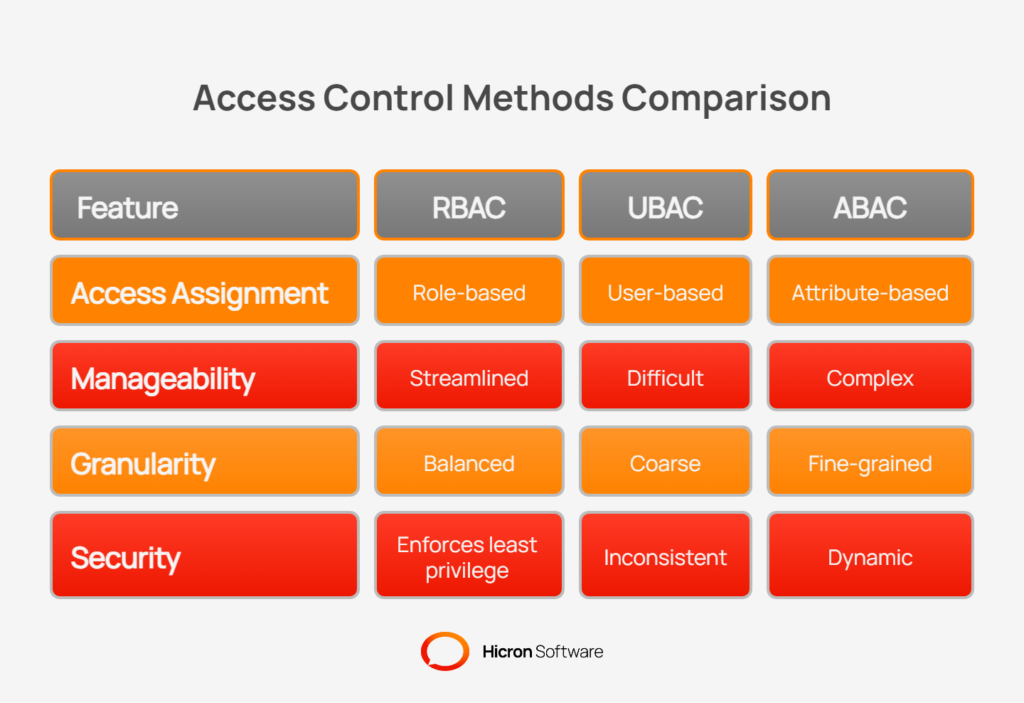
This model differs from other access control methods:
RBAC offers a balance of security and manageability that is ideal for a vendor management system. In a modern VMS architecture, RBAC operates across multiple levels to ensure consistent security:
Implementing role-based access control in a vendor management system provides foundational improvements to both security posture and operational efficiency.
By standardizing permissions, organizations can achieve a balance between protecting sensitive data and enabling users to work effectively. This approach offers clear advantages over managing permissions on an individual basis.
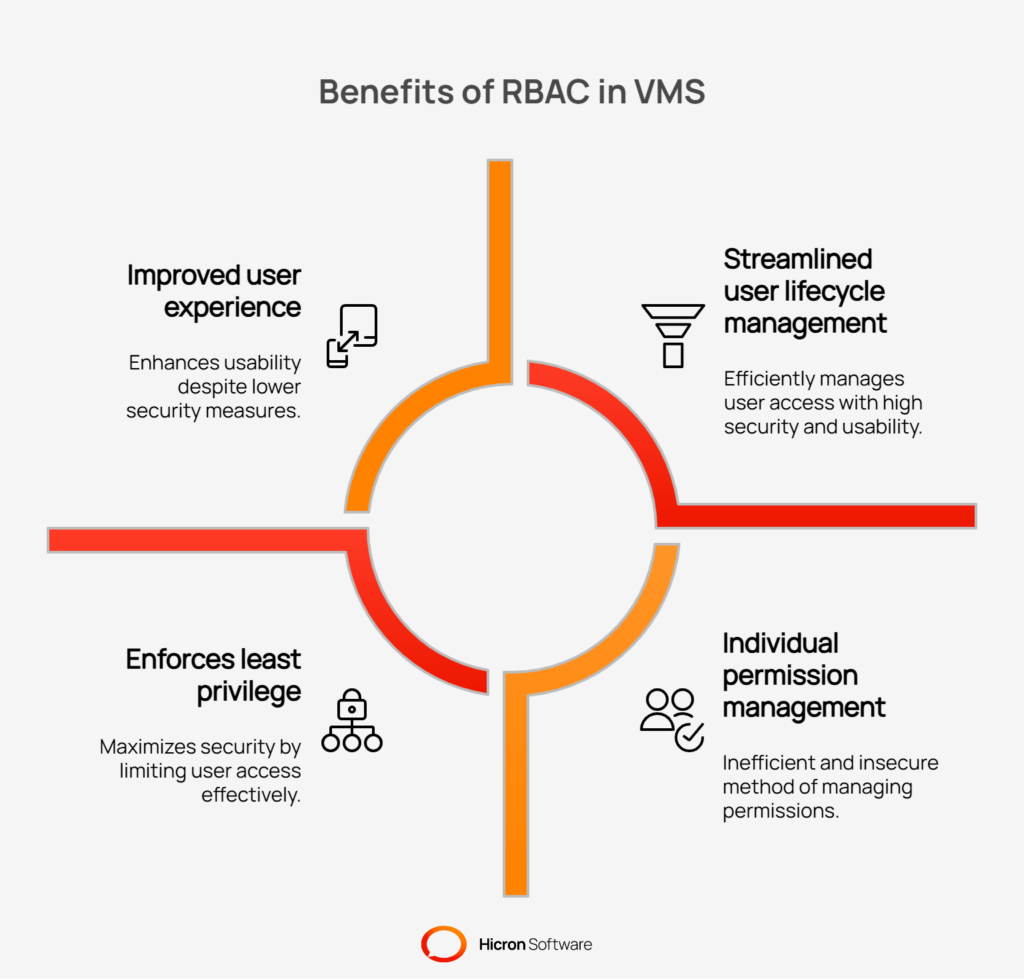
The core benefits of a VMS RBAC strategy include:
Effective Role-Based Access Control hinges on translating real-world job functions into a structured set of digital permissions. A well-designed VMS will include a catalog of pre-defined roles that can be assigned to both internal employees and external supplier contacts. These roles are then refined by applying scope, which further limits access based on business context, such as a specific plant or product line.
Internal roles grant your team members the permissions needed to manage supplier relationships, oversee procurement processes, and maintain the VMS. Each role is tailored to a specific job function, ensuring employees can work efficiently without accessing sensitive information outside their responsibilities.
| Role | Description |
| System administrator | Manages system-wide settings, role definitions, and user accounts. Has comprehensive access for configuration purposes. |
| Security admin | Oversees security policies, monitors access logs, and manages user authentication settings like SSO and MFA. |
| Quality manager | Accesses supplier quality performance data, non-conformance reports (NCRs), and corrective action plans (CAPAs). |
| Buyer/planner | Manages purchase orders, sourcing events, and supplier communication related to procurement activities. |
| AP/finance | Reviews and processes invoices, manages payment terms, and reconciles financials with suppliers. |
| Plant/division manager | Has read-only or approval access for suppliers and activities relevant to their specific plant or business unit. |
| IT support | Can view user profiles and system logs to troubleshoot issues, but cannot modify critical data or configurations. |
Granting suppliers direct access to your VMS improves collaboration and data accuracy, but it must be done securely. External roles provide suppliers with limited, task-oriented permissions to manage their own information, respond to requests, and fulfill orders.
| Role | Description |
| Supplier admin | Manages the supplier’s company profile, user accounts, and contact information. Acts as the primary administrator for their organization. |
| Supplier quality | Submits quality documentation, responds to audits, and manages corrective action requests from the quality team. |
| Order fulfillment | Acknowledges purchase orders, provides shipping notifications, and manages inventory or delivery schedules. |
| Auditor/read-only | Granted temporary, view-only access to specific documents or data for compliance audits or assessments. |
Scope is a feature that constrains roles to specific data sets, adding a critical layer of security to VMS RBAC. It ensures that a user, even with a particular role, can only view or act upon information relevant to their part of the business. This prevents a user in one division from viewing supplier data from another division.
| Scope | Example of use |
| Division/plant | A plant manager can only see supplier performance data and purchase orders associated with their specific facility. |
| Product line | A buyer is limited to managing suppliers who provide components for their assigned product line. |
| Commodity | A category manager can only access sourcing events and contracts for their specific commodity, such as “electronics.” |
| Supplier | An internal user is granted access to view documents and data for a single, specific supplier. |
| Document type | A finance user might only see invoices and payment records, but not quality or engineering documents. |
| Geography | A regional manager’s access is scoped to suppliers and operations within North America. |
For large, multi-division organizations, a flat list of roles is not enough. An effective VMS RBAC model must be designed to scale with the business, adapting to organizational complexity while remaining manageable. This involves using proven design patterns that promote reusability, enforce security policies, and provide flexibility for real-world scenarios.
Instead of building every role from scratch, a scalable approach involves grouping individual permissions into reusable “permission bundles.” These bundles can then be combined to create role templates.
For example, a “view purchase orders” permission could be bundled with “View Invoices” to create a “financial read-only” bundle.
This concept extends to role hierarchies, where roles can inherit permissions from a parent role. A “quality manager” role might inherit all permissions from a “quality engineer” role and add permissions for approving documents. This simplifies maintenance, as an update to the parent role automatically propagates to all child roles.
Separation of Duties is a fundamental security principle that prevents a single individual from having the permissions to complete a high-risk process alone. A well-designed RBAC system enforces SoD by defining toxic combinations of permissions that cannot be assigned to the same role or user. This is critical in a VMS to prevent fraud and errors. For example, a user with permission to create a new supplier should not also have permission to approve that supplier’s first invoice.
| Conflicting action 1 | Conflicting action 2 | Risk mitigated |
| Create a new supplier record | Approve supplier onboarding | Prevents creation of fraudulent or non-compliant suppliers. |
| Submit an invoice | Approve the invoice for Payment | Reduces risk of unauthorized or inflated payments. |
| Modify supplier bank details | Initiate a payment run | Protects against payment diversion and financial fraud. |
| Create a purchase order | Approve the same purchase order | Ensures purchasing oversight and budget control. |
Effective access control requires more than just hiding a button in the user interface. A RBAC strategy combines two layers of control. Function-level controls determine what actions a user can perform (e.g., “Can create invoice”), while data-level controls filter what information they see (e.g., “Can only see invoices for plant A”). By combining these, you can grant a user the role of “AP clerk” but limit their access to records associated with their specific business unit or region.
Business needs are not always static. Users may require temporary access elevation for specific tasks, such as participating in an audit or covering for a colleague on vacation. A scalable RBAC system supports just-in-time (JIT) and delegated access. This allows an administrator to grant a user a specific role for a limited time or for a manager to delegate their approval authority to a direct report temporarily. These temporary permissions should be automatically revoked after a set period to maintain a state of least privilege.
Turning RBAC policies into a functional reality within your Vendor Management System requires a technical framework that connects user identities to specific permissions. This implementation process bridges the gap between your access control strategy and its day-to-day operation, ensuring security is manageable. A successful rollout focuses on integrating with existing identity systems and establishing clear, auditable processes.
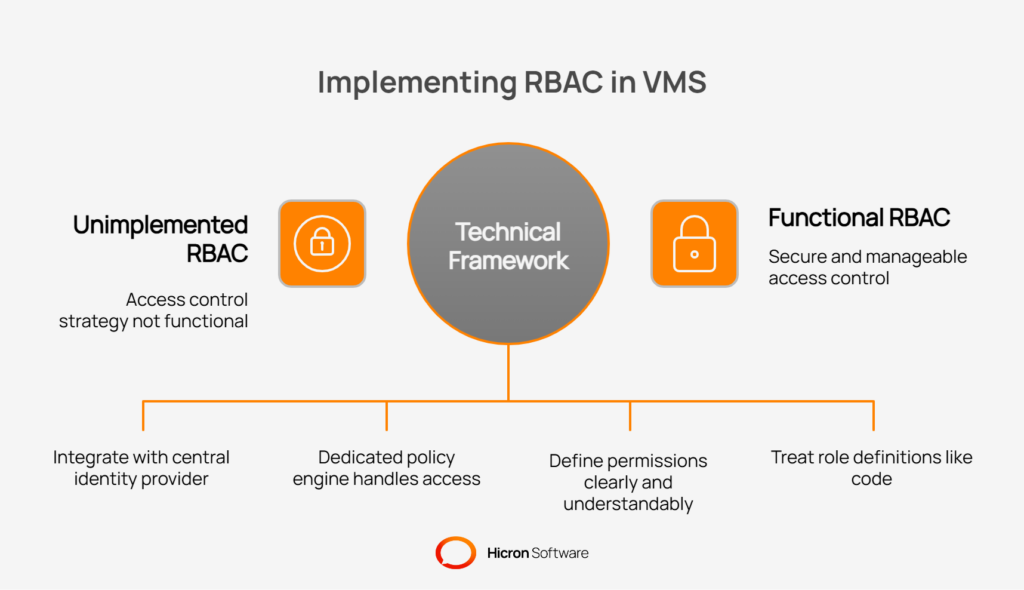
The key technical components include:
Granting external partners access to your VMS introduces new security considerations that extend beyond your internal controls. The principle of least privilege must apply just as rigorously to suppliers, auditors, and other third parties. A secure VMS architecture establishes strong boundaries to control, monitor, and limit external access to only what is necessary.
Successfully managing third-party access involves implementing specific technical and procedural safeguards.
One of the most effective ways to secure supplier data is to isolate it. By creating separate logical “tenants” or namespaces for each supplier organization, you ensure that each supplier can never access the data or user information of another supplier. This multi-tenant design prevents lateral movement between supplier environments and contains the impact of a potential breach to a single external entity.
Passwords alone are insufficient to secure external access. A security model for suppliers and third parties should include multiple layers of verification. This includes using IP allowlists to restrict access to known locations, mandating multi-factor authentication (MFA) for all external accounts, and performing device posture checks to ensure the connecting device meets your organization’s security standards (e.g., has an updated OS and active antivirus software).
Not all external access needs to be permanent. For specific, short-term activities like a compliance audit or a supplier corrective action plan, access should be granted for a limited duration. Implementing time-boxed or just-in-time access ensures that permissions are automatically revoked once the designated period expires. This prevents the accumulation of forgotten or unused accounts, which can become significant security risks over time.
Implementing role-based access control is not a one-time project; it is an ongoing program that requires consistent governance to remain effective. Over time, without proper oversight, even the most well-designed RBAC system can suffer from “permission creep,” where users accumulate unnecessary access. A strong governance framework ensures that permissions stay aligned with current roles and responsibilities, maintaining security and simplifying compliance audits.
Key governance practices are essential for keeping VMS access clean:
A secure system is only effective if people can use it correctly. For a role-based access control model to succeed, its implementation must prioritize usability and be supported by a thoughtful change management strategy. When secure access is also easy access, user adoption increases, training costs decrease, and the risk of frustrated users attempting to circumvent controls is minimized. The goal is to make the most secure path the easiest path.
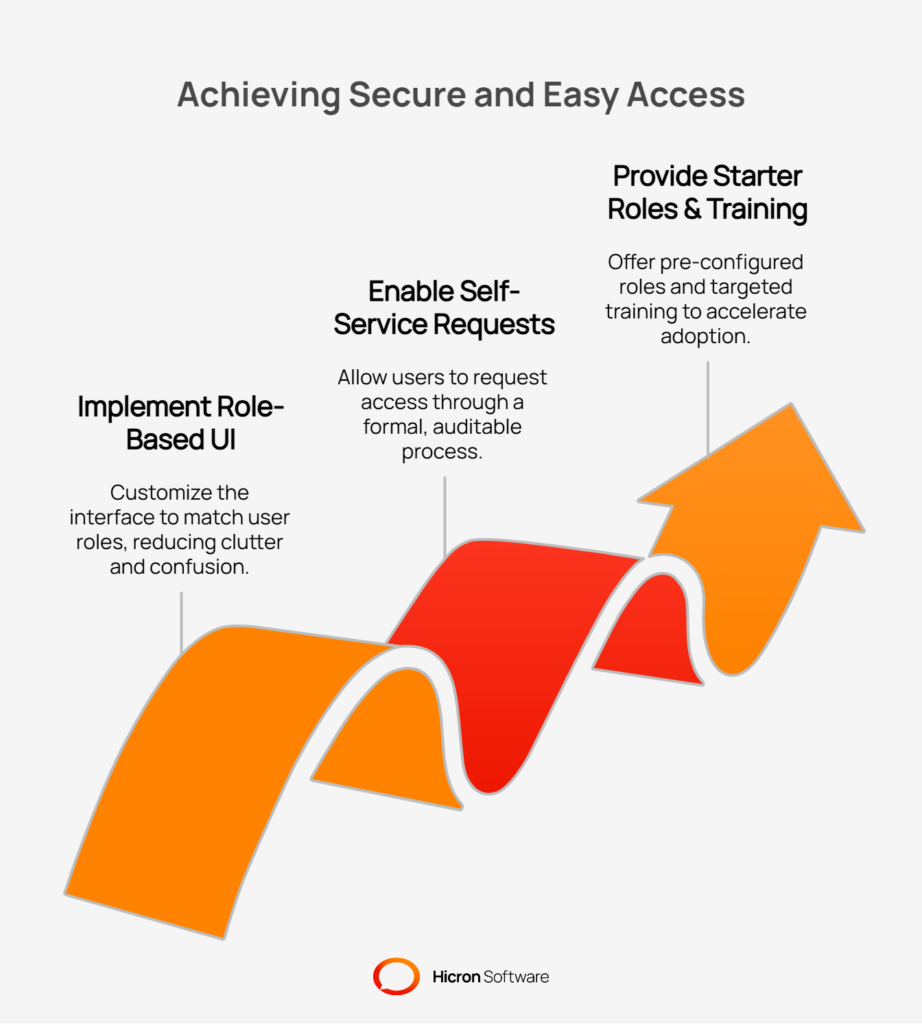
To achieve this, focus on the user experience and provide clear support resources.
#1 Implement a role-based user interface: The VMS interface should adapt to the user’s role. By dynamically hiding irrelevant modules, menu items, and on-screen actions, the system presents a clean, uncluttered workspace. This helps users focus on their specific tasks without being distracted or confused by functions they cannot use. Including contextual tooltips that briefly explain a field or function can further guide users and reduce their reliance on support tickets.
#2 Enable self-service requests: Users will inevitably need access beyond their standard role, even if only temporarily. Instead of relying on email and manual approvals, a VMS should include a self-service portal that allows users to formally request access to a role or a specific permission. These requests should trigger a formal approval workflow, routing the request to the appropriate role or data owner for a decision, creating an auditable trail for every access grant.
#3 Provide starter roles and training: To accelerate adoption, provide a catalog of pre-configured “starter roles” based on common personas (e.g., Buyer, Quality Inspector, Supplier Admin). This gives administrators a solid foundation to build from. Support this with targeted training materials, such as quick-start guides and short video tutorials specific to each role. When users are shown exactly how to perform their tasks within the new system, they feel more confident and are less likely to resist the change.
A successful role-based access control program is not static; it requires continuous monitoring and refinement to adapt to changing business needs and security threats. By tracking key performance indicators (KPIs), your organization can quantitatively measure the effectiveness of its VMS access policies, demonstrate value, and identify areas for improvement. This data-driven approach transforms RBAC from a simple security feature into a strategic operational asset.
Tracking the right metrics provides clear insight into the health and efficiency of your access control framework. These KPIs help measure everything from operational speed to risk reduction.
| KPI | Description |
| Time-to-provision | Measures the average time it takes from a user’s start date or role change to when their VMS access is fully granted and functional. |
| Access violations prevented | The number of blocked attempts by users to access data or functions outside their assigned permissions. |
| SoD conflicts detected | The count of potential Separation of Duties conflicts identified by the system, either in role definitions or user assignments. |
| Inactive account count | The number of user accounts that have not been logged into for a specified period (e.g., 90 days), indicating potential stale access. |
| Approval SLAs | The percentage of access requests that are approved or denied within the service-level agreement timeframe. |
Beyond tracking metrics, continuous improvement involves proactive analysis to keep the system clean. This includes periodic “role mining,” an analytical process in which you review actual user activity and compare it with their assigned permissions. This analysis helps identify unused or overly broad permissions within roles, allowing you to fine-tune them toward a more actual state of least privilege. This ongoing effort reduces permission creep and ensures the RBAC model remains as lean and secure as possible over time.
Vendor management system rarely operates in isolation. It connects to a broader ecosystem of enterprise applications, including ERP, PLM, and data analytics platforms. For role-based access control to be truly effective, its security principles must extend across these system boundaries. A consistent authorization strategy ensures that a user’s permissions are respected across all integrated services that consume its data.
Managing RBAC across connected systems requires a thoughtful integration architecture that prioritizes security and consistency. Key considerations include how roles are translated and how authorization is checked across different communication patterns.
| Integration point | Description | Benefit |
| Downstream services | User roles and permissions (claims) established in the VMS are passed to connected services, such as APIs and data warehouses. | Ensures that when users access VMS data through other tools (e.g., a BI report), their access is governed by the same set of rules. |
| Enterprise systems (ERP/PLM) | An integration layer maps VMS roles to corresponding permission sets in other core systems, such as ERP or PLM. | Creates a unified security model that prevents users from circumventing VMS controls by using another application to access related data. |
| Process flows | Authorization checks are consistently applied in both real-time (synchronous) user actions and background (asynchronous) data processing jobs. | Guarantees that all data access and modifications, whether initiated by a user or a system process, adhere to the defined RBAC policies. |
While role-based access control offers security and operational benefits, a poorly planned implementation can create new problems. Avoiding common mistakes is crucial to building a scalable, maintainable access control model in your vendor management system. A successful RBAC strategy requires foresight to prevent complexity and ensure long-term effectiveness.
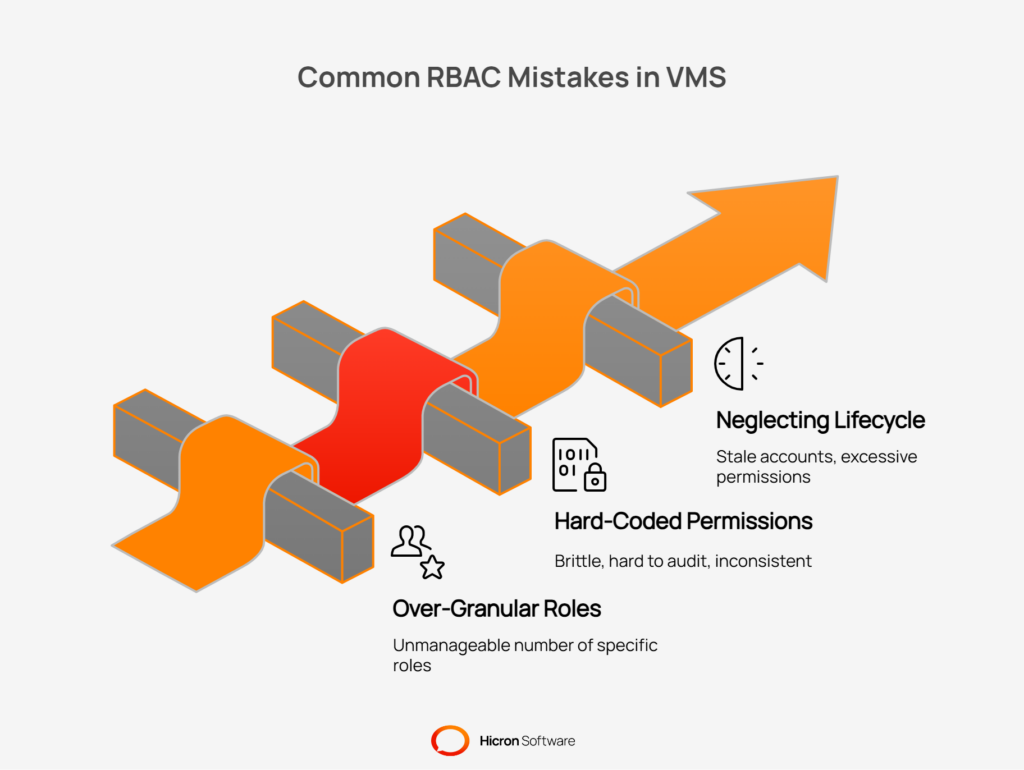
Here are some of the most frequent pitfalls organizations encounter:
#1 Creating over-granular roles: It can be tempting to create a unique role for every minor variation in job function, but this leads to “role explosion”, an unmanageable number of highly specific roles that are difficult to maintain and audit. Instead of creating “Plant A Buyer” and “Plant B Buyer” roles, it is better to have a single “Buyer” role and use scoping rules to limit access by plant. This keeps the role catalog clean and manageable.
#2 Hard-coding permissions in the UI: A critical architectural mistake is embedding permission checks directly into the user interface code (e.g., hiding a button with an if statement). This approach is brittle, hard to audit, and creates inconsistencies. The correct method is to use a centralized policy engine or authorization service. All access decisions should be made by this service, ensuring that rules are applied consistently across the application, APIs, and all other data access points.
#3 Neglecting lifecycle and review processes: RBAC is not a “set it and forget it” system. One of the most common failures is the absence of a process for managing user lifecycles and periodically reviewing access. Without automated de-provisioning for leavers and regular access recertification campaigns, the system will accumulate stale accounts and excessive permissions. This is especially risky for external supplier accounts, which can become forgotten entry points for security threats if not properly managed.
Building secure and usable access with RBAC isn’t just about ticking boxes, it’s about making life easier and your systems safer as your business grows. With role-based access, you minimize risk, keep things organized, and make sure people only see what they’re supposed to see. It also means your teams, suppliers, or partners won’t get overwhelmed by unnecessary menus or complicated permissions.
Where do you go from here? Take some time to look at who currently has access to what, chances are there’s old or unnecessary access floating around. Think about which roles really make sense for how your organization works. Start small: try out role-based access in one division or with a few suppliers, see what works, and adjust as you learn. The most important part is to get started and keep improving as needs change. RBAC can turn access management from a headache into a real advantage.
A role-based access control VMS uses predefined roles to manage user permissions. Instead of assigning access to individuals, you assign users a role (such as “buyer” or “supplier admin”) that has a specific set of permissions. This approach simplifies access governance and ensures users see only the data and tools necessary for their jobs, following the principle of least privilege.
VMS RBAC enhances security by strictly limiting access. It contains the potential damage from a compromised account because users have no permissions beyond what their role requires. It also enables critical security policies, such as Separation of Duties (SoD), which prevent a single user from controlling a high-risk process, such as creating and approving a supplier invoice.
RBAC is crucial for securely managing supplier access because it allows you to grant external users limited, task-specific permissions. You can create separate, isolated environments for each supplier and use features like time-boxed access for temporary needs, like audits. This ensures suppliers can collaborate effectively without ever accessing another vendor’s sensitive information or your internal data.
Start by auditing your current user permissions to find and remove excessive or outdated access. Next, define a clear catalog of roles based on actual job functions within your organization and for your suppliers. Finally, launch a pilot program with a single department and a few trusted suppliers to test and refine your roles before a full rollout.
A VMS with RBAC improves the user experience by creating a clean, role-specific interface. It automatically hides irrelevant menus, functions, and data, reducing clutter and helping users focus on their tasks. This leads to faster onboarding, fewer user errors, and less need for support tickets because the system is more intuitive.
Hicron Software proved to be a trusted partner with unmatched technical expertise, delivering a scalable and user-friendly web application that was pivotal to our successful U.S. market expansion.

Hicron’s contributions have been vital in making our product ready for commercialization. Their commitment to excellence, innovative solutions, and flexible approach were key factors in our successful collaboration.
I wholeheartedly recommend Hicron to any organization seeking a strategic long-term partnership, reliable and skilled partner for their technological needs.

After carefully evaluating suppliers, we decided to try a new approach and start working with a near-shore software house. Cooperation with Hicron Software House was something different, and it turned out to be a great success that brought added value to our company.
With HICRON’s creative ideas and fresh perspective, we reached a new level of our core platform and achieved our business goals.
Many thanks for what you did so far; we are looking forward to more in future!

Hicron is a partner who has provided excellent software development services. Their talented software engineers have a strong focus on collaboration and quality. They have helped us in achieving our goals across our cloud platforms at a good pace, without compromising on the quality of our services. Our partnership is professional and solution-focused!

The IT system supporting the work of retail outlets is the foundation of our business. The ability to optimize and adapt it to the needs of all entities in the PSA Group is of strategic importance and we consider it a step into the future. This project is a huge challenge: not only for us in terms of organization, but also for our partners – including Hicron – in terms of adapting the system to the needs and business models of PSA. Cooperation with Hicron consultants, taking into account their competences in the field of programming and processes specific to the automotive sector, gave us many reasons to be satisfied.

