What is a Vendor Management System (VMS)? 2026 Guide
- October 03
- 12 min

Definition: On-premises VMS security involves protecting a Vendor Management System (VMS) hosted on your organization’s own servers. These platforms are central to operations, managing highly sensitive supplier details, confidential pricing structures, and critical quality data.
This article explains the security measures needed for an on-premises setup. While on-premises deployment gives you direct control and data sovereignty, it demands a disciplined approach to security architecture and daily operations. We will explore best practices for building a robust defense for your VMS, from access controls to data encryption, to ensure your vendor information remains protected within your own infrastructure.
Effective on-premises VMS security requires a proactive approach that anticipates potential threats. Because the system is housed within your own infrastructure, you are responsible for defending it against a variety of risks. Designing your security architecture to counter these specific threats is fundamental to protecting your vendor data.
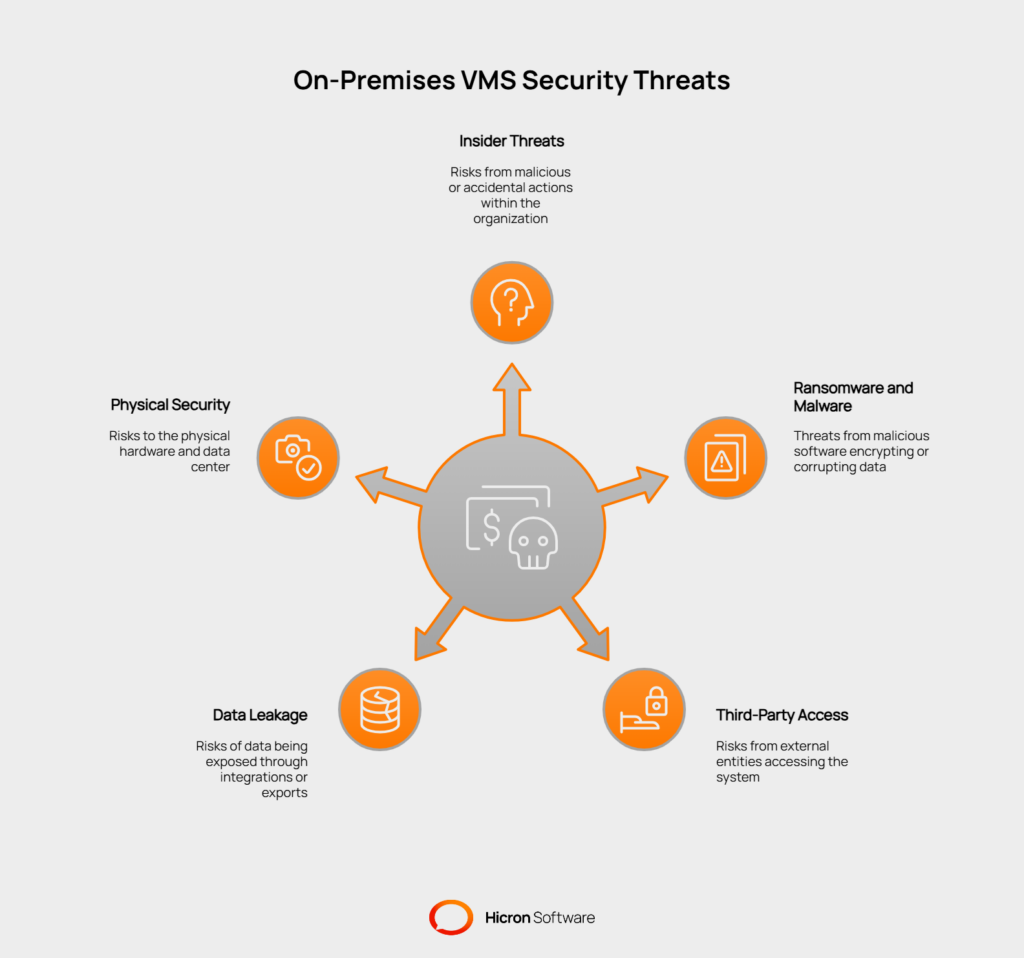
One of the most challenging risks comes from within your organization. Insider threats can be malicious, where an employee intentionally steals or corrupts data, or accidental, where a well-meaning user makes a mistake that exposes sensitive information. Privilege misuse occurs when users have more access than they need for their roles, increasing the potential for damage. Implementing a strict Role-Based Access Control (RBAC) model ensures that individuals can view and modify only data relevant to their job functions. This principle of least privilege is a core component of a zero-trust security framework.
Ransomware and other forms of malware pose a constant threat to on-site servers. An attack could encrypt your entire VMS database, making it inaccessible and disrupting your procurement and supply chain operations. Attackers often seek entry through phishing emails or unpatched software vulnerabilities. A strong defense includes regular security updates, advanced threat detection systems, and comprehensive employee training on identifying malicious attempts. Protecting your data with continuous, tested backups is also critical for recovery in the event of a breach.
Your VMS may be on-premises, but your vendors and other third parties might still require remote access to certain modules. Each external connection is a potential entry point for attackers if not properly secured. Managing these access points is a key part of on-premises VMS security. Adopting a zero-trust approach, where no user or device is trusted by default, helps verify every access request. You must have clear policies and technical controls that limit what third parties can see and do within your system.
A VMS does not operate in isolation. It often integrates with other critical systems, such as your Enterprise Resource Planning (ERP) platform. While these connections improve efficiency, they also create pathways for data leakage if not secured properly. The same risk applies to data exports, where large datasets can be downloaded into less secure formats, such as spreadsheets. Protecting data in transit with strong encryption is essential. Furthermore, all data at rest within the VMS and connected systems should be protected with encryption to render it unreadable if an unauthorized party gains access.
Since you control the physical hardware, you are also responsible for its physical protection. Unauthorized access to the data center could lead to data theft or direct damage to servers. Environmental factors like power outages, fires, or floods also pose a real threat to your system’s availability and integrity. A comprehensive security plan must include physical access controls for your data center, video surveillance, and environmental monitoring. Having redundant power supplies and a tested disaster recovery plan ensures your VMS can withstand physical disruptions.
Building strong on-premises VMS security starts with a solid architectural foundation. Instead of reacting to threats, you can proactively design a resilient system by default. This involves layering multiple security controls across your network, access points, data, and system integrations. Below are the core architectural pillars for protecting your on-premises vendor management system.
A foundational strategy for protecting your VMS is to adopt a zero-trust model. This approach assumes that no user or device is inherently trustworthy, whether inside or outside your network. Every access request must be verified. This is achieved through network segmentation, which involves dividing your network into smaller, isolated zones.
Isolating the application, data, and administration planes prevents an attacker who compromises one part of the system from easily moving to another. For instance, a breach in the user-facing application would not grant immediate access to the core database or administrative controls. This is enforced with deny-by-default firewall rules, meaning all traffic is blocked unless explicitly permitted. Further control can be achieved with microsegmentation, where security policies are applied to individual workloads, creating an even more granular defense.
| Technique | Description | Security benefit |
| Isolate planes | Separate application, data, and admin network zones. | Limits the impact of a breach to a single area. |
| Deny-by-default | Firewalls block all traffic that isn’t expressly allowed. | Prevents unauthorized communication between zones. |
| Microsegmentation | Apply security policies to individual servers or applications. | Provides highly granular control over data flows. |
Controlling who can access your VMS and what they can do is critical. A strong identity and access management (IAM) framework ensures that only authorized individuals can access sensitive vendor data. The first step is to centralize user authentication through a Single Sign-On (SSO) solution integrated with your corporate directory (like LDAP or Active Directory).
Every login attempt should be protected with Multi-Factor Authentication (MFA), which requires a second form of verification beyond a password. Once inside the system, access should be governed by the principle of least privilege. Role-Based Access Control (RBAC) assigns permissions based on a user’s job function, ensuring they only have the access necessary to perform their duties. For sensitive operations, just-in-time (JIT) access can grant temporary, automatically expiring elevated permissions, reducing the risk of privilege misuse.
| Technique | Description | Security benefit |
| Centralized SSO | Integrate VMS logins with a central identity provider. | Simplifies user management and enforces consistent policies. |
| MFA | Require two or more verification methods for access. | Protects against stolen credentials and unauthorized logins. |
| RBAC | Assign permissions based on defined user roles. | Enforces the principle of least privilege. |
| JIT access | Grant temporary, time-bound elevated permissions. | Minimizes the window of opportunity for privilege abuse. |
Your vendor data is valuable, so it must be protected at all times. A comprehensive encryption strategy makes data unreadable to unauthorized parties, whether it is being stored or transmitted. This involves two primary components: encryption in transit and encryption at rest.
Encryption at rest applies to all stored data. This includes your primary database, any file or object storage your VMS uses, and all system backups. Should an attacker gain access to the physical server or storage media, the data will be indecipherable.
Encryption in transit protects data as it moves across the network. All connections to the VMS, both from users and integrated systems, should use strong, modern protocols like TLS 1.2 or higher. Additionally, managing secrets like API keys, passwords, and encryption keys is vital. These should never be hardcoded in applications but stored securely in a dedicated secrets management tool, such as a vault or a Key Management Service (KMS).
| Technique | Description | Security benefit |
| Encryption at rest | Encrypt data stored in databases, files, and backups. | Protects stored data from physical theft or server compromise. |
| Encryption in transit | Use TLS 1.2+ for all network traffic. | Prevents eavesdropping and data interception. |
| Secrets management | Store API keys and credentials in a secure vault. | Avoids exposing sensitive secrets in code or configuration files. |
Your VMS rarely operates in isolation; it connects to other systems, such as your ERP platform, to exchange data. Each integration is a potential weak point that must be secured. An API gateway can act as a single, controlled entry point for all system-to-system communications. It helps enforce security policies, manage traffic, and monitor for threats.
For service-to-service communication, mutual TLS (mTLS) ensures that both systems in an integration verify each other’s identities before exchanging data. Security can be further enhanced by creating allowlists that permit connections only from pre-approved IP addresses. To prevent denial-of-service attacks or system overload, implement rate limiting on API calls. Finally, robust payload validation checks all incoming data for malicious content or incorrect formatting. At the same time, an anti-corruption layer can translate data between the VMS and an ERP, preventing insufficient data from one system from affecting the other.
A key aspect of on-premises VMS security is protecting the data where it lives: in your databases, storage systems, and backups. While network and access controls prevent unauthorized entry, data-level security ensures that even if other layers are bypassed, your information remains protected. This requires a diligent approach to hardening your databases, securing file storage, and planning for reliable recovery.
Your VMS database is the central repository for sensitive vendor information, contracts, and performance data. Hardening the database itself adds a critical layer of defense. Start by creating separate database user roles for the application and for human administrators. The application should have just enough permission to run its functions, while administrators have the elevated privileges needed for maintenance. This separation limits the damage an application vulnerability could cause.
Implement row-level and column-level security to enforce access policies directly within the database. This functions like a more granular form of RBAC, ensuring users can only see the specific rows or columns of data relevant to their role. To prevent common SQL injection attacks, all database queries should be parameterized. This practice treats user input as data rather than executable code. Finally, enable comprehensive audit logs to track all database activity, providing a clear record of who accessed or modified data and when.
| Technique | Description | Security benefit |
| Separate roles | Create distinct database users for the application and for admins. | Limits the blast radius if the application is compromised. |
| Row/column security | Apply access controls to specific rows and columns of data. | Provides highly granular data access enforcement. |
| Parameterized queries | Treat all external input as data rather than executable code. | Prevents SQL injection attacks from corrupting or stealing data. |
| Audit logs | Record all significant actions performed within the database. | Enables monitoring for suspicious activity and aids in forensics. |
A VMS often stores unstructured data, such as contracts, certificates, and vendor documents, in file or object storage systems. This storage requires its own set of security controls. When providing temporary access to a file, use signed URLs. These are time-limited links that grant access without exposing the file’s permanent location or requiring complex permissions changes.
To prevent malware from entering your system, implement antivirus scanning for all file uploads. This automatically checks every document before it is saved to your storage. Data Loss Prevention (DLP) policies can be configured to scan for and block the storage of unauthorized sensitive information, like credit card numbers or personal IDs. Lastly, use lifecycle and retention policies to manage your data automatically. This can move older, less-accessed files to cheaper storage tiers or permanently delete data after a specified retention period to comply with regulations and reduce your attack surface.
| Technique | Description | Security benefit |
| Signed URLs | Generate temporary, secure links for file access. | Provides controlled, time-bound access without changing permissions. |
| Antivirus scanning | Scan every uploaded file to detect malware. | Prevents malicious files from being stored and spread. |
| DLP policies | Monitor and block unauthorized sensitive data patterns. | Reduces the risk of storing non-compliant or high-risk data. |
| Lifecycle management | Automatically move or delete data based on age. | Manages storage costs and reduces the volume of exposed data. |
No security strategy is complete without a recovery plan. The 3-2-1 backup rule is a foundational best practice: maintain at least 3 copies of your data on 2 different media types, with 1 copy stored off-site.
For the highest level of protection against ransomware, one of these copies should be an immutable backup. Immutable backups cannot be altered or deleted for a set period, ensuring that even if your live systems are compromised, you have a clean copy to restore from. An offline copy serves a similar purpose.
Your ability to recover depends on having clear, tested procedures. Maintain and restore runbooks that document the step-by-step process for bringing your VMS back online. Regularly test these procedures to ensure they work as expected. You must also define your Recovery Point Objective (RPO), which is the maximum amount of data you can afford to lose, and your Recovery Time Objective (RTO), which is how quickly you need the system to be operational again. These targets will guide your backup frequency and recovery architecture.
While infrastructure and data-level controls are essential for on-premises VMS security, the application itself must be built with security in mind. Secure coding practices and application-layer defenses ensure that your VMS can resist manipulation and protect data integrity from the inside out. This involves writing code that anticipates and blocks common attack vectors, enforcing strict permissions, and maintaining a clear audit trail of all activity.
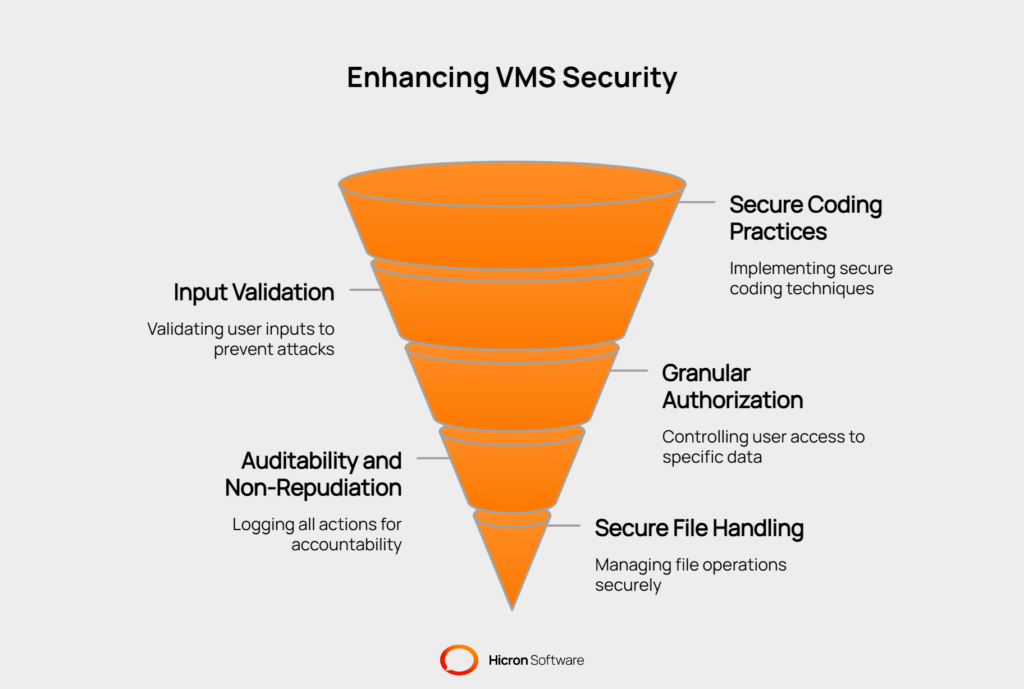
Many security breaches begin with an attacker submitting malicious input. Your VMS application must treat all user-supplied data as untrustworthy until it has been validated. This is a core principle for preventing many of the threats listed in the OWASP Top 10, a widely recognized standard for web application security.
By implementing strict input validation, you can defend against common attacks. For example, properly validating and sanitizing input helps prevent injection attacks that attempt to execute malicious code. Using secure development frameworks and centralized validation libraries ensures these defenses are applied consistently across the entire application.
Key defensive measures include:
Effective security goes beyond simply authenticating a user; it must also control what they are authorized to do. Granular authorization ensures that users can only access the specific functions and data necessary for their role. This extends the principle of least privilege from the infrastructure level into the application itself.
Instead of broad permissions, a secure VMS should support a detailed authorization model. This might be based on a user’s role (RBAC), their attributes, or the context of their request. Permissions should be enforced at both the functional level (what features they can use) and the data level (which specific records they can see or edit).
Examples of granular authorization include:
To ensure accountability and assist in forensic investigations, every action within the VMS must be logged. A comprehensive audit system creates a trail of all user and administrator activities, allowing you to see who did what and when. For these logs to be reliable, they must be tamper-evident, meaning any unauthorized changes to the logs themselves are detectable.
This concept supports non-repudiation, which prevents users from denying they performed an action. By logging key events and maintaining a change history on important records (such as vendor bank details or contract amounts), you create an authoritative record of system activity. This is a vital component of a zero-trust framework, as it provides the visibility needed to verify ongoing trust.
Key elements for auditability include:
The VMS application often manages file uploads and downloads, such as contracts, invoices, and compliance certificates. Each file operation presents a security risk that must be managed directly within the application. Poorly handled file uploads can introduce malware into your system, while insecure downloads can expose sensitive data.
A secure file handling process involves multiple layers of validation and control. It starts by defining strict rules for what can be uploaded, then processing those files in a safe, isolated environment. This prevents malicious files from being executed on the server or spreading to other users.
Best practices for secure file handling are:
On-premises VMS security does not end once the system is deployed. Security is an ongoing process that requires consistent attention and operational discipline. “Day-2” practices refer to the routine tasks and procedures that maintain your system’s security posture over time.
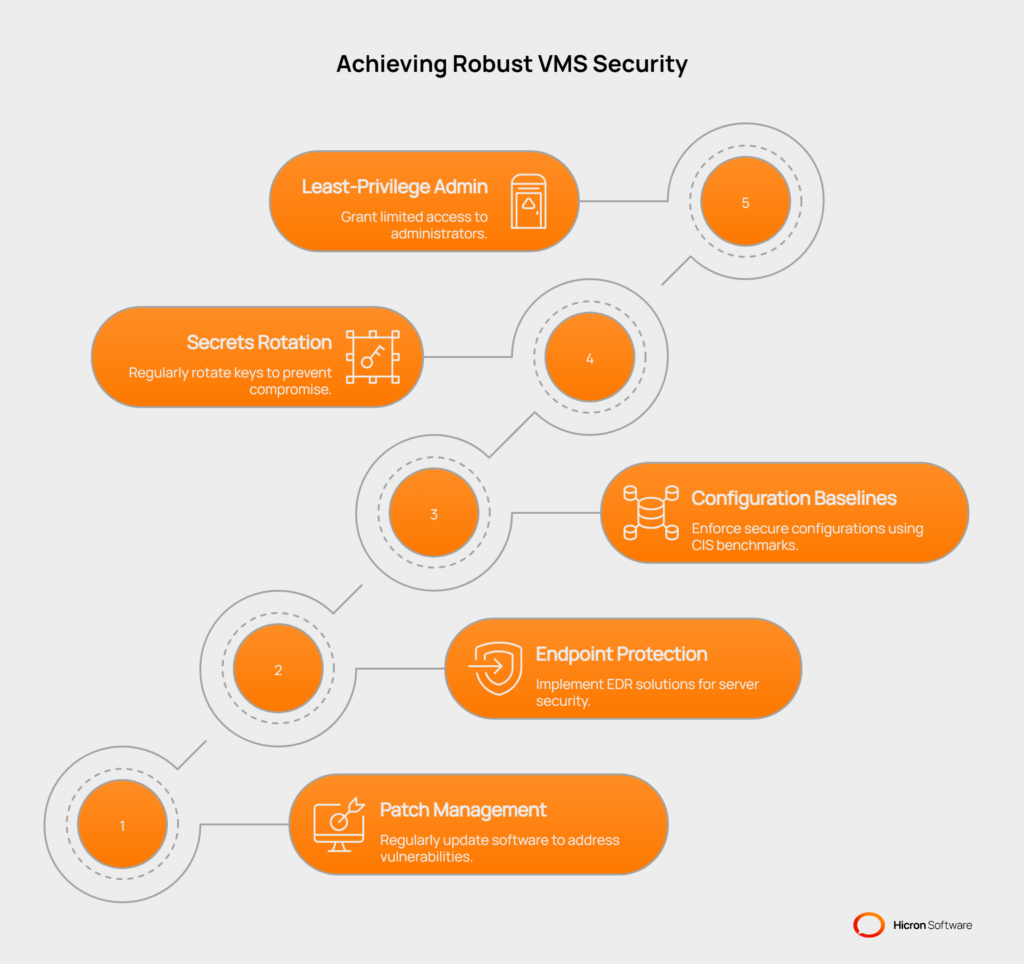
These activities ensure that your defenses adapt to new threats and that your initial security architecture remains effective long after launch.
Software is constantly evolving, and new vulnerabilities are discovered daily. A proactive patch management program is essential for protecting your on-premises VMS. This involves regularly scanning for and applying security patches to all components of your technology stack. Failing to do so leaves your system exposed to known exploits that attackers can easily leverage.
A comprehensive patching strategy should cover all layers of your system, including:
Your servers are the endpoints of your on-premises infrastructure, and they require dedicated protection. Traditional antivirus software is no longer sufficient. Modern Endpoint Detection and Response (EDR) solutions provide a much deeper level of visibility and control. EDR tools continuously monitor server activity for suspicious behavior that might indicate an attack in progress.
By deploying EDR on your VMS servers, you can:
A secure system can quickly become vulnerable if its configuration drifts from a safe state. Establishing and enforcing configuration baselines is crucial for maintaining a consistent security posture. These baselines define the secure configuration for every component of your VMS environment, including servers, databases, and network devices.
The Center for Internet Security (CIS) Benchmarks provide industry-recognized best practices for securely configuring a wide range of technologies. By adopting these benchmarks, you create a hardened and defensible system.
Secrets, such as API keys, passwords, and encryption keys, grant access to your most sensitive data and systems. If these secrets are compromised, the impact can be severe. A key part of on-premises VMS security is managing these secrets throughout their lifecycle. Regular rotation is a critical practice, as it limits the window of opportunity for an attacker who may have stolen a secret.
Standard operating procedures (SOPs) for key management ensure that this process is handled securely and consistently. This is especially important for managing the keys used for encryption at rest.
Even administrators should operate under the principle of least privilege. Granting administrators full, persistent access to everything increases the risk of both accidental misconfiguration and malicious activity. A least-privilege administrative workflow ensures that admins only have the access they need, when they need it. This aligns with a zero-trust approach where trust is never assumed, even for privileged users.
At the same time, you must plan for emergencies. “Break-glass” procedures are predefined protocols that allow for emergency access to a system when standard access methods fail.
Beyond securing the application and data, robust on-premises VMS security involves hardening the underlying platform against direct attacks. This means creating a perimeter of specialized defenses that can identify and block malicious activity before it ever reaches your VMS.
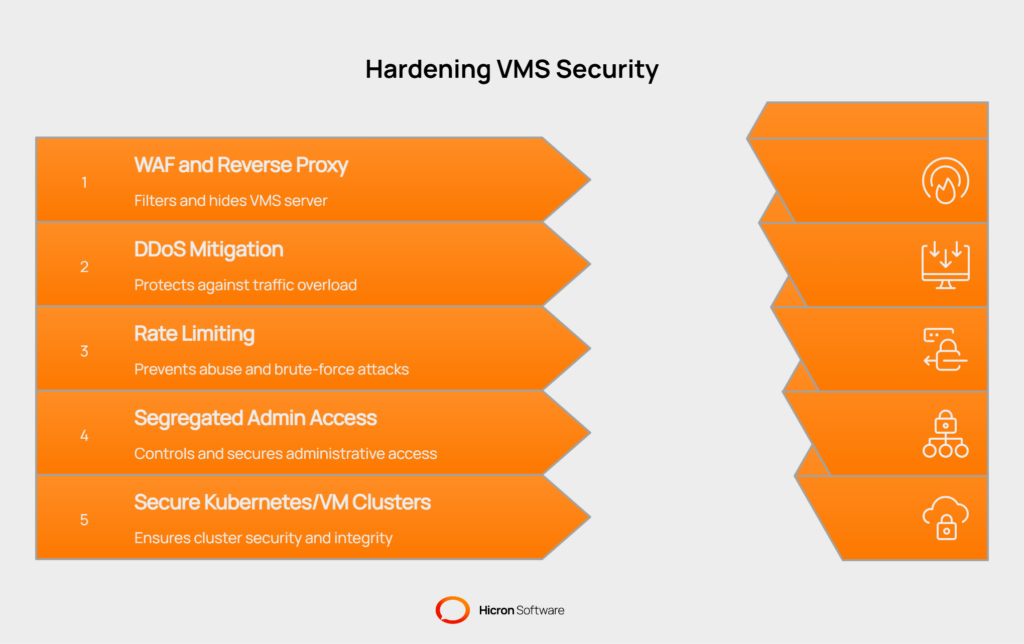
These measures protect your system’s availability, absorb automated attacks, and ensure that administrative access is tightly controlled.
Placing a Web Application Firewall (WAF) and a reverse proxy in front of your VMS serves as your first line of defense. The reverse proxy acts as a gatekeeper, receiving all incoming traffic and forwarding it to the VMS server. This setup hides your VMS server’s valid IP address, making it harder for attackers to target it directly.
The WAF inspects this incoming traffic for common web-based attacks. It uses a set of rules to identify and block malicious requests, such as SQL injection attempts or cross-site scripting (XSS) payloads. For example, if an attacker tries to submit a malicious script in a search field, the WAF will detect and block the request before it reaches your VMS application. This provides a critical layer of protection that complements your secure coding practices.
Your on-premises VMS is a critical system, and an outage can disrupt your entire supply chain. Distributed Denial of Service (DDoS) attacks threaten to cause such an outage by overwhelming your servers with illegitimate traffic. Implementing a DDoS mitigation strategy is essential for ensuring system availability. This can be an on-premises appliance or a cloud-based service that absorbs and filters out attack traffic, allowing legitimate user requests to get through.
Rate limiting is another effective technique that works on a smaller scale. It limits the number of requests a single user or IP address can make in a given period. This helps prevent automated brute-force login attempts and API abuse. For example, you could configure a rate limit to lock an account for 5 minutes after 10 failed login attempts, thwarting an automated password-guessing attack.
Administrative access to your VMS servers, databases, and network devices carries the highest level of risk. This access should never be exposed directly to the internet. Instead, all administrative connections should be routed through a segregated and highly monitored pathway. This aligns with a zero-trust philosophy, where access is granted through specific, controlled entry points.
A jump host (or bastion host) is a dedicated, hardened server that acts as the sole gateway for administrative access. An administrator must first connect to the jump host, which is heavily monitored and secured, before they can “jump” to the target server. Another common approach is to require administrators to connect to a corporate Virtual Private Network (VPN) before they can access internal management interfaces. This ensures that all administrative traffic is encrypted and originates from a trusted network.
Modern applications, including VMS, are often deployed on virtual machines (VMs) or on container orchestration platforms such as Kubernetes. The security of this underlying cluster is fundamental to your overall on-premises VMS security. Hardening the cluster involves applying security best practices at every level.
For example, using Kubernetes RBAC ensures that different teams, users, and service accounts have only the permissions they need within the cluster. You can also enforce security standards for how containers are run using pod security policies or admission controllers, which can prevent containers from running with excessive privileges. Image signing verifies that only approved, trusted container images are deployed into the cluster. Finally, runtime policy enforcement tools can detect and block anomalous behavior within running containers, providing a last line of defense against an active compromise.
On-premises VMS security also depends on your ability to monitor your environment and respond quickly when something goes wrong. A preventative strategy can block most attacks, but a “detect and respond” capability is essential for handling advanced threats that may slip through. This requires turning vast amounts of system data into actionable intelligence and having a clear remediation plan.
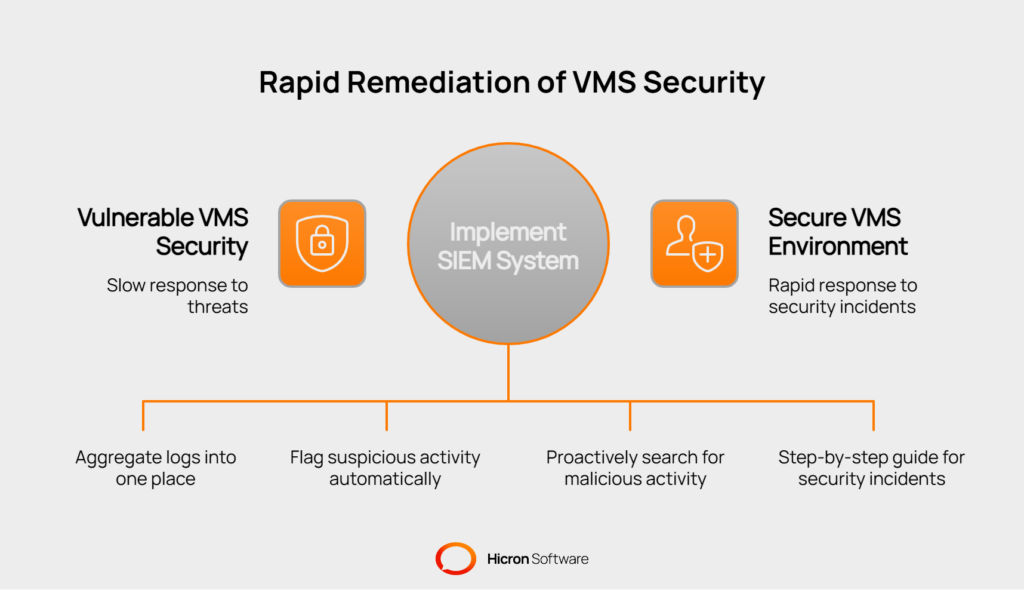
Your on-premises VMS environment generates a constant stream of logs from multiple sources. This includes application logs detailing user activity, database logs tracking data queries, operating system logs recording system events, and network logs showing traffic flows. To make sense of this data, you must aggregate it into a central location. A Security Information and Event Management (SIEM) system is designed for this purpose.
By feeding all logs into a SIEM, you create a single source of truth for security monitoring. The SIEM can correlate events across systems to identify complex attack patterns that would be invisible when viewed in isolation. For example, a suspicious login attempt on the application server (from application logs) followed by unusual database activity (from DB logs) could signal a breach in progress.
A SIEM can process millions of events, but its true power lies in its ability to automatically flag suspicious activity. Configuring alerts for anomalous behavior is a critical step in moving from passive monitoring to active defense. These alerts should be tuned to your specific environment to minimize false positives while ensuring you are notified of genuine threats.
Key anomalies to alert on include:
While automated alerts are essential, a proactive approach can uncover threats that automated systems miss. Threat hunting is the practice of actively searching through your logs and system data for signs of malicious activity. This assumes attackers may already be inside your network, moving quietly to avoid detection. A threat hunter might search for subtle indicators of compromise, such as a user account that suddenly starts accessing systems it has never accessed before.
Even without a dedicated threat-hunting team, periodic log reviews remain a valuable practice. Regularly reviewing key security logs, such as those detailing administrative access or changes to firewall rules, can help you spot misconfigurations or policy violations before they become serious security incidents.
When an alert fires or a threat is discovered, your team must be prepared to act immediately. An incident response (IR) playbook is a step-by-step guide that documents exactly how to respond to a specific type of security incident, such as a ransomware attack or a data breach. These playbooks eliminate guesswork during a crisis, ensuring a swift and consistent response.
To ensure your playbooks are effective, you should conduct regular tabletop exercises. These are simulated security incidents where your team walks through the response process to identify gaps in your plan. Finally, your systems should be prepared for a potential forensic investigation. This means ensuring that logs are preserved in a tamper-evident format and that you have the tools and procedures in place to collect evidence without contaminating it. This readiness is a key part of a mature security program.
Beyond technical defenses, a mature on-premises VMS security program must satisfy external regulations and internal governance policies. Proving that your system is secure is often as important as securing it. This involves aligning your practices with established standards, managing data according to its sensitivity, formalizing agreements with suppliers, and regularly testing your defenses.
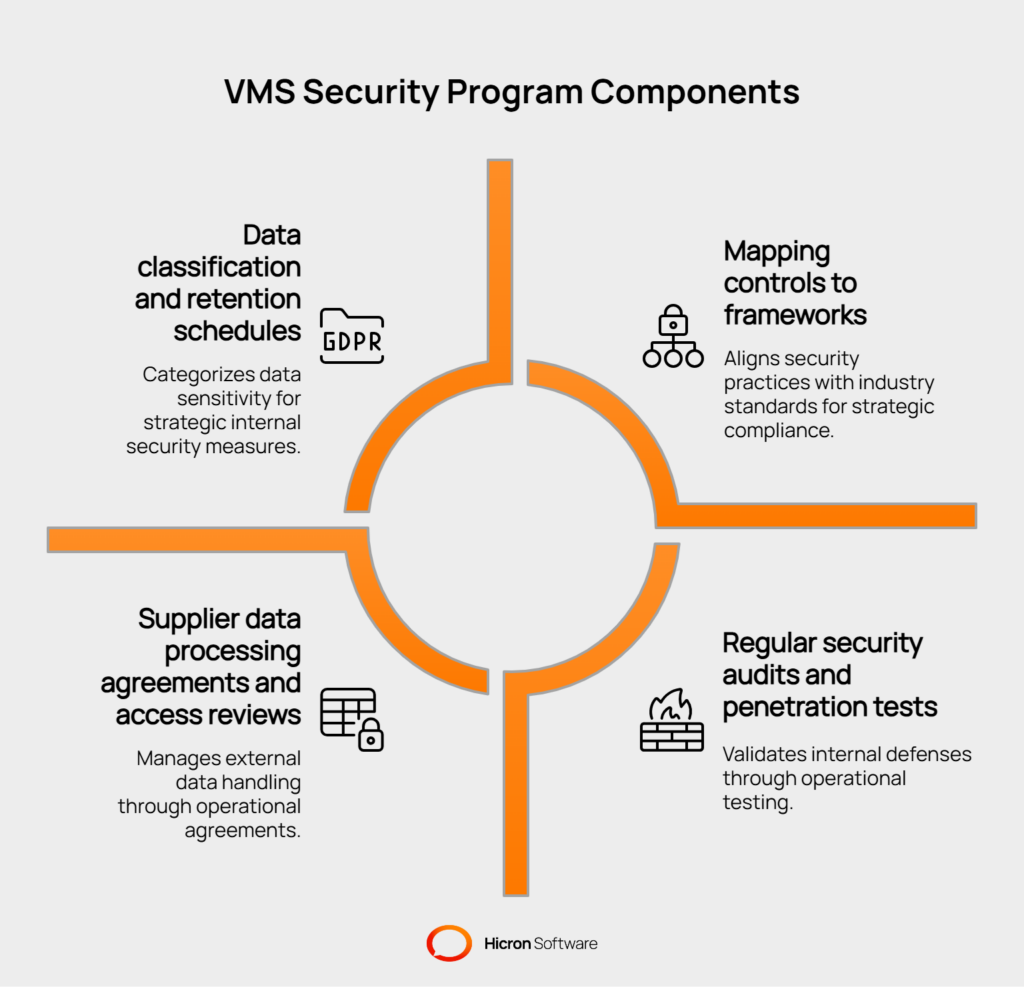
These activities demonstrate due diligence and build trust with auditors, customers, and partners.
Instead of inventing security policies from scratch, you can use established security frameworks as a guide. Mapping your security controls to frameworks like ISO 27001, the NIST Cybersecurity Framework (CSF), or SOC 2 provides a structured, industry-recognized approach to managing risk. This simplifies compliance efforts and demonstrates a commitment to best practices.
For example, when implementing access controls, you can map your RBAC model to the specific requirements outlined in the ISO 27001 standard. This not only ensures your approach is sound but also gives you ready-made documentation for an audit. Using these frameworks helps you identify gaps in your security posture and prioritize improvements logically.
Not all data is equally sensitive. A data classification policy is a formal process for categorizing information by sensitivity level, such as “public,” “internal,” and “confidential”. Your VMS likely contains a high volume of confidential data, including supplier pricing, bank details, and performance reviews. Classifying this data helps you apply the appropriate level of security. For instance, data marked as “Confidential” would require stricter access controls and encryption at rest.
A data retention schedule complements this by defining how long each category of data should be kept. Legal and regulatory requirements often dictate minimum retention periods for financial or contractual records. A clear policy ensures you meet these obligations while also allowing you to securely dispose of data that is no longer needed, reducing your storage footprint and overall risk.
Your relationship with suppliers involves more than just transactions; it includes data sharing. A Data Processing Agreement (DPA) is a legally binding contract that outlines how a supplier is permitted to handle the data you share with them. It should specify the purpose of data processing, the security measures they must have in place, and what happens to the data upon contract termination. This is a critical component of managing third-party risk.
Furthermore, if suppliers have any level of access to your VMS, it must be managed and monitored. Regular access reviews are a formal process to verify that user permissions are still appropriate. For example, a quarterly review could confirm that a specific supplier contact who left the company no longer has an active account in your VMS.
You cannot assume your security controls are working perfectly. You must test them. Regular security audits and penetration tests are essential for validating your defenses and uncovering hidden vulnerabilities. An internal or external audit will review your policies, procedures, and configurations against a chosen framework to assess compliance and identify gaps.
A penetration test is a more active approach in which ethical hackers simulate a real-world attack on your on-premises VMS. They attempt to breach your defenses to identify exploitable weaknesses in your infrastructure, application, and processes. For example, a penetration tester might try to exploit a software vulnerability to gain access to the database. The findings from these tests provide invaluable, actionable insights to strengthen your security posture.
While your VMS is on-premises, its users often are not. Suppliers, contractors, and other external partners need access to perform their functions, which extends your security concerns beyond your own network. Strong on-premises VMS security involves creating a secure, controlled environment for these third parties. This means providing them with the access they need without exposing your entire system or creating unnecessary risk.
The most effective way to provide external access is through a segmented supplier portal. This is a separate, web-facing part of your VMS designed specifically for third-party users. It acts as a walled-off environment, ensuring suppliers can only interact with the data and functions relevant to them. This approach enforces the principle of least privilege by design.
For example, a supplier logging into the portal might only be able to view their own purchase orders, submit invoices, and update their company contact information. They would have no visibility into your other suppliers, internal comments, or different parts of the VMS application. This segmentation drastically reduces the potential impact if a supplier’s account is compromised, as the breach would be contained within that limited portal environment.
Securing the entry points to these external portals is critical. Every external user account is a potential target, so authentication must be robust. Requiring Multi-Factor Authentication (MFA) for all external logins is a non-negotiable security control. It ensures that a stolen password alone is not enough for an attacker to gain access, as they would also need a second factor, such as a code sent to the user’s mobile device.
You can further strengthen access controls by using IP allowlists. This practice restricts portal access to a pre-approved set of IP addresses, such as a supplier’s corporate office network. Any login attempt from an unrecognized location would be automatically blocked. For temporary needs, such as granting a short-term contractor access to upload specific documents, you can use just-in-time (JIT) accounts. These accounts provide access for a limited time and are automatically disabled, minimizing the risk of lingering, unused credentials.
Your security responsibility extends to ensuring your partners handle access and data appropriately. This should be formalized in your contractual agreements. Contracts with suppliers should include specific security clauses that outline their responsibilities, such as maintaining the confidentiality of data, using strong passwords, and reporting any potential security incidents.
To ensure these clauses are being followed, you can require periodic attestations. This is a formal process in which the supplier must regularly certify compliance with your security requirements. For example, you might need an annual attestation from a supplier confirming they have removed VMS access for all their former employees. This creates a clear record of accountability and reinforces the importance of security throughout your supply chain.
Technology and architecture are crucial for on-premises VMS security, but the human element is equally important. Your employees, from end users to administrators, are your first and last line of defense. Building a security-first culture means embedding security consciousness into your organization’s daily operations. It transforms security from a technical task into a shared responsibility, where everyone understands their role in protecting sensitive vendor data.
A strong security culture begins with education. Comprehensive security awareness training is essential for both general users and privileged administrators. The goal is to equip them with the knowledge to recognize threats and follow secure procedures. For end users, this means understanding the value of the data they handle and the common ways attackers might try to trick them. For administrators, training should go deeper, covering the technical aspects of the secure workflows and configurations they are responsible for maintaining.
Training must be reinforced with practical application. Regular phishing simulations are an effective way to test and improve employee vigilance. These controlled, simulated attacks mimic real phishing emails, helping users learn to identify red flags in a safe environment. This should be paired with specific training on safe file handling, teaching users to be cautious with email attachments and downloads.
Crucially, you must foster an environment where employees feel comfortable reporting suspicious activity without fear of blame. A simple, clear process for reporting potential phishing emails or unusual system behavior enables your security team to respond quickly, often before any damage is done.
A user’s access needs change throughout their time at your company. A structured joiner-mover-leaver (JML) process is vital for managing permissions effectively.
To ensure permissions do not accumulate unnecessarily over time, conduct periodic access recertifications. This formal review process, typically performed quarterly, requires managers to verify that their team members’ access rights are still appropriate for their roles.
| Practice | Description | Security benefit |
| Security awareness | Educate all users and admins on security best practices, threats, and policies. | Reduces human error and empowers employees to be a part of the defense. |
| Phishing simulations | Send controlled, fake phishing emails to test and train employee vigilance. | Provides practical experience in identifying and avoiding real-world attacks. |
| JML process | Implement formal procedures for managing user access during onboarding, role changes, and offboarding. | Prevents “privilege creep” and ensures terminated employees cannot access systems. |
| Access recertification | Regularly review and re-approve all user access permissions. | Ensures the principle of least privilege is maintained over time. |
On-premises VMS security is not a “set it and forget it” discipline. The threat landscape constantly changes, and your defenses must evolve with it. A continuous improvement cycle built on testing, measuring, and refining your security posture is essential. This proactive approach allows you to identify weaknesses before attackers do, validate that your controls are working as expected, and demonstrate progress to stakeholders.
The foundation of any testing program is a consistent schedule of automated scans. Regular vulnerability scans of your servers, network devices, and databases can identify known security flaws, missing patches, and common misconfigurations. This gives you a continuous, high-level overview of your infrastructure’s health.
For the VMS application itself, Static Application Security Testing (SAST) and Dynamic Application Security Testing (DAST) are critical.
Using these tools provides a systematic way to find and fix bugs early in the development lifecycle and validate the security of production systems.
While automated scans find known vulnerabilities, they may not uncover complex attack paths that a creative human attacker could exploit. This is where adversarial simulations come in.
Red team exercises involve a team of ethical hackers simulating a real-world attack against your on-premises VMS and its supporting infrastructure. Their goal is to achieve a specific objective, such as accessing sensitive vendor data, while evading your security controls.
A purple team exercise enhances this by fostering collaboration between the offensive red team and your defensive blue team. As the red team executes an attack technique, the blue team works to detect and respond to it in real time.
This collaborative feedback loop is incredibly effective for fine-tuning your monitoring alerts, improving incident response playbooks, and training your security operations staff.
You cannot improve what you do not measure. Tracking key performance indicators (KPIs) provides objective data on the effectiveness of your security program. These metrics help you quantify risk, justify security investments, and focus your efforts where they are needed most. For on-premises VMS security, a good set of metrics can provide clear insights into your operational performance and overall risk posture.
| Category & practice / metric | Description | Security benefit |
| Testing: Vulnerability scans | Regularly scan infrastructure for known vulnerabilities and misconfigurations. | Provides continuous visibility into your security posture and patching compliance. |
| Testing: SAST/DAST | Analyze application code and the running application for security flaws. | Identifies and helps eliminate vulnerabilities directly within the VMS software. |
| Testing: Red/purple team | Simulate real-world attacks to test defensive capabilities and team collaboration. | Validates security controls against advanced threats and improves incident response. |
| Measurement: Patch SLAs | Track the time it takes to patch critical vulnerabilities after discovery. | Measures the efficiency of your vulnerability management program. |
| Measurement: Failed login trends | Monitor the volume and source of failed login attempts. | Can indicate brute-force attacks or other credential-stuffing campaigns. |
| Measurement: MTTD / MTTR | Measure Mean Time to Detect and Mean Time to Respond to incidents. | Quantifies the effectiveness of your detection and incident response capabilities. |
| Measurement: Backup restore tests | Track the frequency and success rate of tests to restore data from backups. | Provides confidence in your ability to recover from a destructive attack. |
Achieving robust on-premises VMS security is not a single project but an ongoing commitment. It requires a holistic strategy that combines a hardened architecture, rigorous operational discipline, and continuous monitoring. By building defenses at the platform, application, and data layers, you establish a strong foundation. This must be supported by disciplined Day-2 practices and a security-aware culture to maintain that defensive posture against an ever-evolving threat landscape.
Proper security comes from integrating these elements into a unified program. Your goal should be to create a resilient system that can repel attacks, detect incidents, and respond to them quickly.
If you’re ready to take your vendor management security to the next level, reach out to start a conversation about your specific challenges. Consider scheduling a comprehensive assessment of your VMS to uncover critical vulnerabilities and work with experts to develop a practical, prioritized roadmap for improvement.
Don’t wait until an incident occurs, plan a recovery test today to ensure you’re prepared for whatever comes next.

An on-premises VMS gives you full control over your data and infrastructure, but it also makes you directly responsible for its security. Unlike a cloud provider that manages security for you, you must handle everything from server patching and network configuration to application hardening and data backups. Attackers often target on-premises systems because they may have unpatched vulnerabilities or misconfigurations that can be exploited to gain access to valuable vendor data.
While a layered approach is best, enforcing Multi-Factor Authentication (MFA) for all external users is arguably the most critical control. Stolen or weak passwords are a primary cause of security breaches. MFA ensures that even if an attacker obtains a supplier’s password, they cannot access your system without the second authentication factor (like a code from a mobile app). This simple step dramatically reduces the risk of unauthorized access.
Protecting data at rest is crucial. The most effective method is data encryption. All sensitive information within the VMS database, such as bank account details, contracts, and performance reviews, should be encrypted. This means that even if an attacker manages to access the server or database files directly, the data itself will be unreadable without the correct decryption keys. This should be combined with strict access controls to ensure only authorized personnel can view decrypted data.
The key is to turn log data into actionable intelligence, which is where a Security Information and Event Management (SIEM) system comes in. You should configure your SIEM to alert on specific, high-risk anomalies. Key events to monitor include “failed login storms” (indicating brute-force attacks), unusually large data exports (a sign of data theft), and any attempts by users to access data or systems outside their regular role. Regularly reviewing these alerts helps you spot threats early.
Meeting compliance standards for on-premises VMS security requires mapping your security controls directly to the framework’s requirements. For example, you would document how your Role-Based Access Control (RBAC) policies meet the ISO 27001 access control requirements. The process involves performing a gap analysis to identify where you fall short, creating a roadmap to implement missing controls, and gathering evidence (such as penetration test reports and access review logs) to demonstrate your compliance to auditors.
Hicron Software proved to be a trusted partner with unmatched technical expertise, delivering a scalable and user-friendly web application that was pivotal to our successful U.S. market expansion.

Hicron’s contributions have been vital in making our product ready for commercialization. Their commitment to excellence, innovative solutions, and flexible approach were key factors in our successful collaboration.
I wholeheartedly recommend Hicron to any organization seeking a strategic long-term partnership, reliable and skilled partner for their technological needs.

After carefully evaluating suppliers, we decided to try a new approach and start working with a near-shore software house. Cooperation with Hicron Software House was something different, and it turned out to be a great success that brought added value to our company.
With HICRON’s creative ideas and fresh perspective, we reached a new level of our core platform and achieved our business goals.
Many thanks for what you did so far; we are looking forward to more in future!

Hicron is a partner who has provided excellent software development services. Their talented software engineers have a strong focus on collaboration and quality. They have helped us in achieving our goals across our cloud platforms at a good pace, without compromising on the quality of our services. Our partnership is professional and solution-focused!

The IT system supporting the work of retail outlets is the foundation of our business. The ability to optimize and adapt it to the needs of all entities in the PSA Group is of strategic importance and we consider it a step into the future. This project is a huge challenge: not only for us in terms of organization, but also for our partners – including Hicron – in terms of adapting the system to the needs and business models of PSA. Cooperation with Hicron consultants, taking into account their competences in the field of programming and processes specific to the automotive sector, gave us many reasons to be satisfied.

