11 DevOps Automation Tools to Streamline Your Workflow
- May 21
- 10 min


Real-time ERP data synchronization connects enterprise systems to maintain consistent information across operations. This integration creates a single source of truth for organizations. Accurate data integration eliminates manual data entry and prevents costly financial losses. Business leaders must adopt reliable data synchronization methods to optimize operational efficiency. This comprehensive guide outlines best practices for data management and system architecture.
TL;DR: Connecting your enterprise software directly improves data accuracy and operational efficiency. Organizations should use middleware for complex setups and API connections for simple integrations. Implementing idempotent design prevents duplicate orders and system failures. Proper data quality management ensures accurate inventory and reliable reporting across all connected platforms.
An ERP system acts as the central hub for enterprise operations. ERP data synchronization is the automated process of sharing information between enterprise platforms. This data exchange connects an ERP system with other software applications. Accurate synchronization guarantees that all departments access the same customer records and inventory data. Integrating systems helps avoid data silos and prevents organizations from depending on outdated information.
Without integration, companies face data discrepancies across departments.
Gartner’s study finds that Companies that successfully adopt new technology experienced a 75% decrease in financial errors, while those that fail to do so saw a 61% rise in errors.
Reliable data synchronization enhances operational efficiency throughout the organization, allowing workers to save up to 40 hours a week (depending on your processes) that they would otherwise have spent retyping customer information into various databases. Accurate inventory levels allow sales teams to make better business decisions immediately. Efficient synchronization processes remain foundational for modern enterprise architecture.
A single source of truth guarantees that one system holds the definitive data record. This centralized approach to data sync prevents conflicting information across different business applications. When multiple databases store overlapping customer data, confusion inevitably arises. A unified data source eliminates these inconsistencies entirely.
Without this centralization, a CRM might display a different address than the ERP system. Such data discrepancies lead to failed deliveries and frustrated clients. Establishing one authoritative database ensures every application references the exact same facts. This alignment improves system performance and builds trust among internal teams.
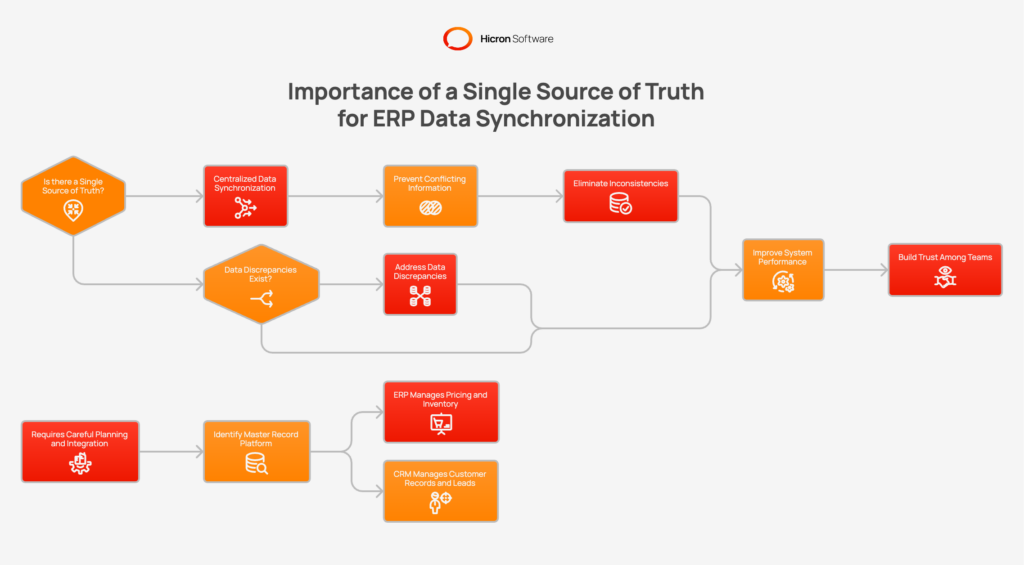
Creating this truth requires careful planning and strong integration strategies. Organizations must identify which platform acts as the master record for specific details. For example, the ERP generally manages product pricing and precise inventory information, while the CRM system typically oversees customer records and initial sales leads.
Different business requirements demand different synchronization methods to maintain data accuracy.
The main types of ERP data synchronization include:
Real-time synchronous integration updates a target system and waits for success confirmation. This method works best for critical data like credit checks or customer addresses. Real-time asynchronous synchronization pushes updates via message queues without waiting for confirmation.
Batch processing exchanges large data files at scheduled intervals. Organizations often use this method for nightly reports or bank reconciliations. It suits high-volume data that does not require immediate, real-time updates. Change Data Capture streams every database change to other systems immediately.
Choosing the right pattern to synchronize data depends heavily on specific use cases and scalability needs. Real-time synchronization prevents systems from freezing during minor network delays. Two-way sync allows data to flow freely back and forth between platforms. One-way sync pushes data in a single direction to protect sensitive master records.
Choosing between direct APIs and middleware shapes the scalability of an integration strategy. Direct APIs connect systems point-to-point using custom code. This approach works well for small operations managing three or fewer external systems. Direct APIs offer low latency but require extensive coding and maintenance.
Middleware platforms sit between the ERP system and other applications. These hubs handle data transformation and error handling for complex integrations. Organizations should choose middleware when connecting four or more data sources. Middleware reduces maintenance overhead because changes affect only the central hub connection.
Integration Platform as a Service delivers cloud-based solutions for rapid deployment, featuring prebuilt connectors that reduce coding effort. Middleware offers centralized control to oversee and ensure system health. For most mid-market organizations, iPaaS is the recommended middleware choice for integrating with modern applications.
|
Direct APIs |
Middleware |
|
|
Connection Type |
Connects systems point-to-point using custom code. |
Sits between the ERP system and other applications, acting as a central hub. |
|
Best For |
Small operations managing three or fewer external systems. |
Complex integrations connecting four or more data sources. |
|
Pros |
Low latency. |
Reduces maintenance, handles data transformation, and manages error handling. |
|
Cons |
Requires extensive coding and high maintenance. |
Changes can affect the central hub connection. |
|
Scalability |
Limited scalability. |
Offers the best path for long-term scalability for growing enterprises. |
|
Example |
Integration Platform as a Service (iPaaS) offers cloud-based solutions with pre-built connectors that reduce coding. |
Provides centralized governance for monitoring and maintaining system health. |
Experts recommend transitioning to middleware, Enterprise Service Bus (ESB), or Integration Platform as a Service (iPaaS) architectures when managing 4 to 5 external systems. These hub-and-spoke models simplify integration by replacing quadratic growth (n*(n-1)/2) with linear scaling.
For example, in a 10-system setup, the integration requirement drops from 45 custom connections to just 10 standardized connections to a central hub.
Ensuring data quality should be a priority before beginning any integration coding. Feeding bad data into a new ERP system spreads errors across systems. Organizations need to perform a thorough data audit to detect formatting problems. Teams should remove duplicate entries and obsolete data prior to starting synchronization.
Standardization requires creating detailed mapping documentation for every data field. A data dictionary defines field names and formats for every integration point. Middleware can serve as a transformation layer to automatically convert mismatched formats. This ensures product codes and location identifiers remain identical across all platforms.
Automated quality tools (such as Great Expectations, AWS Deequ/PyDeequ, Informatica Data Quality, Monte Carlo, Metaplane, Alteryx, Talend Data Quality, Trifacta/Google Cloud Dataprep, Tamr, and OvalEdge) help clean large volumes of business data. These tools identify duplicates and flag anomalies for human review. Validation rules prevent new errors from entering the source system during manual updates. Clean data improves operational efficiency and ensures reliable reporting across the enterprise. For enterprise data governance, the strongest fits are Collibra, Informatica, Alation, Atlan, and Microsoft Purview.
Here are a few tips to get it right:
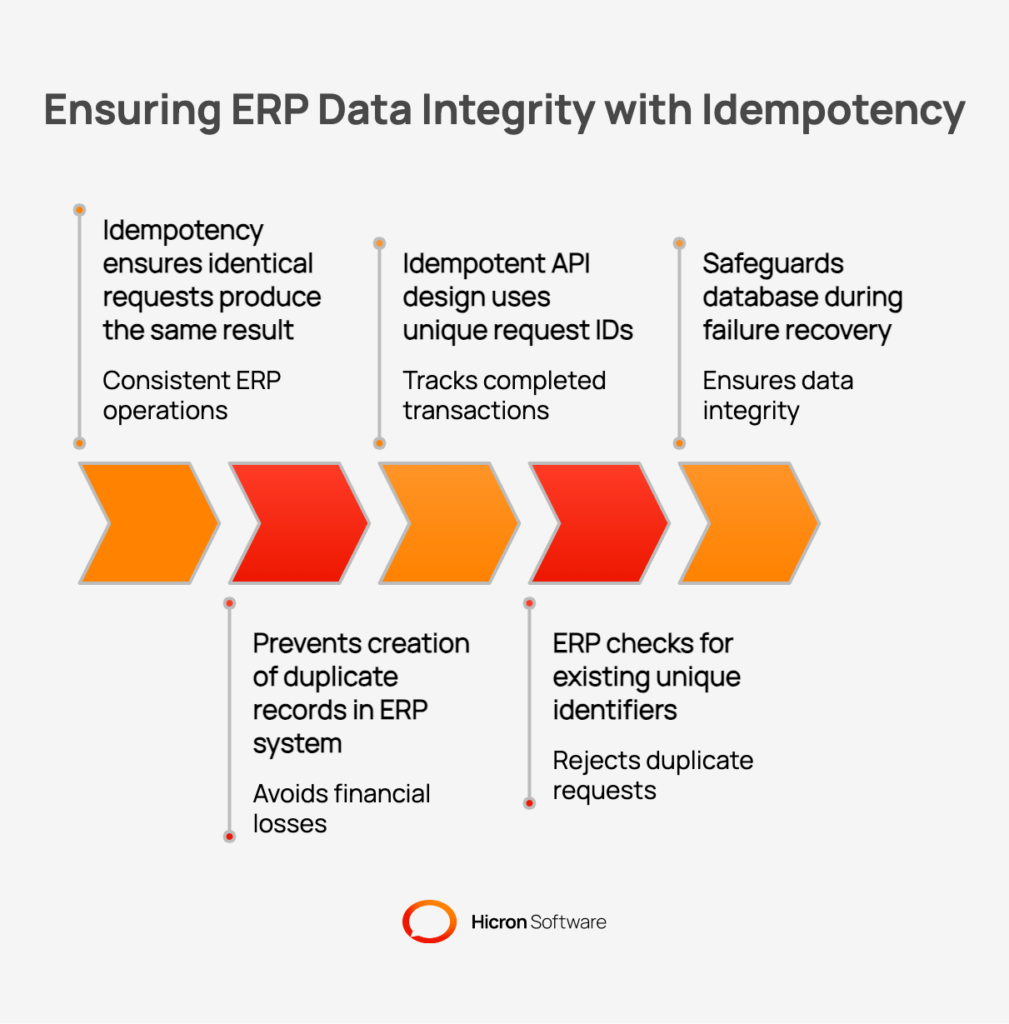
Idempotency is an operation’s property where performing it multiple times yields the same result as doing it once. Idempotency ensures that identical requests produce the exact same result every time. This design principle prevents the creation of duplicate records in an ERP system. Without idempotency, network retries could automatically generate multiple identical sales orders. Duplicate orders cause severe financial losses and major logistical headaches.
Systems encounter errors caused by unstable connections or when users double-click. A slow system might cause a timeout, prompting an automatic retry. If the first attempt succeeded, the retry creates a duplicate unless idempotency exists. Idempotent API design uses unique request IDs to accurately track completed transactions.
When an ERP receives a request, it checks for existing unique identifiers. If the order number already exists, the ERP rejects the duplicate request. This check protects the database during failure recovery and queue redelivery events. Idempotency remains a critical safeguard for reliable data synchronization.
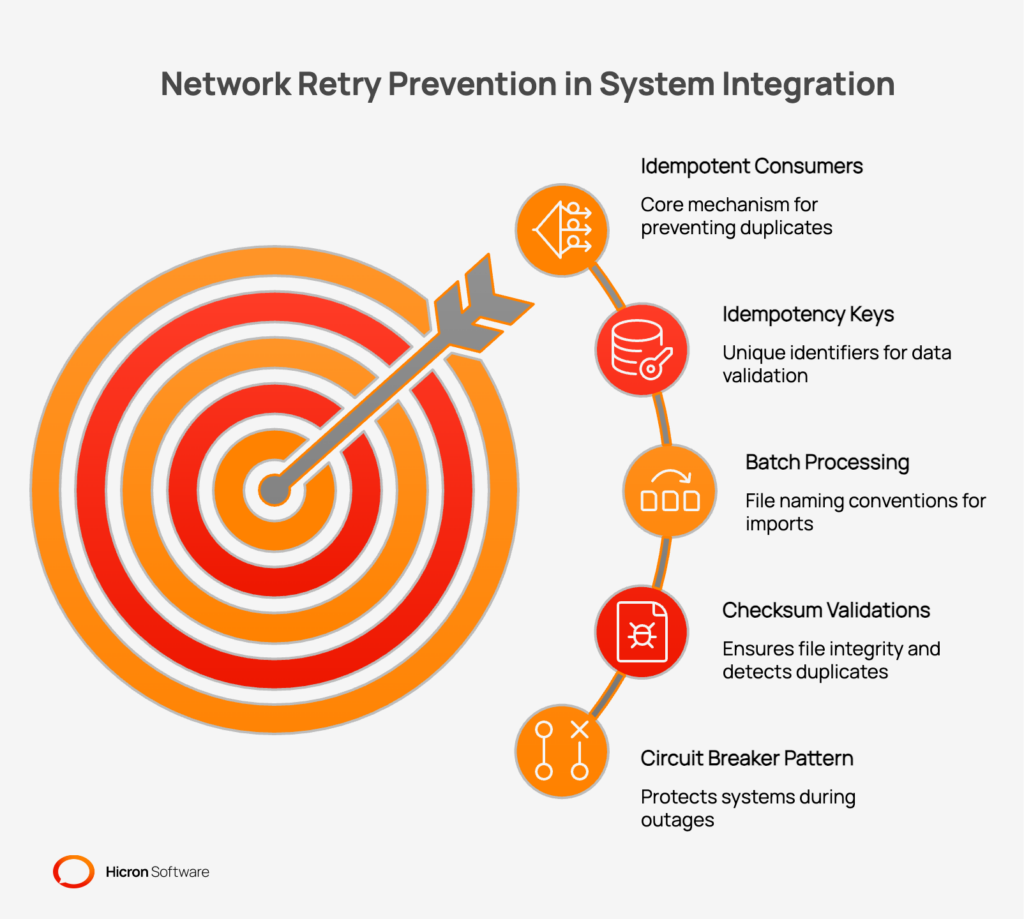
Architecting systems to handle network retries requires strict validation and error handling. Developers need to create idempotent consumers for asynchronous message queues. The ERP must check for unique idempotency keys prior to processing any new data updates. Order numbers or customer emails serve as excellent, unique identifiers for this purpose.
Batch processing relies on strict file naming conventions to avoid duplicate imports. Checksum validations ensure file integrity and help identify exact duplicates before processing begins. These measures prevent finance systems from importing the same invoice multiple times. When retries are necessary, exponential backoff should be employed to handle temporary system timeouts smoothly.
A circuit breaker pattern protects systems during severe outages or failures. If the ERP goes offline, the integration stops sending requests immediately. It queues the requests to avoid flooding the system upon recovery. This architecture ensures smooth integration across multiple databases without data loss.
Master Data Management defines strict rules for data ownership across an organization. MDM designates one specific application as the ultimate system of record. This strategy eliminates data silos by clarifying which system holds the accurate facts. A strong MDM framework supports every successful ERP integration project.
For example, an ERP system typically owns inventory levels and financial data. A CRM system acts as the master for marketing leads and customer details. Establishing these boundaries prevents non master systems from overwriting critical business data. Clear access controls protect sensitive information from unauthorized manual updates.
Governance policies dictate how changes to records propagate from the master to other systems. These policies simplify internal workflows and maintain consistent data quality. Whenever systems share information, the master record takes precedence and overrides conflicting data. MDM forms the foundation of all best practices for data management.
Common data flows that connect core business functions to improve daily operations include:
Optimizing these flows requires:
Efficient synchronization processes rely on clean, uninterrupted data flows.
Scaling an ERP synchronization strategy requires planning for increased volume and complexity. Organizations should shift from simple point-to-point APIs toward more robust middleware solutions. Middleware handles massive data spikes without compromising overall system performance. Scalability demands an architecture that can support dozens of connected applications easily.
Teams should deploy monitoring tools to consistently track data flows between systems. As data volumes increase, managing errors becomes more challenging and critical. Effective synchronization relies on automated alerts to quickly identify and address integration failures. Regular audits help monitor and maintain data integrity as the ecosystem expands.
Cloud-based solutions offer elastic infrastructure capable of processing large-scale sync data. They come with pre-built connectors for well-known CRMs and financial systems. Using iPaaS reduces IT workload and simplifies the integration of new data across sources. Proper planning for data at scale is essential for the long-term success of any enterprise ERP synchronization initiative.
Skilled IT professionals create highly reliable bridges between disconnected business software platforms. How does a proper data synchronization setup actually improve daily corporate operations?
These real-life implementations of the data synchronization process save valuable time and almost completely eliminate expensive human errors. Experienced developers ensure this steady flow of information remains secure and always up to date. Such targeted integrations directly reduce operating costs and system failures while increasing overall productivity across the entire internal processes.
Let us guide you through the complexities of ERPs, record changes, data synchronization. Reach out today, and we’ll help you achieve seamless data flow.
Cloud platforms provide scalable infrastructure that handles large volumes of data effortlessly. These solutions offer centralized dashboards for monitoring the health and security of integrations. Modern iPaaS tools include hundreds of pre-built connectors for popular business applications. Cloud architecture eliminates the need for expensive on-premises hardware maintenance.
Two-way sync enables data to flow freely, benefiting customer service applications. However, one-way sync works better for protecting highly sensitive master records. Organizations often use one-way sync to push approved pricing from the ERP outward. The choice depends entirely on specific business requirements and governance policies.
Costs vary based on the chosen integration method and system complexity. Direct APIs have low upfront costs but require expensive long-term maintenance. Middleware platforms involve subscription fees but drastically reduce development time and effort. Organizations should weigh initial expenses against long-term operational efficiency gains.
Project timelines depend on data cleanliness and the number of connected systems. Using pre-built middleware connectors can reduce deployment time to a few weeks. Custom API development for multiple systems often takes several months to complete. Cleaning dirty data beforehand prevents massive delays during the implementation phase.
Poor synchronization causes data discrepancies that lead to severe financial losses. Inaccurate inventory levels cause overselling and permanently damage customer relationships. Duplicate orders waste resources and complicate accounting processes. Manual data entry errors increase compliance risks and reduce overall business agility.
Hicron Software proved to be a trusted partner with unmatched technical expertise, delivering a scalable and user-friendly web application that was pivotal to our successful U.S. market expansion.

Hicron’s contributions have been vital in making our product ready for commercialization. Their commitment to excellence, innovative solutions, and flexible approach were key factors in our successful collaboration.
I wholeheartedly recommend Hicron to any organization seeking a strategic long-term partnership, reliable and skilled partner for their technological needs.

After carefully evaluating suppliers, we decided to try a new approach and start working with a near-shore software house. Cooperation with Hicron Software House was something different, and it turned out to be a great success that brought added value to our company.
With HICRON’s creative ideas and fresh perspective, we reached a new level of our core platform and achieved our business goals.
Many thanks for what you did so far; we are looking forward to more in future!

Hicron is a partner who has provided excellent software development services. Their talented software engineers have a strong focus on collaboration and quality. They have helped us in achieving our goals across our cloud platforms at a good pace, without compromising on the quality of our services. Our partnership is professional and solution-focused!

The IT system supporting the work of retail outlets is the foundation of our business. The ability to optimize and adapt it to the needs of all entities in the PSA Group is of strategic importance and we consider it a step into the future. This project is a huge challenge: not only for us in terms of organization, but also for our partners – including Hicron – in terms of adapting the system to the needs and business models of PSA. Cooperation with Hicron consultants, taking into account their competences in the field of programming and processes specific to the automotive sector, gave us many reasons to be satisfied.

