Methods, types, pros and cons of system integration
- August 31
- 10 min

iPaaS (Integration Platform as a Service) is a cloud platform that connects applications, data stores, and APIs through prebuilt connectors and visual workflow design, with monitoring and governance managed from a central control plane.
Most integration programs stall on connector maintenance and unclear ownership long before anyone debates architecture. iPaaS gives teams a cloud control plane with prebuilt connectors and visual workflow design, which is why many estates ship their first production flow in weeks rather than quarters. Gartner placed worldwide iPaaS revenue at $8.5 billion in 2024, up 23.4 percent year over year, in its market share analysis. iPaaS is projected to grow from USD 19.15 billion in 2026 to USD 108.76 billion by 2034, exhibiting a CAGR of 24.20% during the forecast period.
This guide walks through architecture, three workflow examples, delivery tradeoffs, and a weighted vendor scorecard with proof of concept and total cost steps. Hybrid connectivity, audit logs, and data residency filters sit beside connector coverage when you evaluate platforms for regulated estates.
Key takeaways:
Picture the iPaaS integration platform as a managed cloud service with one place to design flows, run them, and prove what changed. The control plane hosts design tools, connector libraries, and runtime execution. When ERP, warehouse, or legacy databases stay on prem, optional hybrid agents extend that plane into the datacenter without moving the system of record to the public cloud.
Six modules usually share the work.
Platforms such as Boomi, MuleSoft, Workato, Microsoft Power Platform, and Celigo share this modular shape. Bring a written connector list and deployment model to every demo. Feature slides alone rarely tell you whether a platform fits your stack.
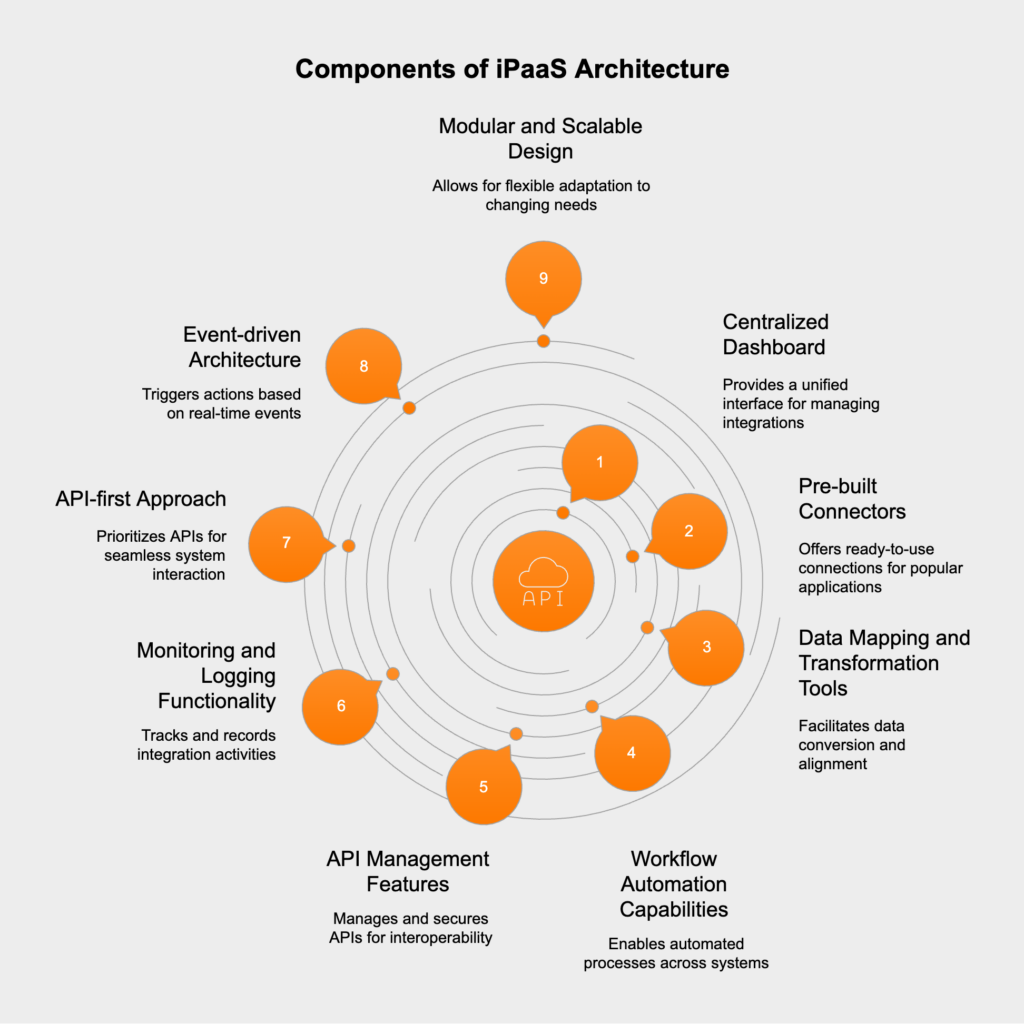
Once the architecture is clear, the day-to-day work follows a repeatable rhythm. A business analyst or integration engineer owns the flow from first mapping through production monitoring.
Most teams run the same five steps for every new connection.
In production, alerts land on the integration owner when retries exhaust or schema drift breaks a mapping. That owner updates the flow or escalates to the application team that owns the upstream schema change.
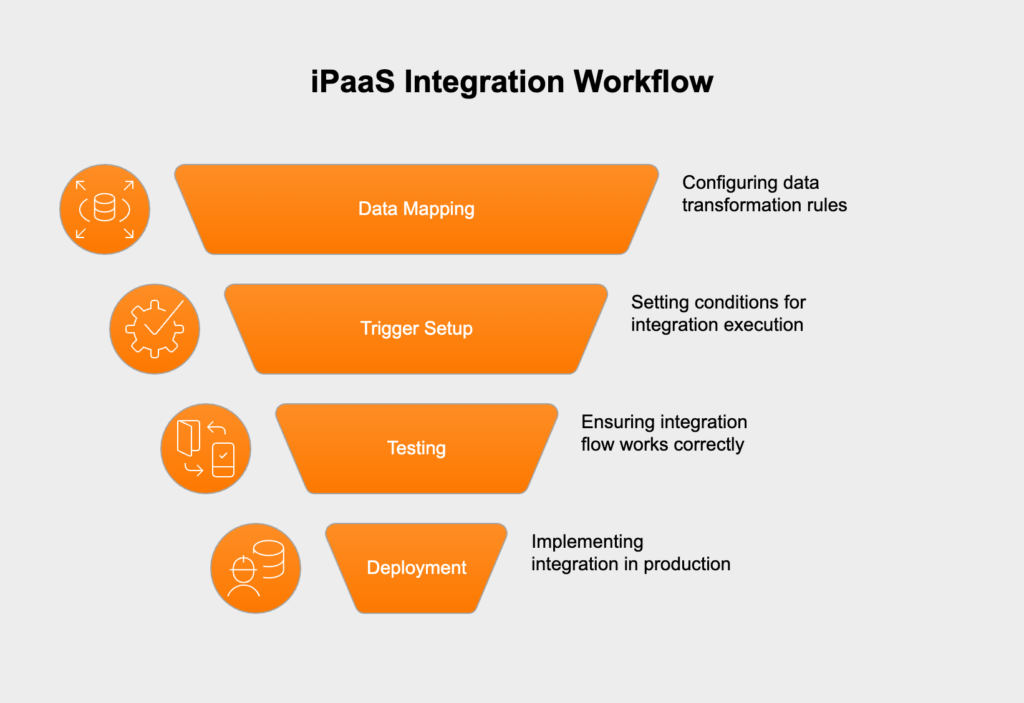
Promotion path: Teams that pair iPaaS delivery with continuous deployment often adopt DevOps services to automate promotion between environments and keep integration tests in the same pipeline as application releases.
Component lists start to click once you attach real system names and handoffs between teams. These three patterns show up on most enterprise shortlists.
A sales team closes a deal in Salesforce. The iPaaS flow listens for a closed won event, maps account and line item fields to the ERP schema, and creates a sales order in SAP or NetSuite. Finance receives the order number in the ERP within seconds, and the CRM stores the ERP reference on the opportunity so support and billing share one identifier.
A lease status change in a property management system triggers an update to the general ledger. Rent schedules, deposit holds, and tenant IDs map to the chart of accounts in the accounting platform. Operations sees one tenant record across both systems, which removes duplicate manual entry during month end close.
An insurance portal uploads a claim with attachments. The iPaaS flow validates file type, writes metadata to the claims system, and stores PDFs in a document repository with retention tags. Adjusters open one case view that links policy data, photos, and audit timestamps without switching tools.
Each example follows the same operating pattern: a trigger fires on a business event, mapping translates records at the boundary, and a named owner monitors failures while approving schema changes before the next promotion to production.
If one of these mirrors your backlog, use it as the spine for a proof of concept rather than inventing a synthetic demo flow.
Integration technology moved from custom code toward managed cloud platforms over three decades. SaaS adoption accelerated that shift, and business teams started asking for new connections faster than internal middleware groups could staff them.
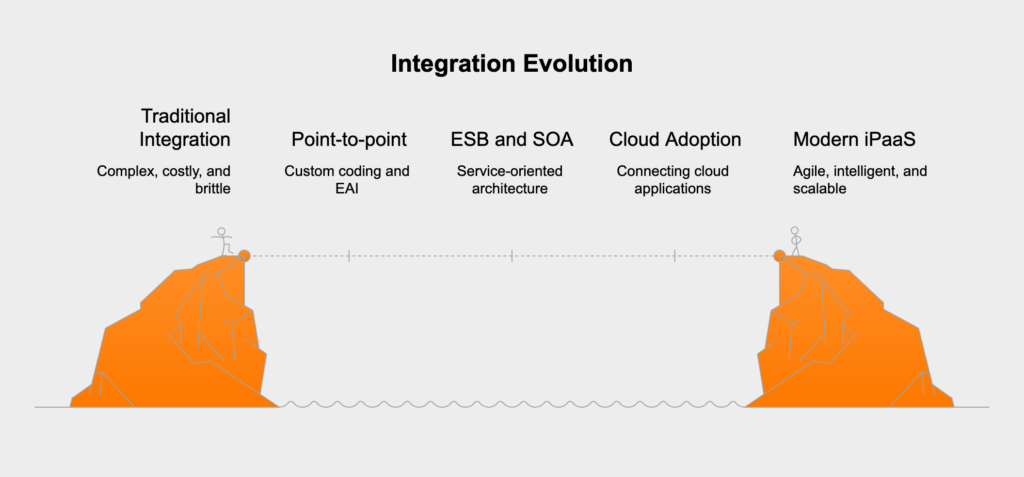
1990s to 2000s: point-to-point custom code and Enterprise Application Integration (EAI). Developers wrote bespoke scripts between each pair of systems. Every new connection duplicated effort.
2000s to 2010s: Service-Oriented Architecture and Enterprise Service Bus (ESB). Central buses routed messages between internal services. Deployments required on-prem hardware and specialized integration teams.
2010s to present: cloud iPaaS. Vendors deliver connectors and runtime as a subscription service. Teams design flows in a browser and scale execution without provisioning middleware servers.
|
Approach |
Best for |
Typical owner |
Time to first integration |
|
Point-to-point custom code |
One stable pair of systems |
Engineering team |
Weeks per pair |
|
ESB on-prem bus |
Large enterprise with centralized IT |
Integration center of excellence |
Months |
|
iPaaS cloud platform |
Many SaaS apps plus hybrid legacy |
IT plus business analysts |
Days to weeks per flow |
Gartner reported that worldwide iPaaS revenue grew 30.7 percent to $7.77 billion in 2023 from $5.9 billion in 2022. iPaaS ranked as the largest stand alone integration segment and the top contributor to net dollar inflow in the application infrastructure and middleware market that year.
Organizations moving off ESB or brittle point-to-point code often start with legacy modernization services that map which flows move first and which systems stay on-prem during a multi-year transition.
Which features actually matter on a Tuesday morning when a flow fails at month-end close? Six capability groups deserve weight on any shortlist scorecard.
For ERP-centric estates, custom ERP solutions often sit beside iPaaS as the system of record while the integration layer handles cross-application sync.
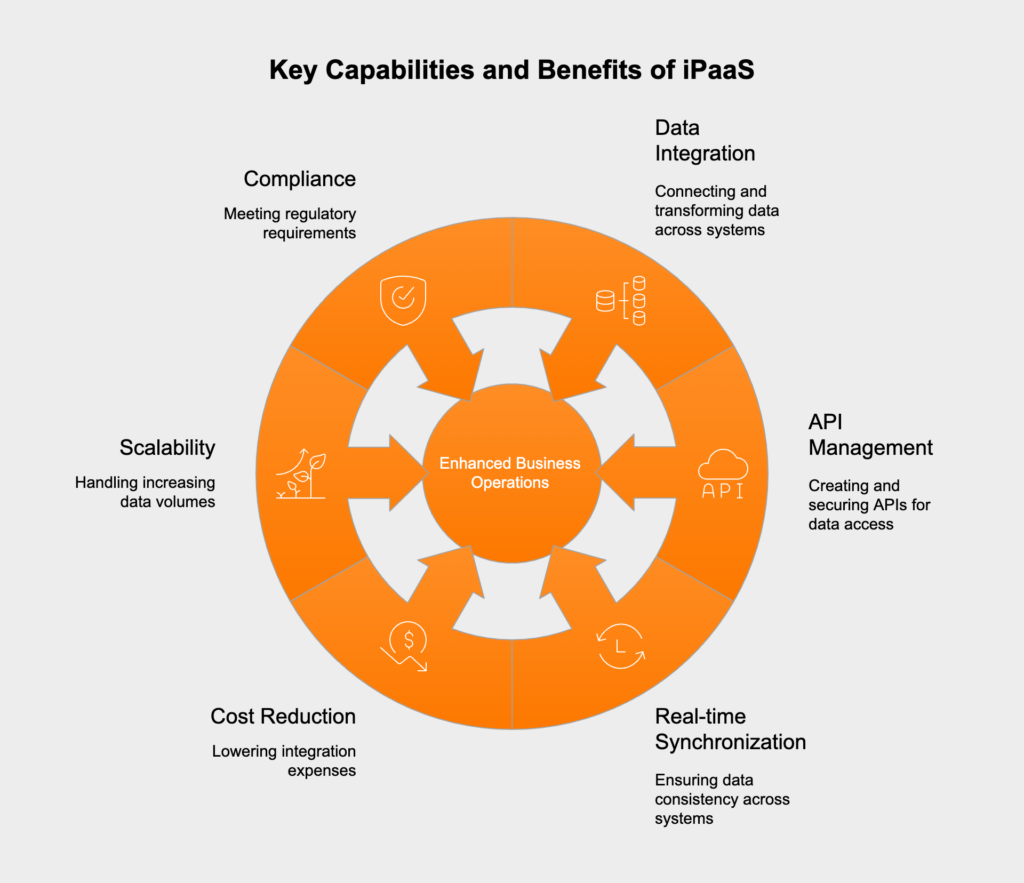
Market growth shows how many organizations bet on iPaaS as their default integration layer. Your steering group still needs operational proof after go-live.
Market context:
Gartner market share analysis placed worldwide iPaaS revenue at $8.5 billion in 2024, up 23.4 percent from 2023. iPaaS ranked as the second-fastest-growing segment in the application and infrastructure middleware market and remained the top contributor to overall growth in that category.
The prior year report showed revenue of $7.77 billion in 2023 after 30.7 percent growth from $5.9 billion in 2022, according to Gartner. The five largest vendors by revenue share in 2023 were Salesforce (MuleSoft ), Oracle, Informatica, SAP, and Boomi, together holding 57.7 percent of the market.
Broader SaaS adoption fuels integration demand. Gartner forecasts worldwide end-user SaaS spending at $247.2 billion in 2024, with growth toward nearly $300 billion in 2025. Each new SaaS deployment adds another endpoint that iPaaS or equivalent integration tooling connects.
Track these outcome metrics after go-live:
Cloud delivery removes on-prem middleware servers from the capital budget line. Self-service design tools let analysts own simple flows while integration engineers focus on complex hybrid paths, which shortens the queue for strategic projects.
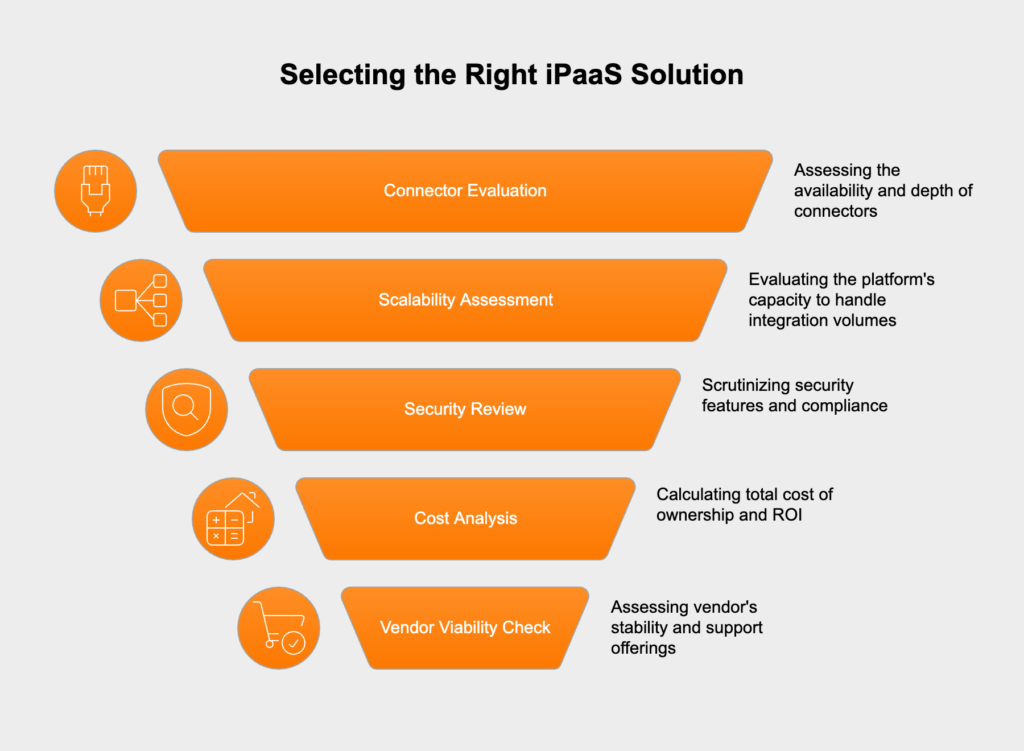
Vendor selection works best when it mirrors a software procurement program: clarify workloads, translate them into technical constraints, score finalists, then prove value in a bounded proof of concept. The nine steps below condense buyer guides from analyst and vendor research into one path a cross-functional team can run in six to ten weeks.
Before the first demo: List the workflows that hurt today. Everything else in the scorecard hangs off that list.
Before reviewing demos, list the top three to five workflows that need connection first. Examples include CRM to ERP order sync, property management to accounting, or claims intake to a document store. Name the teams most affected by missing integration, including business operations, finance, IT, or compliance, and give each a voting weight on the scorecard. Primary goals might include faster time to market, reduced custom code, better data quality, real-time sync, or enabling AI-assisted automation.
Inventory cloud apps, on-prem systems, legacy ERPs, and any mainframe-adjacent databases. Decide whether the estate needs pure cloud, hybrid cloud plus on-prem, or multi-region multi-tenant setups. For EU and UK contexts, document GDPR data residency expectations, sector rules for insurance or real estate data, and vendor legal jurisdiction alongside data center location. Security requirements should cover authentication, encryption, audit logs, role-based access, and API lifecycle governance before shortlisting begins.
A shared scorecard keeps business and IT assessments comparable. Adapt weights to your priorities.
|
Criterion |
Suggested weight |
|
Integration coverage (connectors, protocols, data formats) |
30% |
|
Ease of use and low-code design |
25% |
|
Security, compliance, and governance |
20% |
|
Cost transparency and total cost of ownership |
15% |
|
Automation and AI-assisted mapping |
10% |
Supplement internal scoring with analyst reports such as the Gartner Magic Quadrant for Enterprise iPaaS and peer reviews on G2 or Gartner Peer Insights. Use those sources to sanity-check vendor maturity, not to replace your own proof of concept.
Score each finalist on connectors for your actual stack: Salesforce, SAP, Workday, NetSuite, databases, REST, SOAP, FTP, and messaging buses. Confirm support for required data standards. Verify real-time event flows and scheduled batch jobs both run in one product. Check API lifecycle tools if partners consume your endpoints. Confirm hybrid agents exist for on-prem systems. Review monitoring, alerting, retry policies, and reusable templates for environment promotion.
For AI-heavy workloads, ask how the platform handles assisted mapping, intelligent error resolution, and agent tool calls, since those features affect task volume and billing.
An iPaaS platform that only senior engineers can operate becomes a bottleneck. Confirm whether business analysts can build and maintain simple flows under governance guardrails, inspect the visual designer and debugger, and ask for typical time to first integration plus onboarding steps from each vendor. Strong documentation and partner ecosystems reduce long term operational cost.
A proof of concept should stress the platform, not the slide deck. Use one top use case with production-like volume, deliberate error scenarios, and your security constraints. Include monitoring, retries, and role-based access in scope. Measure time to build, maintainability, latency, throughput, and whether a non-expert can extend the flow. Validate data residency and audit trails in your environment. A well-scoped proof of concept usually narrows the field to one or two finalists within two to four weeks, consistent with buyer guide practice.
Pricing models vary by connector count, task execution, API call volume, environment count, or user seats. Model costs at expected peak volume and include professional services, training, support tiers, and overage charges. AI-assisted flows can multiply task counts when each user action triggers many tool calls. Review contract terms for data export and migration effort if the vendor relationship ends.
Request case studies in similar industries and hybrid estates. Clarify onboarding support, SLAs, escalation paths, and post-go-live support tiers. Compare the vendor roadmap to your needs: deeper legacy support, stronger automation, or enhanced governance features.
Shortlists commonly include Boomi, MuleSoft, Workato, Microsoft Power Platform, and Celigo. Compare finalists against your connector list and hybrid requirements rather than market share slides alone. When legacy systems sit beside modern SaaS, Hicron Software case studies show how integration programs move from proof of concept to production on that mixed estate.
iPaaS reduces custom code and middleware hosting, but hybrid deployments still surface risks that belong in the scorecard and proof-of-concept scope.
Teams connecting facility, lease, or ERP estates often pair iPaaS with cloud application development when custom APIs fill gaps beyond standard catalog connectors.
The iPaaS segment keeps absorbing adjacent capabilities. AI-assisted mapping and error resolution shorten design time for complex transformations. Multi cloud connectors address estates that split workloads across hyperscalers. Edge and IoT endpoints add device telemetry to the same event buses that already sync SaaS records.
Composite suites: Platforms increasingly bundle robotic process automation and low-code application tools alongside integration runtime. The buying question shifts toward composite automation suites, while integration teams still own schema mapping, delivery guarantees, and audit evidence as design surfaces open up to business users.
Market concentration among the top five vendors suggests that connector ecosystems and partner networks will remain decisive selection factors alongside raw feature lists. Treat iPaaS as a long-term integration factory with reusable templates and governed promotion paths, and each new SaaS deployment compounds return on the same control plane.
Sources

iPaaS runs as a managed cloud service with prebuilt SaaS connectors and browser based design tools. An ESB typically runs as on prem middleware that routes messages between internal services. Many enterprises run both during a multi year migration while legacy buses retire flow by flow.
Common models charge per connector, environment, task execution, or API call volume. Model costs at expected peak volume and include support tiers, training, and professional services for legacy adapters. AI assisted flows can increase task counts when each action triggers multiple automated steps.
iPaaS moves and transforms data between systems at schema boundaries. Workflow automation and RPA orchestrate tasks inside applications. Vendors bundle these layers more often now, and integration teams still own mapping rules, delivery guarantees, and audit logs for cross system flows.
A focused proof of concept on one production like workflow usually runs two to four weeks. It should cover error handling, monitoring, security controls, and a realistic data volume test rather than demo data alone.
Yes. Hybrid agents or secure gateways relay events between datacenter systems and the cloud control plane. Legacy ERP and mainframe adjacent systems often need custom adapters beyond standard SaaS connectors, which proof of concept scoping should include.
Hicron Software proved to be a trusted partner with unmatched technical expertise, delivering a scalable and user-friendly web application that was pivotal to our successful U.S. market expansion.

Hicron’s contributions have been vital in making our product ready for commercialization. Their commitment to excellence, innovative solutions, and flexible approach were key factors in our successful collaboration.
I wholeheartedly recommend Hicron to any organization seeking a strategic long-term partnership, reliable and skilled partner for their technological needs.

After carefully evaluating suppliers, we decided to try a new approach and start working with a near-shore software house. Cooperation with Hicron Software House was something different, and it turned out to be a great success that brought added value to our company.
With HICRON’s creative ideas and fresh perspective, we reached a new level of our core platform and achieved our business goals.
Many thanks for what you did so far; we are looking forward to more in future!

Hicron is a partner who has provided excellent software development services. Their talented software engineers have a strong focus on collaboration and quality. They have helped us in achieving our goals across our cloud platforms at a good pace, without compromising on the quality of our services. Our partnership is professional and solution-focused!

The IT system supporting the work of retail outlets is the foundation of our business. The ability to optimize and adapt it to the needs of all entities in the PSA Group is of strategic importance and we consider it a step into the future. This project is a huge challenge: not only for us in terms of organization, but also for our partners – including Hicron – in terms of adapting the system to the needs and business models of PSA. Cooperation with Hicron consultants, taking into account their competences in the field of programming and processes specific to the automotive sector, gave us many reasons to be satisfied.