What is a Vendor Management System (VMS)? 2026 Guide
- October 03
- 12 min


Vendor management system features are the specific capabilities that help businesses manage their supplier relationships. When vendor workflows are fragmented across spreadsheets and emails, operations slow down, risks remain hidden, and costs can spiral out of control. A modern vendor management system (VMS) solves these issues by centralizing collaboration, quality control, compliance, and analytics into a single platform.
This article explores the essential features your VMS should have, from supplier portals and quality management to scorecards and reporting. You will learn how the right set of tools can improve supplier performance, strengthen partnerships, and reduce operational burdens across your supply chain, ultimately boosting efficiency and lowering costs.
Below, we gathered the main components and features of a Vendor Management System (VMS) in a table.
|
Component |
Features |
|
Streamlined Supplier Onboarding and Master Data Management |
|
|
Secure Supplier Portals |
|
|
Built-in Quality Management Tools |
|
|
Supplier Audits |
|
|
Supplier Scorecards |
|
|
Proactive Compliance and Risk Management |
|
|
Operational Visibility Across the Supply Chain |
|
|
Document Management |
|
|
Real-Time Dashboards and Analytics |
|
|
Enterprise-Grade Security |
|
|
Integration Capabilities |
|
|
Workflow Engine and Automation |
|
|
Modular and Scalable Architecture |
|
Any strong supplier relationship begins with a smooth onboarding process and reliable data. Using a dedicated supplier management software ensures that you start every new partnership with accurate, complete, and validated information. These core vendor management system features prevent manual errors and establish a single source of truth from day one.
A digital onboarding feature provides a guided registration experience for new suppliers through a secure supplier portal. Vendors can complete forms, securely upload necessary documentation such as insurance certificates, and use e-signatures to finalize agreements.
Configurable approval workflows automatically route information to the right internal teams, such as procurement, legal, and finance, speeding up the entire qualification process.
Maintaining clean and accurate supplier data is critical for operational efficiency and informed decision-making. A VMS should include tools for master data management that automatically prevent duplicate entries and enforce data validation rules to ensure consistency.
These systems track the entire lifecycle of a supplier, from initial contact to offboarding, and maintain a clear, auditable history of all changes. This level of governance ensures everyone in your organization is working with the same reliable information, reducing confusion and costly mistakes.
A secure vendor portal, a critical component of any modern supplier management software, acts as a central hub for collaboration. It gives both your internal teams and your external partners a transparent, real-time view of shared activities. Instead of relying on scattered emails and phone calls, suppliers can log in to a single platform to view purchase orders, check on shipment statuses, exchange important documents, and send messages directly to your team.
This VMS feature also empowers suppliers with self-service capabilities, allowing them to update their own company profiles, contact information, and certifications. This reduces the administrative load on your procurement team and ensures data accuracy.
Role-based visibility is essential for security and efficiency. You can control what different users see, ensuring a logistics coordinator at a supplier company has access to different information than a quality manager or an administrator, protecting sensitive data while delivering relevant insights to each user.
Maintaining high-quality standards is essential for protecting your brand and satisfying customers. An effective venfor management software integrates quality management tools directly into the platform, enabling you to manage issues proactively. These core vendor management system features move quality control from reactive problem-solving to a structured, data-driven process.
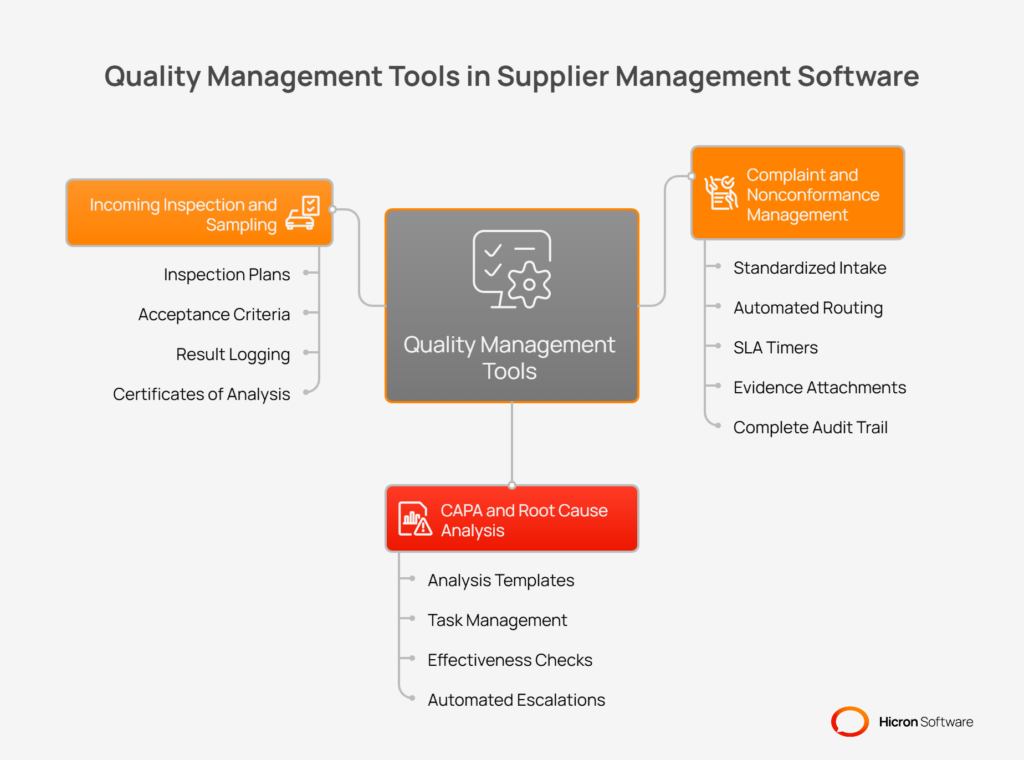
When a quality issue arises, you need a standardized process to address it quickly and consistently. A VMS provides a formal system for managing complaints and nonconformance reports (NCRs) from start to finish.
Identifying the source of a quality issue is the first step toward preventing its recurrence. Integrated Corrective and Preventive Action (CAPA) tools help your team conduct thorough root cause analyses and manage follow-up actions effectively.
A VMS can help you formalize your inspection processes to catch potential issues before they impact production. This feature allows you to define and manage quality control at the point of receipt.
Regular audits are necessary to verify supplier compliance with industry standards and assess their operational capabilities.
A key vendor management system feature is a dedicated module for managing the entire audit lifecycle, moving the process out of spreadsheets and into a collaborative, trackable environment. Using a supplier management software for audits simplifies planning, execution, and follow-up, making the entire process more efficient and transparent. The system helps you formalize assessments, link findings directly to corrective actions, and use the results to inform supplier scorecards.
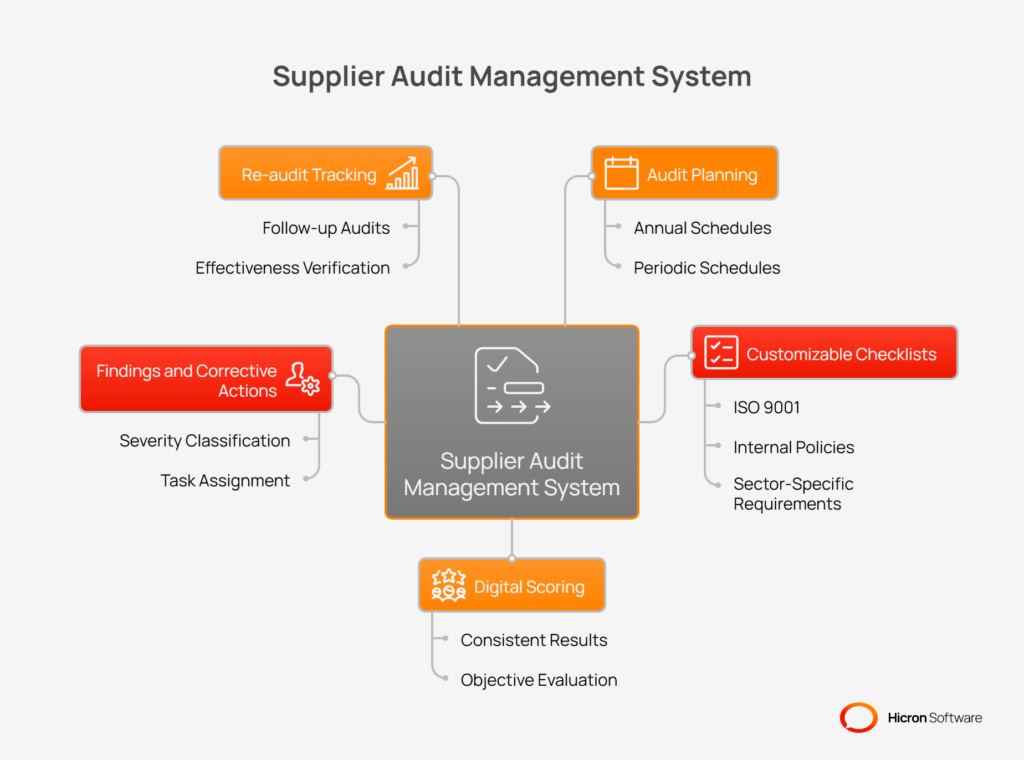
This integrated approach ensures that audit outcomes are not just filed away but are used to drive meaningful improvements. The VMS allows you to create annual audit plans, build checklists tailored to specific standards, and manage all related documentation and communication in one place.
Key features for vendor audits include:
Supplier scorecards are a core feature of vendor management systems for objectively evaluating performance and moving beyond subjective opinions. An effective supplier management software allows you to track key performance indicators (KPIs) that are most critical to your business, providing a clear, data-driven view of how each partner is performing.
This functionality enables you to apply different weights to each KPI based on what is most important for a specific supplier or commodity, which produces a single, comprehensive score.
With these scorecards, you can easily identify performance trends over time, automatically tier suppliers based on their results, and create targeted development plans to help underperforming partners improve. This transforms performance management from a periodic review into a continuous, collaborative process.
| Key performance indicator (KPI) | The role |
| On-time delivery (OTD) | Measures reliability and adherence to scheduled delivery dates. |
| PPM/defects | Tracks the rate of defective parts per million, indicating product quality. |
| Responsiveness | Monitors how quickly a supplier responds to inquiries, issues, or requests. |
| Cost variance | Compares quoted or standard costs against actual invoiced amounts. |
| NCR cycle time | Measures the time taken to resolve a nonconformance report from open to close. |
| CAPA effectiveness | Assesses the success rate of corrective and preventive actions. |
A modern supplier management software must provide tools for proactive compliance and risk management. These VMS features help you monitor regulatory requirements and identify potential disruptions before they impact your business, moving your team from a reactive to a preventive stance. This is crucial for maintaining operational continuity and protecting your brand’s reputation in a complex global supply chain.
One key aspect is tracking essential compliance attributes.
For example, you can tag suppliers with data points like their country of origin to manage trade compliance, or monitor their ESG (Environmental, social, and governance) ratings to ensure alignment with your corporate sustainability goals.
The system also acts as a central repository for critical documents such as ISO certifications, insurance policies, or conflict mineral declarations. It actively tracks expiration dates and sends automated reminders to both your team and the supplier, preventing lapses in compliance.
For instance, an automatic notification can be sent 90 days before a supplier’s ISO 9001 certificate expires, ensuring they have ample time to provide the renewed document.
In addition to compliance, the system should monitor a wide range of risk signals. It can integrate with third-party data providers to track a supplier’s financial health or flag negative news mentions. It also analyzes internal data, such as declining performance trends from supplier scorecards or an increase in quality incidents. Geo-risk alerts can notify you of supply chain disruptions in a specific region, such as a natural disaster or political instability.
These signals can trigger automated workflows to mitigate potential issues.
For example, if a supplier’s on-time delivery score drops below a predefined threshold for three consecutive months, the system can automatically schedule a mandatory business review.
Similarly, a considerable negative financial health alert could trigger a requalification workflow, prompting your team to re-evaluate the supplier’s viability as a long-term partner.
Gaining clear visibility into your supply chain is essential for preventing disruptions and ensuring operational efficiency. Supplier management software provides the tools necessary to track orders and shipments from placement to final delivery.
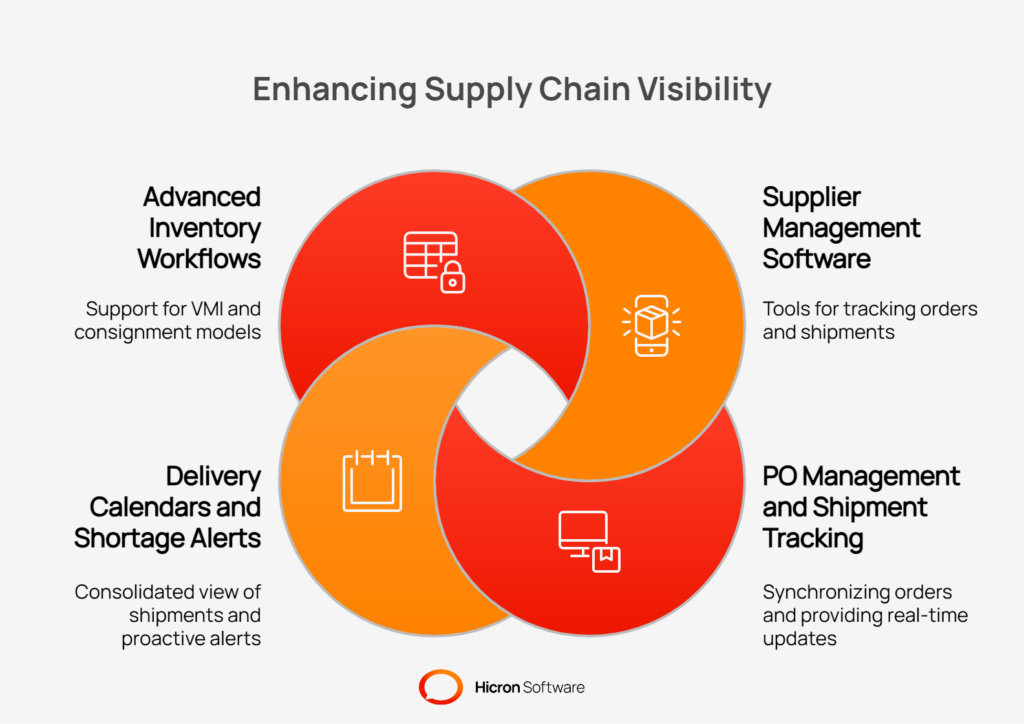
These vendor management system features create a single source of truth for both your internal teams and your suppliers, improving collaboration and enabling proactive decision-making. By moving away from manual tracking in emails and spreadsheets, you gain real-time supply chain visibility, reducing risk and streamlining logistics.
A VMS should synchronize purchase orders (PO) directly from your ERP system, making them instantly visible to suppliers through their portal. This eliminates communication delays and ensures everyone is working from the same information.
Once an order is confirmed and shipped, the system should support advanced shipping notice (ASN) processing, allowing suppliers to upload shipping details before the physical goods arrive. This allows your receiving team to prepare for incoming deliveries. Integrated shipment tracking provides real-time updates on transit status, giving you a clear view of when to expect materials.
To further enhance planning, a delivery calendar feature provides a consolidated view of all inbound shipments. This helps your logistics and production teams anticipate arrivals and manage warehouse capacity effectively. More advanced systems can also generate proactive shortage alerts.
By comparing planned delivery dates against your production schedule or inventory needs, the system can automatically flag potential material shortages before they halt operations. This gives your procurement team valuable time to expedite shipments or find alternative solutions.
For more mature supplier relationships, a VMS can support advanced inventory models like Vendor-Managed Inventory (VMI) or consignment. In a VMI model, you provide suppliers with access to your inventory data, and they take responsibility for replenishing stock to agreed-upon levels.
In a consignment model, the supplier owns the inventory stored at your facility until you consume it. A VMS facilitates these complex workflows by providing the shared visibility and data accuracy required to manage inventory levels, track consumption, and automate billing processes.
Managing supplier-related documents is a critical function that often becomes chaotic when handled through email and shared drives. An essential vendor management system feature is a dedicated document control module that centralizes and secures all significant files.
This component of a supplier management software ensures that everyone is working with the most current version of specifications, drawings, contracts, and standard operating procedures (SOPs). Proper document control is fundamental for maintaining quality standards, protecting intellectual property, and ensuring regulatory compliance.
Document management system provides structured control over a document’s entire lifecycle. Instead of wondering whether a supplier has the latest design drawing or has acknowledged a new NDA, the system provides clarity and an auditable trail.
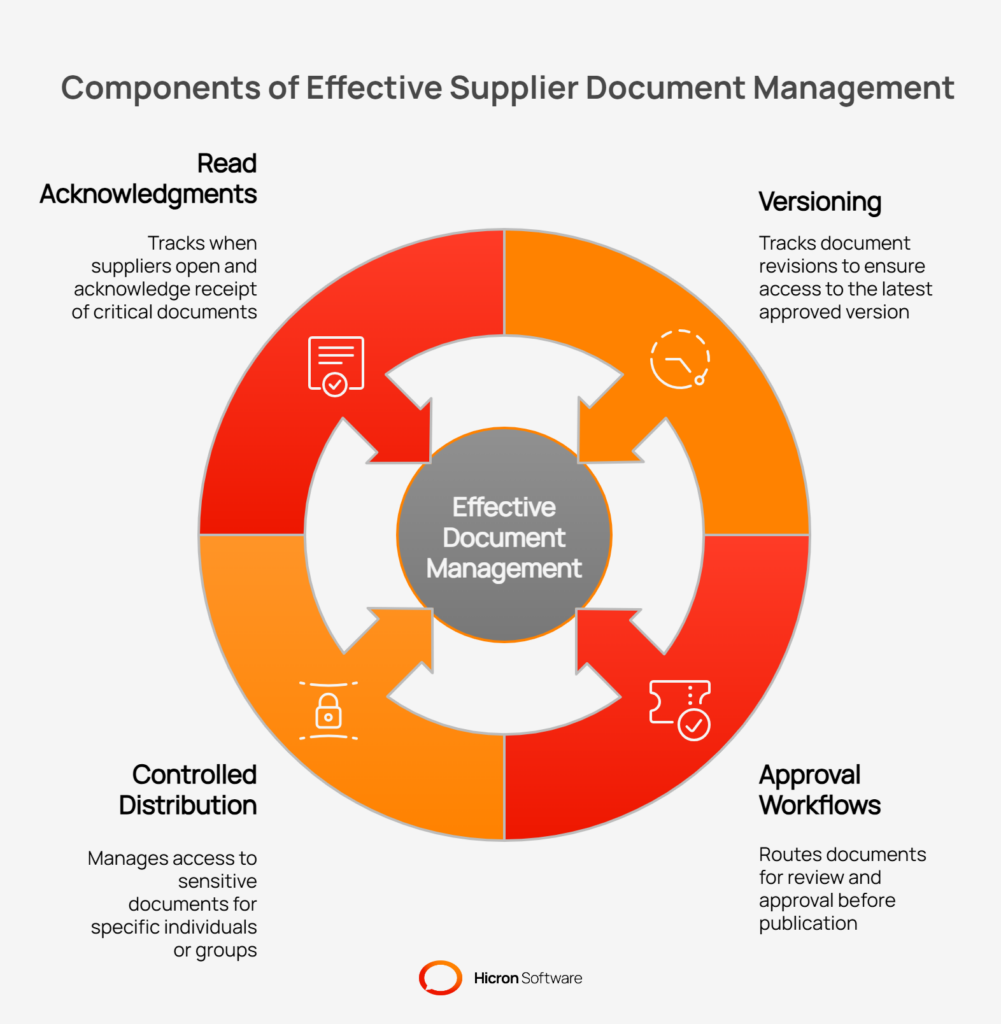
Key features for document control include:
Data is only valuable if you can use it to make better decisions. A critical vendor management system feature is its ability to transform vast amounts of supplier data into clear, actionable insights through reporting and analytics.
An advanced supplier management software moves beyond static, outdated reports and provides dynamic tools that help you understand performance, identify risks, and spot opportunities for improvement in real-time. This empowers your team to manage by exception and focus their efforts where they are needed most.
Modern VMS platforms offer configurable operational dashboards that provide an at-a-glance view of your most important metrics. Instead of digging through spreadsheets, you can immediately see key performance indicators related to quality, delivery, and compliance.
These systems often include data visualization tools like Pareto charts to quickly identify the top sources of defects or delays, helping you pinpoint the 20% of issues causing 80% of the problems.
Similarly, heatmaps can provide an intuitive visual representation of risk or performance across different suppliers, commodities, or manufacturing plants, making it easy to spot trends and outliers that require attention.
While pre-built dashboards are useful, the ability to answer specific business questions is crucial. A VMS with self-serve reporting capabilities allows users to create their own custom reports without needing technical assistance.
A procurement manager could, for example, build a report to compare the on-time delivery performance of all suppliers for a specific commodity over the last six months.
For deeper analysis, the system should allow for scheduled data exports. This feature enables you to automatically push clean, structured supplier data into your company’s dedicated Business Intelligence (BI) tools, like Power BI or Tableau. This integrates supplier performance data with other business data to create a holistic view for strategic analysis and executive-level reporting.
In a system that holds sensitive supplier data, contracts, and performance metrics, security is non-negotiable. A top-tier supplier management software solution must be built on an enterprise-grade foundation of security and access controls.
These critical VMS features protect your data from unauthorized access, ensure data integrity, and provide a complete audit trail for compliance. Properly configured security controls give you the confidence to collaborate with external partners while safeguarding your intellectual property and operational data.
The ability to control who can see and do what is fundamental. A VMS should offer flexible access control models to manage permissions for both internal employees and external supplier users.
| Access control method | Description |
| Role-based (RBAC) | Assigns permissions based on a user’s job function (e.g., quality manager, procurement specialist, supplier admin). This ensures that users have access only to the tools and data relevant to their role. |
| Attribute-based (ABAC) | Provides more dynamic control by granting access based on user attributes (such as division or region) and data attributes (such as product line). For example, it can restrict a user only to see suppliers associated with their specific business unit. |
Verifying user identity and tracking system activity are essential for a secure environment. Modern authentication methods make access both secure and convenient.
| Security feature | Description |
| SSO & MFA | Single Sign-On (SSO) allows users to log in with their corporate credentials, while Multi-Factor Authentication (MFA) adds a second layer of security, such as a code from a mobile app, to verify identity. |
| Audit logs | Creates an unchangeable record of every significant action taken within the system. This provides a complete, time-stamped trail of who did what and when, which is crucial for security forensics and compliance audits. |
For large or complex organizations, it’s vital to partition data to prevent internal teams or suppliers from seeing information that isn’t relevant to them. A VMS achieves this through sophisticated data segmentation. This could involve creating logical separations by division, product line, or geographical region, ensuring that a team in Europe cannot see supplier data exclusive to the North American business unit.
For the highest level of security, some platforms offer supplier-specific tenants or namespaces. This creates a private, isolated digital workspace for each supplier. This architectural approach ensures that one supplier’s data is completely segregated from another’s, eliminating any risk of data crossover and providing maximum security and confidentiality.
Vendor management software should not be an isolated island of data. To deliver maximum value, it must integrate with your existing enterprise technology landscape. The best vendor management system features are built on a modern, flexible architecture designed for connectivity.
This focus on integration capabilities ensures that data flows smoothly between systems, eliminating manual entry, reducing errors, and creating a single, reliable source of truth across your organization.
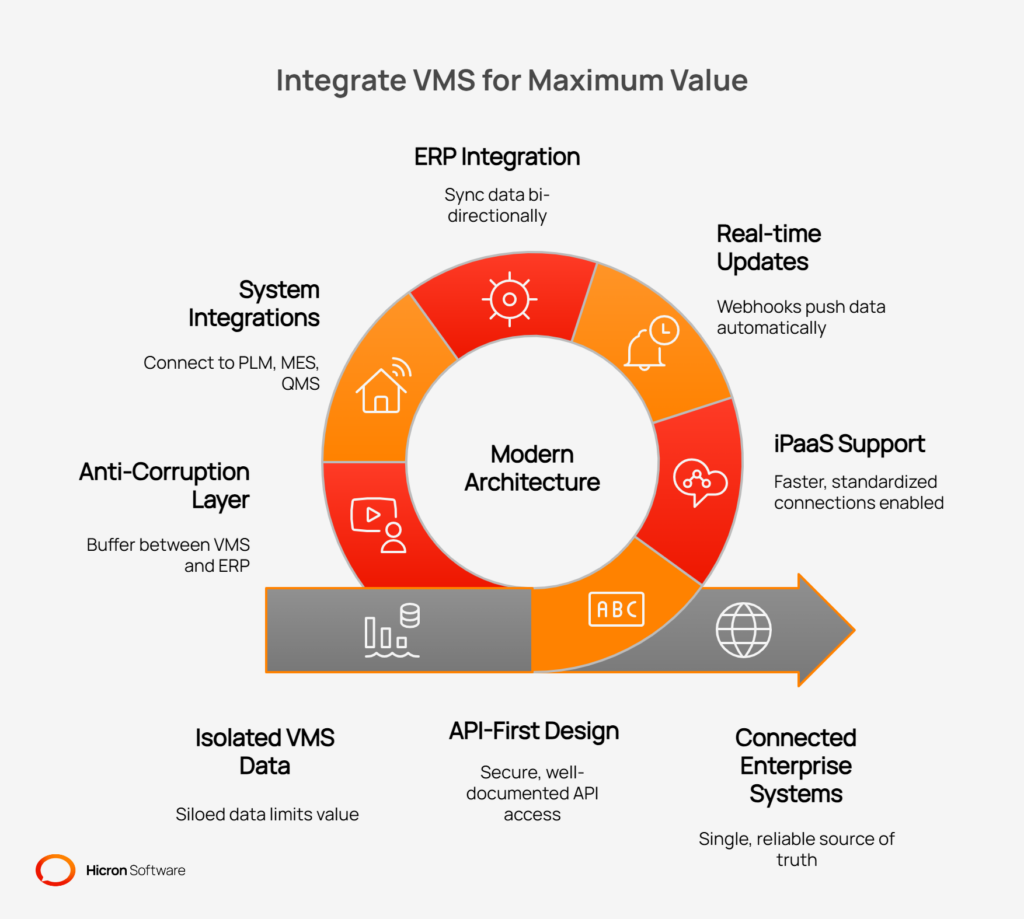
An effective VMS is built with an “API-first” design philosophy. This means that every function within the platform is accessible through a secure, well-documented Application Programming Interface (API). This approach provides ultimate flexibility, allowing for deep and custom integrations.
To simplify this process, the system should also support iPaaS (integration platform as a service) solutions such as MuleSoft or Boomi, enabling faster, more standardized connections. For real-time updates, features like webhooks and event streams push data to other applications automatically when specific events occur, for instance, sending a notification to a logistics system the moment a supplier confirms a shipment.
The primary goal of VMS integration is to connect with the systems that run your business. Strong ERP integration is essential. The VMS must be able to sync data bi-directionally with major ERP platforms like SAP and Oracle, ensuring that purchase orders, supplier master data, and invoices are always aligned.
Beyond ERP, a truly connected VMS will also integrate with other critical systems:
Deep integration introduces risks if not managed properly. A sophisticated VMS architecture includes an “anti-corruption layer.” This is a technical design pattern that acts as a buffer between the VMS and other systems, like your ERP.
It translates data models and decouples the systems, preventing complex or poorly structured data from your legacy ERP from corrupting the clean, modern data model of your supplier management software. This protective layer ensures that your VMS remains a stable, reliable, and high-performing platform, regardless of the systems it connects to.
Repetitive administrative tasks can consume a significant amount of your procurement team’s time, diverting focus from strategic activities. The vendor management system feature is a built-in workflow engine designed for automation.
This core component of a modern vendor management software allows you to digitize and standardize routine processes, ensuring tasks are completed consistently and efficiently. By implementing workflow automation, you reduce manual effort, minimize human error, and accelerate cycle times across all supplier-related activities.
The best platforms empower business users, not just IT specialists, to build and modify processes. A no-code or low-code workflow designer provides a visual, drag-and-drop interface for mapping out process steps.
This allows you to easily configure custom workflows for everything from supplier onboarding to managing a quality issue. You can define specific tasks, assign them to the appropriate roles (internal and external), and set clear dependencies. This flexibility means you can tailor the system precisely to your company’s unique operational needs without writing a single line of code.
An effective workflow engine does more than just assign tasks; it actively manages the process. You can configure Service Level Agreements (SLAs) for each step to define how long a task should take.
If a deadline is missed, the system can trigger automatic escalations, for example, notifying a manager if a critical document approval is overdue. The system can also send automated reminders to ensure tasks stay on track. This proactive management keeps processes moving and provides a complete audit trail of every action, approval, and decision.
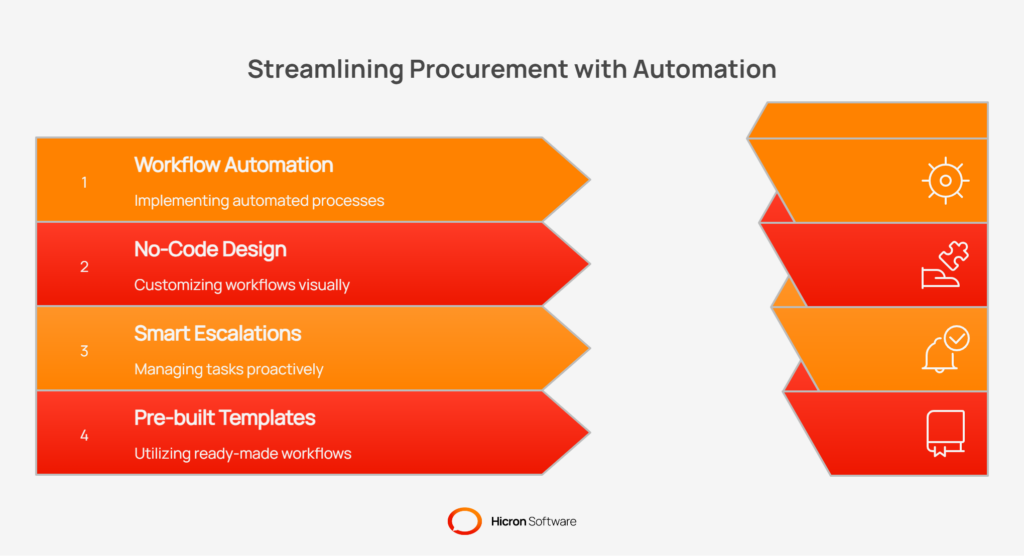
To accelerate implementation, a comprehensive VMS will include a library of pre-built workflow templates for standard supplier management processes. These templates provide a best-practice starting point that can be used as-is or customized to fit your specific requirements. Common templates include:
Choosing a supplier management software is a long-term investment. Your business will evolve, and your VMS must be able to adapt and grow with you. This is why a modern, modular architecture is one of the most critical, yet often overlooked, vendor management system features.
A modular design ensures the platform is flexible, scalable, and resilient, allowing you to adopt new capabilities as you need them without disrupting your existing operations.
A modular VMS is not a single, monolithic application. Instead, it is composed of distinct, independent modules for specific business functions. You might have separate modules for supplier onboarding, quality management, audits, and performance scorecards. These modules are designed to work together but can also operate independently.
This architecture allows for a phased feature rollout, so you can start by implementing the functionality you need most, like onboarding and document control, and add other modules, such as scorecards or risk management, later as your program matures. This approach lowers the initial implementation barrier and maximizes user adoption.
The technical design of a modular platform directly supports scalability and reliability. Because the modules communicate asynchronously (meaning they don’t have to wait on each other to complete tasks), the system is more resilient.
A heavy load in the analytics module, for example, won’t slow down the supplier onboarding process. This architecture supports horizontal scaling, allowing the system to handle a growing number of users and suppliers simply by adding more computing resources. This ensures high availability and consistent performance, even for large, global enterprises with thousands of users and complex supply chains.
This scalability provides confidence that the supplier management software you choose today will meet your performance needs well into the future.
High user adoption is directly tied to the system’s usability and its ability to support a global user base. The best vendor management system features are designed with the end-user in mind, providing an intuitive, accessible, and localized experience.
This focus on usability ensures that everyone, from internal procurement teams to external supplier contacts, can engage with the platform efficiently, regardless of their role or location.
To drive adoption, the user interface (UI) must be clean, modern, and easy to navigate. A key aspect of this is a role-based UI, where the system presents only the tools and information relevant to a specific user’s job function.
This simplifies the experience, as a quality manager sees a different dashboard than a finance clerk or a supplier’s shipping coordinator. To further assist users, contextual help provides guidance and instructions directly within the interface, reducing the need for lengthy training sessions.
This commitment to accessibility ensures that the platform is usable by people with a wide range of abilities, fostering inclusivity.
For companies operating across different countries, localization is a critical capability. An enterprise-grade VMS must offer multilingual support, allowing users to interact with the platform in their native language. This removes communication barriers and makes it simple for global suppliers to provide information accurately.
Equally important is multi-currency support, which enables the system to manage financial data, such as contract values or purchase order amounts, in various currencies. This feature is essential for clear financial tracking and reporting in a global supply chain, making the supplier management software a truly international tool.
Implementing a new supplier management software can feel like a monumental task, but a strategic, phased rollout can make the process manageable and deliver a rapid return on investment. A well-designed implementation roadmap prioritizes core functions first, allowing you to solve immediate pain points and demonstrate value quickly.
This approach, focused on a phased rollout of vendor management system features, ensures user adoption and builds momentum for more advanced capabilities down the line. Instead of a “big bang” launch, you can grow into the platform’s full potential organically.
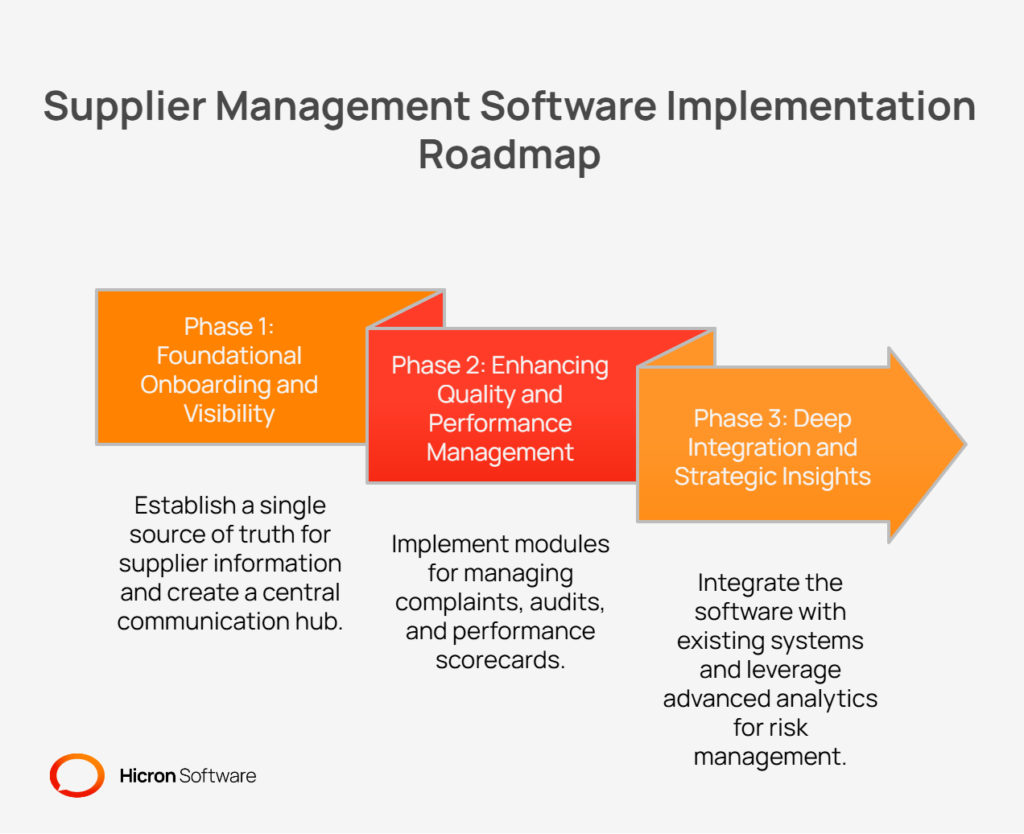
The first phase should focus on establishing a single source of truth for all supplier information and creating a central hub for communication. The goal is to move away from scattered spreadsheets and email chains as quickly as possible.
With the foundation in place, the second phase shifts to proactive quality and performance management. This stage introduces modules that help you collaborate with suppliers to track, measure, and improve their operational excellence.
The final phase elevates your supplier management software from an operational tool to a strategic asset. This involves deeply integrating the VMS into your existing tech stack and leveraging its full analytical power for risk management and strategic decision-making.
Selecting the right supplier management software is about more than just digitizing a few processes; it’s about building a resilient, high-performing, and collaborative supply chain.
A modern vendor management system, or VMS, transforms how you engage with your suppliers by providing a unified platform for every stage of the relationship. By prioritizing key features centered on collaboration, quality, compliance, analytics, and integrations, you create an ecosystem that drives continuous improvement. This strategic approach allows you to move beyond reactive problem-solving and proactively improve supplier performance from end to end.
The journey to a fully optimized VMS begins with a clear understanding of your current state.
First, assess your current vendor processes. Identify the manual workarounds, communication bottlenecks, and data silos that are holding your team back. Consider where you are using spreadsheets, emails, and shared drives to manage critical information.
Next, map your gaps. Compare your current processes against advanced capabilities such as automated workflows, real-time analytics, and integrated quality management. Pinpoint the areas where a modern VMS could deliver the most significant impact.
Finally, pilot a core feature set. You do not have to do everything at once. Start with a manageable pilot focused on a high-priority area, such as supplier onboarding or document control. Proving the value on a smaller scale builds the business case and momentum for a wider rollout.
By taking these deliberate steps, you can confidently select and implement a vendor management software solution that not only meets your needs today but also scales with you as you grow.
The most critical VMS features create a single source of truth for all supplier activities. Key features include a secure supplier portal for collaboration, integrated quality management tools for handling non-conformances and CAPAs, data-driven supplier scorecards for performance tracking, and real-time VMS reporting and analytics. Additionally, integration capabilities with your ERP and a no-code workflow automation engine are essential for driving efficiency and consistency.
A supplier portal is a secure, centralized hub that transforms how you interact with suppliers. It moves communication out of cluttered inboxes and into a transparent platform. Suppliers can use it for self-service actions like updating their company information and certifications, viewing purchase orders, and tracking shipments. This reduces your team’s administrative workload, improves data accuracy, and gives both parties real-time visibility into shared activities, strengthening the partnership.
Yes, modern supplier management software is designed to proactively manage quality and compliance. It includes built-in quality management tools to track complaints, manage corrective actions (CAPAs), and formalize inspections. For compliance, it acts as a central repository for essential documents like ISO certificates, tracking expiration dates with automated reminders. This ensures you maintain high standards and prevent compliance lapses before they become a problem.
A core function of a VMS is to establish and maintain clean supplier master data. It starts with a digital onboarding process that guides suppliers through a structured registration, preventing incomplete or incorrect information from entering your system. Features like automatic deduplication and data validation rules prevent duplicate records and enforce data quality standards. This creates a reliable, single source of truth for all supplier information across your organization.
The best approach is a phased implementation roadmap. A modular VMS allows you to roll out features in stages to ensure a fast ROI and high user adoption.
Hicron Software proved to be a trusted partner with unmatched technical expertise, delivering a scalable and user-friendly web application that was pivotal to our successful U.S. market expansion.

Hicron’s contributions have been vital in making our product ready for commercialization. Their commitment to excellence, innovative solutions, and flexible approach were key factors in our successful collaboration.
I wholeheartedly recommend Hicron to any organization seeking a strategic long-term partnership, reliable and skilled partner for their technological needs.

After carefully evaluating suppliers, we decided to try a new approach and start working with a near-shore software house. Cooperation with Hicron Software House was something different, and it turned out to be a great success that brought added value to our company.
With HICRON’s creative ideas and fresh perspective, we reached a new level of our core platform and achieved our business goals.
Many thanks for what you did so far; we are looking forward to more in future!

Hicron is a partner who has provided excellent software development services. Their talented software engineers have a strong focus on collaboration and quality. They have helped us in achieving our goals across our cloud platforms at a good pace, without compromising on the quality of our services. Our partnership is professional and solution-focused!

The IT system supporting the work of retail outlets is the foundation of our business. The ability to optimize and adapt it to the needs of all entities in the PSA Group is of strategic importance and we consider it a step into the future. This project is a huge challenge: not only for us in terms of organization, but also for our partners – including Hicron – in terms of adapting the system to the needs and business models of PSA. Cooperation with Hicron consultants, taking into account their competences in the field of programming and processes specific to the automotive sector, gave us many reasons to be satisfied.

