What is a Vendor Management System (VMS)? 2026 Guide
- October 03
- 12 min

Definition: A scalable vendor management system is a platform designed to grow alongside your business, handling more users, suppliers, data, and transactions without a drop in performance. Think of it less like a rigid spreadsheet and more like a set of industrial-grade Lego blocks you can add and rearrange as your company expands. This article explores how to build or choose a VMS that supports your growth rather than holding it back.
As organizations add new products, open new facilities, or partner with more suppliers, the manual processes and simple tools that once worked start to show their cracks. What was manageable for one team in one location becomes a bottleneck when stretched across multiple divisions and regions.
The solution is not to keep patching a broken system, but to design a VMS with a modular architecture, multi-division support, and elastic user scalability to handle growth without needing a complete overhaul every few years.
When people talk about scalability, it’s easy to think of it as just “handling more.” But a truly scalable vendor management system does more than just expand; it evolves gracefully under pressure. It’s the difference between a bridge that can hold more cars by simply widening it and one designed with a sophisticated suspension system that adapts to shifting loads, traffic patterns, and even weather, all without slowing everyone down.
In VMS terms, scalability is the system’s ability to accommodate growth across multiple dimensions while maintaining consistent performance and predictable costs.
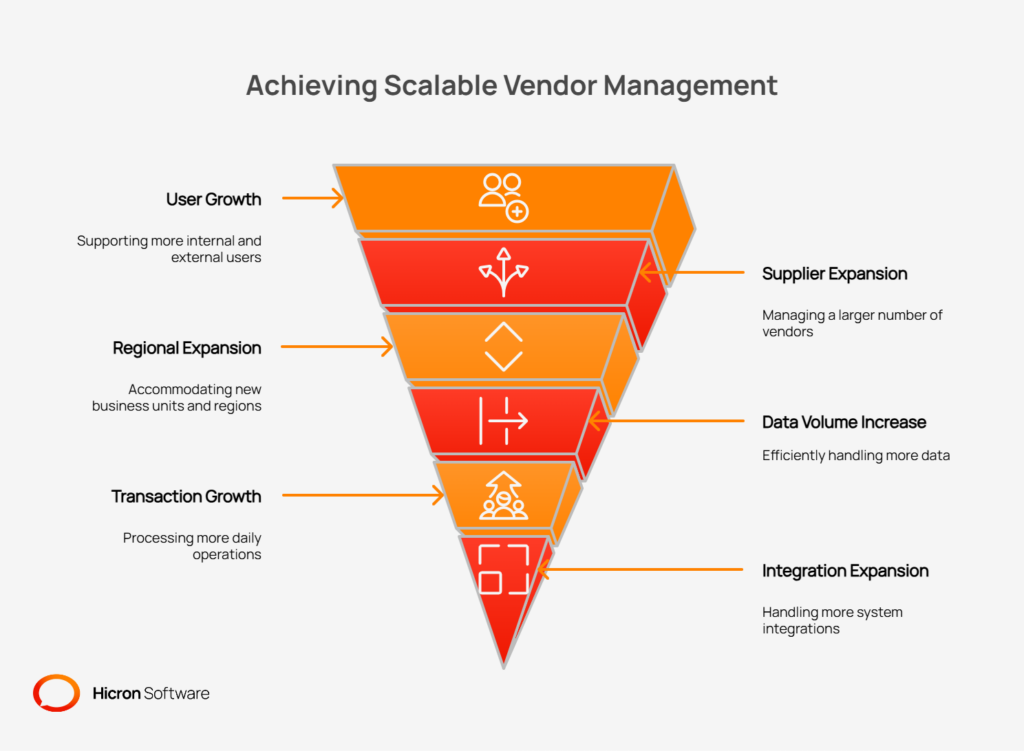
Let’s break down what that growth actually looks like:
A properly scaled VMS ensures consistent, reliable performance, so users aren’t left staring at loading screens during peak business hours. It makes costs predictable, allowing you to budget for growth without facing unexpected platform fees or expensive emergency upgrades.
Most importantly, it enables the rapid onboarding of new suppliers, divisions, or facilities, turning a process that could take months into one that takes weeks or even days.
To create a Vendor Management System that can truly grow with your business, you need an architecture that is flexible by design. A monolithic system, where every function is tangled together in a single block of code, is the enemy of scale.
It’s like a Jenga tower; trying to change one small piece can bring the whole thing crashing down. Instead, a modern, scalable vendor management system is built on a modular, decoupled foundation. This approach breaks the system into independent, communicating parts, allowing you to update, replace, or scale individual functions without disrupting the rest of the system.
The first step is to think of your VMS not as one giant application, but as a collection of specialized services. Each service should manage a clear business domain, or what developers call a “bounded context.” For a VMS, this means creating separate, self-contained modules for core functions like:
By separating these domains, you gain immense flexibility. Need to update the audit workflow? You can modify the audit service without touching the supplier onboarding process. This isolation speeds development, reduces the risk of introducing bugs, and enables different teams to work on different modules concurrently.
When these modules need to talk to each other, they shouldn’t be directly connected like a phone call, where both parties must be on the line at the same time. This “tight coupling” creates dependencies that hurt resilience. If the purchase order service goes down, should that prevent a new supplier from being onboarded? Absolutely not.
This is where asynchronous, event-driven communication comes in. Instead of services calling each other directly, they publish events to a central message queue.
For example, when the onboarding service approves a new supplier, it sends a “SupplierCreated” event. Other services, such as the quality and finance modules, can listen for this event and respond accordingly, by creating a new quality record or setting up the supplier for payment.
This model ensures that if one service is temporarily offline, the messages wait patiently in the queue, and the system as a whole remains responsive.
To handle a growing number of users and transactions, you need to be able to add more computing power easily. The most effective way to do this is through horizontal scaling, which means adding more machines or containers to share the load. This is only possible if your services are “stateless”.
A stateless service doesn’t store any session data from one request to the next. Every request contains all the information needed to process it, allowing a load balancer to send it to any available server.
Of course, constantly fetching the same information from the database can be slow. This is where caching comes in. By using a high-speed in-memory cache like Redis or an edge cache, the system can store frequently accessed data, or “hot data,” closer to the user. This could be supplier profile information, product categories, or user permissions. Caching reduces database load and ensures the application remains fast and responsive, even as user numbers climb.
As a business grows, its structure rarely stays simple. New divisions are created, companies are acquired, and operations expand across different regions. A VMS that was built for a single, flat organization will quickly become a liability. It’s like trying to manage the logistics for a multi-national conglomerate using the same filing cabinet system that worked for a single-office startup.
To succeed, your VMS must be designed to support complex organizational hierarchies from the ground up, ensuring each business unit can operate effectively while still being part of a unified system.
A core architectural decision is how to separate data and configurations across different business units. This is known as the “tenanting model,” where each “tenant” can be a division, a subsidiary, or a distinct company. There are three primary approaches, each with its own trade-offs.
| Model | Description | Best for |
| Single-tenant | Each division gets its own separate instance of the VMS, with its own database and application server. | Maximum isolation and customization are often required for strict regulatory or data-sovereignty requirements. |
| Multi-tenant | All divisions share the same application and database, with data separated by a “tenant ID” in each table. | Cost-effectiveness and easier maintenance, as updates are applied once for everyone. |
| Hybrid model | A single application is shared, but data is stored in separate databases or schemas for each division. | A balance of the cost benefits of multi-tenancy with the data isolation of single-tenancy. |
The hybrid approach, often using division-level namespaces, provides a strong balance for most growing organizations. It gives each division a feeling of ownership and control over its data while allowing the central IT team to manage a single, unified platform.
Regardless of the tenanting model you choose, effectively partitioning data is crucial for both performance and security. Without it, a report run by one large division could slow down the entire system for everyone else. Imagine an apartment building where everyone’s mail is dumped into one giant bin in the lobby, it would be chaotic and insecure. Data partitioning is like giving each resident their own locked mailbox.
By partitioning data tables by division_id, region_id, or supplier_id, you can enforce strict data isolation. This ensures that users in one division cannot accidentally view or modify data from another division. This segmentation also delivers major performance benefits.
When the database needs to find all purchase orders for the European division, it can go directly to that partition rather than scan millions of records across the entire company.
Growth should not mean diluting your operational standards, but it also cannot mean forcing a one-size-fits-all process onto every part of the business. The team in Germany has different public holidays from the team in the United States. A high-volume manufacturing plant may have different supplier quality SLAs than a corporate R&D center.
A scalable VMS must accommodate these local variations without requiring custom code for each division, which can lead to an unmaintainable system. The solution is to build configurable policies that can be applied at the division level. This includes:
This approach provides the best of both worlds: you maintain a single, standardized core system while giving each division the flexibility it needs to operate efficiently within its local context.
A vendor management system is only effective if the right people can access it. As your organization grows, “the right people” can expand from a small team to thousands of internal employees and external supplier contacts. Managing this many users is not just about letting them in; it is about controlling what they can see and do, all while making the login process simple and secure.
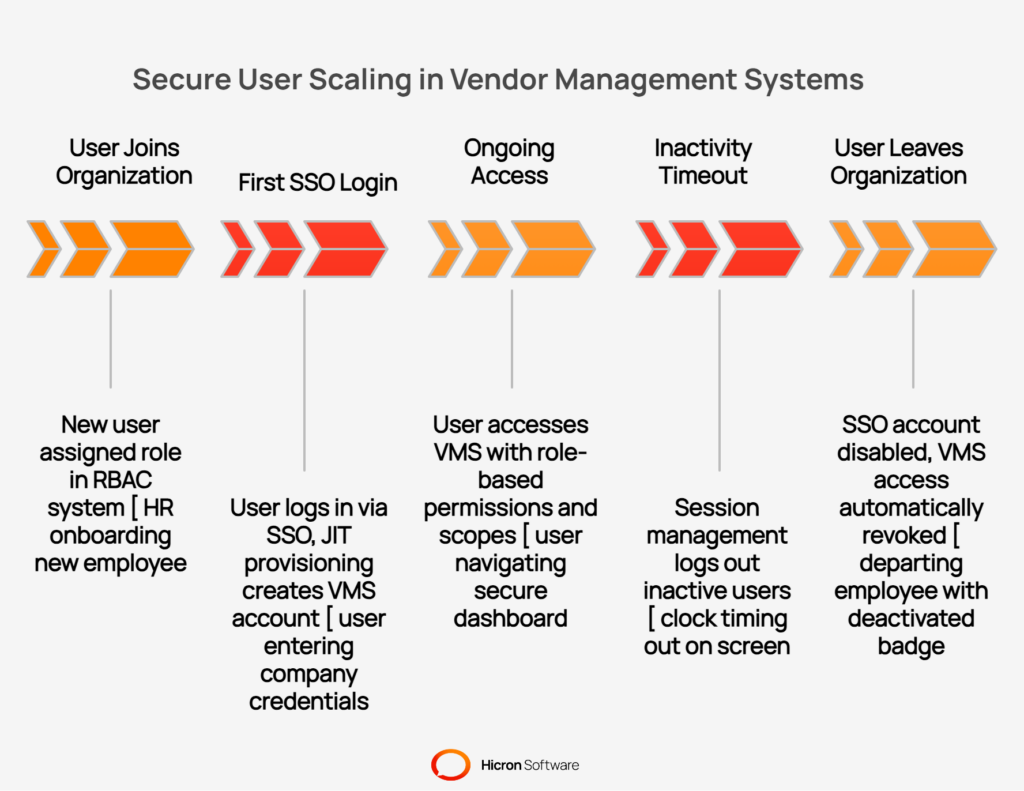
It’s like issuing security badges for a massive corporate campus. You need a system that grants access to the right buildings and floors, can be activated or deactivated instantly, and prevents any single entrance from becoming a bottleneck during rush hour.
The foundation of secure user scaling is a role-based access control (RBAC) system. RBAC moves away from assigning permissions to individual users, which becomes impossible to manage at scale. Instead, you define roles, like “quality manager,” “buyer,” or “supplier contact”, and assign a set of permissions to each role. When a new user joins, you simply assign them the appropriate role.
However, a simple role is not enough in a complex organization. A quality manager in your North American division should not be able to see confidential audit reports from your Asian operations. This is where scopes come in. A well-designed RBAC system allows you to apply roles within specific boundaries, or scopes, such as:
This granular control ensures that users see only the data they need to do their jobs, the principle of least privilege, which is fundamental to enterprise security.
Managing thousands of separate usernames and passwords for your VMS is a recipe for security risks and user frustration. The solution is to integrate the VMS with your corporate identity provider through single sign-on (SSO). SSO allows internal users to log in with their existing company credentials, simplifying access and centralizing control.
Combining SSO with multi-factor authentication (MFA) adds a critical layer of security, requiring users to verify their identity with a second factor, such as a code sent to their phone.
For both internal staff and external supplier users, just-in-time (JIT) provisioning automates the creation of user accounts. When a user logs in to SSO for the first time, a VMS account is automatically created for them with the appropriate role based on their group membership in the corporate directory.
When an employee leaves the company and their main account is disabled, their VMS access is automatically revoked. This eliminates manual account setup and the risk of “ghost” accounts remaining active after a user has departed.
Finally, a system that serves thousands of users must protect itself from being overwhelmed, whether by accident or by malicious intent. A single user running a complex report or an automated script making too many API calls can degrade performance for everyone. To prevent this, a scalable VMS needs protective mechanisms:
These tools work together to manage peak loads and ensure the VMS remains stable and responsive, even when thousands of users are active at once.
As your vendor management system grows, maintaining performance is not just about keeping things fast; it is about keeping them predictable. Users need to trust that the system will be available and responsive, whether it is a quiet Tuesday morning or the busiest day of the quarter.
High-availability VMS design ensures the platform can withstand component failures without causing a service outage. It is the digital equivalent of a hospital’s backup generator. It is not a luxury; it is a necessity for critical operations. Achieving this predictability requires a deliberate strategy for scaling your application, database, and file storage.
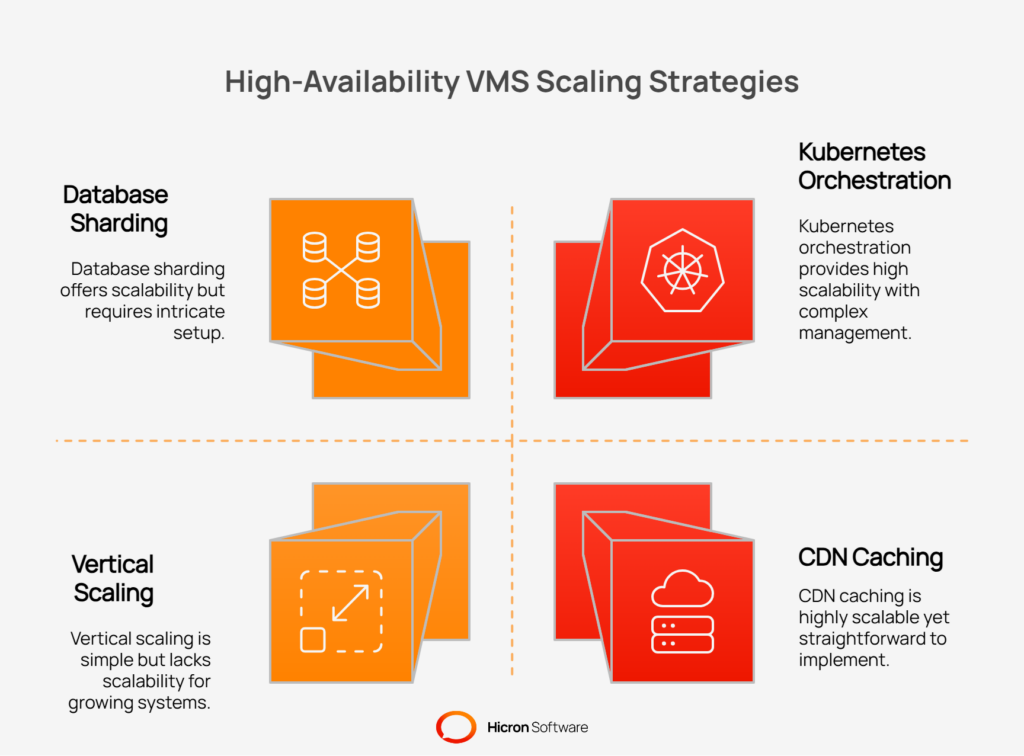
The most effective way to handle increased load is to add more resources. Horizontal scaling involves adding more machines or containers to a cluster, allowing a load balancer to distribute traffic among them. This approach is far more flexible than vertical scaling, which means making a single server more powerful.
Modern systems achieve this using containers and orchestration platforms like Kubernetes. Containers package an application and its dependencies into a lightweight, portable unit. An orchestrator manages these containers, automatically handling tasks like deployment, networking, and scaling.
With autoscaling policies in place, the system can monitor resource usage and automatically add or remove containers in response to real-time demand. This ensures you have enough power for peak loads without overpaying for idle resources during quiet periods. Furthermore, rolling updates allow you to deploy new code without downtime by updating containers one by one, ensuring the service remains available throughout the process.
The database is often the first bottleneck in a growing system. As data volume and transaction rates increase, a single database server can become overwhelmed. Several techniques can be used to scale the database tier effectively.
Read replicas are copies of your central database that handle read-only queries, such as reports and dashboards. This frees up the primary database to focus on write operations like creating new records, which improves overall performance.
For even larger datasets, partitioning or sharding divides a database into smaller, more manageable pieces. Partitioning can separate data within a single database, for instance, by year or region, while sharding spreads it across multiple database servers.
Efficiently managing connections is also vital. Connection pooling reuses existing database connections instead of creating new ones for every request, which reduces overhead.
Finally, consistent query tuning is essential. Analyzing and optimizing slow queries can produce dramatic performance improvements and ensure the database runs efficiently as it grows.
A VMS handles a large volume of unstructured data, including contracts, certificates, audit reports, and images. Storing these files on a traditional server file system is not a scalable solution. Distributed object storage systems, such as Amazon S3, are built for this purpose. They store files as objects in a highly durable and scalable environment, accessible via an API.
This approach allows you to manage massive amounts of data without worrying about disk space. You can also implement lifecycle policies to automatically move older, less frequently accessed files to cheaper storage tiers, optimizing costs.
To ensure fast access to these files, especially for a global user base, a content delivery network (CDN) or internal caching can be used. A CDN caches files at edge locations around the world, closer to your users, reducing latency and improving the user experience when downloading large documents.
As data volume explodes, the integrity of your data model becomes paramount. A poorly designed data structure is like a library with no cataloging system. At first, you can find books through memory, but as the collection grows, it descends into chaos.
A clean, well-governed data model ensures that information remains consistent, accurate, and usable, preventing your VMS from becoming a digital junk drawer. This requires a deliberate strategy for defining your data, managing reference information, and handling changes over time.
When integrating your VMS with other systems, such as an ERP or PLM, it is tempting to mirror their data models simply. This is often a mistake. An ERP’s model for a “supplier” might be cluttered with financial fields that are irrelevant to a quality manager using the VMS. Forcing every system to conform to one master model creates tight coupling and makes future changes difficult.
Instead, a scalable VMS should define its own clear, purposeful data models, known as canonical data contracts. These contracts represent the ideal structure for key business entities such as “supplier,” “part,” and “audit” in the context of vendor management. An anti-corruption layer can then be used at the integration point to map data between the VMS and the ERP.
This approach keeps the VMS domain clean and independent, allowing it to evolve without being constrained by the complex and often rigid structures of other enterprise systems.
In a large organization, it is easy for inconsistencies to creep into your data. One division might use “kg” for kilograms, while another uses “kilo.” One plant might use the currency code “USD,” and another might use “US Dollar.” This seemingly minor issue can break reports, integrations, and automated workflows.
Effective governance of reference data is critical to maintaining data integrity at scale. This involves creating a single source of truth for common, shared data points. Key areas for governance include:
By governing this reference data centrally, you ensure that every part of the system speaks the same language, which is essential for accurate reporting and analytics across a global organization.
Business needs change, and your data model will need to change with them. You might need to add a new field to the supplier profile or modify an existing one. If not managed carefully, these changes can break existing integrations and disrupt operations. The key is to make your data schemas adaptable.
Schema versioning is the practice of tracking changes to your data models over time. When you need to introduce a breaking change, such as renaming a field, you create a new version of your data contract (e.g., supplier-v2). This allows new systems to adopt the updated model while older integrations continue to function using the previous version.
For non-breaking changes, such as adding an optional field, ensure backward compatibility. This means that older applications that are unaware of the new field can still process the data without errors. This strategy allows your VMS to evolve gracefully, supporting new features without forcing an immediate, company-wide update of every integrated system.
As an organization grows, consistency becomes a major challenge. How do you ensure that a supplier complaint is handled the same way in Mexico as it is in Germany? The answer is standardized workflows. However, rigid, one-size-fits-all processes can stifle productivity and fail to account for local business needs.
A truly scalable vendor management system strikes a delicate balance. It provides a strong foundation of standardized processes while offering the flexibility for individual business units to adapt them to their specific operational context.
The most effective way to promote consistency is through reusable workflow templates. Instead of building every process from scratch, a scalable VMS should provide pre-built, configurable templates for common vendor management activities. This includes critical processes such as:
These templates define a standard sequence of steps, required documents, and approval roles. This ensures a consistent baseline for how work gets done across the entire organization. At the same time, these templates are not set in stone.
A division should be able to clone a master template and customize it by adding or removing steps, changing approvers, or modifying form fields to meet its unique requirements, all without needing to write custom code.
A defined workflow is only effective if it keeps moving. Service level agreements (SLAs) are crucial for ensuring that tasks are completed on time. A scalable VMS embeds intelligent timers directly into its workflows.
For example, you can set an SLA that a new supplier complaint must be acknowledged within 24 hours.
If a task is not completed within the specified time, the system should automatically trigger escalations. This could mean reassigning the task to a manager or sending notifications to a broader group. To prevent bottlenecks before they happen, automated reminders can be sent to users as deadlines approach.
The key to making this work at scale is adaptability. The SLA for resolving a complaint might be three days for a manufacturing division but ten days for a corporate office. A flexible VMS allows these timers, escalation paths, and reminders to be configured differently for each division or region, reflecting each division’s or region’s specific operational pace.
As the volume of data and transactions grows, performing tasks one at a time becomes unsustainable. Imagine needing to update the contact information for 100 suppliers or assign a new training module to 50 of them. Doing this manually is not just tedious; it is also prone to error.
A scalable VMS must provide tools for managing data in bulk. This includes features that allow authorized users to import new records from a spreadsheet or perform mass updates on a filtered list of suppliers or parts directly within the user interface. For even greater efficiency, Application Programming Interfaces (APIs) are essential. APIs allow your technical teams to build automated scripts and integrations that can perform mass updates, import large datasets from other systems, or trigger workflows programmatically.
This automation frees up your team from repetitive manual tasks and ensures data can be managed efficiently, no matter the volume.
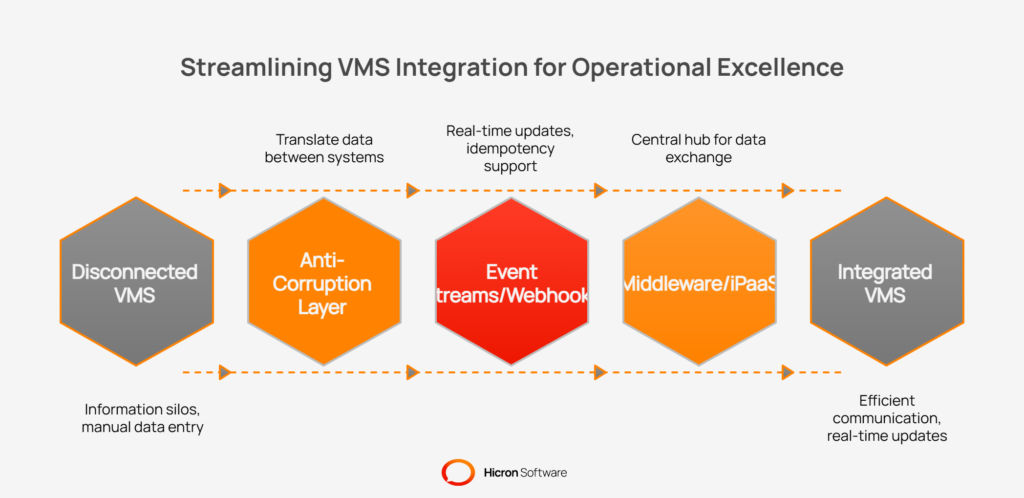
A vendor management system (VMS) must communicate efficiently with other core business systems such as Enterprise Resource Planning (ERP), Product Lifecycle Management (PLM), and Manufacturing Execution Systems (MES). If the VMS is disconnected, information silos form, requiring manual data entry and increasing the risk of errors.
To support operational excellence on a large scale, your integration approach should be strong and reliable, able to handle large amounts of data without slowing down the business.
Each enterprise system uses its own data structure, optimized for its unique function. For instance, your ERP’s definition of a “supplier” might include financial records, while your PLM focuses on technical contacts. One frequent mistake is forcing the VMS to copy the ERP’s model, leading to a system that is hard to change and maintain.
A better solution is to implement an anti-corruption layer. This software layer acts as a translator between the VMS and other platforms, mapping and converting data as it moves between systems.
For example, when a supplier is approved in the VMS, the anti-corruption layer prepares the appropriate data for the ERP, matching the required fields. This keeps the VMS separate from the complexity of other platforms and allows each application to update independently.
Fast, up-to-date information is key for decision-making. Traditional batch updates that run overnight are too slow for most business needs. Instead, event-driven integration lets systems share information as soon as something important happens.
A VMS can use event streams or webhooks for timely updates. When a supplier’s certificate changes, the VMS sends a “certificate updated” notification that other systems can receive right away. Webhooks push these updates directly to different applications.
To ensure these updates work well, integrations need to support idempotency, so repeated events don’t cause errors or duplicates. Retry systems help make sure that if a connection fails, the information will still reach its destination after another attempt, maintaining consistency.
With more integrations, managing direct connections between systems quickly becomes too complex. A central integration platform, such as middleware or an Integration Platform as a Service (iPaaS), solves this by acting as a hub for data exchange.
iPaaS handles message routing, complex data mapping, and provides tools for monitoring the health of integrations. This visibility is crucial for finding and fixing issues quickly. These platforms also help manage flow control.
For example, if the ERP can’t process updates for a while, the integration platform can slow message delivery and store them as needed. This way, data continues to flow smoothly, even when one system is busy or temporarily unavailable.
Running a large-scale vendor management system without visibility is like flying a plane without instruments. You might be fine for a while, but you have no way of knowing if you are heading toward trouble. A proactive approach to observability, monitoring, and capacity planning is essential for maintaining a healthy, high-performing system.
It allows you to move from a reactive “firefighting” mode to a strategic position where you can detect issues before they impact users and confidently plan for future growth.
When your application is distributed across dozens or hundreds of servers, diagnosing a problem by checking individual machine logs is impossible. To get a clear picture of system health, you need to centralize your observability data. This involves three key pillars:
With this data, you can define clear Service Level Objectives (SLOs). SLOs are specific, measurable targets for system performance that directly relate to user satisfaction.
For example, you might set an SLO that 99.5% of all login requests must be completed in under 500 milliseconds. Tracking your performance against these SLOs tells you exactly how well you are meeting user expectations.
| Key metric | Description | Why it matters? |
| Latency | The time it takes for the system to respond to a request. | High latency leads to a slow, frustrating user experience and can cause timeouts. |
| Error rate | The percentage of requests that result in an error. | A high error rate indicates system instability and prevents users from doing their work. |
| Backlog | The number of unprocessed tasks in a queue (e.g., pending integrations). | A growing backlog signals that a part of the system cannot keep up with demand. |
Guessing how much server capacity you will need is a recipe for either overspending or causing performance issues. A more scientific approach is to build capacity models based on historical data and business forecasts. By analyzing usage patterns from previous peak seasons, such as year-end reporting or holiday production ramps, you can predict future resource requirements with much greater accuracy.
This ensures you have enough capacity to handle the load without paying for idle resources year-round.
To support this planning, a scalable VMS should provide detailed cost and usage dashboards. These dashboards allow you to break down resource consumption by division, region, or business unit. This transparency helps business leaders understand their share of infrastructure costs and promotes more efficient use of the system.
It also allows IT teams to identify which parts of the organization are growing the fastest and plan resource allocation accordingly.
Sometimes your monitoring dashboards show all green lights, yet a critical workflow is still broken.
For example, a change in a third-party identity provider could break the login process, even though all your servers are running perfectly. This is where synthetic monitoring comes in.
Synthetic checks are automated scripts that mimic real user behavior to test critical application paths from an end-user perspective. These checks run on a continuous schedule, 24/7, from different geographic locations. They can perform key actions like:
If any of these synthetic transactions fail or become too slow, the system can immediately alert your operations team. This proactive approach helps you find and fix problems in critical workflows before a real user ever notices something is wrong, ensuring the most important parts of your VMS are always available and performing as expected.
As your vendor management system expands to handle more data, users, and global regions, your security and compliance responsibilities grow exponentially. The challenge is not just to add more features but to scale your security posture in parallel.
A data breach or compliance failure can cause far more damage than a performance slowdown, leading to financial penalties, reputational harm, and loss of customer trust. A truly scalable VMS is built on a foundation of security, ensuring that as you grow, your data and operations remain protected against both internal and external threats.
In a multi-divisional or multi-tenant environment, you cannot allow data from one business unit to leak into another. A sales team in North America should not be able to see sensitive supplier contracts from the engineering division in Europe. A scalable VMS must enforce strict data isolation.
This means that data is partitioned logically, ensuring that users can only access the information relevant to their specific tenant or division. This is a fundamental architectural requirement for preventing accidental data exposure and ensuring privacy across different parts of a global organization.
Beyond separation, all sensitive data must be protected through encryption. This happens in two states:
As an organization grows and roles change, it is easy for users to accumulate access permissions they no longer need. This “privilege creep” creates significant security risks. To combat this, a scalable VMS must include user access management features.
Regular access reviews should be a standard process, where managers are required to periodically certify that their team members’ permissions are still appropriate for their job functions.
Segregation of Duties (SoD) controls are another critical component. These are rules that prevent a single individual from completing a high-risk process on their own.
For example, the person who onboards a new supplier should not also be the person who approves that supplier’s first invoice. The VMS should allow you to configure and enforce these rules within its workflows.
To ensure accountability, every significant action taken within the system must be recorded in a detailed, tamper-evident audit trail. This log should capture who did what and when. Whether it is a change to a supplier’s bank details, an update to a compliance document, or an approval of a corrective action plan, the audit trail provides a complete history.
This is not only essential for forensic investigations after a security incident but is also a standard requirement for most compliance regulations.
Operating a VMS across different countries means you must navigate a complex web of regional laws and regulations. What is permissible in one country may be strictly forbidden in another. A scalable platform must be flexible enough to accommodate these varied requirements.
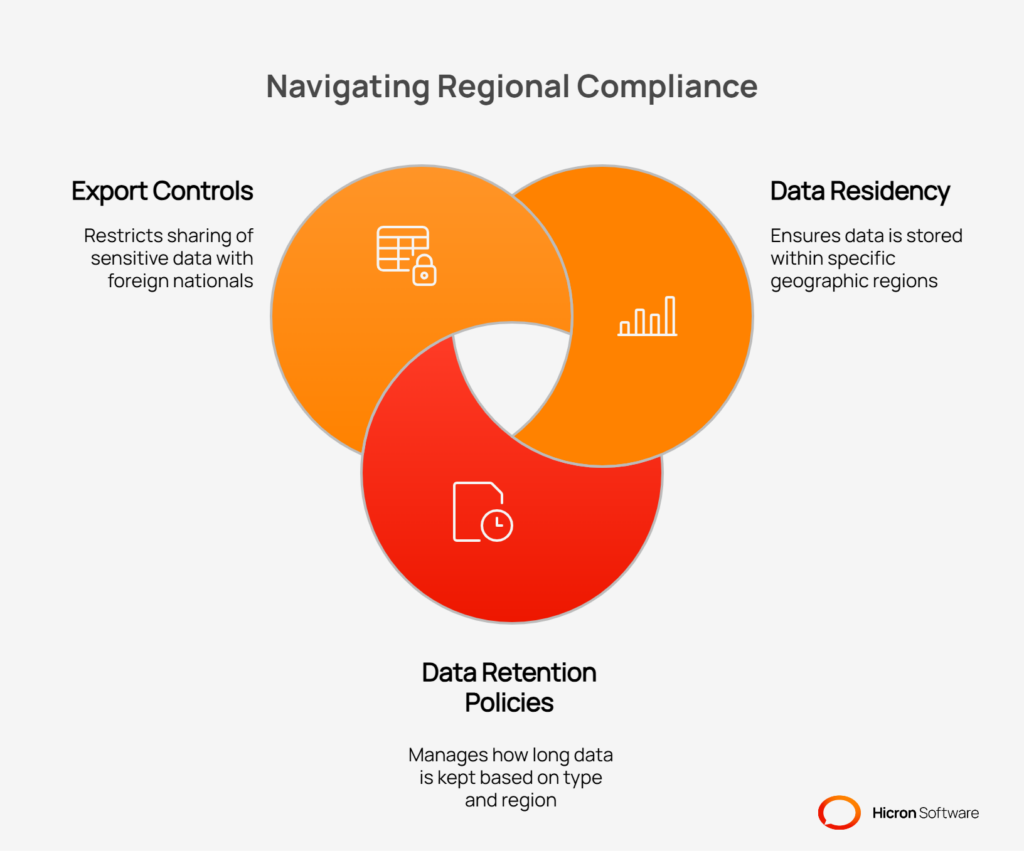
Key areas of regional compliance include:
Attempting to implement a comprehensive, enterprise-wide vendor management system all at once is a common but risky strategy. A “big bang” rollout can overwhelm users, strain internal resources, and delay the time to return on your investment. A more effective approach for a growing organization is a phased implementation.
By breaking the project into manageable stages, you can deliver immediate value, gather feedback, and build momentum for a successful, long-term adoption. This strategy allows you to secure quick wins, demonstrate the system’s value early, and adapt the plan based on real-world experience.
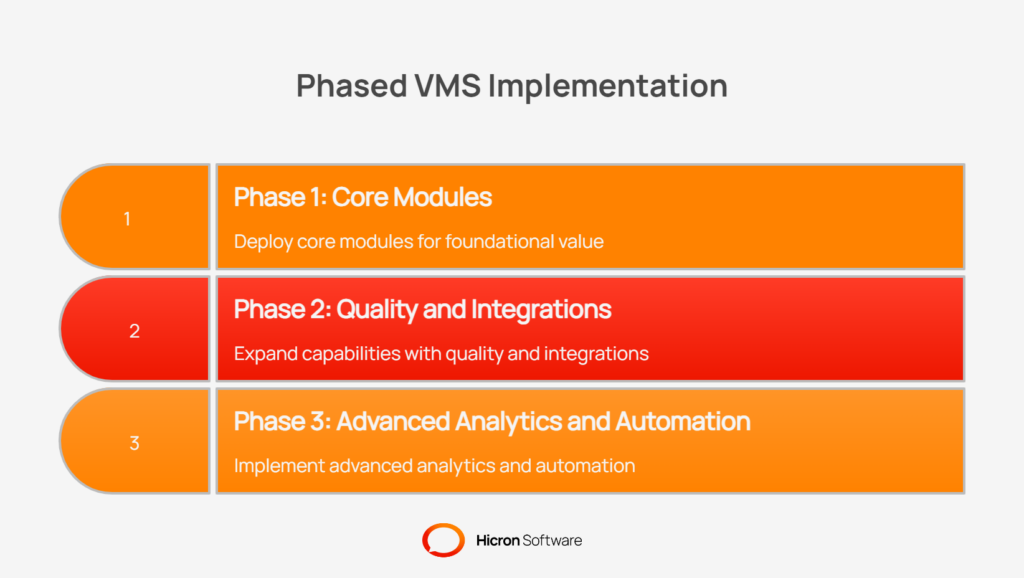
The first phase should focus on solving the most immediate and universal challenges in vendor management. The goal is to establish a central, reliable system of record for all supplier information. This stage typically involves deploying the core modules that provide the value with the least complexity.
Key components of this initial phase include a streamlined supplier onboarding process and a self-service supplier portal. This immediately eliminates manual work, reduces duplicate data entry errors, and gives suppliers a single, consistent place to manage their information.
Paired with basic reporting and dashboards, this foundational deployment provides immediate visibility into your supplier base, enabling you to answer fundamental questions such as “How many suppliers do we have?” and “Which ones are fully approved?”
Once the core foundation is in place and users are comfortable with the new system, you can move on to phase two. This stage expands the VMS’s capabilities into more specialized, high-impact areas such as quality and performance management. This is where you can start digitizing processes that directly influence product quality and operational efficiency.
This phase often includes deploying modules for managing supplier complaints, Corrective and Preventive Actions (CAPA), and formal audits. You can also introduce supplier scorecards to begin tracking performance against key metrics.
Concurrently, this is the ideal time to build out the most critical integrations, such as connecting the VMS to your ERP to synchronize supplier master data or to your PLM system for parts and specifications. This connects the VMS to your broader enterprise ecosystem, breaking down data silos.
With a mature foundation and key processes digitized, the final phase focuses on unlocking the full strategic value of your VMS. This is where you move from simply managing data to using it for predictive insights and advanced automation.
This stage involves rolling out advanced analytics dashboards that can highlight risk trends, identify top-performing suppliers, and provide deep insights into your supply chain.
You can also introduce more sophisticated automation, such as workflows triggered by events in other systems. If your organization operates globally, this is the phase to implement multi-division localization fully.
This includes configuring workflows, forms, and permissions to meet the specific language, currency, and regulatory needs of each business unit or geographic region, completing the vision of a single, unified platform that supports a complex, global enterprise.
No rollout strategy can succeed without a change management plan. Technology is only half the battle; getting people to embrace and use it effectively is what determines success. A continuous change management effort should underpin every phase of the rollout.
This includes providing clear, role-based training to ensure users understand not just how to use the system, but why it benefits them.
Developing a library of reusable templates for common processes, like standard audit checklists or onboarding forms, can accelerate adoption and ensure consistency. Finally, you must define and track key adoption KPIs (Key Performance Indicators).
Monitoring metrics such as the number of active users, the time to onboard a new supplier, or the percentage of complaints resolved within SLA tells you whether the implementation is on track and where you need to focus your training and support efforts.
You cannot improve what you do not measure. As you scale your vendor management system (VMS), establishing clear key performance indicators (KPIs) is the only way to know if your strategies are working.
Tracking the right metrics provides objective evidence of system health, operational efficiency, and financial return. It helps you move beyond vague feelings of “things seem faster” to a data-driven understanding of your platform’s performance.
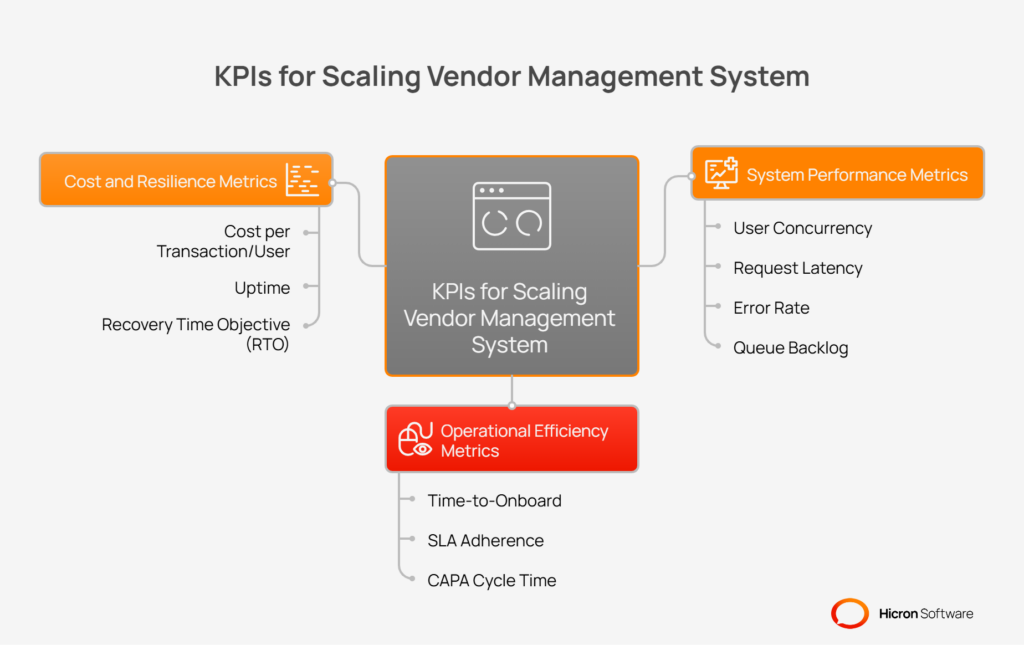
These KPIs serve as your guide, highlighting successes to build upon and revealing early warnings of potential issues before they become critical problems.
These metrics give you a direct look into the technical health and responsiveness of your VMS. They tell you whether the underlying infrastructure can handle the load you are placing on it and provide a good experience for users.
While system metrics focus on the “how,” operational metrics focus on the “what.” They measure how effectively your teams are using the VMS to execute key business processes. Improvements in these KPIs demonstrate a direct return on investment through increased productivity and faster cycle times.
Finally, you need to ensure that your scaling efforts are both cost-effective and resilient. These metrics help you understand the financial impact of your platform and your ability to recover from a major incident.
Scaling a vendor management system (VMS) successfully requires more than just adding server capacity. It involves making smart architectural and process decisions that support growth without introducing fragility. Many organizations learn this the hard way, encountering predictable problems that slow them down, increase costs, and frustrate users.
By understanding these common pitfalls ahead of time, you can navigate the path to scale more smoothly and avoid the costly rework that traps so many growing companies.
When a new division or business unit adopts the VMS, they often come with a list of unique requirements for their specific workflows. It can be tempting to accommodate every request with custom code to drive adoption.
However, this approach is a significant trap. Each customization creates a “fork,” a unique version of a workflow or feature that deviates from the standard. As these forks multiply, your VMS becomes a collection of disconnected, bespoke applications instead of a unified platform.
This makes maintenance a nightmare. A single security patch or feature upgrade now requires testing and deployment across every custom fork, dramatically increasing complexity and cost.
How to avoid it? Adopt a “configuration over customization” mindset. Instead of writing custom code for each division, build flexible, reusable templates for core processes like onboarding or audits. Empower divisions to configure these templates by adding their own fields, adjusting approval steps, or setting unique SLA timers. This approach allows for local flexibility while maintaining a single, standard codebase, ensuring that future upgrades can be rolled out efficiently across the entire organization.
Integrations between the VMS and other systems, like an ERP, are critical. A common mistake is to design these integrations as synchronous, “chatty” conversations. In this design, one system requests another and must wait for an immediate response.
For example, when a supplier is updated in the VMS, the system might make several synchronous calls to the ERP to update different pieces of information.
This works fine at low volumes, but it creates a tightly coupled, brittle system. During a traffic spike, the receiving system can become overwhelmed, causing the VMS to slow down or time out while waiting for responses.
How to avoid it? Design integrations using asynchronous patterns. Instead of a direct, blocking call, the VMS should publish an event (e.g., “SupplierUpdated”) to a message queue. The ERP system can then process these events from the queue at its own pace. This decouples the systems, allowing the VMS to remain responsive even if the ERP is slow or temporarily unavailable. This event-driven approach is far more resilient and can handle massive traffic spikes without causing system-wide slowdowns.
As your VMS grows, certain database tables, often those storing transactions, audits, or logs, can become enormous, containing hundreds of millions or even billions of rows. Without a proper strategy, this leads to “hot tables.”
Queries against these massive tables become progressively slower, leading to application timeouts and a poor user experience. A single user running an extensive report can inadvertently lock a critical table, grinding the entire system to a halt for everyone.
How to avoid it? Implement a database partitioning strategy early. Partitioning involves breaking up a large table into smaller, more manageable pieces based on a specific key, such as a date or a customer ID. For instance, you could partition a large audit log table by month. When a user queries data for a specific month, the database only needs to scan the smaller partition instead of the entire table, making the query dramatically faster. This proactive approach prevents database hotspots and ensures that your VMS remains performant as your data volume explodes.
In a distributed system, network glitches and temporary service outages are a fact of life. An integration might try to send an update, fail due to a brief network issue, and then try again. If the integration lacks proper safeguards, this can lead to serious data integrity problems.
For example, a failed attempt to create a new supplier, followed by a successful retry, could result in two identical supplier records in the downstream system.
How to avoid it? Build idempotency and automated retry logic into all your integrations. Idempotency is the property that ensures that making the same request multiple times has the same effect as making it once. This is often achieved by assigning a unique transaction ID to each request. If the receiving system sees a request with an ID it has already processed, it simply acknowledges the request without creating a duplicate record. Pairing this with a smart retry mechanism (which automatically retries a failed request a few times with a delay) creates an integration that can self-heal from temporary failures and guarantee data consistency.
Successfully scaling a vendor management system is not an accident; it is the result of deliberate design and strategic foresight. As we have explored, achieving sustainable growth requires moving beyond simply managing suppliers to architecting a platform that can evolve with your business. The journey from a simple departmental tool to a global enterprise platform is built on a foundation of key principles.
A modular architecture allows you to roll out functionality in manageable phases, delivering value quickly while building for the future. Support for multiple divisions ensures that you can establish consistent, standardized processes without sacrificing the flexibility that local business units need to operate effectively.
Finally, creating resilient, asynchronous integrations is what separates a fragile, bottleneck-prone system from a truly scalable one that communicates effortlessly with your wider enterprise landscape.
Building a VMS that can handle the complexities of a growing organization requires a proactive, not reactive, approach. Instead of waiting for performance to degrade or for users to complain, the time to act is now. The path forward begins with an honest assessment of your current state. Start by conducting a thorough audit to identify your most significant scale bottlenecks, whether they lie in slow database queries, brittle integrations, or manual workflows that have not been automated.
From there, you can define a clear technical strategy. This involves creating a formal data partitioning and tenancy model to ensure your database can handle massive growth without slowing down. At the same time, begin planning a pilot project for a high-availability rollout in a controlled environment.
By taking these concrete steps, you can begin the practical work of transforming your VMS from a system that merely supports your business to a strategic asset that actively enables its growth.

A scalable vendor management system is a platform architected to handle growth in users, suppliers, data volume, and transactions without degrading performance. It uses a modular VMS architecture, supports complex multi-division structures, and features resilient integrations to grow with your business, rather than holding it back.
A scalable VMS supports multiple divisions through features like tenanting models, data partitioning, and configurable policies. This allows each business unit to have its own localized workflows, SLA timers, and rules while still operating on a single, unified platform, ensuring both consistency and flexibility.
RBAC is critical for securely managing thousands of users. It allows you to assign permissions based on roles (e.g., “quality manager”) and apply them within specific scopes (e.g., a single division or plant). This simplifies user management, enforces the principle of least privilege, and ensures that users access only the data relevant to their jobs.
Poorly designed integrations, especially synchronous ones, create tight coupling between systems. This can lead to performance bottlenecks where a slowdown in your ERP system causes the VMS to time out. It also increases the risk of data duplication and inconsistencies, making asynchronous patterns and retry logic essential for VMS scalability.
To maintain performance, a high-availability VMS relies on horizontal scaling, database read replicas, and a proactive data partitioning strategy. Partitioning tables by division or date prevents queries from slowing down as data accumulates. Centralized monitoring of metrics like latency and error rates also helps you identify and address performance issues before they impact users.
Hicron Software proved to be a trusted partner with unmatched technical expertise, delivering a scalable and user-friendly web application that was pivotal to our successful U.S. market expansion.

Hicron’s contributions have been vital in making our product ready for commercialization. Their commitment to excellence, innovative solutions, and flexible approach were key factors in our successful collaboration.
I wholeheartedly recommend Hicron to any organization seeking a strategic long-term partnership, reliable and skilled partner for their technological needs.

After carefully evaluating suppliers, we decided to try a new approach and start working with a near-shore software house. Cooperation with Hicron Software House was something different, and it turned out to be a great success that brought added value to our company.
With HICRON’s creative ideas and fresh perspective, we reached a new level of our core platform and achieved our business goals.
Many thanks for what you did so far; we are looking forward to more in future!

Hicron is a partner who has provided excellent software development services. Their talented software engineers have a strong focus on collaboration and quality. They have helped us in achieving our goals across our cloud platforms at a good pace, without compromising on the quality of our services. Our partnership is professional and solution-focused!

The IT system supporting the work of retail outlets is the foundation of our business. The ability to optimize and adapt it to the needs of all entities in the PSA Group is of strategic importance and we consider it a step into the future. This project is a huge challenge: not only for us in terms of organization, but also for our partners – including Hicron – in terms of adapting the system to the needs and business models of PSA. Cooperation with Hicron consultants, taking into account their competences in the field of programming and processes specific to the automotive sector, gave us many reasons to be satisfied.

