What is a Vendor Management System (VMS)? 2026 Guide
- October 03
- 12 min

Definition: Kubernetes enhances Vendor Management System (VMS) infrastructure by providing scalability, flexibility, and automation. It enables efficient resource allocation, seamless application deployment, and high availability. Kubernetes’ container orchestration ensures consistent performance, simplifies updates, and supports multi-cloud environments, making VMS more resilient and adaptable to changing business needs.
This article explores how Kubernetes provides the foundation for a modern, scalable VMS infrastructure. You will learn how features like autoscaling, self-healing, and high availability work together. These elements ensure your VMS remains performant and resilient, maintaining uptime and stability across all divisions and operations.
Vendor Management Systems are critical hubs of activity, connecting organizations with hundreds or even thousands of suppliers. As a company grows and adds new divisions, the VMS must handle an expanding user base without a drop in performance. This growth introduces substantial infrastructure challenges. The system must support variable workloads, from quiet periods to intense cycles of order processing and invoicing, all while maintaining consistent responsiveness.
Furthermore, the need for frequent software releases to introduce new features or apply security patches adds another layer of complexity. These updates cannot disrupt operations.
For a VMS, downtime is not an option, as it can halt procurement, delay payments, and damage supplier relationships. Therefore, achieving zero or near-zero downtime is essential. The underlying infrastructure must be resilient and adaptable enough to meet these demanding requirements for high availability and reliable performance.
For product teams, understanding the core components of Kubernetes is key to appreciating how it strengthens a Vendor Management System.
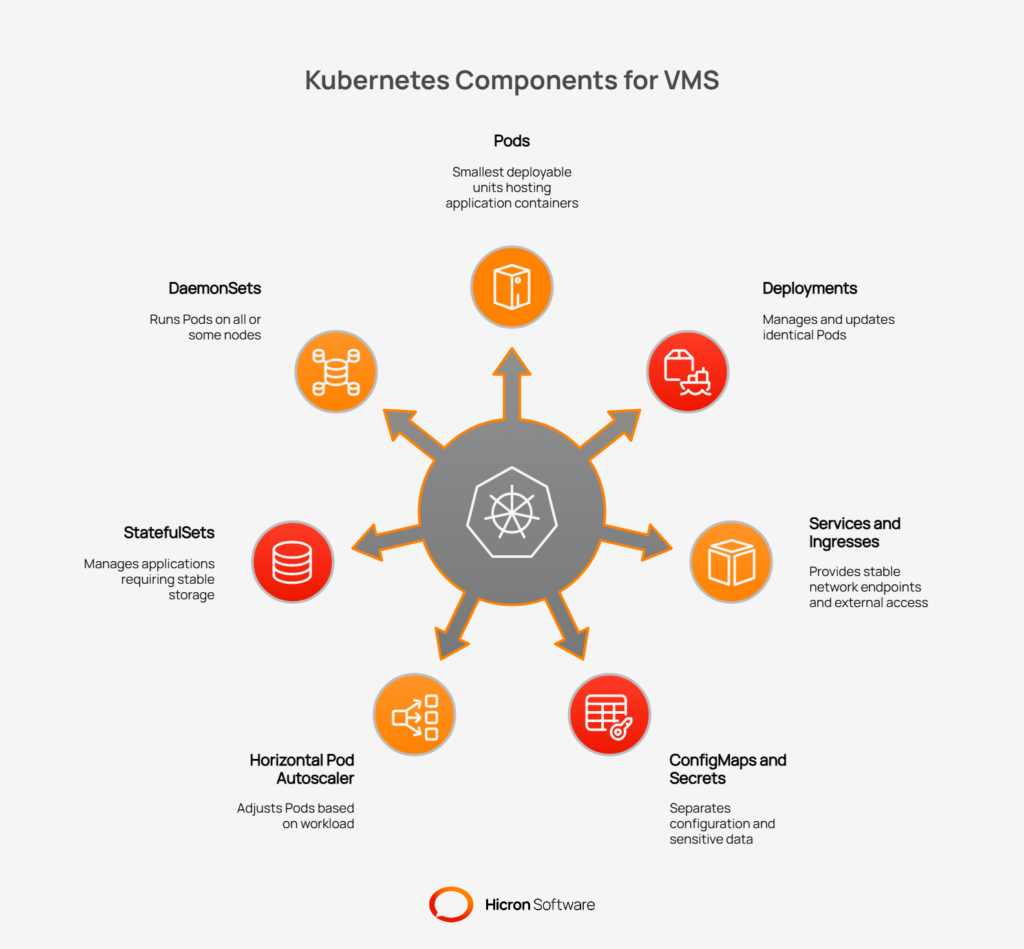
These components work together to run applications reliably and at scale.
For more specialized needs within a VMS Kubernetes environment, other tools come into play. The Horizontal Pod Autoscaler (HPA) automatically adjusts the number of Pods in a Deployment based on CPU usage or other metrics, which is perfect for handling variable workloads. StatefulSets manage applications that require stable storage and network identifiers, such as databases. Finally, DaemonSets ensure that a copy of a Pod runs on all (or some) nodes in the cluster, which is useful for logging or monitoring agents.
These building blocks provide the foundation for creating a truly scalable VMS infrastructure.
One of the most powerful features of a Kubernetes vendor management system is its ability to automatically scale resources. This ensures the VMS performs optimally during high-demand periods and reduces costs during quiet times, all without manual intervention. This dynamic adjustment is a core component of a scalable VMS infrastructure.
Kubernetes offers two primary ways to automatically adjust application resources. Horizontal Pod Autoscaling (HPA) scales the number of application pods based on real-time metrics such as CPU or memory usage. For a VMS, this means that when a sudden influx of users creates purchase orders, HPA will automatically add more pods to handle the load, ensuring consistent performance.
Vertical Pod Autoscaling (VPA), on the other hand, adjusts the resources (CPU and memory) allocated to existing pods. It fine-tunes resource requests and limits, ensuring each pod has what it needs without being over-provisioned. This helps optimize costs and resource efficiency across the system.
While HPA and VPA manage application pods, the Cluster Autoscaler manages the underlying infrastructure. This component automatically adds or removes nodes (the virtual or physical machines that run the pods) from the cluster. During peak order cycles or when running large batch jobs, if the existing nodes run out of capacity, the Cluster Autoscaler will provision new ones. Conversely, when demand subsides, it will remove idle nodes to lower infrastructure costs.
To further enhance a scalable VMS infrastructure, it is best to design services to be stateless. A stateless service does not store session data from one request to the next, which allows Kubernetes to easily scale it up or down and replace pods without losing critical information. Any necessary state can be stored externally. For frequently accessed data, or “hot paths,” in the application, a caching layer like Redis can provide rapid access and reduce load on backend databases. Similarly, using object storage is ideal for storing large files, such as contracts or technical drawings, keeping them separate from the application logic.
A key advantage of running a Vendor Management System on Kubernetes is its built-in self-healing capability. This feature ensures high reliability by automatically detecting and resolving issues without requiring manual intervention, a critical factor for maintaining a consistently available VMS. Kubernetes uses several mechanisms to monitor application health and maintain stability.
One of the primary tools for this is health checks. Liveness probes regularly check if an application pod is running correctly. If a probe fails, Kubernetes automatically restarts the unhealthy pod, restoring service. Meanwhile, readiness probes determine if a pod is ready to start accepting network traffic. If a pod isn’t ready, perhaps because it’s still starting up or loading data, it’s temporarily removed from the service endpoint to prevent users from experiencing errors.
Kubernetes also adds reliability during updates. If a new software deployment fails its health checks, the system can automatically roll back to the previous stable version. This prevents a faulty release from causing system-wide downtime. To protect against voluntary disruptions, such as node maintenance, Pod Disruption Budgets (PDBs) are used. A PDB ensures that a minimum number of application pods remain running at all times, preserving capacity.
Finally, if a node hosting VMS pods fails, Kubernetes automatically reschedules those pods onto healthy nodes elsewhere in the cluster. This process can even span across different physical locations or availability zones, safeguarding the VMS from localized hardware failures or network issues.
| Feature | Description | Benefit for VMS |
| Liveness probes | Automatically checks if a pod is responsive and running. | Restarts failed application components to ensure services recover quickly. |
| Readiness probes | Determines if a pod is ready to accept user traffic. | Prevents traffic from being sent to unresponsive or starting pods, avoiding errors. |
| Automated rollbacks | Reverts to a previous stable version if a new deployment fails. | Protects the VMS from downtime caused by faulty software updates. |
| Pod disruption budgets | Guarantees a minimum number of pods are available during maintenance. | Maintains VMS capacity and availability during planned disruptions. |
| Pod rescheduling | Moves pods from a failed node to a healthy one. | Ensures the VMS remains operational even if the underlying hardware fails. |
A modern Vendor Management System demands constant uptime, and Kubernetes provides the architectural foundation to achieve high availability by design. By distributing workloads and eliminating single points of failure, Kubernetes ensures that a VMS remains accessible and fully functional across different regions and facilities. This built-in resilience is not an afterthought; it’s a core benefit of adopting a VMS Kubernetes infrastructure.
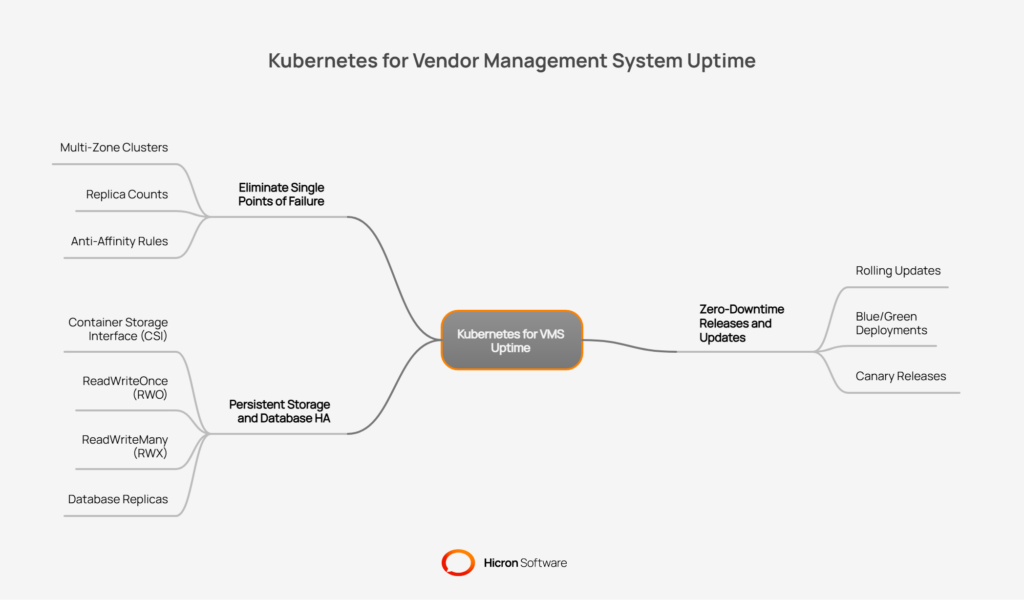
To guarantee consistent uptime, Kubernetes distributes applications across multiple physical or virtual machines, known as nodes. This strategy starts with creating multi-zone clusters, where nodes are spread across different data centers or availability zones. If one zone experiences an outage, the VMS continues to run on nodes in the other zones.
This is further enhanced by two key concepts:
Frequent software updates are a reality for any VMS, but they cannot come at the cost of downtime. Kubernetes facilitates zero or low-downtime releases through sophisticated deployment strategies. The default method is rolling updates, where Kubernetes replaces old pods with new ones incrementally. This ensures that the VMS remains available throughout the update process.
For even greater control and risk reduction, advanced strategies can be employed:
A VMS relies heavily on persistent data, such as contracts, supplier information, and transaction records. Kubernetes manages this through its persistent storage framework. Container Storage Interface (CSI) drivers allow Kubernetes to connect to virtually any storage system, whether on-premises or in the cloud.
Storage is provisioned using different access modes to suit various needs:
For the VMS database itself, Kubernetes supports common high availability patterns. This includes running a primary database with one or more replicas. If the primary database fails, a replica can be automatically promoted to take its place, minimizing data loss and ensuring the VMS remains operational.
A Vendor Management System (VMS) handles sensitive data and serves multiple user groups, from internal divisions to external suppliers. A Kubernetes VMS infrastructure provides robust tools to enforce secure multitenancy, ensuring that each group operates in a controlled, isolated environment. This prevents unauthorized access and protects data integrity across the platform.
Kubernetes uses Namespaces to create virtual clusters within a physical cluster, effectively segmenting environments for different divisions, regions, or even large suppliers. This is the first layer of isolation.
Network policies add another critical layer of security by defining rules that control traffic flow between these namespaces and their pods. For example, you can create a rule that only allows the invoicing module to communicate with the supplier database, blocking all other traffic.
To manage permissions, role-based access control (RBAC) is used to define precisely who can do what within the cluster. This applies not only to human operators but also to applications and automated processes.
For sensitive data, secrets management ensures that credentials and API keys are stored and accessed securely. Further security can be achieved through image signing, which verifies that only trusted container images are deployed into the VMS environment. Security is also hardened at the edge with ingress controller security measures and by enabling mutual TLS (mTLS) to encrypt communication between services. Finally, comprehensive audit logging provides a detailed record of all cluster activities, which is essential for compliance and security analysis.
A high-performance VMS Kubernetes infrastructure requires deep visibility into its operations to identify and resolve issues before they impact users. This is achieved through a comprehensive observability strategy that goes beyond simple monitoring. It involves collecting and analyzing data from every part of the system to build a complete picture of its health.
Modern observability rests on three pillars:
This data is used to define and monitor Service Level Objectives (SLOs) for key performance indicators like latency, error rate, and processing backlog size. Custom health dashboards can be created for specific VMS modules (e.g., orders, quality control, audits) or even for individual divisions, providing a tailored view of system performance.
Observability also plays a big role in cost monitoring. By analyzing resource metrics, teams can ensure proper requests and limits hygiene, preventing pods from consuming excessive resources. This data informs rightsizing efforts and helps fine-tune autoscaling policies, ensuring the VMS runs efficiently while only paying for the infrastructure it truly needs.
A major benefit of a Kubernetes-based architecture is the ability to operate your Vendor Management System (VMS) with a consistent set of tooling, whether in a public cloud, a private data center, or a hybrid combination of both. This consistency simplifies operations and provides deployment flexibility. For organizations with specific data residency or security requirements, running a VMS on-premises is a critical capability.
When deploying on-premises, storage and backup strategies become paramount. Kubernetes supports a wide range of on-prem storage solutions through its Container Storage Interface (CSI), allowing you to use existing infrastructure. A robust backup plan, coupled with tested disaster recovery playbooks, ensures business continuity if a data center incident occurs. Kubernetes also supports unique situations, such as air-gapped environments where the VMS cannot connect to the internet. In these cases, a clear patch management process is essential to apply security updates and new features without external connectivity.
| Deployment aspect | On-prem Kubernetes strategy | Benefit for VMS |
| Tooling | Use the same Kubernetes manifests and tools across all environments. | Reduces operational complexity and training overhead. |
| Storage & backup | Integrate with existing on-prem storage arrays via CSI drivers; implement regular backups. | Protects critical VMS data and leverages existing infrastructure investments. |
| Disaster recovery | Create and regularly test playbooks for failover to a secondary site. | Minimizes downtime and data loss in the event of a site-wide failure. |
| Edge cases | Use private container registries and a defined process for offline patch application. | Enables secure VMS operation in highly restricted or disconnected environments. |
A VMS does not operate in a silo; it must connect reliably with other enterprise systems, such as ERP, Product Lifecycle Management (PLM), and Manufacturing Execution Systems (MES). A Kubernetes VMS infrastructure provides patterns for building stable, resilient integrations that can withstand network issues and system slowdowns.
The foundation of a resilient integration strategy is often an event-driven architecture. Instead of direct, synchronous calls, services communicate through queues or message streams. This decouples the systems, so if an ERP is temporarily unavailable, the VMS can continue to queue up transactions and process them once the ERP is back online. Key principles include:
To further isolate systems, integrations can be deployed in their own separate namespaces. An anti-corruption layer can also be implemented to act as a translation service between the VMS and an external system, protecting the VMS data model from complexities or changes in the other system.
A modern VMS needs to evolve quickly, with new features and security updates delivered frequently and safely. A Kubernetes-native CI/CD (Continuous Integration/Continuous Deployment) process provides the automation and guardrails to ship software faster while minimizing risk. This is achieved by building a reliable and repeatable path from code to production.
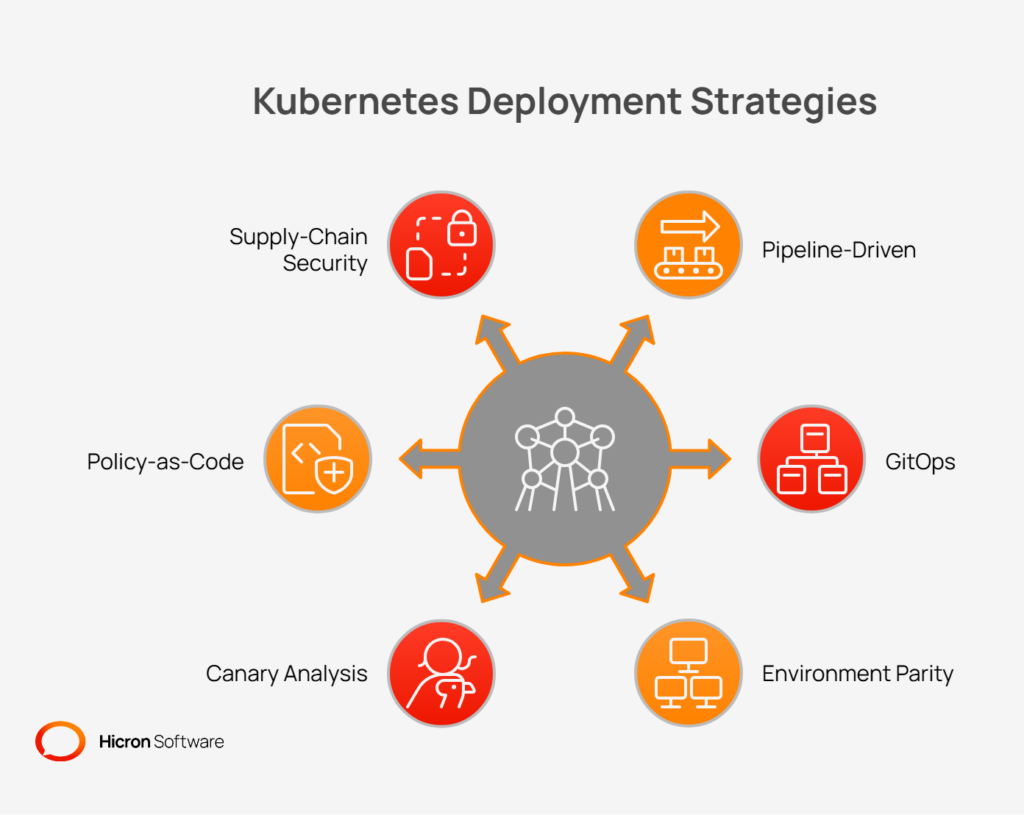
Two popular deployment methodologies in the Kubernetes world are:
#1 Pipeline-driven deployments: Traditional CI/CD pipelines (e.g., Jenkins, GitLab CI) build, test, and deploy container images to the cluster.
#2 GitOps: The Git repository becomes the single source of truth for the desired state of the VMS application. An operator in the cluster automatically synchronizes the live state with the state defined in Git.
Regardless of the method, maintaining environment parity, keeping development, staging, and production environments as similar as possible, is crucial for reducing “it works on my machine” issues. A clear promotion flow defines how a new release moves from one environment to the next.
Kubernetes also enables advanced safety checks during deployment:
#1 Canary analysis: Automatically analyzing metrics from a new release to determine if it is performing within acceptable parameters before rolling it out to more users.
#2 Policy-as-Code: Using tools like Open Policy Agent (OPA) or Gatekeeper to enforce rules across the cluster, such as requiring specific labels or preventing the use of insecure container images.
#3 Supply-chain security: Integrating image scanning into the pipeline to check for vulnerabilities and generating a Software Bill of Materials (SBOM) to provide a full inventory of all components in the application.
Effectively managing data is crucial for any Vendor Management System (VMS), and a Kubernetes VMS infrastructure offers flexible options to balance performance, reliability, and cost. One of the primary decisions is whether to run stateful services (like databases) directly on Kubernetes or use an external managed database service.
Regardless of the approach, a solid data protection strategy is non-negotiable. This involves regular backups, filesystem snapshots for instant recovery, and Point-in-Time Recovery (PITR) capabilities to restore a database to a specific moment before an error occurred. For unstructured data like contracts, invoices, or compliance evidence, object storage is the ideal solution. It provides durable, scalable, and cost-effective storage without consuming expensive block storage resources used by databases.
As the VMS grows, partitioning or sharding strategies become essential for scaling the database. This involves splitting a large database into smaller, more manageable pieces, which can improve query performance and distribute the load across multiple nodes.
| Data strategy | Description | Best for |
| Managed databases | Offloading database management to a cloud provider. | Teams want to reduce operational overhead and focus on application logic. |
| Stateful sets on K8s | Running databases or other stateful services directly within Kubernetes. | Organizations need full control over their data stack to optimize costs. |
| Object storage | Storing files like PDFs, images, and documents. | Archiving large files and unstructured data associated with VMS transactions. |
| PITR backups | Restoring a database to a specific second or transaction. | Critical recovery scenarios to minimize data loss after accidental deletion or corruption. |
A scalable VMS infrastructure must remain responsive and performant even under heavy load. Performance engineering in a Kubernetes environment involves continuous tuning and proactive planning to ensure the system is always ready for demand spikes.
The foundation of VMS performance is resource management. This begins with request and limit tuning, where you define the amount of CPU and memory each application pod needs. Setting proper requests ensures Kubernetes schedules pods onto nodes with sufficient capacity, while limits prevent a single faulty pod from consuming all of a node’s resources and impacting other services. To optimize database interactions, connection pooling is vital. It maintains a ready pool of database connections that application pods can reuse, avoiding the performance overhead of establishing a new connection for every request. These practices, combined with fine-tuned autoscaling policies, ensure the VMS has the resources it needs without being over-provisioned.
Proactive performance management is also critical. This includes:
You can improve the user experience by reducing latency for frequently accessed content. A Content Delivery Network (CDN) can cache static assets and large file downloads closer to end-users, speeding up access times globally. For dynamic data, internal caches (such as Redis) can store the results of common queries or pre-computed dashboard data, providing near-instant responses and reducing load on backend systems.
While Kubernetes brings significant benefits to Vendor Management Systems (VMS), success depends on recognizing and addressing common deployment pitfalls. Below, we break down the most frequent challenges, and how to avoid them, with detailed examples and actionable best practices.
When too many pods are deployed on a single node to maximize resource utilization, the result is often a “noisy neighbor” problem. In this scenario, one aggressive or malfunctioning application can consume the lion’s share of CPU, memory, or disk I/O, diminishing performance and reliability for all other VMS workloads on the same node. This instability can manifest as slow service response times, unexpected pod restarts, or even node crashes.
How to avoid it?
Proactively distribute workloads by setting anti-affinity rules so that key services run on separate nodes. Constantly monitor node resource usage and tune autoscaling policies to prevent overstressing nodes.
Neglecting to specify CPU and memory requests or limits for deployments leaves your cluster exposed to unpredictable behavior. Without constraints, a runaway pod may exhaust system resources, starving or sabotaging critical VMS applications running alongside it. This not only degrades performance but can also trigger cascading failures if multiple services compete for scarce resources.
How to avoid it?
Define clear resource requests and limits for each workload. Use tools like the Kubernetes ResourceQuota and LimitRange objects to enforce cluster-wide policies, ensuring consistency and stability.
Tightly coupling services through synchronous calls presents another risk. If a microservice becomes slow or unavailable, timeouts or failures can ripple through the system. Furthermore, relying on synchronous communication without implementing retry logic or making endpoints idempotent can create duplicate data, lost transactions, or corrupted records in the face of intermittent errors.
How to avoid it?
Favor asynchronous, event-driven communication patterns—such as message queues or streaming systems, that decouple services and make them resilient to transient failures. Ensure that all integration points are idempotent and design retry logic to safely handle communication glitches without unintended side effects.
By default, Kubernetes networking is permissive, any pod can communicate with any other pod in the cluster. Without strict network policies, a compromised application has unfettered lateral movement, putting sensitive VMS components at risk. Attackers can use this gap to expand their reach within the platform or access confidential data.
How to avoid it?
Implement a deny-all approach as a baseline using Kubernetes NetworkPolicies, and then explicitly allow only the minimal required communication paths between pods. Regularly audit and test these rules to ensure they remain effective as the system evolves.
Leaving administrative tools or dashboards open and unprotected is an invitation for security breaches. Publicly accessible interfaces, such as the Kubernetes dashboard or third-party monitoring systems, can be exploited by unauthorized users to gain control over your cluster, view sensitive logs, or modify configurations.
How to avoid it?
Restrict access to all admin interfaces by requiring strong authentication and, where feasible, placing them behind a VPN or within a zero-trust network perimeter. Routinely review user permissions and disable unnecessary accounts or endpoints.
| Pitfall | Consequence | How to avoid? |
| Noisy neighbors | Application instability and degraded VMS services on affected nodes. | Define resource requests and limits; use anti-affinity to spread critical pods. |
| Missing resource limits | Resource starvation and potential node crashes. | Assign explicit CPU and memory requests/limits for each workload. |
| Chatty synchronous calls | Risk of cascading failures and potential data corruption. | Implement asynchronous, event-driven communication; use retries and ensure idempotent endpoints. |
| Unsecured network policies | Increased risk of lateral movement and exposure of sensitive data. | Establish deny-all network policies; allow only explicit, required traffic. |
| Exposed admin tools | Unauthorized access to cluster administration and monitoring. | Protect dashboards and admin tools behind a VPN or strong authentication. |
Migrating a complex application like a Vendor Management System (VMS) to a Kubernetes infrastructure is a significant undertaking. A phased approach is the most effective strategy, as it allows your team to build skills, demonstrate value, and minimize disruption. By breaking the adoption process into manageable stages, you can ensure a smoother transition.
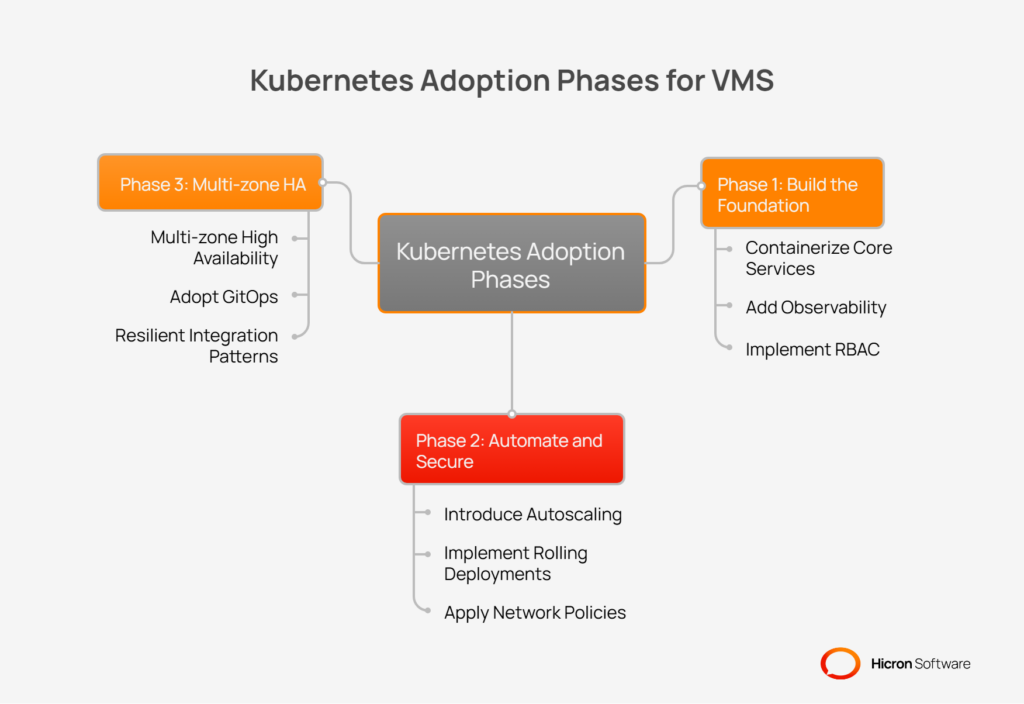
The first phase focuses on containerizing the application and establishing basic operational controls and visibility. The goal is to get the core VMS services running in Kubernetes while ensuring you have the tools to manage and monitor them effectively.
Once the core services are running and observable, the second phase introduces more advanced automation and security features. This stage is about improving reliability, streamlining deployments, and hardening the environment.
The third phase focuses on scaling your VMS to enterprise-grade reliability and operational maturity.
Adopting a Kubernetes-based infrastructure is a strategic move to transform your Vendor Management System into a more resilient, scalable, and efficient platform. By leveraging Kubernetes’s native capabilities, you can build a system that meets the demanding needs of modern supply chain operations. The combination of autoscaling to handle fluctuating workloads, self-healing to automatically recover from failures, and high availability to ensure constant uptime creates a reliable and performant VMS.
This architecture moves beyond simply keeping the lights on; it provides a foundation for innovation, enabling faster feature releases, more secure integrations, and better cost control. Whether you are running in the cloud, on-premises, or in a hybrid environment, Kubernetes provides a consistent, powerful way to manage your VMS infrastructure.
Taking the first step is often the most challenging part of any modernization journey. Here is a clear, actionable path to begin your transition:
Baseline your current state. Start by measuring and documenting your VMS’s current uptime and performance metrics. Understanding your starting point is crucial for demonstrating the value of the migration and for setting realistic goals.
Prioritize one module. Instead of a complete migration all at once, select a single, well-understood VMS module to be your first candidate for Kubernetes. This could be a reporting service, an invoicing component, or another service that can be containerized with manageable risk.
Define your SLOs. For the chosen module, establish clear Service Level Objectives for key domains like latency, error rate, and availability. These objectives will guide your engineering efforts and provide concrete measures of success.

Kubernetes plays a critical role in modernizing and optimizing VMS infrastructure by providing scalability, high availability, and automation. It ensures the system can handle fluctuating workloads, supports zero-downtime updates, and offers self-healing capabilities to maintain consistent performance. Additionally, Kubernetes enhances security, enables seamless integrations with other enterprise systems, and provides a flexible foundation for running VMS in cloud, on-premises, or hybrid environments.
Kubernetes uses autoscaling to automatically adjust resources based on demand. When your VMS experiences a surge in activity, like during mass purchase order updates, it adds more application instances (pods) to maintain performance. When demand subsides, it scales back down, optimizing both performance and cost for your VMS Kubernetes deployment.
Yes. Kubernetes provides multi-tenant namespaces, which act as virtual clusters to securely isolate different tenants, such as internal divisions or external suppliers. By combining namespaces with strict network policies, you can control traffic flow and ensure that each group can only access its own data, enhancing security across the platform.
GitOps streamlines the deployment process by using a Git repository as the single source of truth for your application’s desired state. This makes software updates to your VMS faster, safer, and more auditable. Any changes are made via code, creating a transparent, version-controlled process for managing your infrastructure.
Kubernetes distributes workloads across multiple nodes and zones, uses replica sets to maintain redundancy, and employs self-healing features like pod rescheduling and automated rollbacks to recover from failures and maintain uptime.
Hicron Software proved to be a trusted partner with unmatched technical expertise, delivering a scalable and user-friendly web application that was pivotal to our successful U.S. market expansion.

Hicron’s contributions have been vital in making our product ready for commercialization. Their commitment to excellence, innovative solutions, and flexible approach were key factors in our successful collaboration.
I wholeheartedly recommend Hicron to any organization seeking a strategic long-term partnership, reliable and skilled partner for their technological needs.

After carefully evaluating suppliers, we decided to try a new approach and start working with a near-shore software house. Cooperation with Hicron Software House was something different, and it turned out to be a great success that brought added value to our company.
With HICRON’s creative ideas and fresh perspective, we reached a new level of our core platform and achieved our business goals.
Many thanks for what you did so far; we are looking forward to more in future!

Hicron is a partner who has provided excellent software development services. Their talented software engineers have a strong focus on collaboration and quality. They have helped us in achieving our goals across our cloud platforms at a good pace, without compromising on the quality of our services. Our partnership is professional and solution-focused!

The IT system supporting the work of retail outlets is the foundation of our business. The ability to optimize and adapt it to the needs of all entities in the PSA Group is of strategic importance and we consider it a step into the future. This project is a huge challenge: not only for us in terms of organization, but also for our partners – including Hicron – in terms of adapting the system to the needs and business models of PSA. Cooperation with Hicron consultants, taking into account their competences in the field of programming and processes specific to the automotive sector, gave us many reasons to be satisfied.

