What is a Vendor Management System (VMS)? 2026 Guide
- October 03
- 12 min


Vendor Management Suite (VMS) streamlines order management by centralizing vendor data, automating procurement workflows, and improving communication. They enable businesses to track orders, manage approvals, and ensure compliance in real-time, reducing errors and delays. Additionally, VMS provides analytics and reporting tools to optimize vendor performance and decision-making.
This article delves into how Vendor Management Suite (VMS) streamlines order management by automating processes, integrating with ERP systems, and centralizing supplier communication. It highlights the inefficiencies of traditional manual methods, such as spreadsheets and emails, and explains how VMS features like automated purchase orders, real-time updates, and supplier portals improve accuracy, reduce delays, and enhance collaboration. The article emphasizes the measurable ROI of VMS through reduced manual effort, faster order cycles, and proactive issue resolution, and offers a phased implementation approach to ensure smooth adoption.
Traditional order management relies heavily on manual processes that are often slow and error-prone. When procurement teams depend on spreadsheets, emails, and phone calls to manage purchase orders, critical information can easily get lost or misinterpreted.
This outdated approach creates a disjointed experience, making it difficult to maintain a clear, accurate view of the entire order lifecycle. Without a centralized system, teams are often reactive, spending more time fixing problems than preventing them.
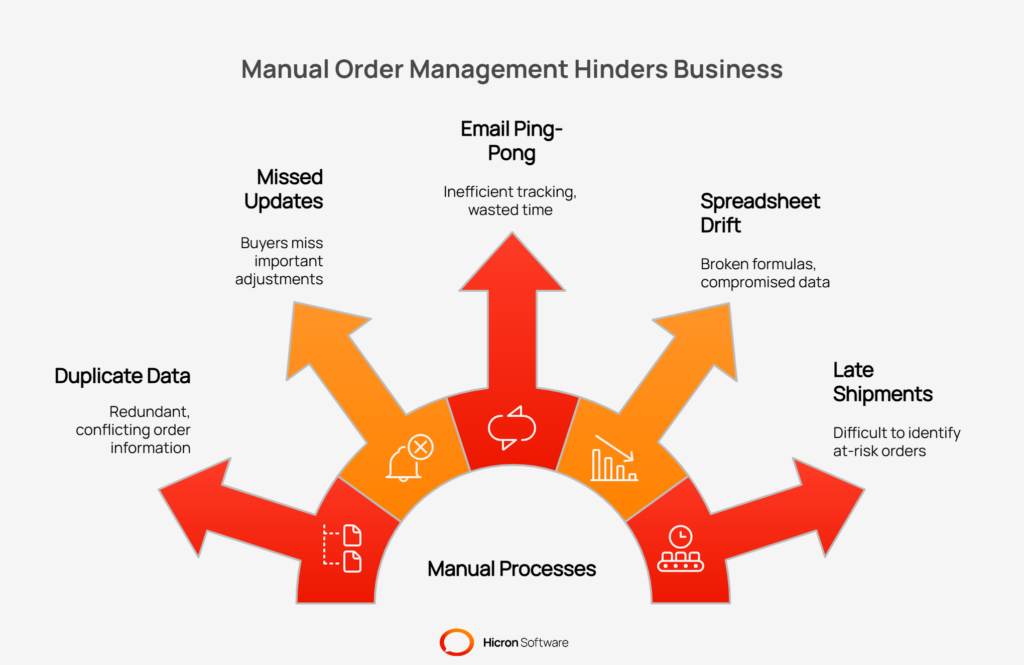
This manual system is the source of many common operational headaches. Key issues include:
The consequences of these breakdowns extend beyond daily frustration. They have a direct impact on business performance, leading to higher operational costs from expedited shipments and error correction. Inefficient processes can also result in stockouts, which halt production lines and create lost revenue opportunities.
Furthermore, a disorganized approach creates a poor supplier experience, potentially damaging relationships with key partners who need clear, consistent communication. An effective vendor management system order management helps streamline purchase orders and provides a collaborative supplier portal to eliminate these costly issues.
Managing orders through spreadsheets and scattered emails often leads to confusion and missed details. It’s a bit like watching a movie with missing scenes; you’re left guessing what’s supposed to happen next. A vendor management system (VMS) provides structure, helping teams move away from a fragmented approach toward a single, reliable source of information.
In a VMS, streamlined order management brings everything related to supplier orders together. Instead of searching through multiple tools for updates or trying to confirm who made changes, teams have a clear dashboard and consistent processes. This setup means less time spent tracking down answers and more time focusing on bigger priorities.
One key advantage is integration with your ERP system. When these systems work together, order details are always up to date for both your team and your suppliers. This connection helps avoid miscommunications and keeps everyone aligned from the first order to final delivery.
Here are the main features that define a strong vendor management system order management approach:
| Capability | How it makes order management smoother? |
| Centralized order views | Access all purchase order details and communications in one place, no more switching between systems or endless searching. |
| Automated updates | Order statuses update automatically, reducing manual follow-ups and missed changes. |
| Standardized workflows | Consistent processes for each order help prevent mistakes, so tasks are completed efficiently every time. |
| Real-time collaboration | Buyers and suppliers can communicate directly within the system, keeping messages organized and tied to each specific order. |
By using these capabilities, teams can spend less time fixing problems and more time building strong supplier partnerships and improving supply chain results.
A modern Vendor Management System (VMS) is equipped with specific tools designed to automate tasks, improve data accuracy, and accelerate the entire order process. These features work together to reduce manual work and prevent common errors that slow down your supply chain.
|
Feature/Capability |
Description |
Benefit |
|
ERP Integration and Data Sync |
Ensures VMS and ERP systems share consistent data, including automatic PO sync and data alignment. |
Creates a single source of truth, prevents mismatches, and ensures seamless data flow. |
|
Supplier Portal and Acknowledgements |
Centralized platform for vendor communication, including self-service PO views and ASN submissions. |
Replaces email chains, improves supplier collaboration, and provides real-time visibility. |
|
Automated Notifications and SLAs |
Automation ensures deadlines are met with due-date reminders, change alerts, and escalation rules. |
Keeps processes on schedule, reduces delays, and proactively addresses potential issues. |
|
Change Control and Versioning |
Tracks revisions, approvals, and comments for purchase orders. |
Maintains order accuracy, eliminates confusion, and provides an auditable history. |
|
Delivery Scheduling and ASN Handling |
Simplifies inbound logistics with tools like time-slot booking, dock calendars, and label support. |
Prevents dock congestion, improves receiving efficiency, and streamlines inbound logistics. |
|
Exceptions and Shortage Management |
Automatically flags issues like price mismatches or late deliveries for proactive resolution. |
Focuses attention on critical problems, reducing supply chain disruptions and delays. |
|
Bulk Actions and Imports |
Enables mass updates, CSV/API imports, and templated changes for managing large volumes of orders. |
Saves time, increases efficiency, and ensures consistency in high-volume order management. |
Vendor management system order management starts with strong ERP integration. This connection ensures that your VMS and your Enterprise Resource Planning (ERP) system share the same data, creating a single, reliable source of truth across your operations.
A supplier portal is a secure, self-service hub for your vendors. It replaces endless email chains with a centralized platform for communication and task management, helping to streamline purchase orders.
Automation keeps everything moving on schedule without manual follow-ups. You can set up rules based on your Service Level Agreements (SLAs) to ensure deadlines are met.
Managing changes to purchase orders via email can lead to confusion and mistakes. A well-planned Vendor Management System provides precise change control to maintain order accuracy. It tracks all revisions, approvals, and comments, creating a complete and auditable history for every PO. This eliminates any doubt about which version is the most current one.
Coordinating inbound logistics is simplified with tools for delivery scheduling and ASN management. This functionality helps prevent dock congestion and improves receiving efficiency.
A VMS helps you manage by exception, focusing your attention where it’s needed most. The system uses rule-based detection to automatically flag potential issues such as price mismatches, quantity discrepancies, or late deliveries. These risk flags and guided resolution workflows allow your team to address problems proactively before they disrupt operations.
For teams managing hundreds or thousands of purchase orders, efficiency is everything. Bulk action features are a major time-saver.
Automation is where a Vendor Management System (VMS) truly transforms order management, moving processes from manual, time-consuming to efficient, hands-off. By setting up rules and workflows, you can create “no-touch” processes that run in the background, freeing your procurement team to focus on more strategic tasks. This level of VMS order automation reduces the risk of human error and ensures protocols are consistently followed. It’s about letting the system handle the routine work so your team can manage the exceptions.
This feature automates the very first step of the purchasing process. Instead of manually creating a purchase order every time a need arises, the system can do it for you.
Approval workflows are often a major bottleneck, relying on managers to manually review and sign off on every purchase. Rule-based approvals help streamline purchase orders by automating this step based on your company’s governance policies. This ensures compliance without sacrificing speed.
| Approval type | How it works? |
| Threshold-based approvals | Orders below a particular monetary value are automatically approved, while larger purchases are routed to the appropriate manager. |
| Delegations | If a primary approver is unavailable, the system automatically sends the request to a designated alternate, preventing delays. |
| Segregation of duties (SoD) | The system enforces SoD controls by preventing the same user from both creating and approving a purchase order. |
Chasing suppliers for acknowledgements and updates is a drain on resources. Intelligent reminders automate follow-ups based on risk, not just a fixed calendar. This proactive approach helps keep orders on track. The system can assess factors such as a supplier’s historical on-time delivery performance or an item’s lead time to determine when to send a nudge, ensuring your team’s attention is focused on the orders most at risk of falling behind.
The final step in the order lifecycle, receiving and payment, can also be automated. A closed-loop process ensures that all related documents are matched and reconciled, completing the cycle and updating all connected systems. This level of automation is crucial for effective vendor management system order management and maintaining data integrity through ERP integration.
Vendor management system order management tears down the communication walls between buyers and suppliers. Instead of operating in separate silos and relying on email for updates, both parties get access to a single source of truth. This shared visibility is the foundation for better collaboration and helps to streamline purchase orders by ensuring everyone is on the same page.
Shared dashboards provide a complete, real-time view of the entire order lifecycle. From the moment a PO is issued, both buyers and suppliers can track its progress without sending a single email. This immediate access to information allows teams to move from a reactive to a proactive state.
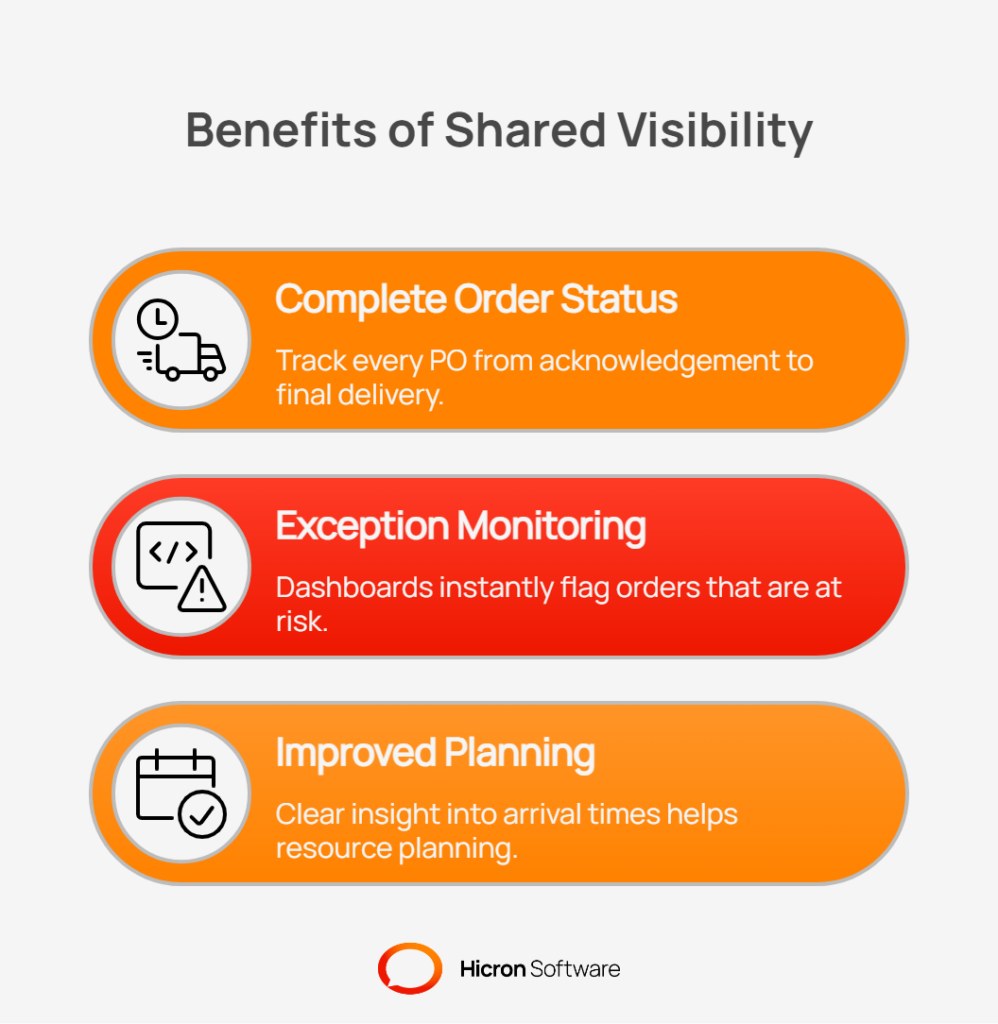
Key benefits of this shared visibility include:
Beyond dashboards, modern VMS platforms improve collaboration with embedded messaging tools. Think of it as a dedicated chat channel for every single purchase order line.
All communication is tied directly to the relevant item, keeping conversations organized and providing a clear audit trail. There is no more digging through old email threads to find out why a delivery date was changed. This contextual communication reduces confusion, clarifies expectations, and builds stronger, more transparent relationships with your vendors through a collaborative supplier portal.
A VMS can act as a gatekeeper, ensuring that products meet specific requirements before they ever leave the supplier’s facility. By embedding quality checks directly into the order process, you can prevent downstream issues such as failed inspections, production line stoppages, or receiving non-compliant goods. This proactive approach is far more efficient than discovering a problem after a shipment has already arrived at your dock.
This is achieved by linking purchase orders directly to necessary quality and compliance documentation. For certain items, you can require suppliers to upload specific documents, such as a certificate of analysis or an inspection report, before they can create an Advance Shipping Notice (ASN). This transforms your VMS into a powerful compliance tool.
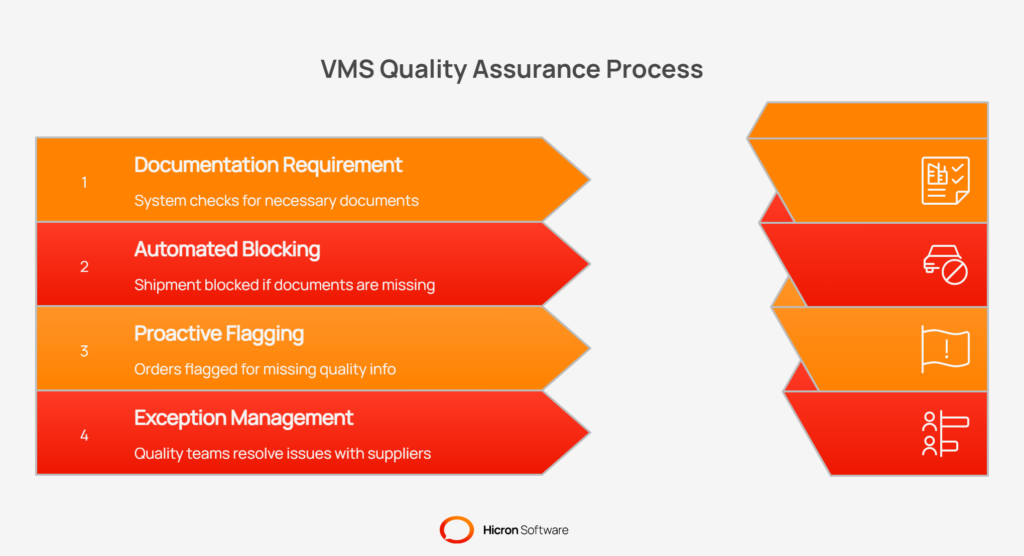
Key features for quality assurance include:
By integrating these checks early in the lifecycle, you streamline purchase orders while simultaneously reinforcing your quality standards. It ensures that compliance is not an afterthought but a built-in step in your procurement workflow, reducing risk and helping maintain the integrity of your supply chain.
A major benefit of centralizing your vendor management system order management is the wealth of data it collects. This data is not just for record-keeping; it is a powerful tool for continuous improvement. By analyzing performance metrics, you can move beyond simply processing orders to strategically optimizing your entire procurement function.
Analytics features within a VMS provide clear insights into what is working well and where bottlenecks are forming, allowing you to make data-driven decisions that improve efficiency and strengthen supplier relationships.
Tracking the right Key Performance Indicators (KPIs) is essential for measuring success and identifying areas for improvement. A VMS dashboard can make these metrics easily accessible, helping you monitor the health of your order management process at a glance.
| Key Performance Indicator (KPI) | What it measures & ehy it matters? |
| Order cycle time | The total time from purchase order creation to goods receipt. Shorter cycles mean a more agile supply chain. |
| Confirmation lag | The time it takes for a supplier to acknowledge a new PO. A long lag can be an early indicator of communication issues. |
| On-time delivery (OTD) | The percentage of orders delivered by the promised date. This directly impacts production schedules and supplier performance. |
| Shortage incidents | The frequency of orders that are delivered with incorrect quantities. Tracking this helps identify unreliable suppliers. |
| Change frequency | How often a PO is modified after being issued. High frequency may point to poor initial planning or volatile supplier terms. |
Beyond standard KPIs, advanced analytics tools offer better insights. You can use Pareto analysis to identify the 20% of suppliers or parts that account for 80% of your issues, such as delivery delays. Predictive risk signals can use historical data to flag orders with a high probability of being late, enabling you to intervene proactively. Furthermore, buyer workload dashboards help managers balance assignments and prevent team burnout.
To support deeper analysis, most VMS platforms offer reporting capabilities. You can schedule regular reports to be sent directly to your inbox or export raw data to a Business Intelligence (BI) tool for custom analysis. This helps you continuously refine your processes, streamline purchase orders, and foster a culture of improvement.
Adopting a new vendor management system for order management doesn’t have to be an overwhelming, all-at-once project. A phased rollout allows your team and your suppliers to adapt gradually, ensuring a smoother transition and quicker wins. This approach minimizes disruption and builds momentum as you introduce new capabilities.
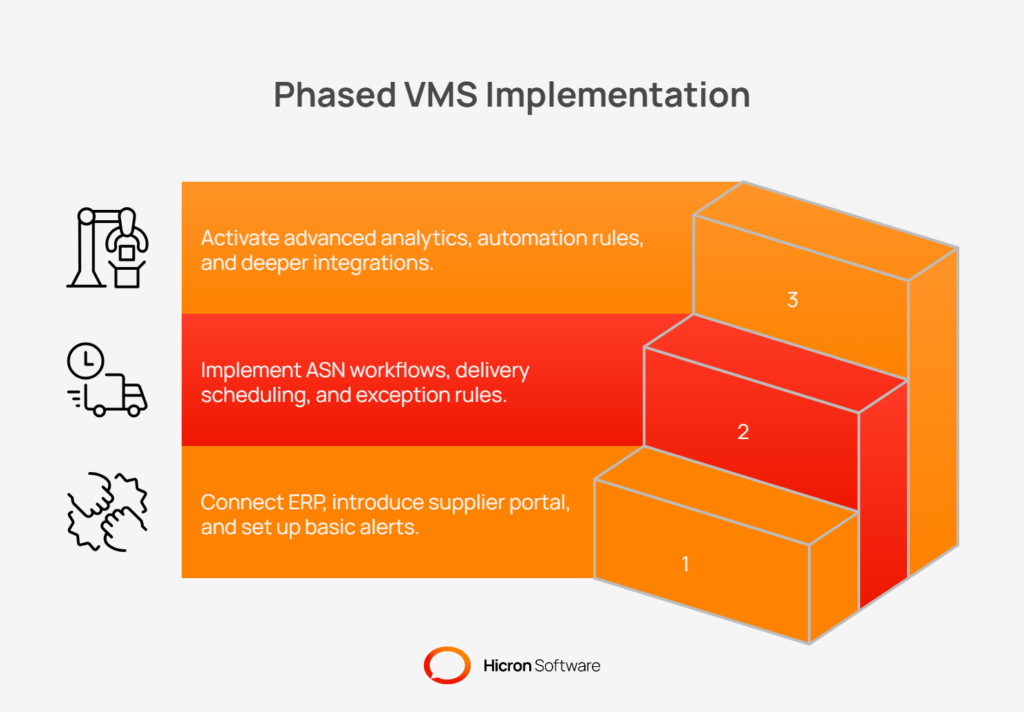
The first phase focuses on creating a single source of truth and opening the primary lines of communication. The goal is to replace manual data entry and email-based confirmations with a centralized system.
Once the foundation is in place, the second phase builds on it by adding more sophisticated logistics and control features. This is where you begin to truly streamline purchase orders and manage your supply chain more proactively.
In the final phase, you can leverage the system’s full power to drive continuous improvement. With a solid process and clean data, you can introduce advanced automation and integrate the VMS with other critical warehouse and manufacturing systems.
Throughout every phase, effective change management is crucial. Support your internal teams and external partners with clear communication, reusable templates, and thorough training. A well-prepared supplier onboarding kit, including guides and contact information, will help your vendors adapt quickly and ensure the successful adoption of your new order management process.
When you centralize all your purchase order data in one system, security and access control become critical. A key function of a vendor management system’s order management is to ensure that sensitive information, such as pricing, delivery terms, and order volumes, is protected and accessible only to authorized individuals. Proper security measures prevent unauthorized access, protect data integrity, and ensure that both internal teams and external suppliers see only the information relevant to their roles.
Role-based access control (RBAC) is the cornerstone of this security framework. It allows you to define specific permissions for different user groups. For example:
To further enhance data security, modern VMS platforms offer advanced authentication and segmentation features. Single Sign-On (SSO) simplifies user access by allowing team members to log in using their existing corporate credentials. At the same time, Multi-Factor Authentication (MFA) adds an extra layer of protection against unauthorized logins.
For large or complex organizations, data can be segmented by division, plant, or product line. This ensures that a user in one business unit cannot view or modify another business unit’s order data unless explicitly granted permission. Finally, comprehensive audit logs track every action taken within the system, who did what, and when. This creates a complete, unchangeable record of all activities, providing full accountability and simplifying compliance checks.
Implementing a vendor management system for order management delivers a clear return on investment (ROI) by driving significant time and cost savings. The value isn’t just in vague efficiencies; it can be measured through concrete improvements in your procurement operations. By automating manual tasks and increasing visibility, a VMS enables your team to focus on strategic activities rather than administrative follow-ups.
The primary impact comes from reducing the manual effort required to manage each purchase order. When you streamline purchase orders, you eliminate time spent on data entry, sending reminder emails, and correcting errors. This leads to fewer rush orders and costly expedites, as processes become more predictable and reliable. Furthermore, the cost avoidance achieved through proactive exception handling is substantial. Catching a price discrepancy or a potential quality issue before a shipment leaves the supplier’s warehouse prevents much larger financial impacts down the line.
These benefits can be quantified through specific metrics that demonstrate the system’s value.
| Benefit area | Measurable impact |
| Reduced manual effort | Lower number of “touches” (emails, calls, data entry) required to process a single purchase order. |
| Faster confirmations | Decreased the average time it takes for a supplier to acknowledge and confirm a new PO. |
| Lower cycle time | Shortened total time from PO creation to final goods receipt, improving supply chain agility. |
| Fewer rrrors & expedites | Reduced order discrepancies and a lower frequency of expensive, last-minute shipments. |
| Proactive cost avoidance | Quantifiable savings from catching and resolving issues (e.g., price variances, shortages) before they impact production or payment. |
Transitioning to a modern vendor management system for order management is about building a more resilient, efficient supply chain. By combining deep ERP integration with smart automation and collaborative tools, you can transform your procurement process.
This cooperation creates faster, more accurate, and error-resistant order cycles. You replace manual follow-ups with automated alerts, email confusion with clear communication, and reactive problem-solving with proactive exception management.
Ready to take the first step? Begin by auditing your current order workflows. Identify the high-friction points, the manual data entry, the endless email chains, and the time spent chasing confirmations. As a simple starting point, consider piloting a process focused on supplier acknowledgements and automated alerts for a small group of vendors. This initial step can quickly demonstrate the value of a more connected and automated approach to your operations.
Vendor management system order management is the use of a single software platform to oversee the entire purchase order lifecycle with your suppliers. Instead of relying on manual tools like email and spreadsheets, it centralizes all order-related communication and tasks, from initial creation and supplier acknowledgement to final delivery and payment matching. This creates a more efficient, error-free, and transparent process for both buyers and suppliers.
A VMS streamlines purchase orders through VMS order automation. It automates repetitive tasks such as creating POs from approved requisitions, routing them for approval based on set rules, and sending automatic reminders to suppliers. Connecting with your ERP and providing a supplier portal eliminates manual data entry, reduces errors, and significantly shortens the time it takes to process an order from start to finish.
ERP integration is a core component of an effective vendor management system order management. It creates a two-way sync of data between your VMS and ERP, ensuring that information like item masters, pricing, and PO statuses are always consistent. This eliminates data discrepancies, provides a single source of truth for both procurement and finance, and supports automated processes such as three-way matching (PO, ASN, Goods Receipt) to accelerate payment cycles.
A supplier portal acts as a secure, self-service hub for your vendors. It replaces inefficient email chains by allowing suppliers to view and acknowledge purchase orders, submit change requests, provide Advance Shipping Notices (ASN), and book delivery scheduling slots directly within the system. This improves collaboration, gives you real-time visibility into order status, and empowers suppliers with the information they need to fulfill orders accurately and on time.
A VMS improves exception management by proactively identifying potential issues before they disrupt your supply chain. It uses automated, rule-based alerts to flag issues such as late supplier confirmations, price mismatches, quantity discrepancies, or missing quality documents. Instead of manually searching for problems, your team is automatically notified and can use guided workflows to resolve these exceptions quickly, minimizing delays and costly expedites.
Hicron Software proved to be a trusted partner with unmatched technical expertise, delivering a scalable and user-friendly web application that was pivotal to our successful U.S. market expansion.

Hicron’s contributions have been vital in making our product ready for commercialization. Their commitment to excellence, innovative solutions, and flexible approach were key factors in our successful collaboration.
I wholeheartedly recommend Hicron to any organization seeking a strategic long-term partnership, reliable and skilled partner for their technological needs.

After carefully evaluating suppliers, we decided to try a new approach and start working with a near-shore software house. Cooperation with Hicron Software House was something different, and it turned out to be a great success that brought added value to our company.
With HICRON’s creative ideas and fresh perspective, we reached a new level of our core platform and achieved our business goals.
Many thanks for what you did so far; we are looking forward to more in future!

Hicron is a partner who has provided excellent software development services. Their talented software engineers have a strong focus on collaboration and quality. They have helped us in achieving our goals across our cloud platforms at a good pace, without compromising on the quality of our services. Our partnership is professional and solution-focused!

The IT system supporting the work of retail outlets is the foundation of our business. The ability to optimize and adapt it to the needs of all entities in the PSA Group is of strategic importance and we consider it a step into the future. This project is a huge challenge: not only for us in terms of organization, but also for our partners – including Hicron – in terms of adapting the system to the needs and business models of PSA. Cooperation with Hicron consultants, taking into account their competences in the field of programming and processes specific to the automotive sector, gave us many reasons to be satisfied.

