How to Choose the Right State Management for Data-heavy UIs
- July 09
- 10 min

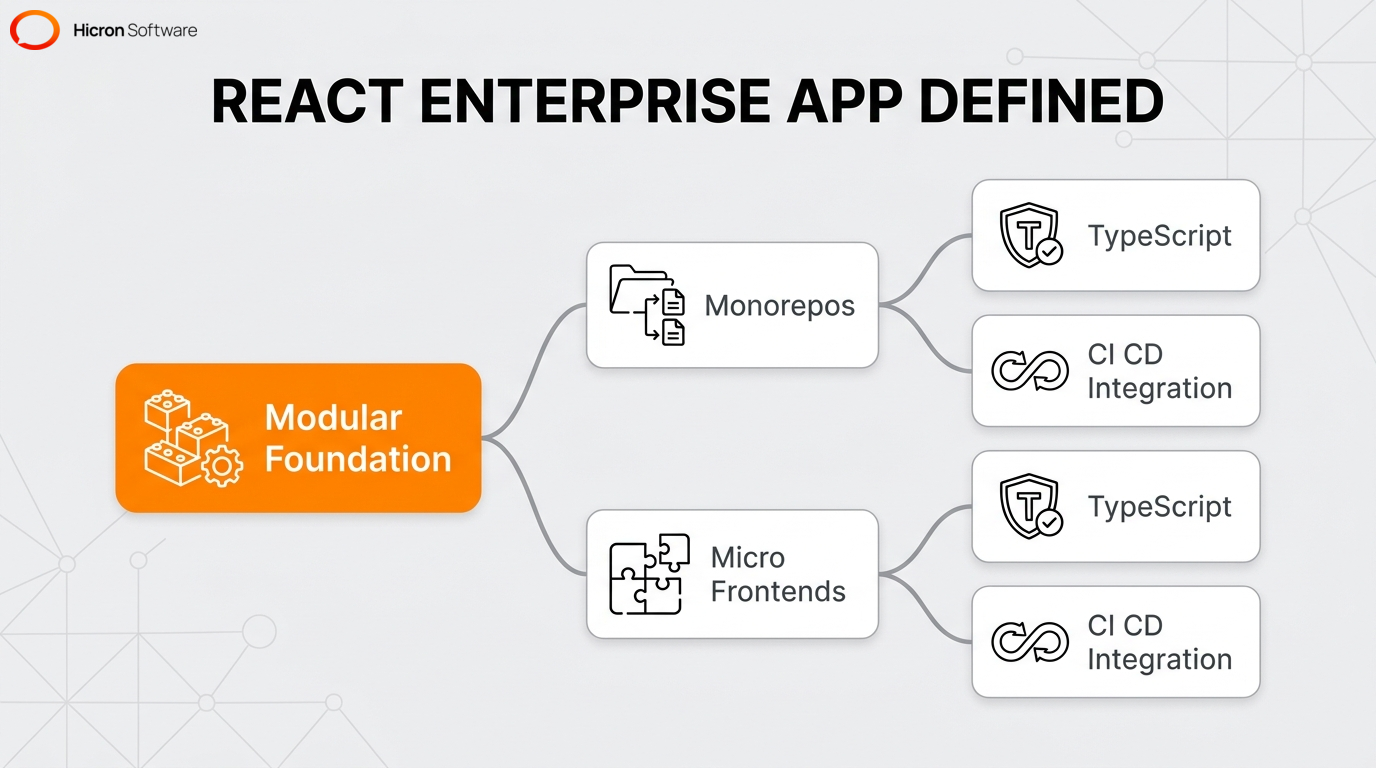
A React enterprise application is a large-scale software system that requires high scalability, maintainability, and well-defined organizational patterns across multiple teams. While standard web projects often focus on a single technology stack, enterprise applications prioritize a modular foundation to maintain code quality. These systems function as a network where independent teams manage smaller applications and shared libraries.
Advanced enterprise architectures rely on specific structural models, such as monorepos or micro frontends, to distribute complexity. To ensure consistency across the entire project, development teams use strict component patterns and centralized state management. Because static typing with TypeScript prevents runtime errors in large codebases, automated CI/CD integration can drive rapid software delivery. High-performance enterprise dashboards also require ongoing refinement to process large data volumes efficiently.
|
Architectural Category |
Key Technologies & Concepts |
Enterprise Benefits & Functions |
|
Architecture & Code Management |
|
|
|
Type Safety & Validation |
|
|
|
Frameworks & Build Tools |
|
|
|
State Management |
|
|
|
UI Libraries & Form Handling |
|
|
|
Performance Optimization |
|
|
|
Testing Strategy |
|
|
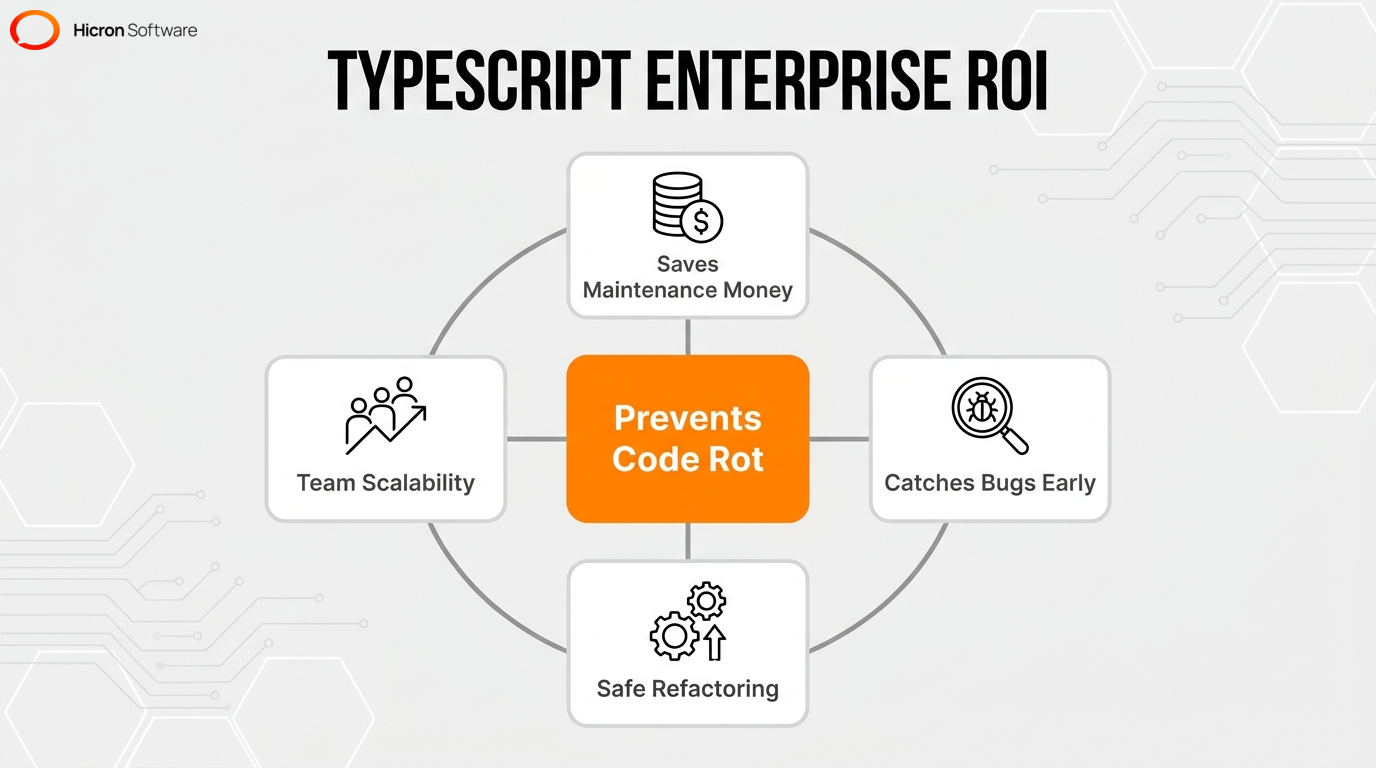
Why does this matter? TypeScript strengthens enterprise architectures because static type checking catches errors at compile-time rather than runtime. In my experience auditing large codebases, skipping this foundational step is usually the first domino to fall when technical debt spirals. Adding static typing ensures type safety and significantly improves maintainability across large codebases. Integrating strict type definitions gives development teams better tooling, autocomplete, and self-documenting code, which prevents code rot in large-scale projects by enforcing strict design and component patterns. This makes refactoring safe and predictable, ultimately saving you money on long-term maintenance.
Static typing is known to catch roughly 15% of common JavaScript bugs before execution. Beyond just catching bugs, validation libraries like Zod and Yup use the type system to provide runtime validation synchronized with compile-time types. Think of it this way: Zod acts like a bouncer at the door of your API, checking the ID of every data payload before letting it inside. Strict type definitions also streamline quality assurance processes, including unit testing and end-to-end testing. Large-scale systems rely on these predictable data models to support multiple independent engineering teams without degrading performance.
If you want to scale a large application effectively, you need a decentralized model. This allows independent teams to scale and deploy parts of the application separately. Scalable patterns manage system complexity and enable independent workflows when organizations establish strict module boundaries. An effective foundation relies on a modular architecture where modules act as isolated packages.
Enterprise architectures reduce maintenance overhead by enforcing consistent design patterns, while clear folder structures and dependency rules prevent tight coupling between distinct business domains. By using dependency injection, teams supply external dependencies to components to improve testability and module isolation. Development teams maintain consistent user interfaces by applying strict component patterns across the entire platform.
A monorepo keeps all your code in one place, acting as a single source of truth. This makes managing dependencies across a massive architecture much easier. If you’ve ever spent hours debugging a version mismatch between two internal packages, you already know why this is so crucial. This approach improves collaboration by making shared resources instantly accessible to all independent teams. Examples include:
By keeping these assets in one place, you simplify your CI/CD pipelines and ensure everyone sticks to the same design standards.
Micro frontends break down a massive, monolithic UI into smaller, independent applications. This allows independent teams to build, test, and deploy features concurrently. Module federation enables multiple independent builds to form a single cohesive application at runtime. Webpack 5 provides a modern technical implementation of this federation feature to construct decentralized enterprise architectures.
Federated modules allow independent deployments in large organizations by isolating release cycles. Because release cycles are isolated, this streamlines CI/CD integration and reduces deployment risks. These design patterns effectively manage singleton environments to compose distinct sub-applications. A well-planned architecture combines a monorepo with runtime code-splitting to keep the application fast when engineering teams share foundational dependencies.
Choosing a framework for a large project comes down to three things:
Full-stack frameworks like Next.js and Remix offer built-in solutions for advanced routing and data fetching. Competing frameworks provide distinct approaches to data loading and full-stack development to cater to various enterprise needs.
Modern build tools deliver fast development servers for client-side rendered applications. Both solutions support strict TypeScript integration to strengthen the overall enterprise architecture. Ultimately, your specific data requirements will dictate the best choice. Organizations adopt full-stack frameworks when the system requires complex data management. However, engineering teams select lightweight modern build tools if the project relies exclusively on client-side interactions. Selecting the right framework ensures long-term maintainability when development teams align the technology stack with specific architectural requirements.
Next.js improves initial load performance and search engine visibility by generating HTML on the server or at build time. For example, server-side rendering delivers fully populated HTML to the client to ensure immediate content availability, an approach that benefits low-power devices by offloading processing tasks from the browser to the server. Meanwhile, static site generation creates pre-rendered pages at build time for assets like marketing dashboards and public documentation, allowing a content delivery network to serve these static assets instantly to users. Even better, incremental static regeneration updates existing pages in the background without requiring a full site rebuild.
Production-grade applications use a combination of these rendering strategies and edge middleware on a per-route basis. These strategies drastically cut down time-to-interactive, getting content to your users faster. A well-designed architecture uses this flexibility alongside runtime code-splitting and a dedicated API layer to manage complex enterprise systems.
Vite replaces legacy bundlers by offering vastly superior development speed and optimized production builds for client-side applications. Adopting modern build tools gives you a faster development server and quicker hot module replacement. Teams increasingly adopt modern build tools for single-page applications when server-side rendering is not required. Many enterprise teams migrate to these modern tools to reduce build times and improve the developer experience.
Moving to Vite keeps the codebase agile. Its fast build times accelerate the testing feedback loop, while advanced code-splitting ensures the app remains fast as it grows. When combined with a monorepo and TypeScript, teams get a highly responsive, type-safe development environment.
A scalable project structure relies on strict module boundaries, clear folder organization, and decoupled logic. When organizing a growing codebase, teams generally focus on:
A modular architecture effectively manages system complexity when each module acts independently. Instead of tightly coupling large modules, teams use event bus mechanisms to let them communicate.
Reference architectures provide blueprints for structuring large-scale projects effectively with isolated reusable components. This decentralized approach strengthens the enterprise architecture and keeps the codebase manageable. To supply external resources to these isolated modules, development teams use dependency injection. Engineering teams maintain consistent user interfaces by applying strict component and design patterns across the entire platform. By centralizing these modular configurations in a monorepo, organizations can support decentralized deployments while micro frontends execute runtime code-splitting efficiently.
Developers custom-implement inversion of control patterns or manage them via context to decouple components from their dependencies. Unlike opinionated frameworks, React itself requires manual implementation of dependency injection. This manual setup strengthens the enterprise architecture when developers establish clear design patterns. Passing external dependencies through context providers is the standard method to achieve this pattern. Developers commonly pass external resources like services, an API layer, and state management utilities through these providers.
Developers implement inversion of control to improve code testability and modularity by allowing teams to swap or mock dependencies easily. This approach accelerates unit testing when engineers isolate specific component patterns. Passing these resources directly improves testability, while strict type definitions ensure you can swap dependencies safely.
Large-scale applications clearly separate distinct states using specialized libraries. Complex systems typically manage multiple categories of state, including server state, global client state, and local component state. Attempting to manage all these distinct states in a single, monolithic store quickly leads to unmaintainable code and performance bottlenecks. Instead, the most effective strategy for managing different types of state combines a data-fetching library for remote data with a lightweight store for user interface interactions. Managing data flow and shared state represents a core challenge that requires predictable architectures. Dedicated middleware or asynchronous patterns manage side-effects for complex application logic.
Enterprise apps frequently combine specific tools like TanStack Query, Zustand, and Redux Toolkit to strengthen the enterprise architecture. This separation ensures smooth rendering by preventing unnecessary component re-renders. State management remains predictable when development teams enforce strict design patterns. By decoupling state stores, you prevent tight coupling across independent modules.
Redux Toolkit provides an official, opinionated toolset for complex state logic, enforcing strict patterns for predictable data flow. In contrast, Zustand offers a lightweight, fast alternative based on simplified flux principles with minimal setup. Teams preferring minimal boilerplate adopt this lightweight alternative to manage global state slices efficiently.
The choice between these tools usually comes down to architectural control versus development speed. Here is a quick pro-tip from the trenches: don’t reach for the heavier option until your data flow actually demands it. Redux Toolkit is ideal for heavy, complex API integrations, while Zustand offers a frictionless experience for simpler global state. Both work perfectly with TypeScript, so the decision depends on how much boilerplate your team is willing to manage.
Managing server state manually is error-prone. Abstracting it simplifies data fetching, caching, and synchronization. TanStack Query abstracts away manual processes like complex fetch calls, loading states, and cache invalidation. Using this tool eliminates the need to store API responses in global client state stores.
By using it exclusively for server-side data alongside global tools like Redux Toolkit, teams can reduce boilerplate code and keep the codebase clean. As a result, the application remains fast and responsive across an enterprise architecture.
Advanced component patterns enable the creation of highly reusable, flexible, and decoupled UI elements to maximize reuse across multiple teams. Large business applications maintain complex logic without duplication when developers implement isolated components. This isolation strengthens the enterprise architecture and reduces code duplication. Design patterns that allow components to share state and logic implicitly provide a flexible API for complex user interfaces. A great example of this is using compound components: they allow developers to build complex elements, such as tabs and accordions, with intuitive APIs.
Modern component libraries use these advanced design patterns to deliver consistent interfaces and ensure reliable rendering. Popular UI libraries using these methodologies include Material UI, Mantine, and Shadcn UI. By building reusable components with strict TypeScript interfaces, independent teams can build features faster without worrying about runtime crashes.
A component library suitable for large-scale environments needs three things: extensive component coverage, strict accessibility standards, and high customizability. Enterprise UI libraries provide these broad, accessible, and highly customizable elements to support scalable design systems. Consistent interface elements are essential for maintaining a unified user experience across large platforms. The component structure often follows atomic design methodologies for better organization and scalability.
Many organizations extend popular component libraries to create custom, branded enterprise design systems. Libraries like Material UI, Mantine, and Shadcn UI supply these building blocks, helping teams enforce strict patterns and accelerate development. High performance remains achievable when development teams customize these components efficiently.
Selecting a specific UI library involves weighing the need for pre-built, standardized designs against the desire for complete styling control. While traditional libraries like Material UI and Mantine offer ready-to-use components based on established design languages to accelerate development, modern alternatives like Shadcn UI take a different approach by providing reusable code you fully own. Shadcn UI uses a copy-paste architecture rather than operating as a standard dependency. Teams seeking maximum control over their component styles prefer this modern architecture over traditional UI kits.
The customization capabilities of these libraries differ significantly for enterprise use. Material UI and Mantine enforce strict design patterns to minimize technical debt through standardized theming engines. Because Shadcn UI components live directly in your codebase rather than in node_modules, developers have absolute control over the markup and styling. I’ve personally found this copy-paste method completely eliminates the friction of trying to override stubborn CSS classes. This is ideal for organizations that need highly bespoke interfaces without fighting a library’s default theme.
Handling complex forms efficiently requires two things: a specialized state management library to minimize re-renders, and a schema-based validation tool to ensure data integrity.
This reduction in re-renders is essential for data-heavy views to ensure a responsive interface. Using performant form handling tools ensures maintainability when development teams establish strict component patterns. Validation libraries enforce strict data rules before submission, securing the application against invalid entries and protecting backend services. A stable architecture relies on this approach to maintain reliable data flows.
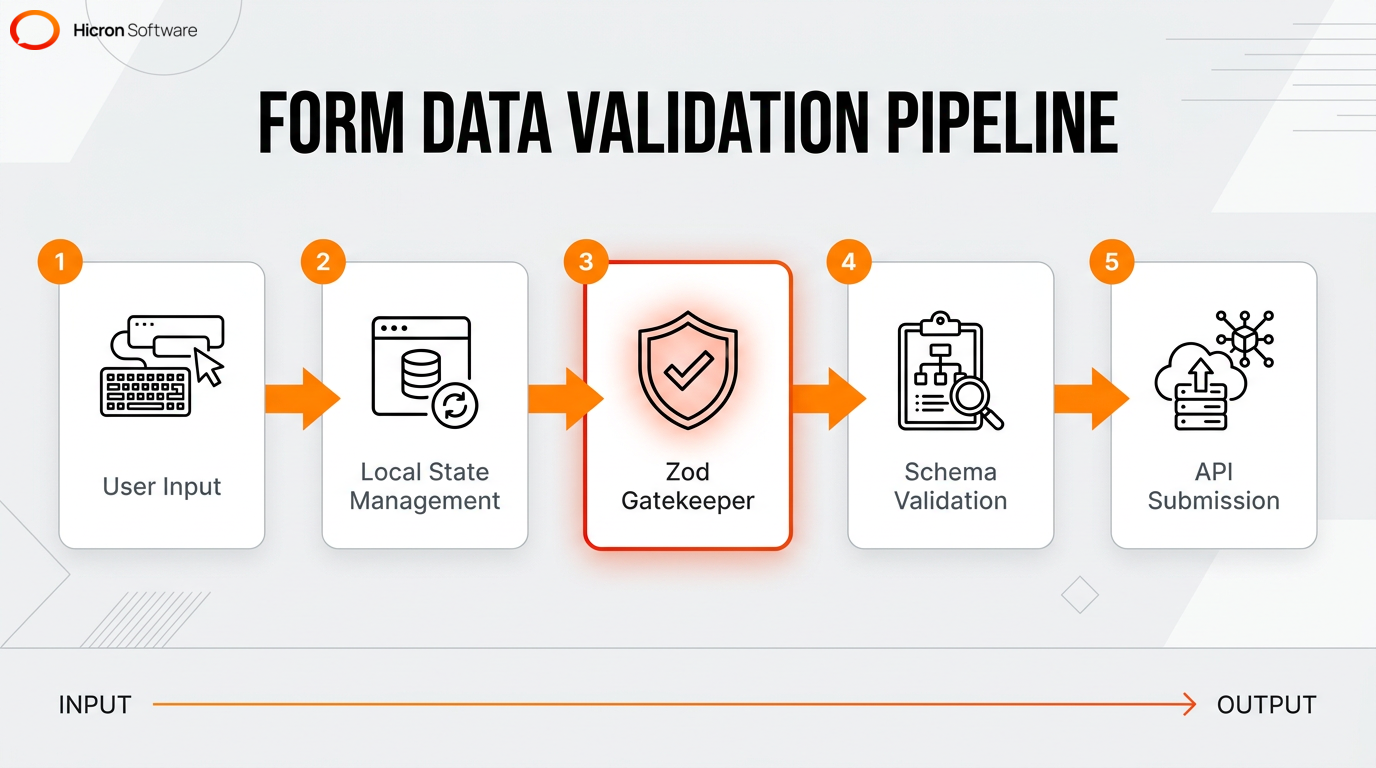
Combining a performant form library with a TypeScript-first schema validator creates a highly reliable and type-safe data entry pipeline. Integrating schema validation with form state management improves type safety and user experience by delivering instant error feedback and blocking invalid data. While React Hook Form minimizes unnecessary component updates during user input, Zod steps in to provide strict schema validation that guarantees predictable data payloads. The schema validator uses the type system to provide runtime validation synchronized with compile-time typing. A developer infers static typing directly from the validation schema, eliminating the need to write duplicate interface code.
The main technical advantages of this TypeScript integration include reduced boilerplate code and predictable data transmission. React Hook Form manages the input state locally to prevent unnecessary re-renders, while Zod acts as the gatekeeper. If the data doesn’t match the Zod schema, the submission is blocked before the API is ever called, keeping your backend secure and your UI responsive.
Maintaining high performance in a growing, complex application relies on measured profiling, strategic rendering, and efficient asset delivery. This multi-faceted approach manages heavy data loads by using virtualization and strategic asset loading to reduce overhead. Modern build tools like Vite and Webpack deliver these split assets efficiently. A well-organized codebase supports these optimization efforts by isolating complex logic into manageable modules.
For example, when dealing with massive datasets, teams implement list virtualization to render only visible interface rows in an enterprise dashboard. Implementing the correct rendering strategy per route significantly impacts initial load times and overall responsiveness. Production-grade applications use edge middleware alongside these rendering strategies to serve content rapidly. Combining these strategies ensures fast interactions across large-scale systems.
Traditional single-page applications often face performance bottlenecks such as delayed content visibility and heavy client-side processing. Advanced rendering strategies drastically reduce time-to-interactive by delivering pre-computed HTML and updating content in the background. As detailed in the Next.js section, these approaches resolve client-side delays to improve performance on low-power devices and enhance search engine visibility. Frameworks supporting these strategies, like Next.js, enable instant content delivery via content delivery networks while keeping data fresh. By shifting the computational load away from the browser, these methods solve traditional SPA limitations.
A well-organized codebase integrates these techniques alongside static site generation to ensure fast load times, while development teams keep the system maintainable by synchronizing this background regeneration with a dedicated API layer. Advanced code-splitting further accelerates these optimized pages across an enterprise architecture.
Code-splitting reduces bundle sizes by dividing the application into smaller, on-demand chunks. This division prevents the browser from downloading unnecessary code and accelerates initial load times. The technique ensures that users only download the JavaScript required for the specific page or feature they are currently viewing. It’s an essential strategy for maintaining fast load times as an enterprise architecture grows in size and complexity. Developers implement lazy loading to optimize the delivery of large JavaScript bundles by using dynamic imports.
Developers dynamically load common elements like heavy components and distinct application routes to ensure smooth rendering. Modern build tools and full-stack frameworks like Vite and Next.js execute this chunking process efficiently. A modular architecture uses these dynamic imports alongside micro frontends and module federation to isolate code execution. Engineers identify large bundle bottlenecks before splitting by analyzing render times with the React Profiler.
Built-in profiling tools are essential for measuring render frequency and identifying expensive component updates in data-heavy views. The React Profiler measures the exact cost of rendering to pinpoint performance bottlenecks within the component tree. This diagnostic tool helps developers understand which elements re-render unnecessarily and require memoization. Teams routinely profile complex interfaces like enterprise dashboards and interactive grids.
Diagnosing these rendering inefficiencies ensures a responsive UI across an enterprise architecture. Teams use these measurements to refine component patterns and keep the codebase efficient. Once identified, developers resolve these bottlenecks by adjusting state management configurations or implementing advanced code-splitting. Engineering teams verify these rendering improvements through rigorous quality assurance methods like unit testing and end-to-end testing.
A solid testing pyramid for a large-scale frontend application consists of distinct layers: unit testing for isolated logic, integration testing for module interactions, and end-to-end testing for complete user journeys. A thorough testing strategy combining these layers is mandatory for shipping enterprise software with confidence. Automated testing ensures quality and prevents regressions across multiple independent modules. This approach validates both isolated component logic and complete user journeys.
Production-grade environments use specialized frameworks to validate user flows and application stability continuously. Implementing this rigorous methodology ensures long-term stability across the codebase. Automated CI/CD integration executes these test suites before deployment to guarantee continuous reliability, while static typing with TypeScript further strengthens this pipeline by catching data inconsistencies before the automated testing phase begins.
Testing individual units of code prevents broader system failures. It guarantees that your foundational building blocks behave predictably under various conditions. Unit testing with Jest verifies the exact correctness of isolated application elements such as business logic, state reducers for state management, and utility functions. Fast, isolated tests provide immediate feedback to developers during the active development cycle.
Combining a test runner with component testing libraries allows teams to assert that user interface elements render correctly based on specific props. This rigorous validation ensures long-term stability. Developers secure the API layer and enforce strict component patterns when they execute these isolated tests during CI/CD integration. Combining this testing approach with TypeScript guarantees predictable code execution across the architecture.
Simulating real browser interactions is necessary for verifying overall application health because it ensures that core business pathways function correctly from end to end. End-to-end testing protects complex user journeys like checkout processes and multi-step form handling. This methodology validates the integration of the frontend with the API layer and backend services.
Automated browser testing frameworks like Cypress catch regressions in key user paths before they reach production, and integrating them into CI/CD integration prevents regressions across an enterprise architecture. This automated verification, alongside unit testing, maintains high performance when development teams deploy frequent updates.
An automated deployment pipeline safeguards code quality and prevents technical debt by running tests on every commit to block problematic code from entering the main branch. Teams use automated static code analysis tools to identify problematic syntax before deployment, including linters, type checkers, and test suites. A pipeline automatically running these tools is essential for maintaining a high standard in a multi-contributor project. Trust me, setting this up early will save your team from countless Friday afternoon deployment headaches.
Automated pipelines act as the final safeguard for a large codebase. By running unit tests, E2E checks, and TypeScript compilation on every commit, teams can confidently merge code. This continuous validation ensures that even with dozens of contributors, the application remains fast, stable, and maintainable.

Hicron Software proved to be a trusted partner with unmatched technical expertise, delivering a scalable and user-friendly web application that was pivotal to our successful U.S. market expansion.

Hicron’s contributions have been vital in making our product ready for commercialization. Their commitment to excellence, innovative solutions, and flexible approach were key factors in our successful collaboration.
I wholeheartedly recommend Hicron to any organization seeking a strategic long-term partnership, reliable and skilled partner for their technological needs.

After carefully evaluating suppliers, we decided to try a new approach and start working with a near-shore software house. Cooperation with Hicron Software House was something different, and it turned out to be a great success that brought added value to our company.
With HICRON’s creative ideas and fresh perspective, we reached a new level of our core platform and achieved our business goals.
Many thanks for what you did so far; we are looking forward to more in future!

Hicron is a partner who has provided excellent software development services. Their talented software engineers have a strong focus on collaboration and quality. They have helped us in achieving our goals across our cloud platforms at a good pace, without compromising on the quality of our services. Our partnership is professional and solution-focused!

The IT system supporting the work of retail outlets is the foundation of our business. The ability to optimize and adapt it to the needs of all entities in the PSA Group is of strategic importance and we consider it a step into the future. This project is a huge challenge: not only for us in terms of organization, but also for our partners – including Hicron – in terms of adapting the system to the needs and business models of PSA. Cooperation with Hicron consultants, taking into account their competences in the field of programming and processes specific to the automotive sector, gave us many reasons to be satisfied.

