A Guide to Maximizing ROI in Real Estate Technology Investments
- January 15
- 16 min


TCO, or total cost of ownership, is the full 3-year cost of a software decision, not just the purchase price. It includes implementation, integration, maintenance, scaling, internal effort, and exit costs.
A 3-year TCO covers every cost category across a full 36-month horizon. That includes acquiring, deploying, operating, upgrading, integrating, and eventually leaving a software solution.
Most enterprise software purchases are decided on the monthly fee. That number is real, but it covers only a fraction of what the software will actually cost. A 3-year TCO brings the full picture into view: direct costs, hidden costs, integration work, scaling expenses, maintenance, and exit costs that together determine whether to build or buy.
Exit costs belong in the TCO model from the start. Data export, migration support, retraining, and integration rebuilds are predictable expenses that carry real weight in any build vs buy decision. Leaving them out of the initial analysis often produces a comparison that favors the lower entry price over the lower total cost.
Key Takeaways:
Comparing monthly fees, evaluating demo environments, and picking the vendor with the best pitch often drive enterprise software decisions. That approach feels rational in the moment, but it leaves out most of what the decision will actually cost. Three years later, the real costs arrive: unexpected integration work, usage-based surcharges, hourly change requests, and an exit that costs more than the original deal. The build vs buy decision deserves a better framework. A total cost of ownership model over a 3-year horizon gives enterprise leaders, procurement teams, and technical decision-makers a shared way to compare SaaS, custom software, and hybrid approaches on equal terms.
This article compares SaaS, custom software, and hybrid models through a TCO analysis lens, moving beyond the license fee or the initial development quote. The goal is practical: a decision model grounded in an eight-category cost framework, plus a negotiation checklist that applies directly to buying software.
Most enterprise software decisions start with the monthly fee. This figure serves as a benchmark, against which everything else is measured. The monthly subscription covers only the opening portion of the total cost of ownership.
The software license or subscription is the most visible line in any offer. Much of the real spending appears later in the timeline, once the system goes live. A complete TCO calculation adds deployment, integration, training, internal team time, premium support, upgrades, and change requests.
For SaaS, these costs often arrive after the purchase order is signed. For custom software, they show up as ongoing development, hosting, security, and product management. In both models, the first quote covers only the starting point.
A price escalator raises the subscription fee at each renewal. The increase can be a fixed percentage or tied to inflation. Many vendors offer an attractive first-year discount and recover the margin later.
That recovery usually comes through higher renewal pricing, extra modules, or usage-based charges. AI features billed by consumption add another variable that grows with adoption. Buyers gain clarity by requesting the renewal price in writing alongside the launch price. A documented cap on annual increases turns an unknown future cost into a predictable one.
Consider two CRM offers for 100 users over three years. Vendor A has the lower monthly fee. Vendor B costs more per seat but includes more work in the base package:
|
Cost category |
Vendor A: Lower monthly fee |
Vendor B: Higher monthly fee |
|
Subscription, 100 users x 36 months |
$144,000 |
$180,000 |
|
Implementation and data migration |
$35,000 |
$15,000 |
|
CRM and ERP integration |
$30,000 |
$12,000 |
|
Premium support and training |
$18,000 |
$8,000 |
|
Usage, extra modules, and change requests |
$25,000 |
$10,000 |
|
Exit, export, and migration provision |
$15,000 |
$5,000 |
|
Illustrative 3 year TCO |
$267,000 |
$230,000 |
All figures are illustrative and do not represent market data. The example shows how implementation, integration, support, and exit costs can reverse the result of a simple price comparison.
Vendors present costs differently. Some bury implementation in a separate statement of work; others include it. Without a fixed structure, comparisons become unreliable, and the cheapest-looking offer wins by default. We can therefore identify the 8 cost categories every TCO model needs:
|
Category |
What it includes |
Visible or hidden |
When it starts |
|
License fee |
First subscription, software license, requirements analysis, data preparation |
Mixed |
Year 0 |
|
Implementation |
Deployment package, configuration outside scope, extra consultant days |
Mixed |
Year 0 |
|
Integration |
Standard connectors, custom integrations, API maintenance, API call fees |
Mostly hidden |
Year 0 onward |
|
Usage |
Per-user pricing, overage charges, AI consumption, new licenses as teams grow |
Mixed |
Year 1 onward |
|
Support |
Basic package, premium SLA, technical account manager |
Mixed |
Year 1 onward |
|
Changes |
Change requests priced separately, hourly rates, prepaid hour pools |
Hidden |
Year 1 onward |
|
Renewal |
Automatic price increases, loss of launch discount, escalator clauses |
Hidden |
Year 2 to 3 |
|
Exit |
Data export fees, migration cost, integration rebuilds, retraining |
Hidden |
Contract end |
Ask vendors for a written quote on every line in this table. An unanswered line is still useful, since it often points to a future charge.
Direct costs appear on invoices and are easy to assign to the project. They include subscription fees, development costs, consultant fees, hosting, and third-party services.
Indirect costs show up as team time, training, lost productivity, and organizational change. The most accurate way to price them is a fully loaded hourly rate. That rate combines salary, taxes, benefits, and overhead.
Opportunity cost is the value of work the team could have delivered instead. Suppose an in-house development team spends nine months on an internal tool. Those months are no longer available for product work, enterprise AI initiatives, or other strategic projects.
Fixing the cost categories is only the first step. What those categories reveal about SaaS and custom software is where the decision gets interesting. Each model spreads costs differently over a 3-year period, so the cheaper option depends on the time horizon and cost profile.
SaaS usually has the lower upfront cost. Implementation can still grow through data migration, configuration outside the standard package, and extra consultant days.
Custom software carries higher initial costs. The following phases happen before the first user sees value:
In return, the organization controls:
Standard connectors keep integration costs low at the start. Custom integrations require the following work:
Enterprise resource planning (ERP), CRM, data warehouses, identity providers, and payment systems are common integration points. As transaction volume grows, hidden costs can appear:
Integration often looks like a minor line item at purchase. Over time, API fees, rate limits, and sync failures add up, and maintenance work grows with each connected system. Budgeting for these costs early gives the organization a more accurate view of total ownership.
SaaS pricing often grows with users, transactions, stored data, API calls, or AI usage. That makes SaaS easy to adopt early and potentially expensive at scale.
Custom-built software usually avoids vendor per-user license fees. Scaling still costs money through infrastructure, database capacity, support, security controls, and engineering time. The difference lies in control. With an internally owned scalable architecture, the organization decides how and when to spend.
SaaS moves much of the maintenance burden to the vendor. Premium support, faster SLAs, and change requests may still be priced separately. An SLA, or service level agreement, defines guaranteed response times and availability.
Custom software relies on a permanent development team or technology partner. That team owns each upgrade, bug fix, and security patch as business needs evolve. Development costs continue long after launch.
Data becomes a competitive advantage when it feeds analytics, automation, and enterprise AI. Limited data access, restrictive export terms, or unclear usage rights raise the cost of every future AI project.
Before signing, buyers can confirm three points with the vendor:
Governance matters most where sensitive data is involved. The EU AI Act sets a risk-based legal framework for artificial intelligence in the European Union. The NIST AI Risk Management Framework offers a voluntary approach to managing AI risks across the lifecycle. Both shape how enterprises evaluate AI features inside third-party tools in 2026.
Vendor lock-in appears when switching becomes technically, commercially, or organizationally difficult. Common causes include closed data formats, export fees, limited API access, proprietary workflows, and deep integration dependency.
High exit costs strengthen the vendor’s position at every renewal. For that reason, exit cost belongs in the model from day one. The best moment to price the exit is before signing the entry.
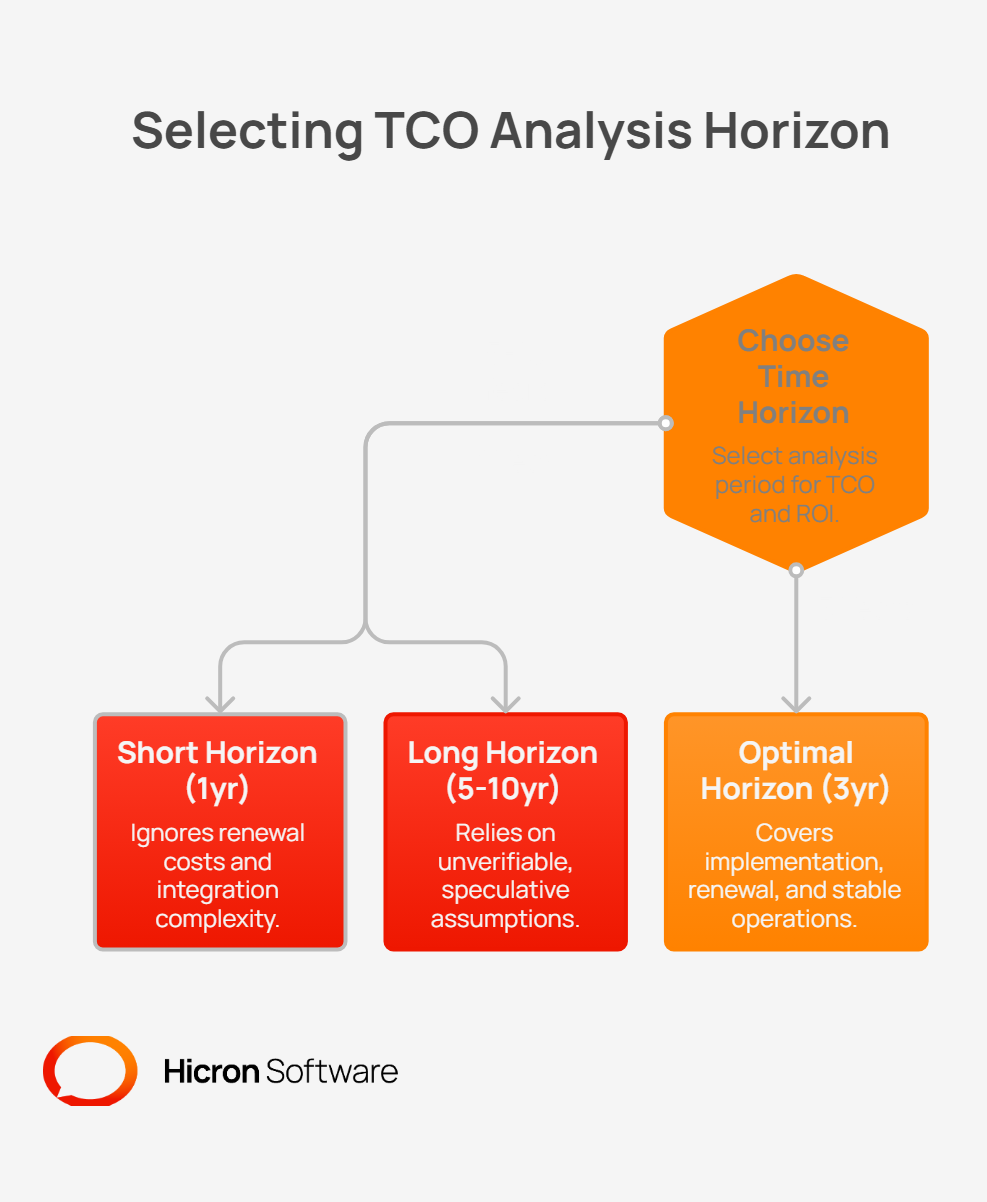
Choosing the right time window is as important as choosing the right cost categories:
Within three years, many enterprises face their first contract renewal. User counts, transaction volumes, and data usage tend to grow. New integration requirements appear once teams rely on the system every day.
Teams also gain a realistic view of vendor fit, support quality, and change request pricing. Three years is long enough to reveal these costs. It is also short enough to keep assumptions grounded.
A 1-year outlook ignores rising renewal costs, economies of scale, and integration complexity. A 5- or 10-year projection relies on assumptions about prices, staffing, and technology that are hard to verify.
The 3-year period covers implementation, stable operation, at least one renewal cycle, and a realistic path to project completion. This provides a reliable basis for estimating the software’s return on investment, while AI pricing models will still change frequently.
A TCO model does not just produce a number. It shows where each delivery model creates costs, where it creates risk, and how it fits the business’s actual structure. With a shared framework applied across all three options, the comparison stops being a matter of opinion.
|
Model |
Pros |
Cons |
Best fit |
|
SaaS |
Fast to launch; low upfront cost; vendor manages infrastructure and upgrades; predictable early costs |
Costs rise with users, usage, and renewals; limited customization; vendor lock in risk; change requests priced separately |
Standard functions, smaller scale, few integrations, limited internal development capacity |
|
Custom software |
Full process fit; deep customization; full data control; no vendor per-user fees; ownership of the roadmap |
High upfront cost; longer development time; requires an internal team or partner; ongoing security responsibility |
Differentiating processes, large scale, deep integrations, AI and analytics built on owned data |
|
Hybrid |
Buys standard capability and builds differentiation; moderate upfront cost; strong fit where it matters most |
More complex architecture; demanding integration management; multiple vendors and dependencies |
Organizations with both standard needs and unique, strategic workflows |
Off-the-shelf software often wins when the function is standard across the industry. Modest scale, few integrations, and no internal development team also favor SaaS.
It is a strong option when requirements are still unclear. A short contract lets you test quickly before committing to custom development. For commodity functions like HR, accounting, or collaboration, off-the-shelf software usually delivers faster ROI.
Custom software may justify its higher upfront cost when the process in question is strategically differentiating, heavily integrated, or difficult to support through standard software without ongoing compromise. Typical examples include unique pricing logic in insurance, proprietary routing algorithms in logistics, specialized compliance workflows in finance, or a distinctive customer experience in retail.
A bespoke software solution becomes more compelling at large scale, when deep ERP and legacy integrations require ongoing development, or when enterprise AI depends on full ownership of sensitive data. Development takes longer, and upfront costs are higher, so a stable delivery process is essential. Where differentiation justifies that investment, custom software delivers lower total cost and stronger strategic control over three years.
The hybrid principle is simple: buy standard functions and build the ones that set the company apart.
For example, a logistics company might buy SaaS for HR, accounting, and collaboration. It could then build custom applications for route planning, connected to its ERP, fleet data, and customer systems. The downside is a more complex architecture and harder integration management. Clear API contracts between components keep that complexity under control.
A hybrid model is not automatically the best choice. It fits best where the organization has the capacity to manage added complexity across architecture, integration, vendor coordination, governance, and long term maintenance.
|
Criterion |
SaaS |
Custom software |
Hybrid |
|
Upfront cost |
Low to moderate |
High |
Moderate |
|
Time to launch |
Fast |
Slow |
Fast for standard; slower for custom |
|
Process fit |
Limited by configuration |
High |
High where custom |
|
Data control |
Depends on contract |
High |
High for custom components |
|
Scaling |
Easy, though pricing can rise sharply |
Controllable, owned internally |
Mixed |
|
Vendor lock-in risk |
Higher |
Lower external risk; higher internal dependency |
Lower with well-designed contracts and APIs |
A TCO framework delivers value only when it drives a clear, defensible decision. 5 steps turn cost categories into a structured evaluation process that works for any software investment. Each step surfaces the assumptions that quietly favor one option over another.
Start with one question: does this function create competitive advantage for the business strategy?
Commodity capability usually points toward buying SaaS. Unique, mission-critical functions may justify building custom software.
Use the same eight categories and the same 36-month horizon for SaaS, custom software, and hybrid options. A shared model stops offers from looking cheaper through formatting, exclusions, or deferred charges.
Include team time for deployment, integration, training, administration, and change management. Use the fully loaded rate instead of base salary alone. This step often reveals the highest hidden costs in the model.
Assume realistic growth in users, transactions, data volume, or AI usage over three years first, then price migration, integration rebuilds, retraining, and data export. A model without these two lines describes year one only.
Compare the 3-year TCO of each option, then link the result to expected ROI. The lowest TCO is a strong signal, though rarely the only one. The best decision delivers the required business outcome at an acceptable cost, risk, and level of strategic control.
Buyers often use the TCO model solely as an evaluation tool, but it also serves as a negotiating asset. When a company enters a meeting with a supplier armed with a comprehensive 36-month cost model, the discussion changes. The buyer knows which cost categories the supplier omitted, where discrepancies lie in the contract-renewal calculation, and how much a credible alternative costs.
Here’s how to turn that knowledge into leverage at the negotiating table, one step at a time:
Place every vendor offer into the same model before the first commercial meeting. A single view makes comparison honest. It also removes the advantage vendors gain from presenting prices in their own formats.
Send the eight-category checklist to every vendor. Ask for a written price or a clear exclusion on each line. A missing answer signals a future charge and becomes a negotiation point.
BATNA stands for the best alternative to a negotiated agreement. Price the TCO of the second-best option, such as another vendor, a custom build, a hybrid model, or the current system. Treat that figure as the upper limit for the deal.
A longer commitment can be exchanged for a renewal price cap, fixed implementation scope, or stronger SLA. A larger upfront payment can secure lower scaling costs or a prepaid change request pool.
Focus on structural terms over one-time discounts that disappear at renewal. Implementation support, data portability, and AI data use terms are easier to agree on before adoption.
Specify the export format, export fees, transition period, and migration support. Define data ownership, data return, and what happens to data after termination. These terms carry the most weight before you sign the contract.
Knowing the full 3-year cost of an offer changes what a buyer asks for in a negotiation. Price is rarely the only lever worth pulling. Two areas tend to produce more long-term value than a one-time discount:
The TCO of a custom or hybrid option sets a credible ceiling for any SaaS proposal. If a vendor’s 3 year offer exceeds that ceiling, the buyer has a clear reason to walk away. The gap can also fund negotiations on price, scope, service levels, and exit protections.
TCO analysis tends to fail in predictable ways. The errors rarely appear as obvious mistakes. They appear as reasonable shortcuts: a narrower time window, a missing cost category, an internal team hour that never made it into the model. Each one quietly tilts the comparison toward the option that looks cheapest on day one.
A three-year TCO view creates a more consistent basis for evaluating SaaS, custom software, and hybrid options because it forces the same discussion across implementation, integration, support, scaling, change, renewal, and exit.
The right choice is not inherently SaaS, bespoke, or hybrid. It depends on the role of the function, the level of integration required, the expected pace of growth, the importance of data control, and the organization’s ability to absorb delivery and operating complexity.
Choose SaaS when the capability is standard, speed matters, and integration needs are manageable. Choose bespoke when the process creates competitive advantage, requires deep customization, or depends on tighter control over data and logic. Choose hybrid when part of the capability is standard, part creates differentiation, and the organization has the capacity to manage the added operating complexity.
In many cases, the most defensible decision will be the one that separates standard capability from differentiation, then applies the appropriate delivery model to each. What matters most is choosing the one whose costs, constraints, and strategic tradeoffs remain acceptable over time.
The subscription price covers access to the software for a set period. TCO adds implementation, integration, support, internal team time, renewals, and the cost of leaving. It reflects what the organization actually spends across the contract.
Three years usually includes the first renewal, user or data growth, and new integration needs. A shorter period hides these costs. A longer one relies on assumptions that are hard to verify.
Custom software often costs less at large scale, with deep integrations, or for processes that create competitive advantage. It also fits cases where AI and analytics depend on full data ownership. Development time and ongoing maintenance still belong in the comparison.
A hybrid model combines building and buying. The organization buys standard functions and builds the ones that differentiate it. It works best when a company has both commodity needs and unique, strategic workflows.
Start with data export fees and the effort to convert data into a usable format. Add migration work, integration rebuilds, reimplementation on the new platform, and retraining. Price each item with the vendor’s written terms and a fully loaded hourly rate.
Hicron Software proved to be a trusted partner with unmatched technical expertise, delivering a scalable and user-friendly web application that was pivotal to our successful U.S. market expansion.
Hicron’s contributions have been vital in making our product ready for commercialization. Their commitment to excellence, innovative solutions, and flexible approach were key factors in our successful collaboration.
I wholeheartedly recommend Hicron to any organization seeking a strategic long-term partnership, reliable and skilled partner for their technological needs.

After carefully evaluating suppliers, we decided to try a new approach and start working with a near-shore software house. Cooperation with Hicron Software was something different, and it turned out to be a great success that brought added value to our company.
With HICRON’s creative ideas and fresh perspective, we reached a new level of our core platform and achieved our business goals.
Many thanks for what you did so far; we are looking forward to more in future!

Hicron is a partner who has provided excellent software development services. Their talented software engineers have a strong focus on collaboration and quality. They have helped us in achieving our goals across our cloud platforms at a good pace, without compromising on the quality of our services. Our partnership is professional and solution-focused!

The IT system supporting the work of retail outlets is the foundation of our business. The ability to optimize and adapt it to the needs of all entities in the PSA Group is of strategic importance and we consider it a step into the future. This project is a huge challenge: not only for us in terms of organization, but also for our partners – including Hicron – in terms of adapting the system to the needs and business models of PSA. Cooperation with Hicron consultants, taking into account their competences in the field of programming and processes specific to the automotive sector, gave us many reasons to be satisfied.