10 Real Estate Software Development Companies in 2026
- February 03
- 9 min



Formula parsing architecture is the layered design that turns spreadsheet formula text into a structured representation a host application can edit, validate, evaluate, and serialize back to the sheet.
This article draws on work around a production digital product with an Excel add-in that exposes custom domain functions to live backend data. Client and product names are omitted; the failure sequence and architectural response are unchanged.
The first production version treated formulas as strings end-to-end. The add-in read cell text, extracted enough structure to find a domain function call, hit the API, and returned a value. That carried the initial release. It did not carry the roadmap. As the product added a formula builder, argument editing, preview before insert, and workbook-wide search, each new feature re-implemented the same questions against raw text: where does one argument end, what is the operator precedence, how do you replace one fragment without corrupting the rest. Bugs clustered around quoting, nesting, and partial edits. The product was becoming a formula editor while the internal model was still a string.
Rather than patch each feature independently, we proposed replacing string handling with a compiler-style pipeline: tokenization, parsing, an abstract syntax tree, declarative domain function configuration, and serialization back to spreadsheet text. After that migration, the add-in gained a stable internal object model. Features that previously required fragile string logic became localized tree operations. New capabilities shipped faster because builder, validator, preview engine, and workbook scanner all read from the same structure instead of re-parsing text at every step.
What follows explains why that shift was necessary, what the parsing layer is for and what it is not, where Excel ends and product logic begins, and which technical structures carried the design from a working MVP through a growing feature set, without a quarterly parser rewrite.
Key Takeaways
Many digital products reach a point where the web app is not enough. Users are accustomed to modeling data in spreadsheets and anticipate seeing live platform data directly within cells, rather than managing a separate workflow in a browser tab.
An Excel add-in bridges that gap by allowing custom domain functions to serve as typed API calls from a cell directly into the product’s backend. A function such as APP.BALANCE fetches a live value. Arguments carry identifiers the backend understands: environment, entity ID, account code, and date range. Other functions return aggregates, adjustments, or domain-specific records. The product provides the core value. Excel recognizes it as a number or text, passing it to native functions, pivot tables, or other formulas. The add-in does not replace the spreadsheet but enhances it, expanding the digital product into a familiar surface users already rely on.
That integration looks lightweight from the outside. A cell contains:
=APP.BALANCE("env", "12345", ...) + APP.ADJUSTMENT(...)The first implementation is often equally lightweight. Excel sends formula text. The add-in parses enough to find the custom call, hits the API, and returns a result. Strings carry the formula from cell to code and back.
Product requirements rarely stop at evaluate and return. Roadmaps add a visual formula builder, validation before commit, search across workbooks, and edit flows for formulas already in cells. Each item needs the product to understand the formula structure, not only the formula text. That shift is where formula parsing architecture becomes a dedicated product feature.
String handling carries the MVP. It fails predictably as the feature set grows. A product that keeps formulas as strings through every module repeats the same work at every hop. Is this token a domain function or a cell reference? Where does one argument end and the next begin? What is the operator precedence? Each consumer of the string independently answers those questions again. Bugs cluster around quoting, nesting, and partial edits.
The break points arrive in a familiar order:
None of these is string manipulation in the small. Each needs a representation that preserves precedence, nesting, and stable references to individual fragments. Regex patches and substring logic work in demos. They do not survive production workbooks with hundreds of formulas and iterative edits.
The architectural trigger is concrete. The product stops being a formula evaluator and becomes a formula editor. That change in product shape demands a change in data representation.
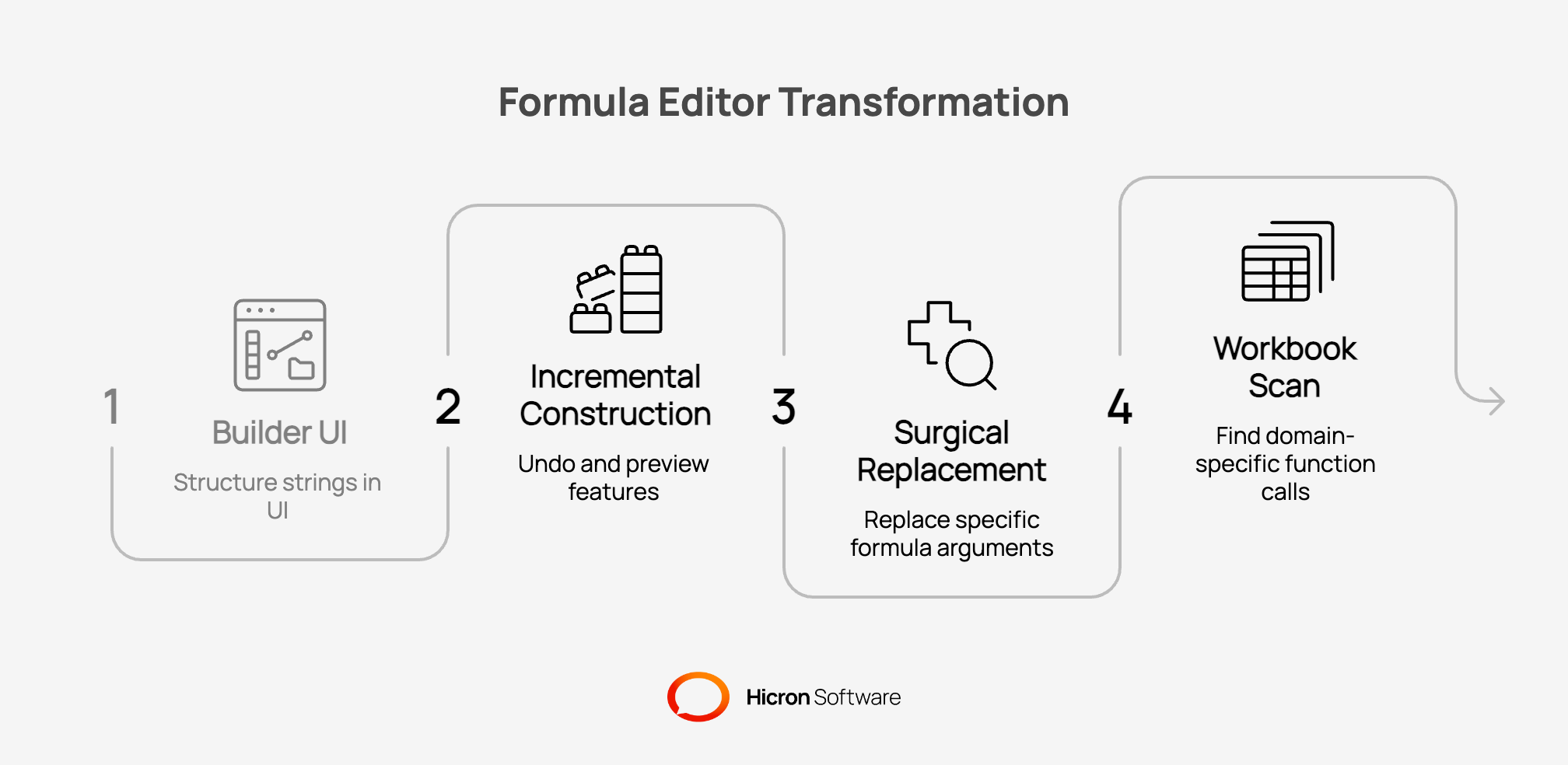
On the production add-in, the break points arrived in roughly this order. Reading existing formulas into a builder UI was the first feature that exposed how little structure strings preserved. Incremental construction with undo followed, then preview before commit, then surgical argument replacement, then workbook scan for specific domain function calls. Each step added another module that independently re-parsed the same text. That repetition was the signal to stop patching and change the internal representation.
A formula parsing layer is the internal machinery that lets an add-in treat spreadsheet syntax as structured data. Naming what it is for and what it is not keeps scope honest during design and roadmap planning.
SUM or ROUND may appear in formulas. The add-in does not recreate Excel calculation semantics. Domain functions get full preview through API calls. Native functions get limited handling. The product previews business values combined with basic arithmetic. Excel still owns the rest.Teams that scope the feature as “parse and evaluate” ship a calculator. Teams that scope it as “represent, manipulate, and serialize” ship a foundation that survives roadmap growth.
Excel and the add-in meet at a narrow interface. Excel exposes formula text. The add-in receives a character sequence and later writes a character sequence that Excel accepts. Everything between those two points belongs to the product.
Two contexts share that boundary, and conflating them is a common early mistake. When Excel evaluates a custom function at runtime, it invokes the add-in handler with already-resolved arguments; the add-in does not re-parse the full expression tree for that path. When the product reads formulas from cells to power a builder, a preview dialog, or a workbook scanner, it receives raw formula text and must parse it itself. The parsing architecture described here serves the second context: everything the product does with formulas before and after they sit in a cell. Excel still owns final cell evaluation.
The boundary rule: parse at entry, serialize at exit, work on objects in between.
  Excel cell (string)
      │
      ▼  parse once
   Add-in object model (tree + domain metadata)
      │
      ▼  operate: edit · validate · preview · scan
   Add-in logic (UI, API calls, tree surgery)
      │
      ▼  serialize
   Excel cell (string)
Conversion runs once when a formula enters the add-in. The formula builder, validator, preview engine, and workbook scanner all operate on the same tree. None of them re-parses raw text on each interaction.
On export, each node renders itself as spreadsheet syntax. Declarative function metadata drives argument order, quoting, and required fields. The serializer mirrors the tokenizer.
The common early mistake is passing strings between internal modules. Every module re-infers structure from scratch. Consolidating parse logic at the host boundary and passing trees internally removes duplicate interpretation and cuts a class of format bugs that only appear under real editing flows.
Consider a user opening an existing cell containing =APP.BALANCE("prod", "12345") + C14 in the formula builder and replacing the literal "12345" with a cell reference. The request is not resolved by string replacement. Each layer answers a separate question in sequence.
APP.BALANCEa string literal node with a stable identifier, and replaces it with a cell reference node. No substring indexes. No re-quoting of unrelated arguments. The rest of the tree is untouched.APP.BALANCE with the resolved arguments and reads the value of C14 from context. The user sees a result before anything is written back to the sheet.This sequence is what string handling cannot express cleanly. Import infers structure once. Edit targets one node. Preview and validation read the same tree. Export produces text at the boundary. That is the behavior a formula editor needs by design, not as a growing list of regex patches.
Spreadsheet formula syntax is a small language: functions, operators, literals, parentheses, precedence rules. The expression (1 + 2) * 2 differs from 1 + 2 * 2. Parentheses and precedence are structure, not decoration.
The pipeline follows a pattern from compiler design:
  "=APP.BALANCE(...) + 10"
          │
          ▼
    ┌───────────┐
    │  Tokens   │   "What are the pieces?"
    └─────┬─────┘
          ▼
    ┌───────────┐
    │    AST    │   "How do the pieces connect?"
    └─────┬─────┘
          ▼
    preview · edit · export · scan
Text → tokens → abstract syntax tree → tree operations.
Each stage answers one question:
|
Layer |
Question it answers |
|
Tokenizer |
What are the atomic pieces of this formula? |
|
Parser |
How do those pieces combine given operator precedence? |
|
Tree model |
What is the editable structure kept in memory? |
|
Evaluator |
What value does this structure produce for preview? |
|
Domain layer |
What do custom functions mean and what arguments do they need? |
Parsing stays separate from UI code and separate from API clients. Each layer accepts fixed inputs and produces fixed outputs. Unit tests run without a live Excel instance. That separation is what keeps the feature maintainable as the product adds builder steps, validation rules, and scan types.
Three structures divide the problem. Each maps to a distinct part of the add-in feature.
Every formula fragment becomes a node: number, string literal, domain function call, native spreadsheet function, or operator. Nodes carry stable identifiers. Replacing one argument means swapping one node, not rebuilding the formula string.
Example: balance + adjustment * 2 becomes a tree where multiplication binds deeper than addition, matching operator precedence.
Custom functions are declared outside the parser. Configuration holds name, argument list, required flags, and return type. The parser recognizes the APP.* namespace. Configuration defines what each call means to the product backend.
A new function is a configuration entry. The tokenizer and parser stay unchanged unless the syntax itself changes.
Three flows share one tree model:
Direct construction makes undo reliable. The product stores tree-state per builder step, not accumulated string diffs.
Algorithm choice follows product shape. A formula editor needs a tree. A formula calculator can use a flat evaluation stack. Most add-in roadmaps start as calculators and grow into editors. The parser should match the destination, not only the MVP.
The tokenizer scans text into typed tokens: domain functions, native functions, numbers, operators, parentheses, cell references. The grammar is narrow. A hand-written scanner is preferable when the team needs control over ambiguous tokens, such as a function name that resembles a cell reference; a recurring issue in Excel formula syntax where the token boundary depends on context, not a fixed keyword list.
The parser builds an abstract syntax tree from tokens while respecting operator precedence. Multiplication binds before addition. Parentheses override both. The tree emerges directly. No intermediate reverse Polish stack sits between parse and edit.
Reverse Polish notation and the shunting yard algorithm optimize evaluation speed. They flatten the structure into operand and operator sequences. That shape is hard to undo in a builder UI, hard to navigate for partial edits, and hard to attach stable IDs to for highlighting.
Here, the product problem is representation for manipulation, not evaluation throughput. Precedence climbing produces the tree builder, validator, and scanner already needed.
The evaluator traverses the tree for preview values. Domain functions call the product API, while native spreadsheet functions have limited support by design. Preview allows users to verify business values and arithmetic combinations before the formula is entered into a cell. A full Excel emulation is explicitly outside the scope.
Early choices in formula architecture constrain what the product can ship later. The table below lists the decisions that proved load-bearing in production.
|
Area |
Choice |
What it enables later |
|
Representation |
Abstract syntax tree |
Builder UI, partial edit, domain mapping |
|
Parser |
Precedence climbing |
Direct tree build without RPN conversion |
|
Tokenizer |
Dedicated scanner |
Token-level control, no parser generator dependency |
|
Domain functions |
Declarative configuration |
New functions as data, not parser forks |
|
Evaluation |
Tree traversal |
One model for preview, validation, and export |
|
Native spreadsheet functions |
Limited preview |
Clear scope boundary with Excel |
|
Host boundary |
Parse once in, serialize once out |
Stable internal contracts between modules |
Declarative configuration ties the rows together. One definition surface holds function names, argument schemas, required fields, and return types. The builder populates pickers from it. Validation checks trees against it. The serializer formats output from it.
Adding APP.ADJUSTMENT with three required arguments is a configuration change. Tokenizer rules already accept APP.*. Parser rules already emit function call nodes. The feature ships without reopening core parse logic.
Structured formulas are not an implementation detail visible to users. They unlock product capabilities strings block.
APP.BALANCE call is tree traversal across parsed formulas, not fragile pattern matching over cell text.On the production add-in, this last point was the clearest return on the architectural investment. After the object model was in place, subsequent features, argument pickers wired to configuration, validation before commit, workbook scan for domain function calls, shipped as tree operations against a stable internal contract. The parsing layer did not reopen for each one.
The pipeline is a runtime design and a team ownership map.
|
Layer |
Single responsibility |
|
Tokenizer |
Character stream to tokens |
|
Parser |
Tokens to abstract syntax tree |
|
Tree model |
Structure, IDs, mutation |
|
Evaluator |
Preview computation |
|
Domain config |
Function catalog and rules |
|
Serializer |
Tree back to spreadsheet text |
One module per concern limits cognitive load. A fix in tokenization does not require reading API client code. Parser work and builder UI work proceed in parallel when layer contracts stay stable.
Modules also swap independently. A faster tokenizer replaces one file. Input remains a string. Output remains a token stream. Parser, evaluator, and UI stay untouched.
A single module that tokenizes, parses, evaluates, and encodes domain rules becomes legible only to its author. Splitting by responsibility shortens onboarding and reduces regression risk as the add-in feature set grows.
The Excel add-in is one host surface. The pattern generalizes wherever a product accepts familiar text syntax but needs rich internal structure.
The host technology does not prevent the mistake. An object-capable language can still pass strings between modules and re-infer meaning at every boundary. The rule holds across hosts: text at the edge, structure inside, text on exit.
The compiler-style pipeline described in this article did not emerge from a greenfield design exercise. It was the response to a production add-in whose string-based formula handling was still working for evaluation but failing under every new editing feature the roadmap demanded.
The first version was adequate for its stage. The add-in found domain function calls in cell text, called the backend, and returned values. Formulas lived as strings inside the product as well as inside Excel. That symmetry felt efficient until the product needed to understand formula structure, not only formula text. Each new capability re-implemented parsing logic in a different module. Quoting bugs appeared under nested calls. Partial edits corrupted unrelated arguments. The team was spending more time maintaining string interpretation than shipping product features.
The proposal was to treat formulas as structured programs internally: a dedicated tokenizer, a precedence climbing parser, an abstract syntax tree with stable node identifiers, declarative configuration for domain functions, and a serializer that mirrored the tokenizer at the Excel boundary. The scope was deliberately narrow. The parser recognizes the domain function namespace and the expression structure the product needs to edit. It does not recreate full Excel calculation semantics. Native spreadsheet functions receive limited preview support. Excel still owns the rest.
The migration did not require rewriting every feature at once. The parse boundary moved to the Excel edge. Modules that previously accepted strings began accepting trees. The formula builder, validator, and preview engine converged on one internal representation. Unit tests ran against the pipeline without a live Excel instance.
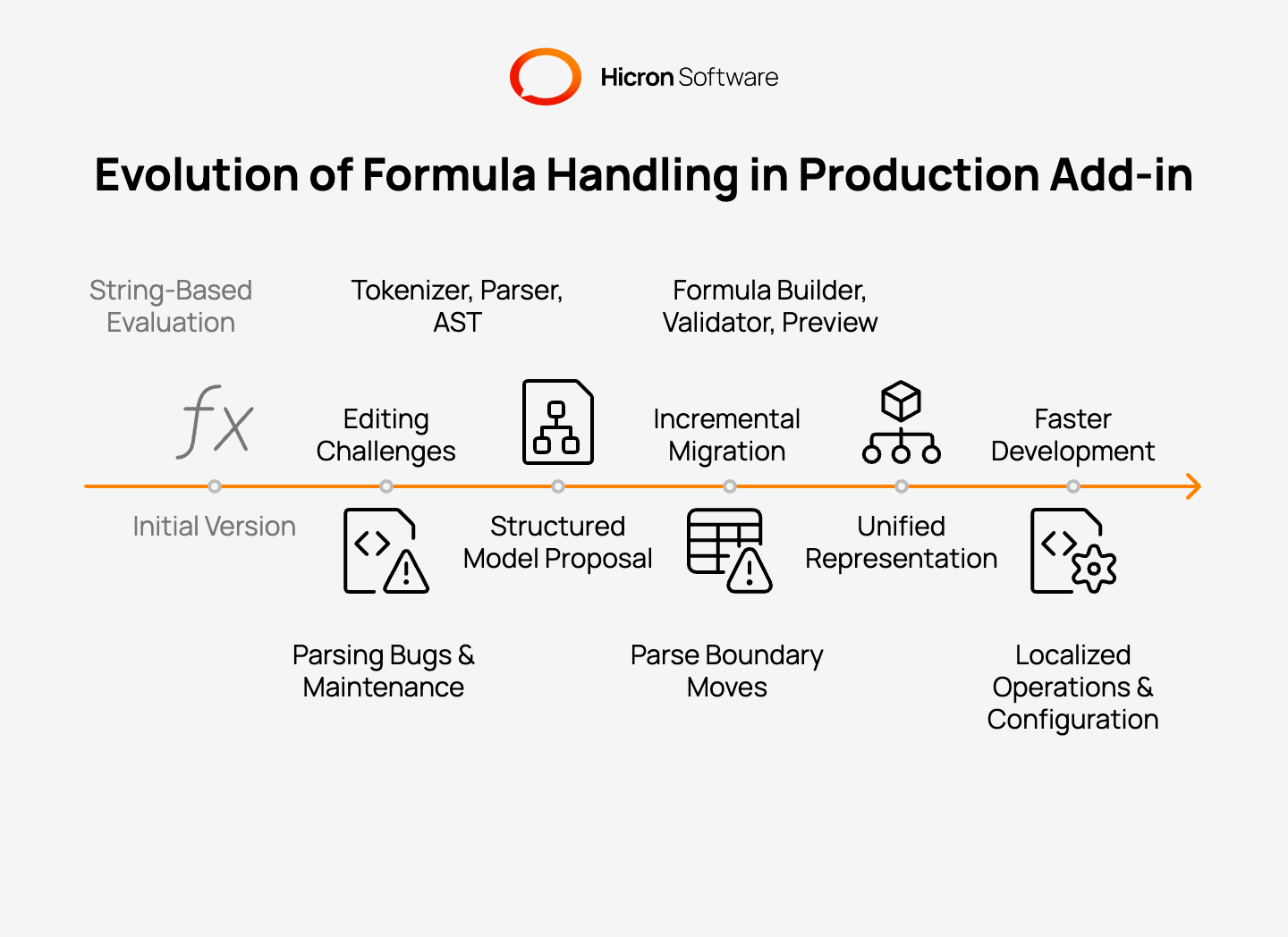
The outcome was not faster evaluation. Excel already handled that. The outcome was faster product development. Features that had looked expensive, undo in the builder, surgical argument replacement, workbook scan, validation before commit, became localized operations on a shared tree. New domain functions shipped as configuration entries rather than parser changes. The add-in gained flexibility it did not have while formulas were strings, and the roadmap stopped waiting on string patches.
Excel covers evaluation for the end user. The digital product owns everything that happens around custom formulas: building them, validating them, scanning them, and mapping them to backend APIs.
Three decisions set the trajectory early.
A well-scoped problem picks proven compiler techniques. The add-in feature that looks like formula evaluation on day one often becomes formula editing by quarter two. Architecture that treats formulas as structured programs, not persistent strings, is what carries that transition without a rewrite.
Excel covers cell evaluation for the end user. The digital product owns everything that happens around custom formulas: building them, validating them, scanning them, and mapping them to backend APIs. Treating formulas as plain strings end-to-end carries the first release. It fails predictably once the product becomes a formula editor.
The production add-in described here followed that sequence. String handling worked until the roadmap demanded structure. A compiler-style pipeline with an abstract syntax tree restored feature velocity. Not by replacing Excel’s calculation engine, but by giving the product a representation it could edit, validate, and serialize reliably. The investment paid off in flexibility: new capabilities shipped faster because they operated on objects, not text.
When an Excel add-in roadmap includes a builder, undo, preview, or workbook search, the architectural decision belongs early. The parser and internal representation should match that destination before string patches accumulate across modules.
Building an Excel add-in where formula requirements are outgrowing string handling? Contact us to discuss how we approach formula parsing architecture, including when to introduce a structured model before the next feature forces a rewrite.
It is the layered design that converts spreadsheet formula strings into a structured tree the add-in can edit, validate, preview, and convert back to text. It covers tokenization, parsing, an abstract syntax tree, evaluation, and domain-specific function metadata.
Declarative configuration defines function names, arguments, required fields, and return types in one place. The formula builder, validator, evaluator, and serializer all read the same definitions. New functions ship as configuration changes rather than parser rewrites.
Reverse Polish notation optimizes evaluation into a flat operand and operator sequence. Formula editors need hierarchical structure for undo, partial replacement, UI navigation, and stable node references. A tree representation aligns with those jobs. RPN does not.
Precedence climbing builds an abstract syntax tree directly while respecting operator order. It avoids an extra conversion step from a flat evaluation stack. That matters when the primary goal is editing and traversing structure, not only computing a numeric result.
An abstract syntax tree fits when the product needs more than evaluation. Typical triggers are a visual formula builder, undo steps, argument editing, preview before insert, validation, or scanning the workbook for specific function calls. Pure evaluate-and-return workflows can stay string-based longer.
Hicron Software proved to be a trusted partner with unmatched technical expertise, delivering a scalable and user-friendly web application that was pivotal to our successful U.S. market expansion.

Hicron’s contributions have been vital in making our product ready for commercialization. Their commitment to excellence, innovative solutions, and flexible approach were key factors in our successful collaboration.
I wholeheartedly recommend Hicron to any organization seeking a strategic long-term partnership, reliable and skilled partner for their technological needs.

After carefully evaluating suppliers, we decided to try a new approach and start working with a near-shore software house. Cooperation with Hicron Software House was something different, and it turned out to be a great success that brought added value to our company.
With HICRON’s creative ideas and fresh perspective, we reached a new level of our core platform and achieved our business goals.
Many thanks for what you did so far; we are looking forward to more in future!

Hicron is a partner who has provided excellent software development services. Their talented software engineers have a strong focus on collaboration and quality. They have helped us in achieving our goals across our cloud platforms at a good pace, without compromising on the quality of our services. Our partnership is professional and solution-focused!

The IT system supporting the work of retail outlets is the foundation of our business. The ability to optimize and adapt it to the needs of all entities in the PSA Group is of strategic importance and we consider it a step into the future. This project is a huge challenge: not only for us in terms of organization, but also for our partners – including Hicron – in terms of adapting the system to the needs and business models of PSA. Cooperation with Hicron consultants, taking into account their competences in the field of programming and processes specific to the automotive sector, gave us many reasons to be satisfied.

