Balancing the DRY Principle with Readability in Software Development
- March 19
- 5 min


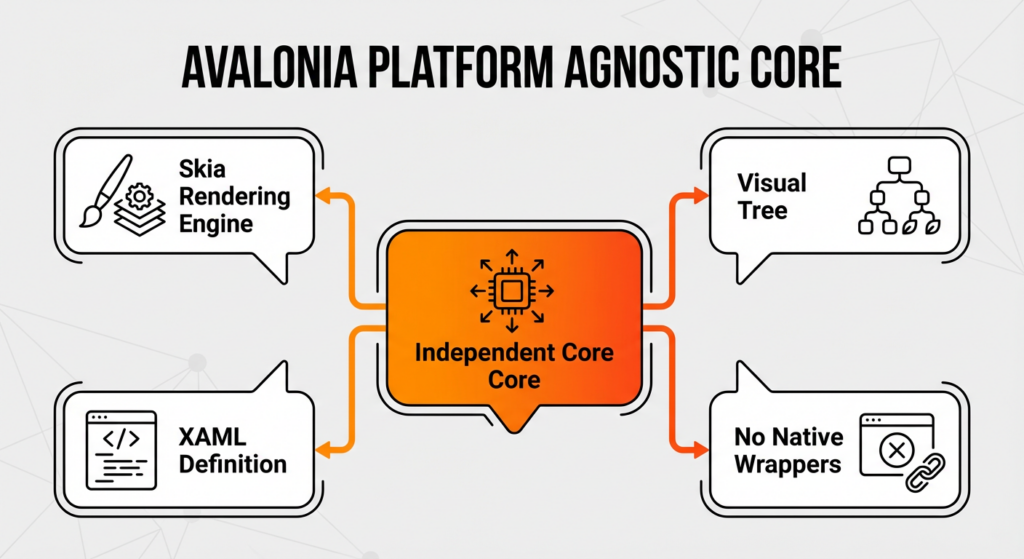
Avalonia UI is a cross-platform UI framework for .NET that uses an independent core to render interfaces. Unlike native wrapper technologies, this architecture draws its own UI elements using a dedicated rendering engine, separating high-level application logic defined in C# and XAML from low-level drawing operations.
By bypassing standard OS-dependent toolkits, the system uses a unified rendering backend to achieve visual parity across all supported platforms. Developers rely on this structure for desktop development to ensure that custom controls and visual tree management behave identically on every operating system.
The platform-agnostic core manages the entire visual tree, layout calculations, and input routing independently of the underlying operating system. This layer controls the hierarchy of UI controls while running inside the .NET managed environment. The framework organizes elements into logical and visual trees to separate high-level structure from rendering details.
The layout system performs measure and arrange passes to position elements without querying the host OS for coordinates. This setup supports features like UI virtualization and consistent visual tree management across platforms.
The Skia rendering engine acts as the universal drawing backend, translating high-level UI instructions into pixels on the screen. It enables the framework to render 2D vector graphics, text, and images identically across all supported platforms. Avalonia uses this consistent library to smooth over hardware differences to achieve identical output without relying on native operating system rendering logic.
Skia supports both software rendering and hardware acceleration via APIs such as Vulkan, Metal, and Direct2D. The engine is known for stability and performance in widely used software like Google Chrome, which ensures that custom controls appear uniform regardless of the host environment.
|
Architectural Component |
Function & Role |
Key Technologies & Details |
|
Platform-Agnostic Core |
Manages the visual tree, layout calculations, and input routing independently of the underlying operating system. |
|
|
Skia Rendering Engine |
Acts as the universal drawing backend, translating high-level UI instructions into pixels to ensure visual parity. |
|
|
Hardware Acceleration |
Offloads graphic instructions to the GPU via platform-specific APIs for performance. |
|
|
Platform Integration Layer |
A “glue” layer that handles window management, system events, and input while keeping rendering logic isolated. |
|
|
Embedded Linux System |
Allows rendering without a desktop environment by bypassing X11 or Wayland. |
|
|
Development Model |
Separates UI definition from business logic using the MVVM pattern and declarative markup. |
|
Avalonia UI stands out because it renders its own interface elements rather than using the operating system’s widget toolkit. While traditional cross-platform frameworks often bridge to platform-specific controls, Avalonia avoids this dependency entirely. Instead, it uses a platform-agnostic core to draw every pixel manually, ensuring that application code and XAML—not the host OS—define the visual appearance.
Developers achieve exact visual replication across all targets without adjusting for platform-specific rendering quirks. The architecture creates a unified API surface that behaves identically on Windows, macOS, and Linux. Unlike wrapper solutions where the visual output varies based on the operating system version or theme settings, this method provides stability. This approach simplifies .NET desktop development and visual tree management while avoiding the complexities inherent to native interop.
Custom-drawn controls consist of graphical primitives rendered directly by the engine, while native widgets are pre-built components provided by the operating system. Avalonia constructs these elements using basic shapes like rectangles, lines, and text paths via the Skia rendering engine. Compare this to native wrappers that instantiate specific system objects, such as Win32 handles on Windows or Cocoa views on macOS. In Avalonia, a standard “Button” exists as a collection of visual instructions defined in XAML, not as a rigid system control. From a developer’s perspective, this shift in thinking unlocks immense creative potential.
The resulting architecture gives developers complete freedom in styling and templating without the constraints of the host OS. Custom controls allow for deep visual customization because they are simply drawing commands managed by the framework. Eliminating these dependencies removes platform-specific bugs and behavioral inconsistencies often found when bridging to native toolkits. The application maintains uniform rendering across desktop development and mobile support scenarios. The look and feel remain uniform on all devices, as the visual output does not rely on the variable rendering logic of the underlying operating system. The framework streamlines visual tree management since it handles all drawing operations internally.
Avalonia bypasses operating system UI toolkits to create a truly platform-agnostic environment where code behaves identically regardless of the underlying OS. Dependence on host toolkits forces frameworks to handle divergent APIs for Windows, macOS, and Linux, often resulting in complex conditional logic and increased technical debt. Anyone who has maintained a large cross-platform codebase knows exactly how painful that debt can become. Ignoring these native layers cuts down maintenance overhead, as developers don’t need to write platform-specific adjustments for standard behaviors.
This approach solves common challenges in desktop development, such as the difficulty of styling native scrollbars or text inputs to look consistent across different systems. Instead of struggling with the limitations of native interop, .NET developers work with a single, unified API that guarantees visual uniformity on all targets. Such design choices ensure development predictability, ensuring that a UI defined in XAML renders exactly as intended without requiring unique code paths for each deployment target.
Avalonia ensures pixel-perfect consistency by owning the entire rendering pipeline instead of relying on the operating system for drawing. This cross-platform UI framework uses a unified layout engine that calculates the exact position and size of elements identically on all systems. It removes the variability caused by OS-dependent font rendering or platform-specific spacing quirks.
A UI defined in XAML on Windows appears exactly the same on macOS because the platform-agnostic core handles visual tree management without interference from native themes. Developers can run the same binary on Linux and Windows to verify that the visual output remains identical. Since the Skia rendering engine executes these drawing commands directly, custom controls and layouts function uniformly across all desktop development targets.
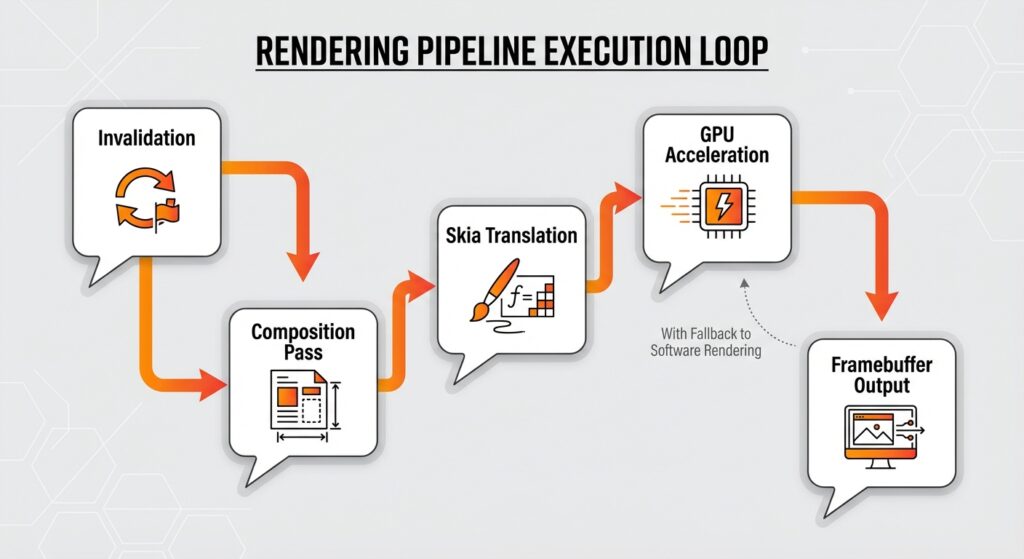
The pipeline functions like a continuous loop that constantly updates the display, converting property changes into visual output through a structured sequence. Think of this effectively as a game loop for your business application.
Because of this pipeline, Avalonia can handle advanced features like UI virtualization, ensuring that only visible elements use processing resources.
The visual tree management system determines the Z-order of elements based on their hierarchical position within the platform-agnostic core. The engine traverses the tree from parent to child, establishing a strict drawing sequence known as the Painter’s Algorithm. This means that parent elements render first, effectively creating a background layer for their children. For example, a Border control draws its background color before the custom controls or text content hosted inside it appear on top.
Hit-testing and input event routing use this same structural logic but use reverse traversal. The rendering architecture checks the topmost elements first to determine which control receives user interaction. While the natural tree order defines the default stacking context, developers can modify this sequence using the ZIndex property in XAML. With this property, you can overlay elements without altering the logical parent-child relationships defined in the layout engine.
Avalonia UI natively supports hardware acceleration to speed up rendering and ensure animation smoothness. The framework uses the Skia rendering engine to offload graphic instructions to the GPU via platform-specific APIs. Integrations include:
This keeps apps running efficiently on diverse hardware.
If GPU acceleration is inaccessible, the architecture automatically engages a software rendering fallback. This ensures that the system maintains visual fidelity across all targets, including mobile support.
Integration relies on an abstraction layer provided by the Skia rendering engine, which interfaces directly with platform-specific graphics APIs. Avalonia detects the host operating system at runtime to select the optimal backend, such as Direct2D for Windows, Metal for macOS, or Vulkan for Linux.
Once initialized, the engine maps high-level drawing commands into low-level GPU acceleration instructions specific to the selected API. Skia transparently handles the translation of vector paths and textures into GPU-compatible data formats, allowing the engine to maintain a single rendering codebase while using the native interop capabilities of each system.
Avalonia UI manages the boundary between its platform-agnostic core and the host operating system through a specialized “glue” layer. This component handles essential system interactions while keeping the bulk of the rendering logic independent. Unlike frameworks that wrap native controls, Avalonia only requires a minimal footprint of platform-specific code to establish a host environment.
This layer primarily handles window management, requesting a native window handle from the OS to serve as a canvas for the rendering engine. Once the system establishes this container, the integration layer captures low-level system events, such as mouse clicks or keystrokes, and standardizes them for the core engine. This keeps input handling consistent across desktop development targets without exposing OS-specific complexities to the developer. The system also simplifies essential services like:
Isolating native interop allows applications to interact naturally with the system shell while maintaining a unified codebase for Linux and mobile support.
On Windows, Avalonia defaults to using the Win32 API for windowing and Direct2D for rendering content. The framework establishes a native window handle (HWND) to host the application, while the Skia rendering engine uses Direct2D to execute drawing commands.
With this setup, GPU acceleration is possible, ensuring that desktop development applications achieve high performance for vector graphics and animations. The system integrates directly with the standard Windows message loop to handle events, making native interop easy with the .NET runtime. Avalonia bypasses legacy rendering paths to use the speed and stability of modern hardware interfaces.
On macOS and iOS, Avalonia uses the Cocoa and CocoaTouch frameworks to manage the application shell. The architecture initializes native containers, specifically NSWindow for desktop development and UIWindow for mobile support, to host the visual content. Within these shells, the Skia rendering engine targets the Metal API to execute drawing commands with GPU acceleration.
Because of this integration, the system guarantees optimal performance on Apple Silicon hardware by bypassing legacy graphics standards like OpenGL. Developers can run a unified codebase on both platforms, where the same XAML definitions render identically on desktop and mobile devices. The framework automatically handles platform nuances, such as integrating the application menu into the native macOS menu bar and managing iOS lifecycle events. Native interop layers translate distinct input methods, converting mobile touch events and desktop pointer data into standard actions for the rendering backend. This design allows the framework to deliver a native feel while maintaining architectural consistency.
The architecture compiles the entire .NET runtime, the Skia rendering engine, and application code into WebAssembly binaries, allowing Avalonia to execute directly inside the client’s browser without relying on server-side rendering. Instead of mapping controls to HTML DOM elements, the system uses a single HTML5 Canvas element as the render target for the UI.
The platform-agnostic core treats this canvas as a raw display surface, drawing pixels via software rendering or GPU acceleration using WebGL. The system intercepts and translates input events from the browser into standard Avalonia commands. Consequently, complex C# applications function with the same visual tree logic used in desktop environments, effectively treating the web as just another supported platform.
Avalonia UI is optimized for embedded systems, enabling high-performance interfaces on devices with limited hardware that lack a full desktop environment. The architecture runs efficiently on minimal Linux distributions by removing dependencies on heavy display servers like X11 or Wayland.
This design contrasts with web-based solutions, as the .NET runtime and application code consume much less memory and CPU cycles on ARM-based hardware. This lightweight approach is ideal for industrial controllers, kiosks, and IoT devices, ensuring stable operation on low-power processors. The framework supports deployment on systems where the application acts as the primary user interface, eliminating the overhead of a traditional operating system shell.
Avalonia displays a UI on Linux devices without a windowing system by writing directly to the framebuffer or using the Direct Rendering Manager (DRM). By doing this, the engine bypasses standard display servers like X11 or Wayland, eliminating the resource overhead associated with a desktop window manager.
The engine communicates directly with the kernel’s graphics subsystem, making it highly efficient for embedded systems and kiosk mode deployments. Here, the application runs as the sole interface on the screen, using either software rendering or GPU acceleration to maintain optimal performance. This ensures that visual output functions reliably on devices that lack a traditional desktop shell, effectively supporting headless rendering configurations that require a physical display.
The Direct Rendering Manager (DRM) and framebuffers are low-level kernel interface mechanisms enabling the framework to drive display hardware directly on embedded systems. DRM represents the modern standard, allowing hardware access that allows the engine to use GPU acceleration for rendering operations. This capability is essential for applications requiring high performance, such as digital instrument clusters in automotive or dynamic industrial displays. On the other hand, the framebuffer provides a basic memory-mapped region for software rendering, serving as a reliable fallback when hardware acceleration is unavailable.
DRM combined with Kernel Mode Setting (KMS) ensures smooth frame rates by managing video memory efficiently. The legacy framebuffer interface guarantees compatibility across a broad range of minimal Linux configurations. Avalonia uses these technologies to select the optimal rendering backend, ensuring that the UI remains responsive even without a window manager.
Avalonia UI uses the MVVM pattern to enforce a strict separation of concerns between the user interface definition and the underlying business logic. Developers use XAML as a declarative UI language to construct the element hierarchy, making visual tree management efficient for custom controls. The framework parses these markup definitions to instantiate platform-agnostic components that the engine renders independently of the host system.
With this approach, the .NET backend can drive application behavior through C# ViewModels, while the data binding system synchronizes state changes with the visual output. As a result, the UI architecture supports a clean development workflow where the graphical presentation remains distinct from the functional code.
The data binding system links UI logic to data models. It uses the INotifyPropertyChanged interface to detect property notification events. When a C# property changes, the framework automatically updates the corresponding element in the visual tree management structure. This keeps the View and ViewModel in sync.
Avalonia offers three distinct binding modes to control the flow of data. Developers use XAML to define these connections declaratively, eliminating the need for manual event handlers. The system also supports reactive programming, enabling complex data transformations within the MVVM pattern.
Control templates enforce the concept of lookless controls, where the functional behavior is distinct from the visual presentation. Here, the logical state of a component is defined in C#, while its appearance is constructed entirely via XAML templates. Because of this separation, developers can completely replace the visual tree management structure of a control without altering its underlying code.
For instance, a standard checkbox can be transformed into a modern toggle switch solely by modifying its control template. The logical property IsChecked remains unchanged, but the visual output shifts from a box to a sliding switch. This capability separates design separation from business logic, permitting designers to restyle custom controls extensively while developers maintain the core functionality. This means the architecture supports deep styling capabilities that align with the MVVM pattern, ensuring that UI customization remains adaptable to changing design requirements. In my experience, this capability alone justifies the learning curve.
Avalonia’s performance stems primarily from its decision to bypass native operating system widgets in favor of a custom rendering pipeline. This approach cuts memory usage for individual controls, as the framework avoids the overhead of instantiating heavy system handles for every UI element. The platform-agnostic core manages a lightweight visual tree, allowing applications to scale efficiently even with thousands of objects.
Smart damage invalidation algorithms maintain rendering efficiency by ensuring that only the specific regions of the screen that have changed are redrawn. While software rendering can introduce CPU overhead on older hardware, the architecture reduces this by using GPU acceleration to offload drawing operations. When dealing with complex layouts or deep UI virtualization, the custom engine often outperforms native wrappers by eliminating the costly context switching required for native interop.
Ahead-of-Time (AOT) compilation improves performance by converting managed .NET assemblies into native code prior to execution. This process removes the substantial overhead of Just-In-Time compilation during the initial launch phase. Eliminating runtime compilation leads to a much faster startup time.
This compilation optimization is critical for mobile support on platforms like iOS and WebAssembly, where JIT compilation is often restricted or entirely banned due to security protocols. Here, AOT ensures that the application complies with platform rules while maintaining high efficiency. Also, embedded systems benefit from this approach as it reduces the computational load on constrained hardware. AOT-compiled applications on mobile and embedded devices experience a noticeable improvement in launch times, often starting instantly compared to their JIT-based counterparts.

Developers choose Avalonia when a project demands a fully branded, identical UI across all target environments. The architectural choice to use a custom rendering engine ensures that custom controls and visual styles maintain strict visual fidelity on Windows, macOS, and Linux. Avalonia excels when the visual identity must remain uniform, regardless of the underlying operating system’s theme.
Teams can cut maintenance overhead and maximize code sharing for multi-platform apps by consolidating logic into a single codebase. Unlike scenarios requiring deep native interop, such as accessing specific sensor APIs or platform-exclusive hardware features, where native solutions often perform better. Avalonia provides the most value in desktop development when visual uniformity and cross-platform reach outweigh the need for strict adherence to host OS interface guidelines.
Hicron Software proved to be a trusted partner with unmatched technical expertise, delivering a scalable and user-friendly web application that was pivotal to our successful U.S. market expansion.

Hicron’s contributions have been vital in making our product ready for commercialization. Their commitment to excellence, innovative solutions, and flexible approach were key factors in our successful collaboration.
I wholeheartedly recommend Hicron to any organization seeking a strategic long-term partnership, reliable and skilled partner for their technological needs.

After carefully evaluating suppliers, we decided to try a new approach and start working with a near-shore software house. Cooperation with Hicron Software House was something different, and it turned out to be a great success that brought added value to our company.
With HICRON’s creative ideas and fresh perspective, we reached a new level of our core platform and achieved our business goals.
Many thanks for what you did so far; we are looking forward to more in future!

Hicron is a partner who has provided excellent software development services. Their talented software engineers have a strong focus on collaboration and quality. They have helped us in achieving our goals across our cloud platforms at a good pace, without compromising on the quality of our services. Our partnership is professional and solution-focused!

The IT system supporting the work of retail outlets is the foundation of our business. The ability to optimize and adapt it to the needs of all entities in the PSA Group is of strategic importance and we consider it a step into the future. This project is a huge challenge: not only for us in terms of organization, but also for our partners – including Hicron – in terms of adapting the system to the needs and business models of PSA. Cooperation with Hicron consultants, taking into account their competences in the field of programming and processes specific to the automotive sector, gave us many reasons to be satisfied.

