11 DevOps Automation Tools to Streamline Your Workflow
- May 21
- 10 min


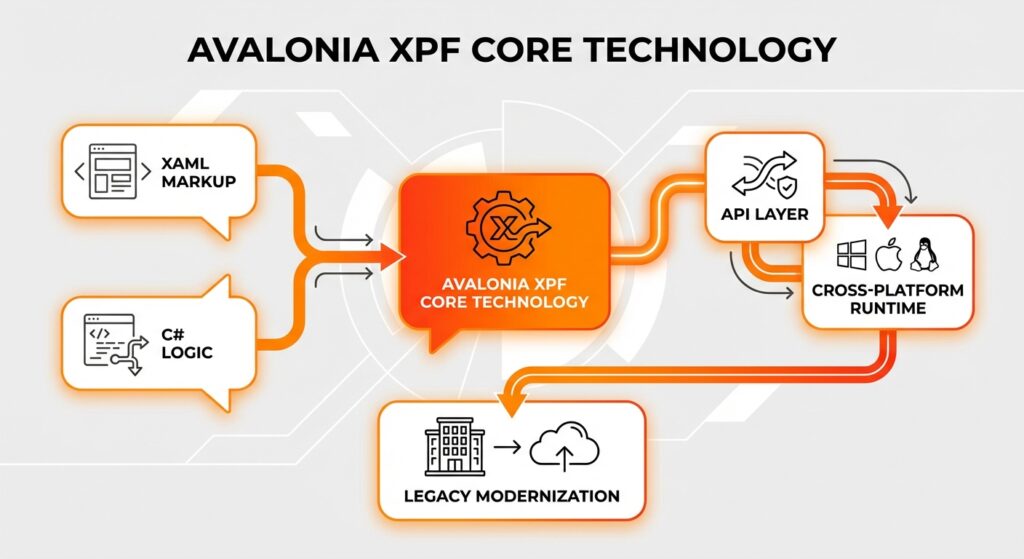
Avalonia XPF enables existing WPF applications to run on macOS and Linux by recompiling against a cross-platform runtime, often with minimal code changes. By enabling legacy systems to run in non-Windows environments, the technology modernizes desktop apps. It connects Windows-only dependencies to a cross-platform runtime through a compatible API layer that translates WPF instructions for different operating systems.
Unlike standard porting processes, leveraging existing XAML markup and C# logic bypasses full rewrites. Teams can then modernize their apps without tossing out years of work, so developers can focus on feature development rather than platform-specific refactoring across three major operating systems. I’ve seen entire projects stall just trying to replicate pixel-perfect layouts, so keeping that original markup is a huge advantage.
| Category | Key Aspect | Description and Benefits |
|
Core Functionality |
Cross-Platform Runtime |
|
|
Architecture |
Rendering Engine |
|
|
Compatibility |
Controls & Libraries |
|
|
Migration |
Code Adjustments |
|
|
Performance |
Optimization Techniques |
|
|
Strategy Comparison |
XPF vs. Alternatives |
|
|
Licensing |
Commercial Model |
Operates under a proprietary enterprise or business license. Includes professional support for bug fixes and platform-specific rendering issues, ensuring guaranteed service levels. |
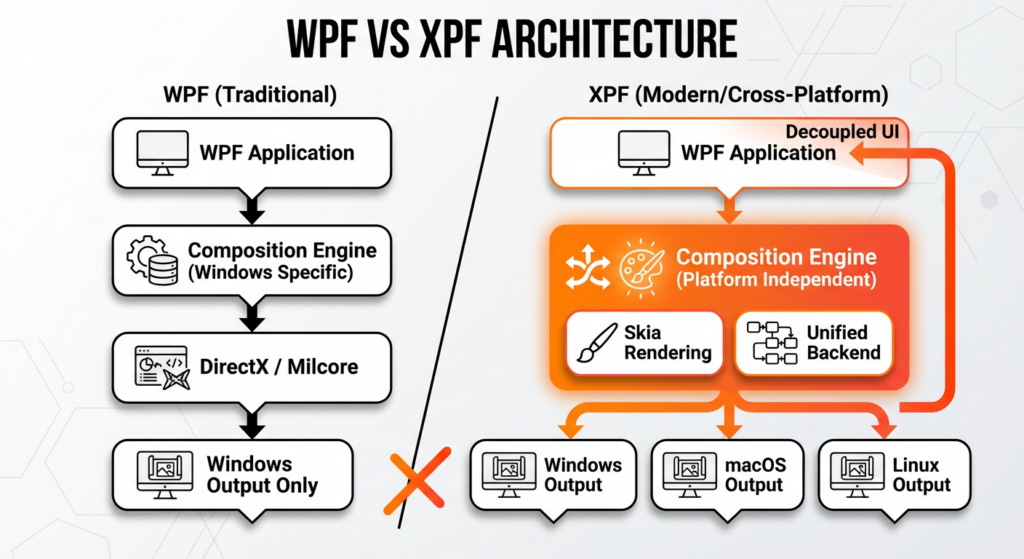
The architecture of Avalonia XPF replaces the standard WPF Windows-specific composition engine with a cross-platform rendering layer. Think of it like swapping a gas engine for an electric one. You keep the same chassis and interior, so the drive feels familiar, but the power source is completely different. Standard WPF relies on Milcore and DirectX to process visual trees and manage graphics hardware. Avalonia XPF substitutes these platform-specific APIs with a single engine to ensure consistent visual output on non-Windows systems.
The architecture decouples the user interface from the operating system, keeping the original XAML syntax and code-behind logic intact. You won’t need to rewrite the styling system or core application behavior. A platform-independent composition target draws pixels identically across all three supported platforms, effectively removing reliance on the operating system kernel for graphical presentation.
Skia handles the graphics, making sure your app looks exactly the same on Windows, macOS, and Linux. Acting as a unified backend, it eliminates platform-specific drawing quirks by bypassing native OS rendering dependencies. If you’ve ever spent hours debugging why a border looks different on different OS versions, you’ll appreciate this consistency. Custom controls and the styling system appear identical on every target platform thanks to this approach.
Fonts and vectors look sharp and correct without requiring adjustments for specific operating systems. The framework achieves cross-platform compatibility by abstracting visual output, ensuring that the application look and feel remain uniform. Furthermore, the streamlined rendering pipeline optimizes performance by avoiding the overhead of mapping to native UI toolkits.
Avalonia XPF abstracts operating system interactions, including file systems, window management, and input events, into a single API. To handle windowing and event loops independently of the Windows kernel, the software architecture employs wrappers. The system maps native OS window events on macOS and Linux directly to standard framework events. It automatically translates discrepancies, such as file paths and dialogs, ensuring existing code-behind logic functions correctly.
The framework supports desktop app modernization by handling low-level differences, removing the need to manually modify platform-specific APIs. The framework handles low-level differences across all three supported platforms, so developers don’t have to worry about the details.
Avalonia XPF lets you reuse your existing UI markup by supporting standard controls, complex layouts, and architectural patterns with little to no modification. The framework includes comprehensive compatibility for standard UI components and layout containers found in the original Windows Presentation Foundation library. Advanced scenarios involving data binding and the MVVM framework function exactly as they do on Windows.
Existing Data Templates and control hierarchies render with precision, preserving the intended visual structure and behavior. Developers retain the original XAML syntax and code-behind logic, eliminating the need for translation or manual adjustments. Such compatibility saves time by focusing efforts on application logic rather than UI reimplementation.
Avalonia XPF supports the integration of popular component libraries from vendors like Telerik, DevExpress, and Infragistics through its binary compatibility layer. Consequently, you can keep using complex UI features without replacing established third-party dependencies. Libraries distributed via NuGet packages operate in the new environment using the compatible API surface provided by the framework. From my experience, retaining these libraries is often the difference between a feasible migration and a complete rewrite.
Hybrid modernization techniques allow hosting specific custom controls, such as advanced data grids or charts, ensuring 100% feature parity. Developers must validate specific components to confirm they don’t rely on unsupported native Windows APIs. You must ensure you comply with enterprise license or business license agreements when deploying these commercial controls to macOS and Linux.
Custom-built UI components transfer directly to the new environment without requiring a rewrite. The styling system uses the existing XAML syntax to maintain the look and feel of user-defined templates. Developers reuse complex control logic and visual trees with minimal refactoring.
Custom controls retain their original code-behind functionality across all three supported platforms. The underlying engine introduces CSS-inspired styling capabilities for optional visual enhancements. This approach simplifies modernization, allowing you to retain your custom investments without rework. The developer experience focuses on feature parity rather than reimplementing interface elements.
Validate project compatibility by auditing NuGet packages and third-party dependencies to confirm support for the target cross-platform runtime. You should analyze the dependency tree to identify libraries relying on Windows-specific technologies, such as the registry or GDI+. Automated analysis tools scan the software architecture to flag incompatible binaries early. Trust me, catching these dependencies before you write a single line of migration code will save you days of debugging later.
Check that all components possess .NET Standard or .NET 6+ targets to identify blockers. Addressing these issues prior to migration prevents runtime failures and determines which elements require abstraction or replacement.
The primary adjustment involves converting legacy `.csproj` XML structures to the modern SDK-style format. This format makes the project file cleaner and easier to manage. You need to update the Target Framework Moniker (TFM) to a current version, such as `net6.0` or `net8.0`, to enable cross-platform execution.
You must migrate dependencies from packages.config to direct NuGet packages references. Eliminate these outdated references to address technical debt and prepare the build system for macOS and Linux, resulting in a cleaner and more maintainable project structure.
You need to identify code that relies on Win32 API calls and isolate it. Managing OS-specific code involves replacing Windows-centric mechanisms with cross-platform alternatives to maintain stability.
Fixing these patterns cleans up the code and ensures that the application behaves consistently across all three target platforms.
To replace direct dependencies on system libraries, refactor code into services that detect the operating system and execute the appropriate logic.
Developers handle legacy P/Invoke signatures by creating distinct implementations for each target platform. The Windows version retains the original native calls, while alternative implementations use standard .NET APIs or compatible libraries. Community-maintained packages often provide ready-made solutions that bridge native API gaps, reducing the manual effort required to rewrite complex system interactions.
For example, refactoring file path retrieval logic to use System.IO methods instead of `kernel32` calls ensures compatibility with standard library paths. This keeps your code clean and reusable.
Preprocessor directives enable developers to maintain a single codebase where specific blocks of code compile only for the relevant operating system. Using #if directives lets teams isolate platform-specific APIs for Windows, macOS, and Linux directly within the code-behind. This ensures the compiler ignores Windows-centric logic when building for other targets, preventing build errors caused by missing dependencies. This enables cross-platform compatibility within a single project file, eliminating the need for separate build configurations.
A common use case involves compiling different file handling routines based on the active build target. For instance, code accessing the Windows Registry sits in a `#if WINDOWS` block, while alternative configuration logic executes on Unix systems. While effective, relying heavily on compiler switches can clutter the code. It’s usually better to limit these directives to infrastructure layers to keep the code clean.
Preprocessor directives are preferable to polymorphism when platform-specific APIs utilize namespaces that do not exist on other operating systems. If a reference prevents the application from compiling on Linux, conditional compilation removes the offending code entirely during the build process. Polymorphism via interfaces is superior for logic that shares a common signature but differs in implementation.
Avalonia XPF optimizes performance on macOS and Linux using hardware-accelerated rendering pipelines that function independently of the Windows OS kernel. The framework integrates the Skia rendering engine to manage graphics instructions directly on the GPU, ensuring efficient resource utilization. This approach replaces the heavy abstraction layers found in standard WPF, such as the Milcore translation layer, which often create bottlenecks in non-native environments.
Bypassing legacy Windows subsystems like GDI+ or DirectX wrappers reduces CPU overhead during the drawing cycle. As a result, applications often demonstrate faster startup times and higher frame rates on Unix-based systems compared to their original Windows performance. These mechanisms ensure that complex visual trees and emulation render smoothly without the latency introduced by virtualization layers.
Ahead-of-Time (AOT) compilation converts managed code into native machine instructions during the build process, reducing the Just-In-Time (JIT) compilation delay typical of .NET applications on cold starts. This technique significantly accelerates application startup speed and lowers memory usage. Performance improves because the runtime environment does not need to compile code while the application loads.
There is a trade-off between longer build durations and immediate runtime execution. It also makes your app more secure as native code is more difficult to reverse engineer than Intermediate Language (IL). Tests show faster startup times for complex desktop solutions. The end-user experience benefits from instant responsiveness and smoother interactions on macOS and Linux. This approach ensures the developer experience prioritizes final product quality over build speed.
Adopting Avalonia XPF requires organizations to secure a commercial enterprise license or business license, as the product operates under a proprietary model distinct from the open-source framework. This structure targets companies modernizing old apps, granting the legal right to deploy existing WPF applications to macOS and Linux. The investment is significantly lower than the cost of a complete rewrite, allowing firms to preserve their code and intellectual property. Businesses fix issues by maintaining a single codebase while expanding their application’s reach to two additional operating systems. This commercial approach ensures the long-term viability of the project through continuous updates to the binary compatibility layer.
Professional support is a critical component of the enterprise license for mission-critical migrations. Commercial agreements typically provide direct access to the engineering team, ensuring priority handling of bug fixes and platform-specific rendering issues. Access to expert help is vital for resolving complex edge cases that often arise when porting deep technical debt to non-Windows environments. Organizations benefit from guaranteed service levels that minimize downtime and accelerate the release cycle across all target platforms. For businesses, this shifts the strategy from a high-risk capital expenditure on rewriting code to a predictable operational investment in licensing and expert support.
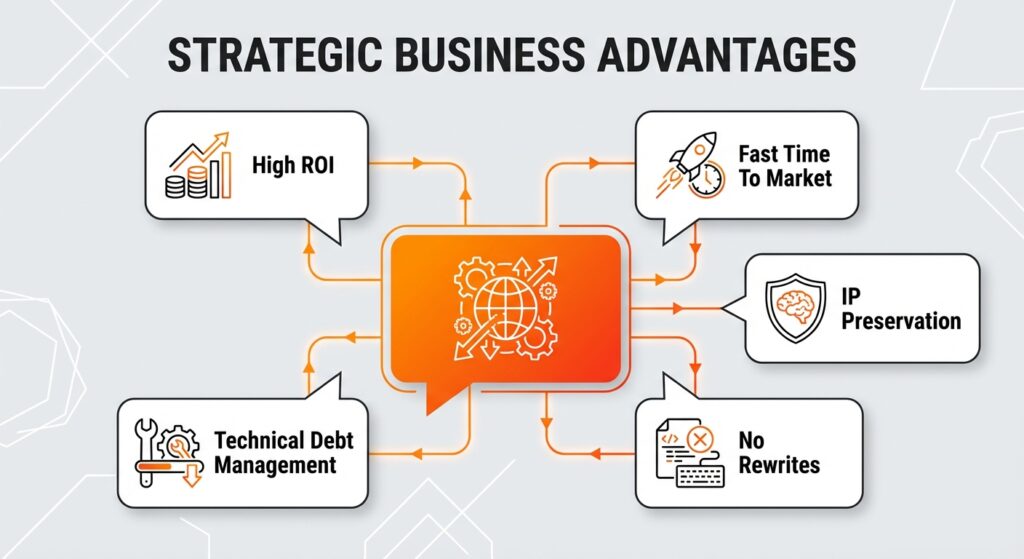
Avalonia XPF stands out because it lets you keep your code instead of rewriting it. Keeping your assets offers a higher Return on Investment (ROI) compared to full rewrites or migrations to web technologies. Legacy system modernization through binary compatibility allows organizations to reuse established C# logic and XAML markup, significantly reducing the developer hours required for cross-platform deployment.
This approach lets you keep your complex business logic, avoiding the risks and delays associated with starting from scratch. This method offers the fastest time-to-market for extending Windows applications to macOS and Linux. Teams effectively manage technical debt by upgrading the underlying framework while maintaining the original developer experience and workflow.
Avalonia UI is a free, open-source framework that requires developers to rewrite views to fit its specific dialect, while Avalonia XPF is a commercial product designed for binary compatibility with existing markup. The distinction centers on the software architecture changes required for legacy system modernization. Migrating to the standard Avalonia UI toolkit involves a manual porting effort where XAML syntax, namespaces, and custom controls must be adapted to match the new API surface.
Avalonia XPF allows applications to run existing WPF code directly on macOS and Linux without these syntax adjustments. This difference impacts the developer experience: the open-source path demands learning a new framework, whereas the commercial solution uses skills you already have. Avalonia XPF is the superior option for preserving existing code, offering nearly 100% reuse of original assets compared to the significant refactoring needed for the open-source alternative.
If you choose Avalonia XPF, you avoid the steep learning curve and high costs associated with a total architectural rewrite. Modernizing with .NET MAUI requires recreating complex custom controls and UI logic from scratch, which often introduces new bugs and instability. It’s rarely worth throwing away a stable, battle-tested codebase just to chase the newest framework trend. XPF preserves the maturity of the existing codebase, ensuring that years of stability and optimizations remain intact without modification.
This keeps technical debt low by using current WPF expertise rather than forcing developers to adopt a new framework paradigm. This makes desktop app modernization a low-risk update rather than a resource-intensive overhaul. Developers can focus on features instead of rewriting code for cross-platform compatibility.
Hicron Software proved to be a trusted partner with unmatched technical expertise, delivering a scalable and user-friendly web application that was pivotal to our successful U.S. market expansion.

Hicron’s contributions have been vital in making our product ready for commercialization. Their commitment to excellence, innovative solutions, and flexible approach were key factors in our successful collaboration.
I wholeheartedly recommend Hicron to any organization seeking a strategic long-term partnership, reliable and skilled partner for their technological needs.

After carefully evaluating suppliers, we decided to try a new approach and start working with a near-shore software house. Cooperation with Hicron Software House was something different, and it turned out to be a great success that brought added value to our company.
With HICRON’s creative ideas and fresh perspective, we reached a new level of our core platform and achieved our business goals.
Many thanks for what you did so far; we are looking forward to more in future!

Hicron is a partner who has provided excellent software development services. Their talented software engineers have a strong focus on collaboration and quality. They have helped us in achieving our goals across our cloud platforms at a good pace, without compromising on the quality of our services. Our partnership is professional and solution-focused!

The IT system supporting the work of retail outlets is the foundation of our business. The ability to optimize and adapt it to the needs of all entities in the PSA Group is of strategic importance and we consider it a step into the future. This project is a huge challenge: not only for us in terms of organization, but also for our partners – including Hicron – in terms of adapting the system to the needs and business models of PSA. Cooperation with Hicron consultants, taking into account their competences in the field of programming and processes specific to the automotive sector, gave us many reasons to be satisfied.

