Balancing the DRY Principle with Readability in Software Development
- March 19
- 5 min


The biggest problem with desktop apps is that software executes in an untrusted environment where the user holds total control over the operating system. In my experience, this is the exact moment where web-centric security models fall apart. Unlike web applications hosted on secured servers, thick-client security models must assume the attack surface includes the binary, memory, and local file system. This Untrusted Client” scenario allows actors to bypass binary protection mechanisms, manipulate memory, and intercept network traffic. Cross-platform app security gets even messier due to fragmented security controls across Windows, macOS, and Linux, often leading to inconsistent implementation of the least privilege principle.
Desktop applications frequently retain data locally, which elevates the risk of sensitive data exposure via physical access or malware. Vulnerability management moves slower in this context because you have to push patches to every single user rather than pushing a single server-side update. Effective secure desktop development needs rigorous threat modeling to address risks like insecure communication and layered reverse engineering defense strategies to protect intellectual property.
| Security Domain | Critical Risks & Threats | Defensive Strategies & Best Practices |
|
Thick-Client Architecture |
|
|
|
Binary Protection |
|
|
|
Data Security |
|
|
|
Network Communication |
|
|
|
Cross-Platform Frameworks |
|
|
|
Supply Chain & Lifecycle |
|
|
The OWASP Desktop Application Security Verification Standard (DASVS) offers a complete blueprint for architects and developers building thick client software. The DASVS fixes the blind spot left by web-centric guidelines by defining controls tailored to untrusted local environments. You can use the DASVS to establish a baseline for security requirements within the secure software development framework. The guidelines address three critical areas specific to desktop contexts: memory management, inter-process communication, and binary protection.
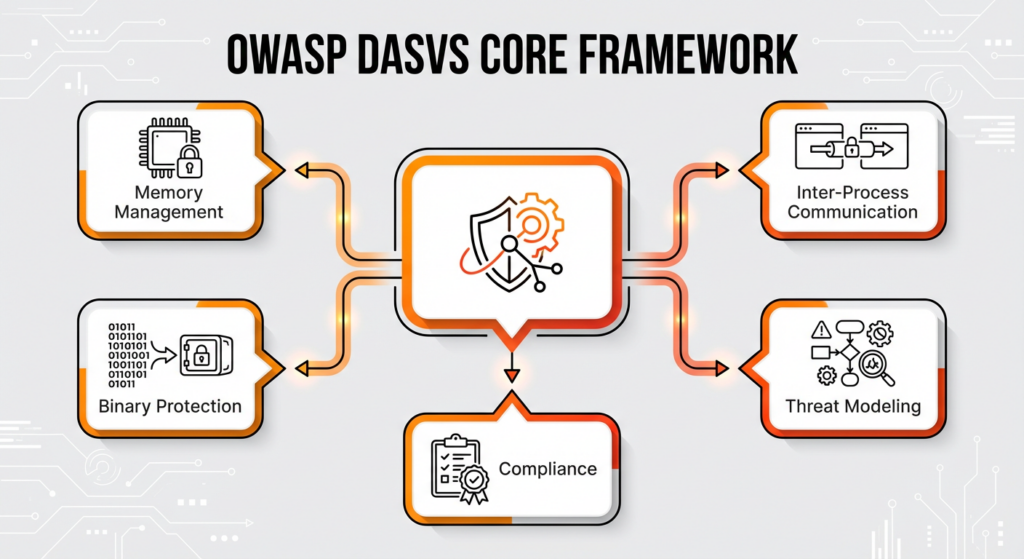
It gives you a way to measure the effectiveness of secure coding practices and vulnerability management efforts. You might include these security standards in contracts and service level agreements to mandate specific deliverables. The structure aligns with threat modeling processes by categorizing requirements based on risk levels. This categorization enables precise application security testing to ensure compliance with necessary defense mechanisms.
The DASVS organizes requirements into three distinct verification levels to fit different risk levels ranging from non-critical tools to high-value systems.
You determine the correct level by performing a risk assessment and threat modeling to evaluate the potential impact of a compromise. This tiered approach lets you tailor application security testing to validate compliance against specific security standards relevant to the asset’s value.
DASVS addresses the unique risks of code executing locally on a user’s machine, while web application security standards focus on server-side processing and browser headers. Thick-client security enforces binary protection and reverse engineering defense mechanisms that web frameworks overlook. Web guidelines prioritize network filtering, which leaves local data storage and memory corruption vulnerabilities wide open.
DASVS mandates specific controls for inter-process communication (IPC) to prevent privilege escalation. Critical desktop vectors such as DLL hijacking and binary code signing are central to DASVS but absent from web standards. Focusing on these vectors builds stronger desktop application security against tampering and local attacks.
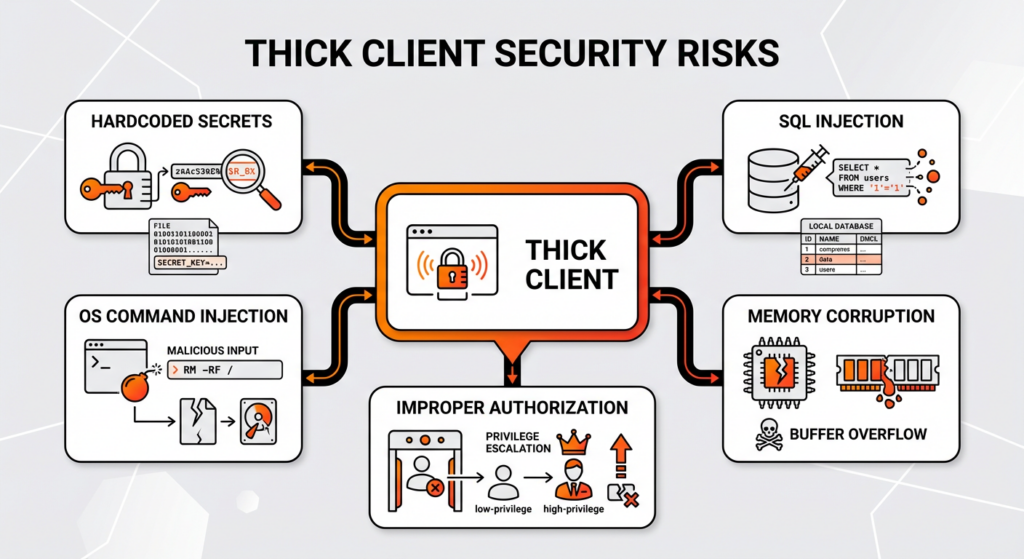
Thick clients face unique risks primarily related to local execution, distinct from server-side web models. Hardcoded secrets are a huge problem for sensitive data exposure, especially when encryption keys are embedded directly within the binary. Trust me, I have seen sophisticated applications compromised by a simple string search. Attackers use decompilers to extract these credentials, compromising the entire security model. SQL injection remains a critical threat, specifically targeting local databases such as SQLite used for offline storage. OS command injection becomes dangerous when applications invoke system shell commands without sufficient input sanitization.
Native applications written in unmanaged languages face memory corruption risks, including buffer overflows that lead to arbitrary code execution. Furthermore, risks such as improper authorization and insecure communication pose significant threats to application integrity. Application penetration testing often reveals privilege escalation vulnerabilities where low-privileged processes manipulate high-privileged services. To manage vulnerabilities effectively, you need to fix these specific architectural flaws to prevent system-wide compromise in thick-client security.
When an application loads dynamic link libraries without specifying an absolute path, it opens the door to DLL hijacking. This vector compromises desktop application security by exploiting the insecure search order used to load dependencies. Operating systems frequently prioritize the “Current Directory” when locating dependencies, creating a specific attack surface. Attackers place a malicious DLL with a legitimate filename in the application folder to achieve arbitrary code execution. This trick leads to privilege escalation if the vulnerable software operates with administrative permissions.
You can prevent these attacks by specifying absolute paths rather than relying on relative locations. For secure coding, use APIs like `SetDllDirectory` with an empty string to remove the current directory from the search path. Application security testing tools detect insecure library loading configurations during the development lifecycle. Make sure your binary protection settings block unsafe DLL searches to thwart this vector.
Applications become vulnerable to insecure deserialization when they reconstruct objects from untrusted data streams without sufficient input validation. This flaw undermines thick-client security, specifically in managed languages like Java and .NET, where native serialization features automatically instantiate objects based on the input data. Attackers use gadget chains during this reconstruction phase to trigger unauthorized commands, leading directly to remote code execution. Relying on native formats for external data gives attackers a way to manipulate application logic and system resources.
A specific instance of this threat involves `BinaryFormatter` in .NET, which is notoriously unsafe for processing external inputs. Because it allows arbitrary type instantiation, the formatter makes RCE easy. Secure coding practices mean you should replace native serialization with restricted formats like JSON to prevent memory corruption and logic tampering. Application penetration testing validates these defenses by simulating attacks against serialization endpoints. Adopting these .NET security best practices removes the risk associated with trusting serialized objects from user-controlled sources.
Reliance on client-side controls to restrict administrative features often leads to improper authorization, triggering privilege escalation. You might use UI suppression, such as graying out buttons, instead of implementing robust server-side validation. If you rely on security through obscurity, attackers can bypass restrictions by manipulating local assets. A specific example includes changing a boolean flag in a local configuration file or registry key to instantly gain ‘Admin’ status.
The vulnerability persists because of a lack of role enforcement at the API or database level. Backend services must strictly enforce the least privilege principle by verifying permissions for every request, rather than trusting the client’s state. Without these server-side checks, simple modifications to local files override the intended access control logic. To code securely, you need to treat all client input as untrusted to prevent this form of broken authentication resulting from security misconfiguration.
Desktop applications frequently fail to enforce strong transport layer security, leaving data in transit vulnerable to interception and manipulation. A common mistake is failing to validate SSL/TLS certificates. You might disable certificate validation during testing and neglect to reactivate it, allowing attackers to perform Man-in-the-Middle (MITM) attacks without triggering warnings. You also risk a lot by using cleartext protocols such as HTTP or FTP for critical functions like software updates or data synchronization. Failing to secure the network results in sensitive data exposure, where hardcoded API keys or session tokens are transmitted in plaintext headers.
For example, an attacker positioned on the same local network captures login credentials sent over unencrypted HTTP traffic. Certificate pinning stops these MITM threats in thick-client security by explicitly associating a host with its expected public key or certificate hash. The application rejects any connection where the server’s certificate does not match the hardcoded pinned value, effectively preventing the use of fraudulent certificates issued by compromised authorities. Implementing modern encryption algorithms and strict validation prevents broken authentication scenarios caused by network sniffing.
Securing intellectual property within a desktop environment requires accepting that no code executing on a client machine is entirely immune to analysis. The primary objective of reverse engineering defense shifts from absolute prevention to deterrence and delay, making it much harder and more expensive for adversaries. The best strategy is to make architectural decisions where you move critical proprietary algorithms and sensitive business logic to the server side, preventing direct access to the code.
When logic must remain on the client, thick-client security relies on layering multiple technical controls to create a strong barrier. The strategic value of this defense-in-depth approach lies in exhausting the attacker’s resources and time. You can use specific techniques such as code obfuscation and tamper-proofing to force reverse engineers to deconstruct multiple complex layers. Integrating these technical measures with legal deterrents and secure coding practices makes it as hard as possible for unauthorized replication or modification.
By transforming source code into a format that is difficult for humans to understand, code obfuscation slows down analysis but does not stop determined attackers. Think of code obfuscation like shredding a sensitive document and taping it back together—the information is still there, but reading it takes infinitely longer. It serves as a key layer of reverse engineering defense by making the logic opaque while keeping it machine-readable. Common techniques include renaming symbols, control flow flattening, and string encryption. For example, tools like Dotfuscator rename descriptive classes and methods to meaningless characters, converting a function like `CalculateRevenue()` into `a.b()`. This isn’t enough on its own because the underlying logic remains intact.
Sophisticated adversaries use automated decompilers and dynamic analysis to eventually reconstruct the original behavior. However, implementing binary protection involves a trade-off between security levels and application performance. Heavy obfuscation often increases the file size and execution time, potentially impacting the user experience. Secure coding practices suggest that obfuscation acts as a speed bump to protect intellectual property by increasing the time and cost for an attacker, rather than serving as an impenetrable firewall. Static application security testing validates that these transformations do not introduce instability or new vulnerabilities.
To ensure software executes as intended, tamper-proofing mechanisms actively detect unauthorized modifications to application code or memory and take action to prevent exploitation. Unlike passive obfuscation, these controls actively validate application integrity to ensure the software executes as intended. You can implement three core strategies to secure the binary.
For example, an app might refuse to launch if the code signing digital signature of its main executable proves invalid. Runtime Application Self-Protection (RASP) improves tamper-proofing by embedding security sensors directly into the application’s runtime environment. RASP monitors execution flow in real-time to identify and block malicious patterns, providing a dynamic layer of binary protection that static reverse engineering defense measures cannot achieve. This keeps your code secure even when in compromised environments.
Protecting data on a desktop requires assuming the device itself may be compromised, which means you need strong encryption for data at rest and in memory. Secure coding practices dictate minimizing local data storage to reduce the attack surface. When retention is necessary, you should use platform-specific secure storage APIs instead of custom implementations.
Standard encryption algorithms such as AES secure data at rest. To protect data in use, clear sensitive information from memory immediately after processing to prevent extraction via memory corruption or dumps. Sensitive data exposure frequently results from storing credentials in plain text configuration files or registry keys, a practice that negates all other data protection controls.
Creating custom cryptography implementations opens you up to critical vulnerabilities due to mathematical errors and implementation flaws. Proprietary schemes lack the rigorous peer review of established standards like AES. Using non-standard methods fails FIPS compliance requirements, leaving applications vulnerable to cryptanalysis and sensitive data exposure.
You must use platform-specific secure storage APIs to protect credentials and tokens, rather than relying on obfuscated files or plain text databases. Effective local data storage relies on three specific operating system mechanisms:
These services manage cryptographic keys, lowering the risk of sensitive data exposure associated with hardcoding secrets or storing keys on disk.
Standard file encryption is insufficient without proper key management because storing the decryption key alongside the encrypted data allows adversaries to bypass protections easily. DPAPI makes sure that data is encrypted with the user’s login credentials, linking access directly to the authenticated session. For structured data, secure desktop development requires encrypting local databases, such as SQLite, using extensions like SQLCipher with strong, user-derived keys. Lastly, secure coding practices suggest keeping cached data for as short a time as possible to reduce the window of opportunity for theft.
In a whitebox environment, the attacker possesses complete control over the execution context, making standard key management useless. Relying on static keys hardcoded in the binary creates a critical vulnerability for sensitive data exposure. Adversaries can easily extract these secrets by running the `strings` command to locate AES keys.
Whitebox cryptography is a specialized binary protection technique that embeds the key directly into the encryption algorithms’ logic. Embedding the key protects it from memory extraction by dissolving it into mathematical lookup tables and code structures. As a result, the key never appears in memory as a contiguous block of bytes, forcing attackers to reverse engineer the entire algorithm. Secure coding practices further suggest deriving keys from user inputs rather than stored secrets. Deriving keys ensures that cryptographic material exists only transiently, boosting reverse engineering defense.
Choosing a framework determines the underlying security model and introduces specific risks based on whether the application relies on web technologies or managed code runtimes. Web-based wrappers like Electron bundle a browser engine, meaning cross-platform app security inherits web vulnerabilities such as Cross-Site Scripting (XSS). In a desktop context, XSS creates a critical path to Remote Code Execution (RCE) because the application operates with the user’s local privileges. Native frameworks such as .NET MAUI and Avalonia architecture change the risks by running on managed code environments.
These platforms reduce browser-specific attacks, but they face distinct risks related to their specific runtime environments and API implementations. Secure desktop development using these tools means you have to stick to .NET security best practices, particularly regarding the deserialization of untrusted data and the management of third-party libraries. Framework security configurations are critical; for instance, C++ frameworks like Qt demand manual memory management to prevent buffer overflows, whereas managed environments focus on preventing logic manipulation and JIT attacks. To manage vulnerabilities effectively, identify these architecture-specific weaknesses to apply the correct secure coding practices.
Electron applications function as web browsers executing locally, meaning that cross-platform app security relies heavily on configuring the Chromium engine to prevent privilege escalation. If you are coming from a web development background, this shift in perspective is crucial. A standard Cross-Site Scripting (XSS) vulnerability escalates to full remote code execution if the application fails to sandbox the renderer process effectively. You need to verify that `nodeIntegration` is set to false and `contextIsolation` is set to true in the `webPreferences` configuration. This setup prevents malicious scripts from accessing Node.js primitives like `fs` or `child_process`. An example of this failure involves an attacker injecting JavaScript to spawn a system shell, granting control over the host operating system.
The ‘preload script’ mechanism is vital for secure desktop development because it acts as a bridge between the untrusted renderer and the privileged main process. Using this architecture, you can expose only specific, sanitized functions via `contextBridge` rather than granting full API access. Handling untrusted content in `WebViews` requires rigorous input validation and the use of `setWindowOpenHandler` to restrict navigation events. Vulnerability management is equally critical, as Electron bundles a specific version of Chromium; failing to update the framework leaves the application exposed to known browser exploits. Application security testing tools specifically target these configuration settings to verify that the attack surface remains minimized.
The Avalonia architecture uses the underlying .NET runtime to provide solid cross-platform app security, inherently mitigating common memory corruption vulnerabilities found in unmanaged languages. By using managed code, the framework enforces strict type safety and automatic memory management, significantly reducing the attack surface related to buffer overflows. That said, secure desktop development in Avalonia requires vigilance regarding XAML-based user interfaces. Loading XAML dynamically from untrusted sources introduces risks similar to code injection, necessitating strict controls over how markup is parsed.
.NET security best practices apply directly to Avalonia’s data binding mechanisms. You must implement strict input validation within ViewModels to prevent malicious data from manipulating application logic or triggering unintended commands. Secure coding practices also require you to carefully vet third-party controls and libraries from the NuGet ecosystem to prevent supply chain attacks. Furthermore, applications must avoid using insecure deserializers for state management, preferring safe formats like JSON to maintain thick-client security.
Effective desktop application security needs a hybrid testing approach that merges automated scanning with rigorous manual assessment. Automated tools provide a baseline for code quality, but they have big limits in understanding complex desktop UI logic and business workflows. A comprehensive penetration testing methodology requires binary analysis and runtime manipulation to uncover flaws that static code reviews miss.
For instance, automated scanners detect syntax errors, whereas manual testing identifies privilege escalation scenarios arising from logic gaps. Integrating these processes into the CI/CD pipeline helps validate secure coding practices continuously. The strategy combines SAST and DAST to address the unique attack surface of thick clients, including local memory and binary integrity.
Combining static and dynamic analysis gives you full coverage by addressing vulnerabilities at different lifecycle stages. Static Application Security Testing (SAST) analyzes source code at rest to identify insecure patterns, such as hardcoded credentials, before compilation. But SAST generates false positives and lacks context regarding the execution environment.
Dynamic Application Security Testing (DAST) adds to this by interacting with the running application to detect runtime issues like memory corruption and input validation failures. Merging these methodologies connects theoretical code flaws and exploitable runtime behaviors, ensuring effective vulnerability management.
Manual application security testing is essential for uncovering logic flaws that automated tools cannot interpret. Scanners often struggle to navigate complex desktop GUIs or understand multi-step business transactions. Human testers use binary analysis tools, such as decompilers and debuggers, to reverse engineer the application and manipulate execution flow. Manual checks confirm that secure coding practices effectively prevent tampering in scenarios where automated DAST tools fail to penetrate the application layer.
Integrating security into the CI/CD pipeline automates the detection of vulnerabilities during the build process. You can configure SAST tools to scan code commits immediately, blocking builds that contain known security violations. Moving security earlier in the process reduces the cost of vulnerability management by addressing issues before they reach the testing phase.
For desktop applications, pipelines also trigger automated unit tests that verify binary protection mechanisms, such as checking for valid digital signatures. CI makes sure that every release adheres to defined security standards without relying solely on end-of-cycle assessments.
Static Application Security Testing (SAST) identifies vulnerabilities by analyzing source code, bytecode, or binaries at rest without executing the application. This form of automated testing acts like a strict code review to detect insecure patterns, hardcoded secrets, and known vulnerability signatures. Scanners examine data flow and control structures to provide early detection of critical flaws like buffer overflows, SQL injection, and weak cryptography. For example, a tool might flag a specific variable in a SQL query that lacks parameterization, so you can fix it right away.
SAST helps you “shift left” in the security lifecycle by enforcing secure coding practices and resolving defects during the coding phase rather than after deployment. Advanced tools integrate Software Composition Analysis (SCA) to scan dependencies, preventing the introduction of known vulnerabilities through third-party libraries. That said, source code analysis faces the challenge of generating false positives. Your team needs to manually check theoretical errors from actual vulnerability management risks effectively.
Automating dynamic application security testing (DAST) for desktop software is significantly more complex than for web applications due to the lack of standard communication protocols like HTTP. Web scanners can easily manipulate headers and parameters, but desktop automated testing requires interacting with proprietary graphical user interfaces (GUIs) using OS-specific accessibility APIs. Tools must simulate physical user actions, such as clicking buttons or dragging files, to navigate through the application logic. Fuzzing is the main way for desktop DAST, replacing the payload injection used in web testing.
In fuzzing, you bombard input fields, command-line arguments, and file parsers with random or malformed data to test input validation robustness. A common example involves a fuzzer injecting an excessively long string into a login field to trigger a buffer overflow, which reveals memory corruption vulnerabilities. Unlike web testing, where the scanner analyzes HTTP response codes, desktop DAST tools must attach to the process to monitor runtime behavior, detecting silent crashes, memory leaks, and exceptions that signal vulnerability management failures.
Manual application penetration testing introduces the human element, simulating real-world attacks that automated scanners cannot replicate. While tools detect syntax errors, expert testers adopt an adversarial mindset to uncover complex business logic flaws. I often tell teams that while tools find bugs, humans find logic gaps. This approach is critical for assessing privilege escalation paths where understanding the intended workflow is key. Testers use reverse engineering defense techniques to deconstruct the binary, analyzing proprietary protocols and internal state management that standard tools overlook.
In manual testing, you manipulate memory and network traffic to alter the application’s behavior during execution. Experts assess the resilience of binary protection mechanisms by attempting to defeat anti-tamper controls and code obfuscation. A concrete example includes a pentester manually patching the binary’s assembly code to bypass a license check, showing that client-side validation isn’t enough. Effective vulnerability management relies on this deep-dive analysis to expose risks in thick-client security where the user has full control over the execution environment.
Modern desktop applications rely heavily on third-party libraries, making supply chain security critical to prevent the introduction of vulnerabilities through dependencies. A significant portion of the code in a typical binary consists of open-source components, creating a vast attack surface outside the developer’s direct control. Historical lessons from incidents like Log4j show why you need to know exactly which libraries are embedded in software to respond effectively to emerging threats.
To defend effectively, you need a secure software development framework that treats external code with zero trust. You must validate the integrity of every package and protect the build environment to make sure the final executable matches the source code without unauthorized modifications.
Mitigate third-party risk by deploying Software Composition Analysis (SCA) tools to automatically inventory and scan every dependency in your project. This process generates a Software Bill of Materials (SBOM), which acts as a record of all open-source libraries, transitive dependencies, and their versions used in the application. It might feel like administrative overhead, but this inventory is a lifesaver during an audit. SCA tools cross-reference the SBOM against global databases of known flaws.
With this visibility, your team can identify and update compromised components before shipping the product. Secure desktop development requires you to block builds that contain libraries with critical severity vulnerabilities to ensure users receive clean binaries.
Protecting the build environment prevents adversaries from injecting malicious code during the compilation process. To secure the supply chain, harden your build servers by restricting internet access and enforcing strong access control to prevent tampering. You verify the integrity of external artifacts by validating digital signatures and checksums before integration into the codebase.
Immutable build agents make sure that the compilation environment remains consistent and free from persistent malware. These measures help ensure that the distributed application is identical to the verified source code, maintaining the integrity of the release process.
A Software Bill of Materials (SBOM) makes vulnerability management faster and smarter by providing a comprehensive inventory of all application components. This transparency is critical for managing third-party risk within the secure software development framework. When a zero-day vulnerability impacts a library, such as a specific version of OpenSSL, you can query the SBOM to instantly identify affected assets without waiting for Software Composition Analysis (SCA) scans. This lets you enable rapid remediation and ensures compliance with emerging government and industry security mandates.
Code signing guarantees application integrity by affixing a cryptographic hash to the executable, acting as a tamper-proof seal. This serves as proof of the author’s identity and the code’s immutability. It uses encryption algorithms to hash the binary; if even a single bit of the file changes after signing—due to corruption or malicious tamper-proofing attempts—the hash validation fails. Operating systems rely on this trust verification to permit execution. For instance, Windows SmartScreen and macOS Gatekeeper block or warn users against running unsigned applications, effectively treating them as potential malware.
Signing confirms that the software received by the user matches the exact artifacts produced by the secure desktop development pipeline. Protecting the signing certificate is as critical as the signing process itself because the private key represents the organization’s digital identity. If an attacker compromises this key, they can sign malware that the operating system trusts implicitly, bypassing standard binary protection controls. That’s why secure coding practices require you to store private keys in Hardware Security Modules (HSMs) rather than on standard build servers. Physically isolating the keys prevents unauthorized access and ensures that the chain of trust remains unbroken.
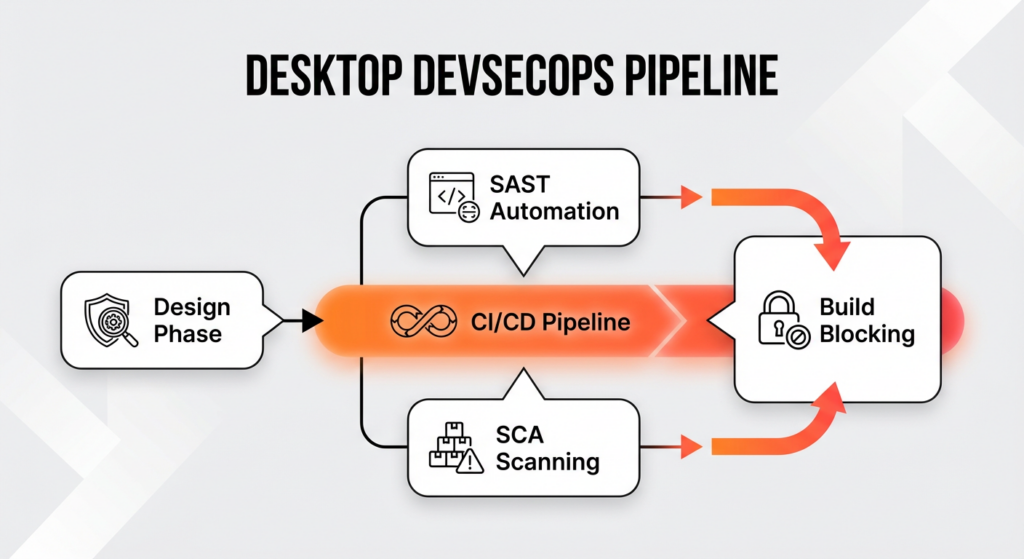
DevSecOps integrates security practices into every stage of the desktop application development lifecycle, moving from a final gatekeeper model to continuous security assurance. It aligns with the secure software development framework by starting security earlier, meaning you perform threat modeling during the design phase to identify architectural risks before writing code. You incorporate secure coding practices directly into the CI/CD pipeline, making sure security checks happen with every commit rather than at the end of the project.
This process uses automated tools like Static Application Security Testing (SAST) and Software Composition Analysis (SCA) to detect logic flaws and insecure dependencies immediately. A key strategy is to break the build automatically if a high-severity vulnerability is detected, preventing flawed code from progressing to deployment.
Automation helps security to keep pace with rapid release cycles by eliminating the bottleneck of manual verification for routine checks. By embedding automated testing into the CI/CD workflow, organizations make sure that vulnerability management occurs in real-time alongside feature development. A continuous feedback loop lets developers to fix security defects immediately while the context is fresh, rather than delaying releases for extensive post-development audits.
Hicron Software proved to be a trusted partner with unmatched technical expertise, delivering a scalable and user-friendly web application that was pivotal to our successful U.S. market expansion.

Hicron’s contributions have been vital in making our product ready for commercialization. Their commitment to excellence, innovative solutions, and flexible approach were key factors in our successful collaboration.
I wholeheartedly recommend Hicron to any organization seeking a strategic long-term partnership, reliable and skilled partner for their technological needs.

After carefully evaluating suppliers, we decided to try a new approach and start working with a near-shore software house. Cooperation with Hicron Software House was something different, and it turned out to be a great success that brought added value to our company.
With HICRON’s creative ideas and fresh perspective, we reached a new level of our core platform and achieved our business goals.
Many thanks for what you did so far; we are looking forward to more in future!

Hicron is a partner who has provided excellent software development services. Their talented software engineers have a strong focus on collaboration and quality. They have helped us in achieving our goals across our cloud platforms at a good pace, without compromising on the quality of our services. Our partnership is professional and solution-focused!

The IT system supporting the work of retail outlets is the foundation of our business. The ability to optimize and adapt it to the needs of all entities in the PSA Group is of strategic importance and we consider it a step into the future. This project is a huge challenge: not only for us in terms of organization, but also for our partners – including Hicron – in terms of adapting the system to the needs and business models of PSA. Cooperation with Hicron consultants, taking into account their competences in the field of programming and processes specific to the automotive sector, gave us many reasons to be satisfied.

