Balancing the DRY Principle with Readability in Software Development
- March 19
- 5 min


The main difference comes down to their runtime environments and rendering engines. One approach uses a native ecosystem to execute compiled code. The other bundles a complete browser engine to interpret web technologies. These underlying technologies determine how much memory and CPU the app needs and execution model.
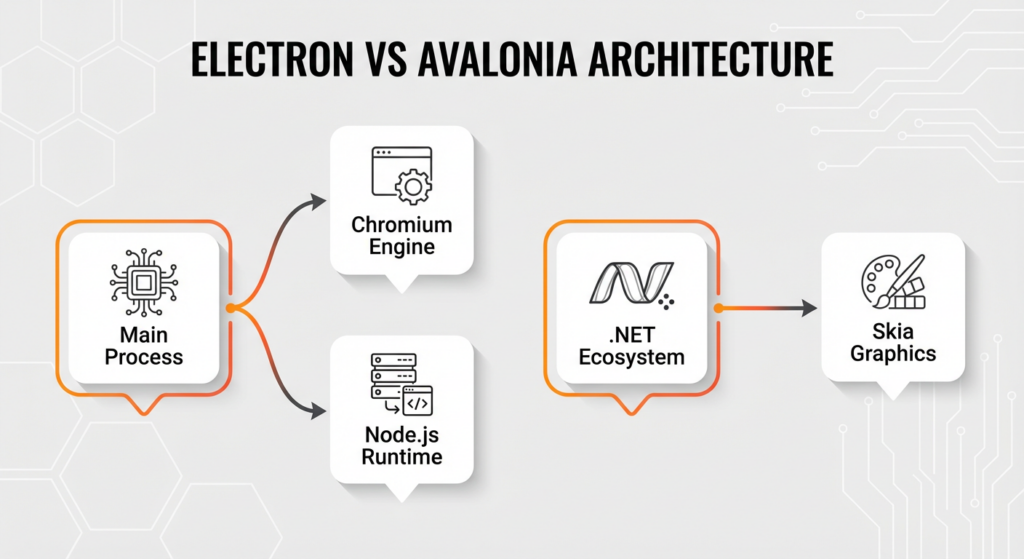
Electron connects web and desktop environments by integrating two distinct technologies. The framework uses the Chromium rendering engine to visualize the user interface by parsing HTML and CSS, relying on the Document Object Model (DOM) for layout—identical to a standard web browser. At the same time, the Node.js runtime executes backend logic, providing access to operating system APIs and the file system.
The Main process handles application lifecycle and native interactions, while the Renderer process manages visual elements. Separating them directly impacts system performance and distribution. Bundling a fully functional browser engine results in larger application binaries compared to native solutions. This approach eats up memory because each window instance requires a separate renderer process with its own resource allocation. This setup allows developers to use familiar web technologies for standalone application development. However, it trades resource efficiency for cross-platform compatibility.
Avalonia UI uses the .NET ecosystem to manage complex application logic through compiled C# and XAML definitions. The framework uses the Skia graphics library to render the user interface, completely bypassing the host system’s native OS widgets. By drawing every control directly to the canvas, the engine makes sure visual elements like buttons or text inputs look identical on Windows, Linux, and macOS.
To achieve native performance, the software architecture integrates with hardware acceleration APIs, including DirectX, Metal, and OpenGL. By cutting out these layers, Avalonia offers a high-performance solution for cross-platform development.
|
Feature Category |
Avalonia UI (.NET) |
Electron (Web) |
|
Core Architecture |
|
|
|
Performance & Memory |
|
|
|
Security & Protection |
|
|
|
Developer Experience |
|
|
|
Rendering & Styling |
Achieves pixel-perfect rendering consistent across Windows, Linux, and macOS using hardware acceleration (DirectX, Metal, OpenGL). |
Uses cascading styles (CSS); often falls into the “Uncanny Valley” where UI mimics desktop elements but lacks precise native behaviors. |
|
Deployment Size |
Supports “trimming” to remove unused libraries for compact binaries; can use shared system runtime. |
Large installer sizes (often >100MB) due to the “browser tax” of bundling the complete engine. |
Native .NET solutions generally outperform web-based wrappers in raw execution speed, memory efficiency, and startup time. The main difference is how each architecture manages system resources. This gap between interpreted JavaScript and compiled C# further defines the performance gap, impacting how complex logic is processed.
Avalonia UI minimizes memory consumption through a native XAML-based architecture that shares a single .NET runtime across the application. Electron, however, carries the heavy weight of the Chromium Content Module. Electron relies on browser process isolation, forcing the operating system to allocate separate resources for a full browser instance for each window. Managed .NET memory management allows Avalonia to allocate and release memory more efficiently without this duplication.
If you’ve ever stared at your Task Manager in disbelief, you know exactly what I’m talking about. Benchmarks show this difference. A basic “Hello World” application built with web-based frameworks frequently consumes over 100MB of RAM. An equivalent .NET application typically uses a small fraction of this memory.
Optimizing resource usage is critical for enterprise applications deployed on older hardware or embedded systems. These environments often have limited RAM and processing power, making the high footprint of web technologies unsustainable. Excessive memory usage triggers paging to disk, causing system sluggishness and potential instability. Choosing a framework with native performance ensures your app fits the constraints of the target device.
Hardware acceleration boosts rendering speed by allowing the UI toolkit to offload graphical computations directly to the GPU. Native frameworks use graphics libraries such as Skia to talk directly to low-level APIs like DirectX, OpenGL, and Metal. Direct communication skips the slowdowns associated with DOM manipulation in web technologies, where the browser must recalculate layout and styles before painting.
For data-heavy enterprise dashboards, choosing a rendering engine with native performance ensures that complex visualizations and real-time data updates remain fluid. Skia uses this hardware acceleration to render UI elements at high frame rates, keeping the app buttery smooth even during intensive operations like window resizing or complex animations.
Yes, native apps launch significantly faster because compiled code executes immediately. Avalonia UI uses the .NET ecosystem to execute code immediately, bypassing the need to initialize a heavy web browser engine. Electron must load the Chromium engine and Node.js runtime before displaying any UI, which causes a noticeable delay.
Electron relies on the V8 engine to process JavaScript, which adds weight from Just-In-Time (JIT) compilation and inter-process communication. You’ll notice this initialization cost particularly during a cold start, where the system loads all dependencies from disk for the first time. I always tell my clients that users have zero patience for a loading spinner. Users judge an app by how snappy it feels; a lag at launch often leads users to view the software as sluggish. Enterprise applications benefit from the instant availability of native performance, as it makes the app feel professional.
While Electron developers often use splash screens to hide this latency, Avalonia apps deliver immediate interactivity. Native apps run code directly, which is always faster than interpreting web code.
Let’s be honest: developer productivity depends more on the team’s existing technical background than the framework’s intrinsic speed. If your team knows web technologies, you’ll achieve rapid development with Electron because you can use familiar tools like JavaScript, HTML, and CSS to build user interfaces. Using this approach allows for immediate code reuse from existing web projects and speeds up prototyping.
However, .NET developers move faster using Avalonia UI due to the strong typing of C# and the structured nature of XAML. The choice determines whether a team uses existing web skills for speed or relies on the architectural stability of the Microsoft ecosystem for complex logic.
Enterprise applications require stability over long lifecycles, so long-term maintainability is key. The .NET ecosystem is easier to maintain in the long run through the strong static typing of C# and strict compile-time safety. These features prevent an entire class of runtime errors common in dynamic languages like JavaScript.
While TypeScript adds type safety to Electron projects, Avalonia UI has a consistent API surface and a comprehensive standard library. This stability reduces technical debt, making refactoring safer and more predictable for teams maintaining complex enterprise software over many years.
The C# and XAML workflow offers a strongly typed, declarative environment that enforces strict validation during compilation. This is very different from the dynamic nature of JavaScript and HTML, which focus on flexibility and rapid UI iteration. Avalonia UI uses XAML to implement the Model-View-ViewModel (MVVM) pattern, creating a clear separation between the user interface and business logic.
Structure like this ensures that the .NET compiler verifies data binding and event handling, preventing many common errors before the application runs. Electron uses common HTML and CSS to define components, allowing developers to use extensive web styling ecosystems. While this provides significant freedom in design, the absence of native type safety in plain JavaScript increases the likelihood of runtime bugs in large-scale enterprise applications. This means code quality in C# projects benefits from static analysis and reduced bug density, whereas maintaining similar stability in web technologies often requires additional layers of tooling.
The .NET ecosystem, managed via NuGet, prioritizes stability, security, and backward compatibility, making it a strong foundation for mission-critical enterprise applications. On the flip side, the npm ecosystem drives web technologies with the world’s largest software registry, offering unparalleled variety but introducing significant supply chain security risks due to variable package quality.
Enterprise projects using C# often rely on comprehensive standard libraries and professional third-party controls, significantly reducing the need for unverified external dependencies. JavaScript development, however, frequently involves deep dependency trees, requiring rigorous vetting processes to reduce risks introduced by frequent updates and abandoned packages. The centralized and curated approach of .NET fits better with strict corporate security policies than the rapid, decentralized nature of npm, where ensuring safe code reuse and system integrity demands continuous monitoring.
The quality of development tools plays a huge role in the time-to-market for new features by reducing the friction between coding and deployment. For .NET developers building with Avalonia UI, Visual Studio offers a powerful Integrated Development Environment (IDE) equipped with:
Speaking from experience, having this level of visibility can save you days of hunting down elusive bugs. This deep integration lets engineers inspect multiple threads, analyze heap allocations, and execute snapshot debugging directly within the C# workflow. This means complex backend logic issues are resolved faster because the software architecture is visible to the debugger.
Electron development, however, uses lightweight editors like Visual Studio Code combined with browser-based developer tools. The Electron ecosystem focuses on speed through features like Hot Module Replacement (HMR), which instantly updates JavaScript, HTML, and CSS changes without restarting the application. While HMR accelerates UI iteration, debugging the dual-process architecture of Electron often requires coordinating between Node.js server logs and the Chromium inspector. While web technologies are great for visual prototyping, .NET’s comprehensive tooling ensures that enterprise applications achieve stability and performance targets with greater efficiency during the implementation of critical business logic.
UI customization differs because web tech relies on cascading styles, while .NET uses a template-based architecture. Electron uses CSS to control layout and aesthetics, using the same styling engine found in modern web browsers. Avalonia UI, however, uses a XAML-based styling system that goes beyond just visuals.
Using ControlTemplate and DataTemplate, the toolkit allows engineers to completely redefine the visual tree and interaction behavior of a control while keeping the underlying business logic. For enterprise applications maintaining a large-scale design system, the resource dictionary system in XAML offers superior modularity. It allows teams to define reusable styles and brushes that apply consistently throughout the software architecture, reducing the risk of side effects common in global CSS cascades.
Looking native isn’t just about visual aesthetics; it requires replicating platform-specific UI behaviors such as:
Web-based applications often fall into an “Uncanny Valley” where the interface mimics desktop elements but lacks the precise responsiveness and interaction patterns of the host operating system. We’ve all used an app that just felt “off”—scrolling was wrong, or the right-click menu looked weird. These small differences negatively impact the user experience, as users expect software to follow the rules of their environment.
Avalonia UI solves this by using the Skia graphics library as a high-performance UI toolkit. It allows the framework to render controls that either strictly follow the host OS design language or create a consistent look across all devices. By drawing UI elements directly via GPU APIs, .NET applications avoid the inconsistencies often found in HTML-based styling.
Your decision to match the operating system’s design or maintain a uniform brand identity depends on the strategic goals of the cross-platform development project. Matching the host OS makes it easier for users by providing familiar controls and interactions, which is often critical for data-heavy enterprise tools. On the other hand, a consistent brand identity ensures that the product is instantly recognizable on any device, a strategy frequently used by consumer-facing services. Avalonia UI supports both methodologies with native performance, but doing this in web wrappers requires significant effort to override default browser behaviors and style sheets.
Skia ensures visual consistency by bypassing the host operating system’s native widgets and drawing every pixel directly to the application canvas. The engine acts as a layer that talks directly with low-level hardware interfaces, including DirectX, OpenGL, and Metal. By controlling the entire rasterization pipeline, the software architecture eliminates platform-specific rendering quirks often encountered in cross-platform development.
A UI element defined in the UI toolkit, such as a border or font glyph, renders with identical geometry and anti-aliasing on Windows, Linux, and macOS. Pixel-perfect rendering means that developers don’t need to account for variations in how different operating systems interpret standard controls. This simplifies the testing and QA process for multi-platform releases. Teams validate the visual fidelity primarily on one environment, as the graphics engine guarantees that the interface looks exactly the same across all targets. This predictability means you don’t need exhaustive visual regression testing on every specific OS version.
Avalonia UI is a great choice for modernizing legacy Windows applications due to its strong similarity to older XAML technologies. It helps create a direct migration path from Windows-only constraints to a flexible cross-platform .NET environment. Unlike switching to web-based alternatives like Electron, which requires a complete rewrite, Avalonia allows teams to use existing C# codebases.
Staying within the XAML/.NET ecosystem cuts down in both development costs and time-to-market. Code reuse is the main reason for this efficiency, as developers port existing data models and view models directly to the new framework. Reuse avoids the expense of rewriting functional logic for a web stack. This lets legacy systems evolve into modern cross-platform applications with a fraction of the effort required for a total platform switch.
The XAML syntax and API structure of Avalonia look just like those of WPF, minimizing the learning curve for experienced .NET teams. Core concepts such as data binding, resource dictionaries, and control templates function in a nearly identical manner. This similarity lets developers to copy and paste substantial blocks of UI markup with only minor adjustments. The framework effectively connects historical Windows development and modern cross-platform development requirements.
Non-UI components, including business logic, data access layers, and MVVM models, you can typically reuse 100% within the .NET ecosystem. This high reuse lets developers to reference existing .NET Standard libraries directly, preserving the established software architecture. While the view layer requires minor namespace adjustments to adapt Windows-specific APIs for cross-platform development, the core C# execution remains unchanged. Binary compatibility minimizes the risk of introducing regressions during application modernization, as the backend infrastructure you don’t have to rewrite. Teams can then focus solely on updating the UI, ensuring stability for critical enterprise applications.
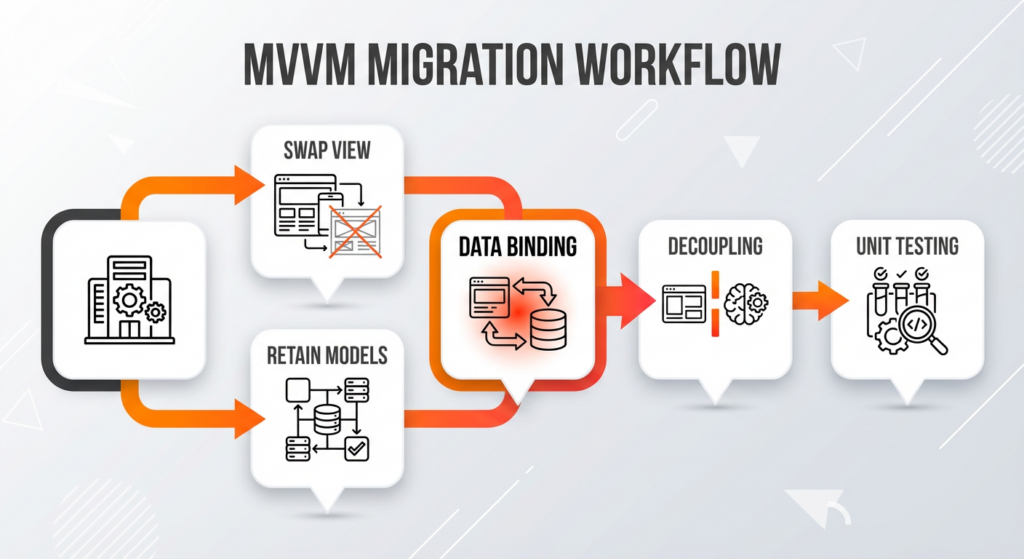
The Model-View-ViewModel (MVVM) pattern is the main driver for efficient application modernization by keeping a strict separation of concerns between the user interface and business logic. In a well-structured software architecture, the ViewModel contains the state and behavior of the application but doesn’t know anything about the visual layer. Decoupling means that if a legacy enterprise application was built using MVVM, developers can port the entire logic layer to Avalonia without modification.
The migration process involves swapping the platform-specific View while retaining the existing Models and ViewModels, which maximizes code reuse. Since Avalonia uses a XAML data binding engine that is nearly identical to legacy frameworks, the connection between the C# backend and the frontend remains stable during the transition. The UI toolkit binds to properties and commands in the ViewModel using the same syntax, ensuring that interaction patterns function correctly on the new platform. MVVM is known as a best practice for maintainable architecture because it isolates the presentation layer, allowing the underlying logic to be unit-tested and updated independently of the visual implementation. This isolation reduces the risk of regression errors during cross-platform development initiatives within the .NET ecosystem.
Security architecture sets apart native .NET frameworks from web-based wrappers. Compiled applications generally offer superior intellectual property protection and a smaller attack surface compared to web-based applications that bundle a browser engine. Vulnerability management is a big difference, as the dependency chain decides the risks.
Compliance requirements heavily drive technology choices for sensitive data. Web-based frameworks open up risks like Cross-Site Scripting (XSS), posing risks to system integrity. Native software architecture enables precise memory management, essential for meeting regulatory standards. While code reuse accelerates development, application modernization in regulated sectors prefers the strict control of compiled applications over web containers.
Bundling a full browser engine like Chromium introduces a massive attack surface, effectively importing web security risks into the desktop environment. This setup makes standalone application development vulnerable to Cross-Site Scripting (XSS), where malicious scripts can potentially access the Node.js runtime and host file system.
Maintenance becomes a critical burden for enterprise applications. Developers must continuously monitor and patch the rendering engine, as using an outdated version leaves the software open to known web technologies exploits. To keep security up to date, teams must set up automated systems that immediately integrate upstream Chromium patches. Without this quick fix, the application remains exposed to public vulnerabilities. Ongoing maintenance is a defining factor in desktop framework comparison for secure environments.
Compiled .NET binaries are much harder to reverse-engineer compared to interpreted JavaScript source code. JavaScript is distributed as plain text or minified files, where protection depends mostly on minification. Minification removes whitespace and shortens variable names to reduce file size, yet the underlying logic and control flow remain fully accessible and easily reversible using standard formatting tools.
However, C# code is compiled into Intermediate Language (IL) or native machine code before distribution. The binary format is naturally harder for humans to read and supports advanced obfuscation techniques, such as symbol renaming and control flow scrambling, which effectively stop hackers. Code protection is a critical consideration for cross-platform desktop application development because distributed software runs on untrusted client machines where intellectual property is vulnerable. Implementing OWASP security standards for securing proprietary algorithms and licensing logic prevents unauthorized modification and protects revenue streams in competitive markets. While web technologies expose the entire application structure to anyone with a browser debugger, the compiled nature of the .NET platform ensures that critical business rules remain concealed within the software architecture. It makes compiled solutions the preferred choice for secure desktop software development in enterprise applications where maintaining the confidentiality of trade secrets is a priority.
The distribution footprint of an application depends heavily on the chosen software architecture. Web-based frameworks for standalone application development, such as Electron, always come with the “browser tax”—the need to bundle a complete Chromium engine and Node.js runtime within the installer. Bundling everything frequently results in installer sizes exceeding 100MB, regardless of the application’s complexity.
However, native .NET solutions offer flexible deployment strategies that significantly reduce this weight. Developers can use “trimming” features to remove unused libraries, producing compact, self-contained binaries for Windows, Linux, and macOS. Alternatively, framework-dependent deployments use the shared .NET runtime already present on the host system, reducing the application package to just a few megabytes. This efficiency means users download only the essential logic required to run the software.
Application size is a huge barrier to entry in regions with limited internet bandwidth or metered connections. Large downloads associated with web-based wrappers put users off from installing software due to long wait times and high data costs. A trimmed native application, often ten times smaller than its Electron counterpart, ensures faster acquisition and broader reach. Minimizing the initial download size is a key step for enterprise applications targeting global markets where high-speed infrastructure is not guaranteed.
Choosing Avalonia UI depends on specific project requirements regarding efficiency, infrastructure, and team capability. The choice typically comes down to critical constraints such as:
Native performance is non-negotiable for software targeting embedded systems or legacy hardware with limited RAM. Cross-platform development with Avalonia UI ensures that the application operates smoothly without the overhead of a browser engine. Efficiency is vital for tools that run continuously in the background or process large datasets, where the resource footprint of web technologies would slow the system down. Examples include industrial control dashboards and financial trading platforms where every millisecond counts.
If your team knows the .NET ecosystem well, you will achieve faster time-to-market with Avalonia UI. Leveraging existing team expertise in dependency injection and debugging tools removes the pain of adopting a JavaScript-based workflow. As a result, application modernization projects transition seamlessly from WPF or WinForms, preserving valuable business logic and reducing the risk of delivery delays. Using one language for both backend and frontend development streamlines communication and reduces the complexity of the codebase.
Projects that need tight security benefit from the compiled nature of C#. Unlike Electron, which exposes source code within the application bundle, Avalonia compiles logic into binary formats that are significantly harder to reverse-engineer. This protection is key for enterprise applications handling proprietary algorithms or sensitive financial data, ensuring that intellectual property remains secure on client machines.

Maintaining a resource-heavy web-based application costs more due to increased operational costs and energy consumption. Deploying Electron apps often requires upgrading client workstations to handle the memory load of the Chromium engine. However, performance optimization through a native framework extends the lifespan of existing hardware, reducing capital expenditure and lowering the total cost of ownership for large-scale deployments. Resource usage efficiency means less battery drain on mobile devices and laptops, improving user satisfaction in field operations.
“
Hicron Software proved to be a trusted partner with unmatched technical expertise, delivering a scalable and user-friendly web application that was pivotal to our successful U.S. market expansion.

Hicron’s contributions have been vital in making our product ready for commercialization. Their commitment to excellence, innovative solutions, and flexible approach were key factors in our successful collaboration.
I wholeheartedly recommend Hicron to any organization seeking a strategic long-term partnership, reliable and skilled partner for their technological needs.

After carefully evaluating suppliers, we decided to try a new approach and start working with a near-shore software house. Cooperation with Hicron Software House was something different, and it turned out to be a great success that brought added value to our company.
With HICRON’s creative ideas and fresh perspective, we reached a new level of our core platform and achieved our business goals.
Many thanks for what you did so far; we are looking forward to more in future!

Hicron is a partner who has provided excellent software development services. Their talented software engineers have a strong focus on collaboration and quality. They have helped us in achieving our goals across our cloud platforms at a good pace, without compromising on the quality of our services. Our partnership is professional and solution-focused!

The IT system supporting the work of retail outlets is the foundation of our business. The ability to optimize and adapt it to the needs of all entities in the PSA Group is of strategic importance and we consider it a step into the future. This project is a huge challenge: not only for us in terms of organization, but also for our partners – including Hicron – in terms of adapting the system to the needs and business models of PSA. Cooperation with Hicron consultants, taking into account their competences in the field of programming and processes specific to the automotive sector, gave us many reasons to be satisfied.

