11 DevOps Automation Tools to Streamline Your Workflow
- May 21
- 10 min


The core distinction lies in their rendering philosophies. While one framework acts as an abstraction layer over native controls, the other uses a custom engine to draw the interface independently. Such fundamental architectural divergences directly influence how applications behave and appear during cross-platform development.
Native wrappers create actual platform-specific components, while custom rendering engines bypass standard controls to visualize graphics directly on a unified canvas. Frameworks using wrappers rely on libraries such as UIKit on iOS, AppKit on macOS, or WinUI on Windows to generate interface elements. Custom engines, often using Skia, ignore these system widgets to render every UI element from scratch.
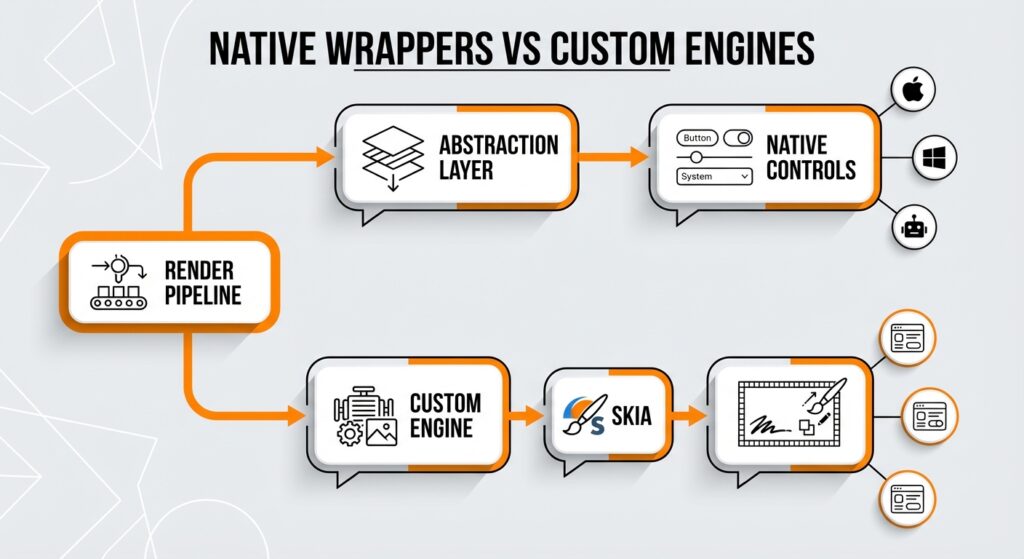
Because native wrappers inherit specific OS behaviors, they lead to layout variability. For instance, a button often displays different padding or shadow attributes on Android compared to iOS due to underlying OS constraints. Custom rendering engines allow for exact visual matches and predictable layout behavior by managing the entire render pipeline without relying on variable OS APIs.
SkiaSharp is the C# binding for Google’s Skia rendering engine, enabling frameworks to draw hardware-accelerated graphics directly onto a unified canvas. By bypassing native UI controls, the library ensures visual consistency across Windows, macOS, and Linux. By handling low-level drawing operations, SkiaSharp enables the creation of complex vector graphics and custom shapes without platform-specific code.
The engine uses hardware acceleration to offload rendering tasks to the GPU, ensuring high performance even in visually demanding scenarios. Consequently, cross-platform development becomes viable even on constrained hardware, as the architecture handles heavy lifting efficiently. It works even where standard operating system widgets are unavailable.
| Feature | .NET MAUI | Avalonia UI |
|
Core Architecture |
Native Wrappers Acts as an abstraction layer over native controls (UIKit, AppKit, WinUI). Inherits specific OS behaviors and layout constraints. |
Custom Rendering Engine Draws the interface independently on a unified canvas. Bypasses standard controls to manage the entire render pipeline. |
|
Rendering Technology |
Maps C# abstractions to platform-specific native controls. Instantiates actual system widgets. |
Uses Skia (SkiaSharp) to draw hardware-accelerated graphics directly. Ensures pixel-perfect consistency across all devices. |
|
Platform Support |
|
|
|
Best Use Case |
Mobile-First Consumer Apps Ideal for apps prioritizing native user experience, adherence to OS design guidelines, and deep integration with device hardware (GPS, Camera, Biometrics). |
Desktop-First Enterprise Apps Ideal for data-heavy tools, high-density interfaces, and complex dashboards requiring precise mouse/keyboard input and identical rendering across OSs. |
|
Legacy Migration |
Xamarin.Forms Successor Natural step for Xamarin.Forms projects. Requires a complete rewrite for WPF apps due to mobile-centric paradigms and different XAML dialects. |
WPF Compatible High compatibility with WPF. Shares similar XAML syntax (Styles, DataTemplates), allowing reuse of existing code and MVVM patterns. |
|
Performance |
May face overhead and slower startup times due to marshalling (bridging data between C# and native OS). Visual Studio offers native compilation optimization. |
Uses GPU acceleration for high performance. Bypasses the costly interop layer, maintaining consistent frame rates for complex visualizations. |
|
Recommended IDE |
Provides the best scaffolding tools, live visual tree, and property explorer. |
JetBrains Rider Offers a real-time, interactive previewer that functions identically on macOS, Linux, and Windows. |
Both .NET MAUI and Avalonia UI support major commercial platforms, covering:
Their approaches to desktop environments and additional platform support vary significantly. While both target the core mobile and desktop ecosystems, they differ significantly in Linux implementation and web deployment capabilities.
Microsoft doesn’t provide official first-party support for Linux within the .NET MAUI ecosystem. Developers targeting Linux distributions must rely on community-maintained forks rather than direct implementation from Microsoft. Reliance on open source contributors becomes necessary for the stability and feature set of Linux deployments. Speaking from experience, betting your production timeline on community goodwill is a calculated risk you need to weigh carefully.
Companies often worry about risks without guaranteed vendor backing for their chosen software architecture. Unlike the official framework, alternative C# solutions treat Linux as a first-class citizen, enabling reliable cross-platform development for desktop and embedded systems. Corporate teams must evaluate whether community support meets their requirements for performance optimization and long-term maintenance.
Mac Catalyst ports the iOS runtime to macOS, effectively wrapping mobile-first UIKit controls for a desktop environment. As a result, applications often inherit touch-centric behaviors, such as oversized hit targets and simplified navigation stacks, which are very different from standard desktop development patterns. True native rendering, achieved via AppKit or custom engines like Skia, creates interfaces designed explicitly for mouse and keyboard precision.
Developers frequently criticize Mac Catalyst for producing “uncanny valley” interfaces that resemble native controls but lack the responsiveness and density expected on macOS. Custom rendering bypasses these mobile legacy constraints, offering better performance and granular control over UI scaling. Complex desktop applications can thus utilize the full capabilities of the UI framework without the limitations of an emulated mobile layer.
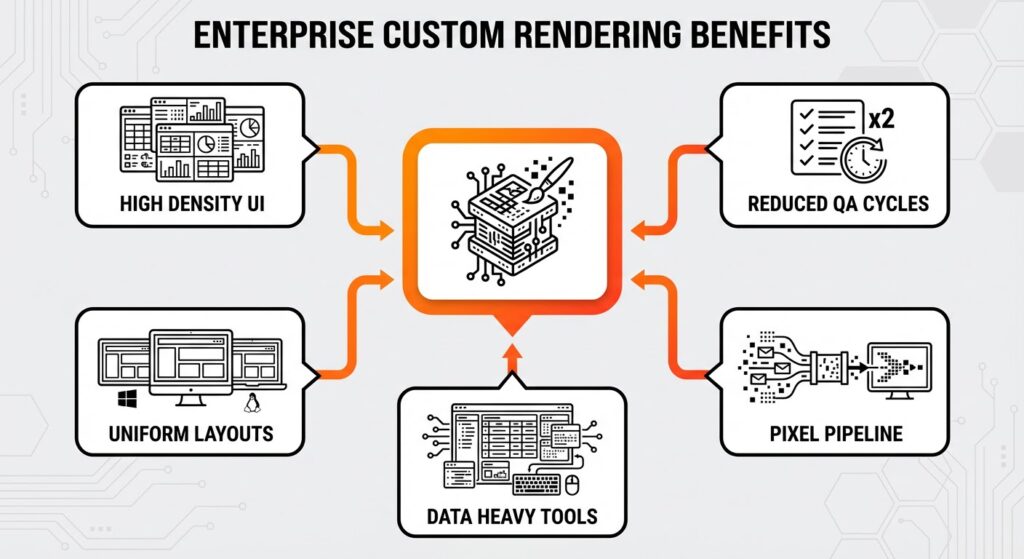
Custom rendering engines are usually better than native wrappers when building complex, data-heavy enterprise applications. Internal corporate tools often require high-density user interfaces that display vast amounts of information simultaneously, a requirement that conflicts with the spacious, touch-friendly layouts inherent to mobile-first frameworks. By controlling the entire pixel pipeline, the custom architecture ensures that complex menus, data grids, and multi-window docking systems render identically on Windows, macOS, and Linux. Achieving a uniform look and feel significantly reduces the testing workload for internal teams, as layout bugs don’t vary between operating systems. I’ve found that this consistency alone can cut QA cycles in half. Because it prioritizes keyboard and mouse interactions over touch, the custom rendering engine is the preferred choice for workstation-class software.
While .NET MAUI inherits touch-centric behaviors from its mobile roots—such as larger hit targets and simplified navigation—Avalonia UI supports the precise input methods required for professional dashboards and IDE-like experiences. Organizations migrating from legacy C# technologies like WPF and Windows Forms find this helpful. The shared XAML dialect and strong support for the MVVM pattern allow for a smoother transition. Advanced data binding capabilities also help preserve existing business logic and developer skills. Plus, technical enterprise tools frequently require Linux support for engineering departments, a capability that is native to the custom rendering approach but absent in Microsoft’s official mobile-focused offering.
Microsoft’s official UI framework stands out as the premier option for mobile development strategies prioritizing a native user experience. .NET MAUI is the direct successor to Xamarin.Forms, inheriting a proven architecture designed specifically for iOS and Android ecosystems. By mapping C# abstractions to platform-specific native controls, the framework ensures that applications adhere strictly to the design guidelines of the host operating system. Users get the familiar interactions they expect, such as platform-specific navigation patterns and distinct scrolling behaviors.
If your app needs deep integration with device hardware, you’ll benefit significantly from this wrapper approach. The framework gives you native, out-of-the-box access to mobile APIs, simplifying feature integration without requiring additional dependencies, including:
Visual Studio offers great tools to manage these platform capabilities efficiently, supporting performance optimization through native compilation. For a more natural look on an iPhone, .NET MAUI delivers the superior result by instantiating actual UIKit components rather than emulating them. This ensures that buttons, inputs, and transitions feel indistinguishable from those in a standard Apple application.
Your speed depends heavily on the chosen Integrated Development Environment (IDE) and its ecosystem integration. Both frameworks use Hot Reload technologies to speed up UI changes, allowing developers to visualize changes without restarting the application. Microsoft supports both C# and XAML updates during runtime, while Avalonia focuses on rapid, state-preserving XAML refreshes. This distinction influences the speed of iteration depending on whether the task involves architectural logic or visual layout adjustments.
Visual Studio provides the most powerful XAML preview environment for .NET MAUI. It includes a live visual tree and property explorer that interact directly with the running application.
JetBrains Rider is the best choice for Avalonia UI. The dedicated Avalonia extension for Rider offers a real-time, interactive previewer that renders complex layouts instantly. This tool functions identically on macOS, Linux, and Windows, so that the interface design matches the final output on all operating systems.
XAML syntax varies significantly between these frameworks, acting like different dialects rather than a uniform standard. Avalonia UI aligns closely with the WPF specification, keeping familiar names such as:
Migrating legacy desktop applications becomes simpler thanks to this structural similarity.
Conversely, .NET MAUI uses a dialect inherited from Xamarin.Forms that targets mobile paradigms. Consequently, standard controls use different names; for instance, a text input is an `Entry` instead of a `TextBox`, and a `StackPanel` becomes a `StackLayout`. Data binding syntax and event handling also diverge across these solutions. While the MVVM pattern is supported universally, property names for binding modes and command implementations often require adjustment. So, you can’t just copy-paste XAML code between .NET MAUI and WPF or Avalonia without refactoring control names and attributes to match the specific UI framework. Save yourself the headache—treat them as separate languages that just happen to look alike.
For .NET MAUI, you’ll want to stick with Visual Studio to get the best scaffolding tools and deep integration with Microsoft’s official software architecture. It offers essential scaffolding and built-in emulators that simplify mobile development on Windows.
When using Avalonia UI, JetBrains Rider is the way to go. It aligns with the framework’s cross-platform development nature. For development on a Mac, JetBrains Rider is the recommended IDE, delivering a C# and XAML editing experience on macOS that matches the stability found on Windows, ensuring consistent desktop development without reliance on virtualization.
Looking exactly the same everywhere is the main reason to choose the custom rendering framework, while native wrappers inevitably introduce platform variations. Forcing native controls to look identical proves difficult because they inherit the specific theme and spacing rules of the underlying operating system. A Skia-based rendering pipeline solves this by taking full control of the drawing process. The rendering engine draws the UI directly on the canvas, ensuring that graphics appear identical on Windows, Linux, and macOS.
Native controls consistently reflect the host system’s look and feel, leading to layout discrepancies in cross-platform development. Eliminating these discrepancies supports advanced styling scenarios, such as those found in SukiUI, where brand identity requires absolute uniformity. Avalonia UI provides this level of control for both desktop and mobile development. You don’t need to make platform-specific adjustments to achieve a unified look.
Migrating legacy desktop applications presents distinct challenges depending on the chosen target architecture. Avalonia UI offers high compatibility with WPF, acting as a cross-platform iteration of the standard Windows presentation layer. This framework shares a nearly identical XAML syntax, including the structure of Styles, DataTemplates, and ControlTemplates. As a result, engineering teams reuse a significant percentage of their existing codebase when modernizing enterprise applications. The migration path preserves established C# logic and MVVM patterns, so your team doesn’t need to learn a whole new tool. If you’ve ever dreaded retraining a team on a new stack, you’ll appreciate how much time this saves.
In contrast, transitioning to .NET MAUI demands a complete rewrite of the user interface. This framework inherits the mobile-first philosophy of Xamarin.Forms, which differs fundamentally from the desktop development paradigms found in WPF and Windows Forms. Developers must adapt complex desktop layouts to mobile-centric structures, often replacing precise coordinate systems with flow-based layouts suitable for phones and tablets. While WinUI 3 powers the Windows implementation, the abstraction layer forces a departure from legacy XAML standards. Commercial tools exist to automate the conversion of WPF projects directly to Avalonia, showing it’s great for quick updates. Avalonia UI allows for the direct reuse of existing WPF code and architectural knowledge.
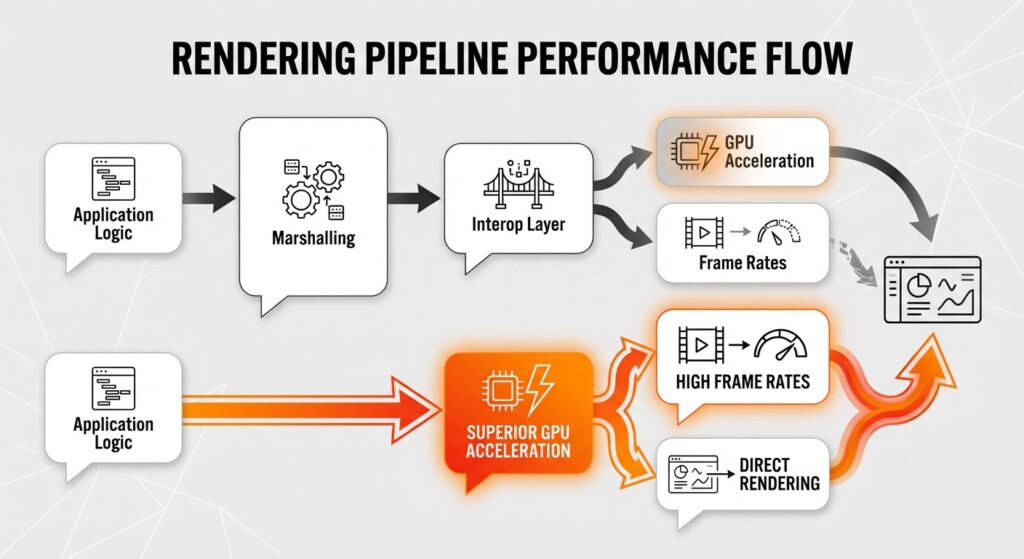
Performance varies significantly based on how the rendering engine interacts with the hardware. Native wrappers often face performance overhead due to marshalling—the costly process of bridging data and commands between the managed C# environment and the native operating system. This architectural bridge frequently results in slower startup times, which you’ll really notice during mobile development on Android devices where initializing native controls is heavy.
However, custom rendering solutions like Avalonia UI use the GPU to draw the interface directly, bypassing the costly interop layer required by native widgets. Direct rendering runs much faster for complex, high-frequency UI updates, such as real-time data visualization or intricate animations. While native wrappers may experience lag when synchronizing thousands of UI elements, Skia-based engines maintain consistent frame rates by managing the entire render pipeline internally. The custom rendering engine is generally faster for complex graphical interfaces because it eliminates the bottleneck of communicating with the OS for every visual change, making it highly efficient for desktop development and embedded systems. If you are building a data-viz dashboard, this raw throughput is a game-changer.
Enterprise organizations require assurance that their software will be supported to ensure security and compliance over extended periods. Microsoft aligns .NET MAUI strictly with the official .NET release cadence, offering Standard Term Support (STS) of 18 months and Long Term Support (LTS) of 36 months. Large organizations gain the guarantees needed for audit trails and compliance on Windows and mobile platforms through this support structure. However, this model binds software architecture to a rigid upgrade path, forcing teams to migrate C# codebases regularly to remain supported.
In contrast, Avalonia UI’s open-source nature allows for greater flexibility regarding stability and version locking. While the core project evolves rapidly, the commercial entity behind the framework offers paid support agreements that extend maintenance for specific versions beyond standard community windows. Regulated industries, such as healthcare or manufacturing, find this model particularly valuable for desktop development where software must remain unchanged for 10 or more years. Avalonia UI offers a support model capable of aligning with decade-long project lifecycles through custom commercial agreements. It lowers the risk of vendor lock-in by allowing companies to negotiate direct support channels for cross-platform development on Linux, macOS, and Windows. Mission-critical tools remain operational without forced updates from a central vendor.
Avalonia UI is often the most strategic choice for projects prioritizing a desktop-first strategy and requiring Linux support. This open-source framework delivers pixel-perfect consistency across Windows, macOS, and Linux by using a custom rendering engine based on Skia. Teams who need everything to look exactly the same choose this C# technology to implement complex design systems or themes like SukiUI without platform-specific deviations.
Developers targeting the Linux ecosystem or embedded systems find Avalonia superior due to its first-class support for these environments. Organizations with deep expertise in WPF move easily to this architecture because it shares a similar XAML dialect. A complex data dashboard running identically on multiple operating systems is a perfect example of where this technology excels. The decision depends on whether the primary target is the desktop or the mobile phone. Avalonia UI is the preferred choice for high-density enterprise applications where mouse and keyboard interactions are more important than touch-based inputs.
Microsoft’s official framework is the best choice for mobile-first consumer applications that require heavy usage of native device features. Teams already established within the Visual Studio ecosystem benefit significantly from this choice, as it works perfectly with existing Microsoft cloud and development tools. Projects prioritizing a native look and feel on iOS and Android rely on .NET MAUI because it maps C# abstractions directly to platform-specific native controls. Strict adherence to the design guidelines of the host operating system is thus guaranteed, making a consumer-facing mobile app feel at home on an iPhone or a Pixel device.
For organizations migrating from Xamarin.Forms, .NET MAUI represents the natural next step. It preserves established business logic while upgrading the underlying software architecture to support modern cross-platform development. Unlike custom rendering engines, .NET MAUI uses WinUI for Windows and Mac Catalyst for macOS, ensuring that desktop experiences also respect the visual language of the host operating system. So, if the primary requirement is adherence to standard OS interface behaviors rather than pixel-perfect brand consistency, this framework is the better pick. If an app must strictly follow specific platform interface standards, .NET MAUI excels by instantiating actual system widgets rather than emulating them.
Hicron Software proved to be a trusted partner with unmatched technical expertise, delivering a scalable and user-friendly web application that was pivotal to our successful U.S. market expansion.

Hicron’s contributions have been vital in making our product ready for commercialization. Their commitment to excellence, innovative solutions, and flexible approach were key factors in our successful collaboration.
I wholeheartedly recommend Hicron to any organization seeking a strategic long-term partnership, reliable and skilled partner for their technological needs.

After carefully evaluating suppliers, we decided to try a new approach and start working with a near-shore software house. Cooperation with Hicron Software House was something different, and it turned out to be a great success that brought added value to our company.
With HICRON’s creative ideas and fresh perspective, we reached a new level of our core platform and achieved our business goals.
Many thanks for what you did so far; we are looking forward to more in future!

Hicron is a partner who has provided excellent software development services. Their talented software engineers have a strong focus on collaboration and quality. They have helped us in achieving our goals across our cloud platforms at a good pace, without compromising on the quality of our services. Our partnership is professional and solution-focused!

The IT system supporting the work of retail outlets is the foundation of our business. The ability to optimize and adapt it to the needs of all entities in the PSA Group is of strategic importance and we consider it a step into the future. This project is a huge challenge: not only for us in terms of organization, but also for our partners – including Hicron – in terms of adapting the system to the needs and business models of PSA. Cooperation with Hicron consultants, taking into account their competences in the field of programming and processes specific to the automotive sector, gave us many reasons to be satisfied.

