Node.js in 2026: Essential Libraries, Tools, & Community Events
- November 06
- 12 min

Writing tests for your Node.js applications is essential for building reliable, maintainable software. A strong testing strategy allows you to refactor code with confidence, catch bugs before they reach production, and speed up your development lifecycle. This guide covers the main testing frameworks and tools, helping you choose the right stack for your project. You will learn about Jest, Mocha, Chai, and Cypress and see how to use them effectively.
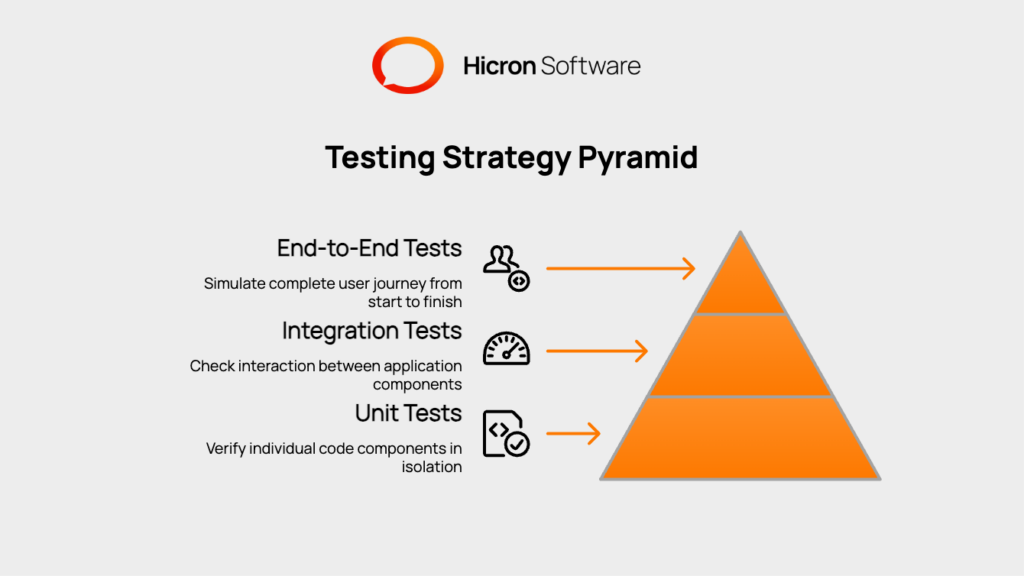
A balanced testing strategy often follows the “testing pyramid” model, which organizes tests into three main categories. Each layer represents a different type of testing, with a focus on speed and scope.
Unit tests are the foundation of the pyramid. They verify individual parts of your application, like a single function or module, in isolation. These tests are fast to run, simple to write, and should make up the bulk of your test suite. Their goal is to confirm that a specific piece of code works as expected.
Integration tests sit in the middle of the pyramid. They check how different parts of your application work together. This could involve testing the interaction between two modules, a service and a database, or an API endpoint. They are slower than unit tests but provide confidence that the components of your system connect correctly.
End to end tests are at the top of the pyramid. They simulate a complete user journey from start to finish, interacting with the application just as a real user would. For example, an E2E test might log a user in, add an item to a cart, and complete a checkout. These tests are the slowest and most complex, so they should be used to verify critical application workflows.
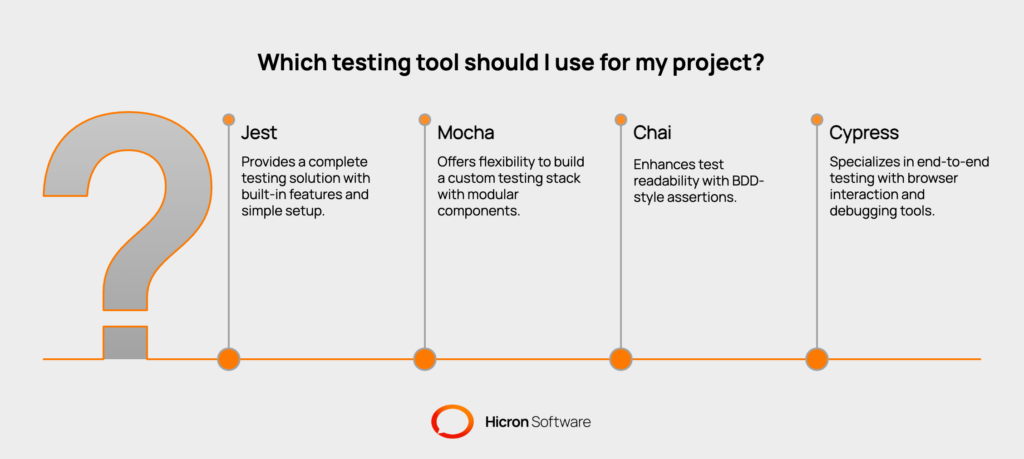
The Node.js ecosystem offers several popular tools for testing. Each has a specific purpose and set of features.
Jest is a popular testing framework that provides a complete solution out of the box. It includes a test runner, an assertion library, and built in mocking capabilities. Developed by Facebook, it is known for its simple setup and excellent developer experience. Key features include snapshot testing, parallel test execution, and built in code coverage reporting.
Mocha is a mature and highly flexible test runner that has been a staple in the Node.js community for years. Unlike Jest, Mocha is just a runner. You need to combine it with other libraries for assertions and mocking. This modularity gives you the freedom to build a testing stack that fits your exact needs.
Chai is an assertion library that is often paired with Mocha. It provides a readable, Behavior Driven Development (BDD) style syntax that makes your tests easy to understand. Chai supports multiple assertion styles, including expect, should, and assert, allowing developers to choose the one they prefer.
Cypress is a modern testing framework built specifically for end to end testing of web applications. It runs tests directly in a real browser, giving you a powerful and interactive way to debug your application’s user interface. Its features, like automatic waiting and time travel debugging, help developers write more reliable and less flaky E2E tests.
This comparison matrix breaks down the key differences between Jest, Mocha + Chai, and Cypress to help you make an informed decision.
| Feature / Criterion | Jest | Mocha + Chai | Cypress |
| Primary Use Case | Unit & Integration Testing | Unit & Integration Testing | End-to-End (E2E) Testing |
| Setup Effort | Low. All-in-one, “zero-config” philosophy. Works out of the box. | Medium. Modular. Requires separate installation of runner (Mocha), assertions (Chai), and other tools. | Low. Simple npm install and cypress open to scaffold a project. |
| Learning Curve | Easy. Well-documented API and unified ecosystem simplify learning. | Easy to Moderate. Core concepts are simple, but requires learning multiple libraries (Mocha, Chai, Sinon). | Easy. Intuitive API and interactive Test Runner provide an excellent developer experience. |
| Speed & Parallelization | Excellent. Runs tests in parallel by default. Smart test re-running in watch mode. | Good. Runs tests serially by default. Parallelization requires custom implementation or specific runners. | Good. Can run tests in parallel on multiple machines (often via a paid dashboard service). |
| TypeScript Support | Excellent. Seamless integration via ts-jest. |
Good. Requires configuration with ts-node or a separate build step (Babel/SWC). |
Excellent. Native TypeScript support for test files out of the box. |
| Mocking & Spies | Built-in. Powerful mocking (jest.fn, spyOn) is included. |
External Library. Requires sinon.js for spies, stubs, and mocks. |
Built-in. Excellent network request stubbing (cy.intercept) and spies/stubs (cy.spy, cy.stub). |
| Assertions | Built-in. Comes with its own expect assertion library. |
External Library. Requires an assertion library like Chai. |
Built-in. Uses a Chai-like assertion style (should, expect) chained off Cypress commands. |
| Code Coverage | Built-in. Generate coverage reports with the --coverage flag. |
External Library. Requires nyc to instrument code and generate reports. |
Instrumental Only. Can collect coverage from application code, but doesn’t test backend logic directly. |
| Snapshot Testing | Yes. A core feature, great for UI components or large object responses. | No. Not supported out of the box; requires third-party plugins. | Limited. Possible with visual snapshot testing plugins, not for data structures. |
| Watch Mode & DX | Excellent. Fast, interactive watch mode that only re-runs affected tests. | Good. Basic watch mode is available but less intelligent than Jest’s. | Excellent. The interactive Test Runner with time-travel debugging is a standout feature. |
| API Testing Support | Good. Pairs well with libraries like supertest. |
Good. Also pairs well with supertest. |
Good. Can make direct HTTP requests (cy.request) or intercept front-end calls. |
| E2E / Browser Automation | No. Not its primary purpose (though possible with Puppeteer via jest-puppeteer). |
No. Not designed for browser automation. | Yes. This is its core strength. Runs tests directly in the browser. |
| CI/CD Integration | Straightforward. Easy to set up with GitHub Actions, CircleCI, etc. | Straightforward. Similar setup to Jest in most CI/CD environments. | Straightforward. Official Docker images and GitHub Actions make CI setup simple. |
| Flakiness Controls | Manual. Requires careful async/await handling. | Manual. Similar to Jest, requires developer diligence. | Excellent. Automatic waiting for elements to appear eliminates a major source of flakiness. Configurable retries. |
| Cross-Browser Support | N/A (Runs in Node.js) | N/A (Runs in Node.js) | Good. Supports Chrome, Firefox, Edge, and WebKit (experimental). |
| Typical Pitfalls | Overuse of snapshots can lead to brittle tests. Mocking can become complex. | “Dependency hell” from managing multiple testing libraries. Configuration can be verbose. | Tests can be slower than unit tests. Cannot test multiple tabs or browsers in a single test. |
| Best Fit Projects | New Node.js APIs, React/Vue apps (via CRA/Vue CLI), projects wanting an all-in-one solution. | Legacy codebases already using it, projects requiring high modularity and custom setups. | Full-stack applications requiring UI validation, browser-specific testing, and critical user journey verification. |
Use this checklist to guide your decision:
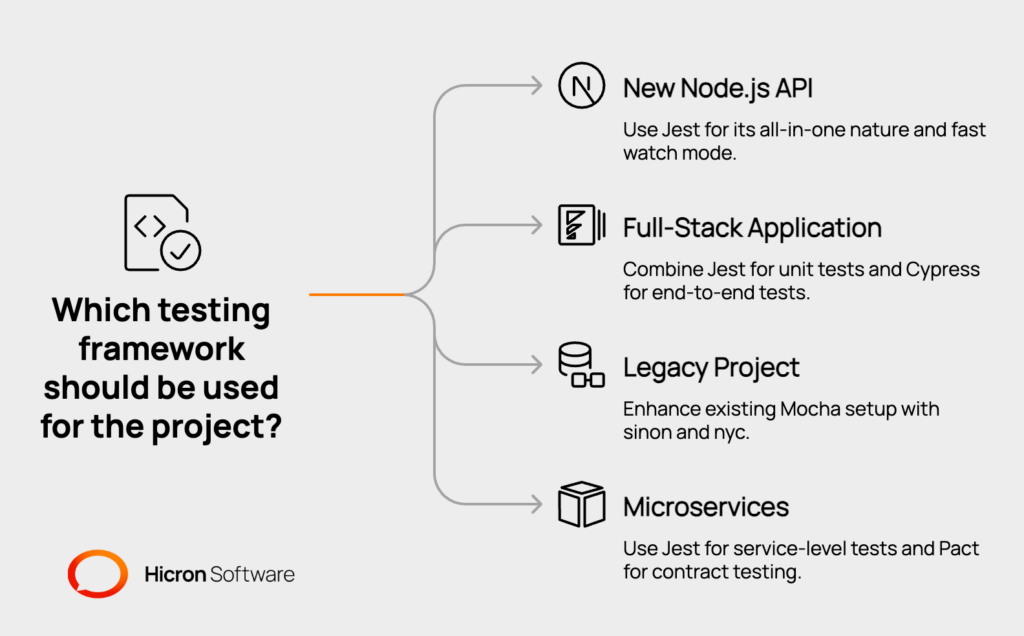
Selecting the right tools depends on your project requirements, team experience, and personal preferences.
ts-jest, while Mocha requires extra configuration.sinon for mocks and nyc for code coverage.Here is how you can get started with each tool, including installation and basic test examples.
npm install --save-dev jest supertestjest.config.js file. Jest often works without any configuration.package.json, add "test": "jest".Jest Unit Test Example
// calculator.js
const add = (a, b) => a + b;
module.exports = { add };

// calculator.test.js
const { add } = require('./calculator');

test('adds 1 + 2 to equal 3', () => {
expect(add(1, 2)).toBe(3);
});
Jest API Test with Supertest
const request = require('supertest');
const app = require('../app'); // Your Express app

describe('GET /health', () => {
it('should respond with a 200 status code', async () => {
const response = await request(app).get('/health');
expect(response.statusCode).toBe(200);
expect(response.body.status).toBe('ok');
});
});npm install --save-dev mocha chai sinon supertesttest directory.package.json, add "test": "mocha".Mocha and Chai Unit Test Example
const { expect } = require('chai');
const { add } = require('../calculator');

describe('Calculator', () => {
it('should add two numbers correctly', () => {
expect(add(1, 2)).to.equal(3);
});
});
Mocha and Chai API Test with Supertest
const request = require('supertest');
const { expect } = require('chai');
const app = require('../app'); // Your Express app

describe('GET /health', () => {
it('should respond with a 200 status code', async () => {
const response = await request(app).get('/health');
expect(response.status).to.equal(200);
expect(response.body.status).to.equal('ok');
});
});npm install --save-dev cypressnpx cypress open. This command opens the Cypress Test Runner and creates a cypress directory with example files.package.json, add "cypress:open": "cypress open".Cypress E2E Test Example
describe('Homepage', () => {
it('should display the main heading', () => {
cy.visit('http://localhost:3000'); // Visit your app's URL
cy.contains('h1', 'Welcome to Our Application').should('be.visible');
});
});Once you have a basic testing setup, you can explore more advanced topics to improve your workflow.
Code coverage tools measure which lines of your code are executed by your tests.
jest --coverage.nyc library. Run your tests with nyc npm test.A coverage report is a useful guide for identifying untested parts of your codebase, but achieving 100% coverage does not guarantee your application is bug free.
Automating your tests in a Continuous Integration (CI) pipeline is a standard practice. Here are example workflows for GitHub Actions.
GitHub Actions Workflow for Jest
name: Node.js CI

on: [push]

jobs:
build:
runs-on: ubuntu-latest
steps:
- uses: actions/checkout@v3
- name: Use Node.js
uses: actions/setup-node@v3
with:
node-version: '18.x'
- run: npm ci
- run: npm test
GitHub Actions Workflow for Cypress
name: Cypress Tests

on: [push]

jobs:
cypress-run:
runs-on: ubuntu-latest
steps:
- name: Checkout
uses: actions/checkout@v3
- name: Cypress run
uses: cypress-io/github-action@v5
with:
start: npm startFlaky tests are tests that pass sometimes and fail at other times without any code changes. They are often caused by timing issues or reliance on external services. Cypress helps reduce flakiness with its automatic waiting feature. For other tests, ensure you are properly handling asynchronous operations and mocking any unpredictable dependencies.
ts-jest package for a smooth integration. It transforms your TypeScript files on the fly.ts-node to execute TypeScript test files directly.If your team decides to switch tools, a common path is migrating from Mocha to Jest. This usually involves replacing assertion libraries, converting test structures, and updating mocking logic. The jest-codemods project can help automate parts of this process.

Jest is often recommended for beginners because it provides an all in one package with a simple setup and clear documentation.
You can test an API using a library like Supertest in combination with a test runner like Jest or Mocha. Supertest allows you to make HTTP requests to your application’s endpoints and assert on the responses.
Yes, using Jest and Cypress together is a very common and effective strategy. Jest is used for unit and integration tests, while Cypress handles end to end tests.
Jest is an all in one framework with a runner, assertions, and mocks. Mocha is only a test runner, requiring you to choose your own assertion and mocking libraries.
Snapshot testing, a feature of Jest, captures a snapshot of a UI component or data structure and saves it. On subsequent test runs, it compares the new output to the saved snapshot. It is useful for preventing unintended changes in UI or large API responses.
You can use Jest’s built in mocking functions (jest.mock) or a library like Sinon.js to replace the database module with a fake version that returns predictable data.
No, you do not need Chai with Jest. Jest has its own built in assertion library (expect).
Yes, Jest is widely used for testing frontend frameworks like React, Vue, and Angular.
Hicron Software proved to be a trusted partner with unmatched technical expertise, delivering a scalable and user-friendly web application that was pivotal to our successful U.S. market expansion.

Hicron’s contributions have been vital in making our product ready for commercialization. Their commitment to excellence, innovative solutions, and flexible approach were key factors in our successful collaboration.
I wholeheartedly recommend Hicron to any organization seeking a strategic long-term partnership, reliable and skilled partner for their technological needs.

After carefully evaluating suppliers, we decided to try a new approach and start working with a near-shore software house. Cooperation with Hicron Software House was something different, and it turned out to be a great success that brought added value to our company.
With HICRON’s creative ideas and fresh perspective, we reached a new level of our core platform and achieved our business goals.
Many thanks for what you did so far; we are looking forward to more in future!

Hicron is a partner who has provided excellent software development services. Their talented software engineers have a strong focus on collaboration and quality. They have helped us in achieving our goals across our cloud platforms at a good pace, without compromising on the quality of our services. Our partnership is professional and solution-focused!

The IT system supporting the work of retail outlets is the foundation of our business. The ability to optimize and adapt it to the needs of all entities in the PSA Group is of strategic importance and we consider it a step into the future. This project is a huge challenge: not only for us in terms of organization, but also for our partners – including Hicron – in terms of adapting the system to the needs and business models of PSA. Cooperation with Hicron consultants, taking into account their competences in the field of programming and processes specific to the automotive sector, gave us many reasons to be satisfied.

